Multistate Checkboxes
approvedby evgene-kopylov
Theme-independent extended checkbox states with custom SVG icons - This plugin has not been manually reviewed by Obsidian staff.
Multistate Checkboxes
Extended checkbox states for Obsidian, theme-independent. SVG icons are embedded via data:image/svg+xml, colors use Obsidian CSS variables for automatic adaptation to any theme.
Features
- 20 checkbox states with unique SVG icons
- Theme-independent — all colors via Obsidian CSS variables
- Flexible configuration — enable/disable states, custom colors and icons
- Cycling — command to rotate through states in order
- Supports Reading view and Live Preview
Default States
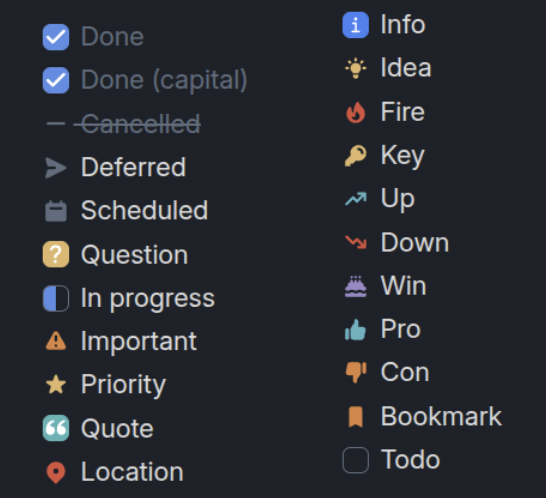
Installation
Manual
- Download the latest release from Releases
- Extract to
.obsidian/plugins/obsidian-multistate-checkboxes/ - Reload Obsidian
- Enable the plugin in Settings → Community plugins
From source
cd /path/to/vault/.obsidian/plugins/
git clone https://github.com/Evgene-Kopylov/obsidian-multistate-checkboxes.git
cd obsidian-multistate-checkboxes
npm install
npm run build
Usage
Creating a checkbox with a state
In a Markdown task, use the corresponding symbol inside the brackets:
- [x] Done
- [X] Done (capital)
- [-] Cancelled
- [>] Deferred
- [<] Scheduled
- [?] Question
- [/] In progress
- [!] Important
- [*] Priority
- ["] Quote
- [l] Location
- [i] Info
- [I] Idea
- [f] Fire
- [k] Key
- [u] Up
- [d] Down
- [w] Win
- [p] Pro
- [c] Con
- [b] Bookmark
- [ ] Todo
Cycling
- Place the cursor on a checkbox line
- Run the command
Multistate Checkboxes: Cycle checkbox state - The state will change to the next one in order
The cycle order can be configured in Settings → Multistate Checkboxes.
Settings
In Settings → Multistate Checkboxes you can:
- Enable/disable any state
- Override icon color (hex, rgb(), CSS variable)
- Replace the SVG icon with your own
- Configure the cycling order
Development
npm install        # install dependencies
npm run dev        # watch mode build
npm run build      # production build
# Install the plugin in a vault
# Symlink the current folder (with the build output) into the vault's plugins
ln -s "$PWD" "/home/death/obsidian-vault/.obsidian/plugins/multistate-checkboxes"
License
GPL-3.0 — see LICENSE
For plugin developers
Search results and similarity scores are powered by semantic analysis of your plugin's README. If your plugin isn't appearing for searches you'd expect, try updating your README to clearly describe your plugin's purpose, features, and use cases.