by KJH
Integrated task and project management for MyWorld workspace.
Life OS Task Manager
[!NOTE] 🚨 Major Release Notice (v1.1.2) 🚨 One-Stop ⚙️ GUI Modals & Seamless Action Widgets!
Completely eliminates markdown formatting corruption caused by manual text editing.
Supports both English and Korean natively.
Easily manage your Daily Schedule, Routine Checklists, and Project Tasks through dedicated ⚙️ popup modals without manually editing raw markdown text!
📸 Showcase & Overview
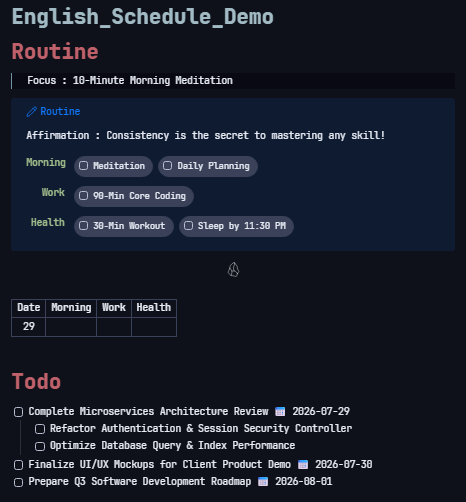
Sleek routine callout, instant header action widgets, and D-Day urgency-colored task lists.
✨ Key Features
- ⚙️ One-Stop GUI Modals: Edit Todo items, Routines, and Project Execution tasks via dedicated modal windows (
# Todo ⚙️,# Routine ⚙️,# Project ⚙️). - 🔄 Real-time Bi-directional Auto-Sync: Tasks created or updated in your daily schedule or project modals automatically sync back to original project notes in real-time.
- 🎨 Clean D-Day Urgency Borders & Date Inheritance: Clean border visualization (🔴 Today/Overdue, 🟡 D-1, 🟢 D-2, 🔵 D-3) without text badge clutter. Indented child tasks automatically inherit parent deadlines.
- 📝 Freely Editable
# PlanSection: Outline your project roadmaps and analysis freely under# Plan. Click the⬆️(Copy to Execution) button to promote planned tasks to top# Executionsection instantly. - 🌤️ One-Click Daily Reset & Monthly Archive: Archives checked routine counts, resets checklists for tomorrow, and generates monthly performance report notes with a single click.
📊 Project Dashboard & Checklist Matrix
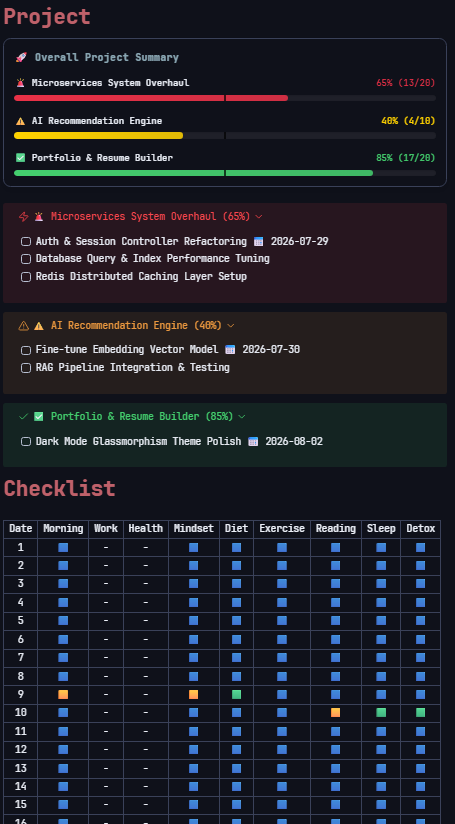
Dynamic project progress tracking bar, callouts, and active-first routine checklist tables.
📖 Complete User Guide
1. Daily Schedule Management (Control Tower)
- Todo Manager (
# Todo ⚙️): Click the ⚙️ icon to open popup modal. Edit task text freely, set deadlines (📅 YYYY-MM-DD), reorder tasks viaAlt + Up/Down, and indent child tasks viaTab / Shift+Tab. - Routine Manager (
# Routine ⚙️): Click the ⚙️ icon to add/delete/reorder routine categories and items safely across all archive notes. - Daily Reset (
☀️) & Monthly Archive (🗂️): Archive today's progress and generate monthly performance report notes with one click.
2. Project Notes Workflow
- Project Task Manager (
# Project ⚙️): Click the ⚙️ icon next to# Projecton your schedule note. View all active project execution tasks ordered by urgency level (🔥 > 🚨 > ⚠️ ...), edit tasks, and perform one-click batch save & bi-directional sync. # PlanSection: Freely write roadmap steps, technical analysis, and notes. Click the⬆️(Copy to Execution) button next to any uncompleted task to copy it up to the# Executionsection for main schedule visibility.# ExecutionSection: Holds active tasks, synced bi-directionally in real-time with main schedule notes.
3. Routine Analytics & Performance Graphs
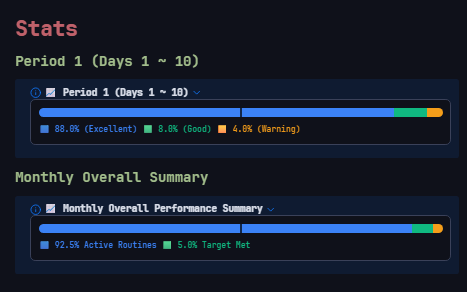
Period-based achievement progress bars and monthly performance summaries.
4. D-Day Urgency & Inheritance Rules
- Border Visualization: Clean border colors based on target deadline diff (🔴 Today/Overdue, 🟡 D-1, 🟢 D-2, 🔵 D-3, ⚪ Default).
- Date Inheritance: Indented child tasks automatically inherit target deadlines from their direct parent tasks for consistent urgency border colors.
🛠️ Customization & Signpost Rules (Do & Don't)
⛔ [Strictly Prohibited] Do not alter these signposts
Modifying these headers will break automatic parsing and synchronization:
- Major Section Headers:
# Todo,# Routine(# 루틴),# Checklist(# 체크리스트),# Stats(# 통계),# Project(# 프로젝트),# Plan(# 계획),# Execution(# 실행). - Task Block IDs: The 6-character identifier at the end of synced lines (e.g.,
^a1b2c3).
✅ [Freely Editable] Feel free to customize
- Routine & Task Lists: Add, remove, rename, or reorder freely via dedicated ⚙️ GUI Modals.
- Project Plans: Write detailed meeting notes, technical analysis, and roadmaps under
# Planor# Details.
🚨 Frequently Asked Questions (FAQ)
- Q. Does this plugin support Korean?
- A. Yes! It natively supports both English and Korean based on your Obsidian language settings.
- Q. Do routine updates propagate to past archive notes?
- A. Yes! Saving in the Routine Manager Modal automatically propagates column alignment and new categories across all weekly and monthly archive files under
4. Archive.
- A. Yes! Saving in the Routine Manager Modal automatically propagates column alignment and new categories across all weekly and monthly archive files under
Created by KJH. For questions or support, please visit the developer feedback link in the plugin settings.
For plugin developers
Search results and similarity scores are powered by semantic analysis of your plugin's README. If your plugin isn't appearing for searches you'd expect, try updating your README to clearly describe your plugin's purpose, features, and use cases.