by SlaveKnight_Yobzz
Dashboard, tasks, time tracking, tickets, research notes and writing tools in one themed workspace.
✦ Neon Deck
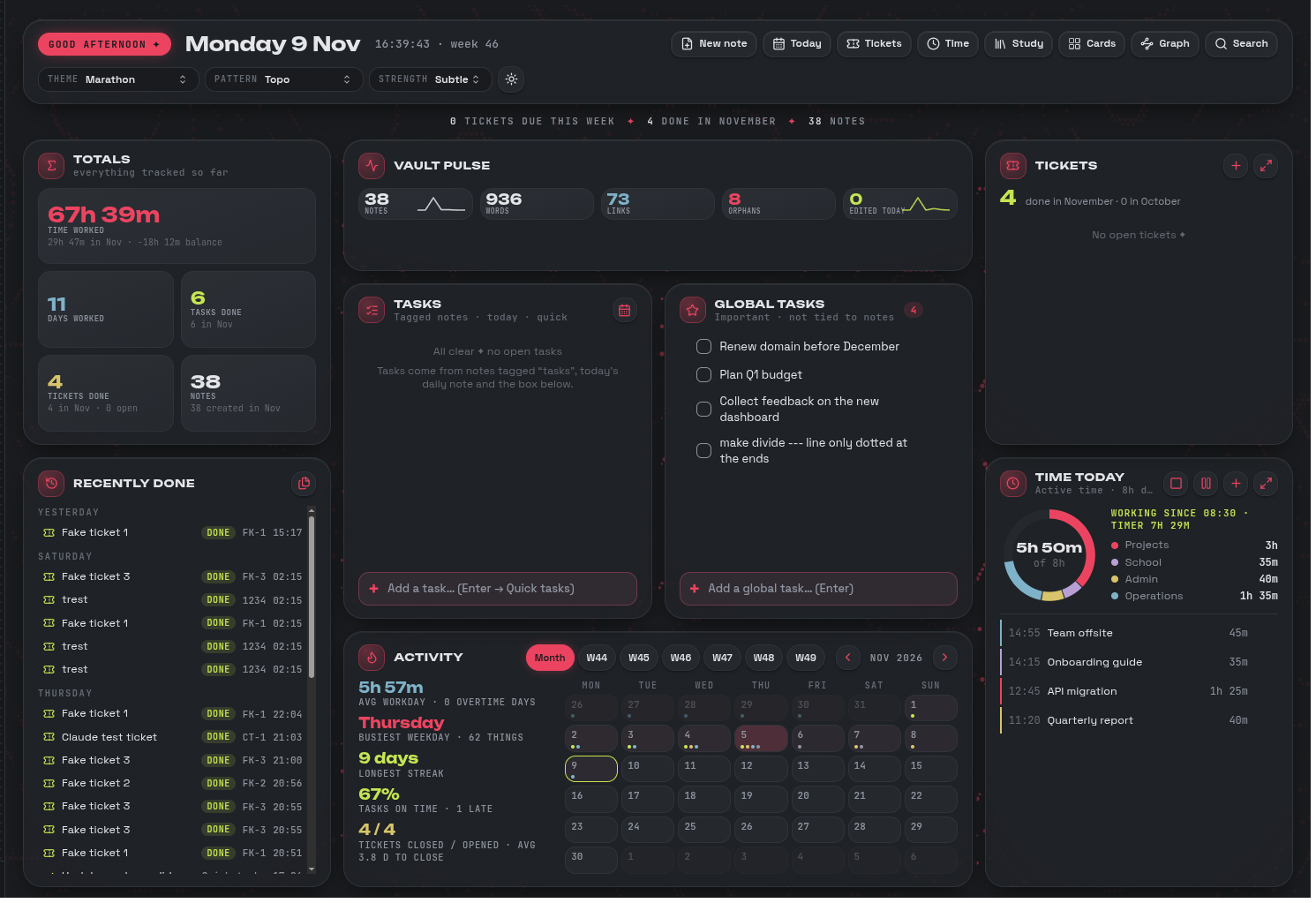
One Obsidian plugin as a personal command centre: dashboard, tasks, tickets, automatic time tracking, study notes and writing tools, in a neon look. Runs 100% locally: no network calls, no telemetry, no remote code.
| Module | What it does |
|---|---|
| Neon Deck | Dashboard, themes, live patterns, quick capture, card explorer, note graph |
| Neon Tasks | Tasks widget, Global tasks, New note card, Fix properties |
| Neon Tickets | Ticket pop-up, templates, reminders, self-writing log, PDF export |
| Neon Time | Active time per category, workday timer, daily Time Log notes |
| Neon Write | Table picker, slash menu, selection toolbar, lockable callouts, page breaks |
| Neon Study | Study tab: topic tree, research list, quiz cards, link suggestions |
All six are modules of one plugin; switch any off in Settings → Neon Deck modules.
Features
Dashboard
- Totals, Vault pulse, Recently done, Activity (month/week + day pop-up), Tasks, Global tasks, Tickets and Time today on one page that fits any window.
- One main pane: a nav list in the left sidebar (Dashboard, Cards, Tickets, Time, Graph) switches it; Back / Forward move between notes.
- 9 themes, each light and dark, with a live background pattern (pauses when unfocused or with Reduce motion).
- Quick capture (
Ctrl+Shift+Space) to Task, Global task, Ticket or Time entry. - Card explorer with category chips and Revisit reminders. Notes and folders starting with
!are pinned: on top, in their own colour.
Tasks
- Open tasks from notes tagged
tasks, today's daily note and a Quick tasks note, grouped Overdue · Today · Later. - Global tasks for things not tied to a note, with a daily backup.
- Edit (pencil) or delete (×, with Undo) any task on hover; global tasks reorder by drag.
Tickets
- A ticket is a note with
type: ticket: steps, due dates, reminders, Waiting with follow-ups, and a log that writes itself. - Done tickets file into
Done/YYYY-MM/. Templates are notes inCore/Tickets/Templates. - Paste or drop screenshots; export a ticket as a PDF report. Sort and group by due, status, priority and more.
Time
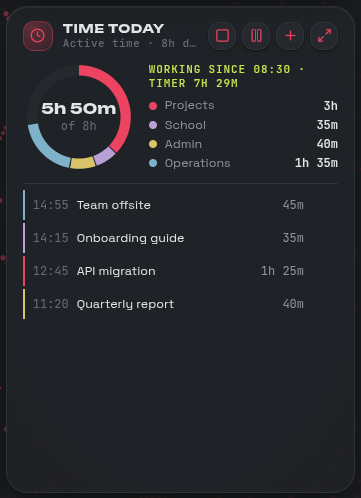
- Counts active time only while you work in a note; stops after an idle time.
- Category from checkbox properties (
projects,school,admin,operations) or tags;untracked: trueis never logged. - Donut against your workday target, overtime, weekly/monthly balance, editable entries with Undo.
- Start day / Pause / End day, Add time and Log break (
930,9:30both work). - One Time Log note per day (
Core/Time Log/YYYY-MM-DD.md), written for an AI agent to pass on to Jira.
Writing
- Table picker,
/slash menu, toolbar on selected text. - Lockable callouts (
[!info|locked]) and math blocks ($$ % locked). - Page breaks for PDF export (
/pagebreak), merged table titles, lime dividers. - Theme fonts and colours in notes, a lifted writing card, the pattern dimmed behind notes.
- New images (
.png,.jpg,.gif,.webp,.svg, …) move toCore/Images; links keep working.
Study
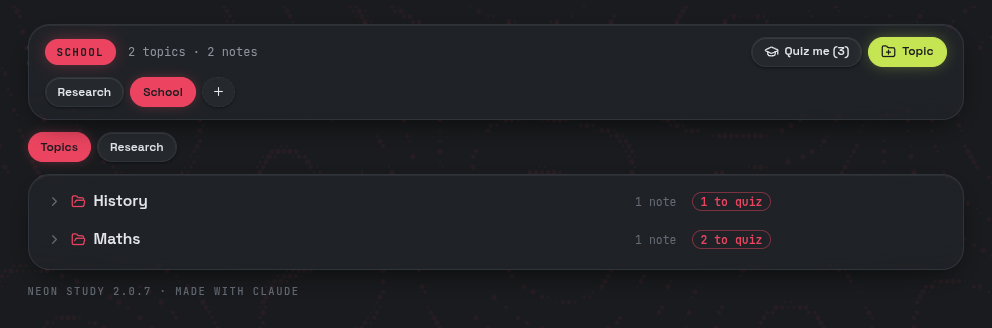
- A Study tab with a tree of topics → subtopics → notes (topics are folders), in sections like Research or School.
- Research list: a checklist of things to look into; paste several lines to add several.
- Quiz cards:
Question :: Answerlines (or/flashcard); "Quiz me" with spaced repetition. - Link suggestions for words that match other research notes.
Install
- Download
neon-deck.zipfrom the latest release and unzip it. - Put the
neon-deckfolder into your vault's.obsidian/plugins/. - Enable Neon Deck in Settings → Community plugins.
Updating: copy only main.js, manifest.json and styles.css over the ones in .obsidian/plugins/neon-deck/, then reload. Don't replace the folder itself: it holds your settings and data (since 2.2.1 a copy is kept in .obsidian/neon-deck-data/ and restored if the folder was replaced).
Safe mode: if Neon Deck fails while starting, the next start keeps all modules off; turn them back on in Settings → Neon Deck modules.
Requires Obsidian 1.5.0+, desktop. Coming from 1.x (six plugins)? Turn the old ones off and reload; their data is copied over once.
For developers
- Sources in
src/(MAP.mdlists every file,CLAUDE.mdhas the rules). Build:node tools/build.mjs→dist/neon-deck/. - Check:
node --test test/*.test.mjsandnode tools/check.mjs dist. - Release: bump
src/kernel/manifest.jsonandversions.json, build, attach the three dist files to a GitHub release, then run Actions → Package installer for the ZIP.
Latest release notes: 2.3.0. Older notes are in the git history.
License
Free to use and fork, never to sell: CC BY-NC-SA 4.0 since 1.6.0 (MIT up to 1.5.0). Bundled fonts (JetBrains Mono, Space Grotesk, Unbounded) are under the SIL OFL 1.1. Made by Yobzs with Claude.
TL;DR
- What: dashboard + tasks + tickets + time tracking + study + writing tools, one local-only Obsidian plugin.
- Install: unzip
neon-deck.zipinto.obsidian/plugins/, enable it. - Update: copy the 3 files (
main.js,manifest.json,styles.css), never the folder. - Start: ribbon
▦orCtrl+P → Neon Deck: Open dashboard; capture anything withCtrl+Shift+Space.
For plugin developers
Search results and similarity scores are powered by semantic analysis of your plugin's README. If your plugin isn't appearing for searches you'd expect, try updating your README to clearly describe your plugin's purpose, features, and use cases.