Polaris Dashboard
unlistedby Alvin
A glassmorphism personal dashboard with work, knowledge and review boards, task timeline, pomodoro timer and vault statistics. Works as a custom view inside your note-taking app.
🌌 Polaris Dashboard · 北极星个人工作台
Obsidian 个人工作台仪表盘插件 —— 把工作、知识、复习三大板块收进一个玻璃拟态仪表盘。
Polaris Dashboard is an Obsidian plugin that brings a glassmorphism personal dashboard to your vault: work kanban, knowledge base, review tracker, pomodoro timer, gantt timeline and more — all in one home page.
English · 中文请往下翻 ↓
Polaris Dashboard turns your Obsidian vault into a beautiful glassmorphism command center with three boards:
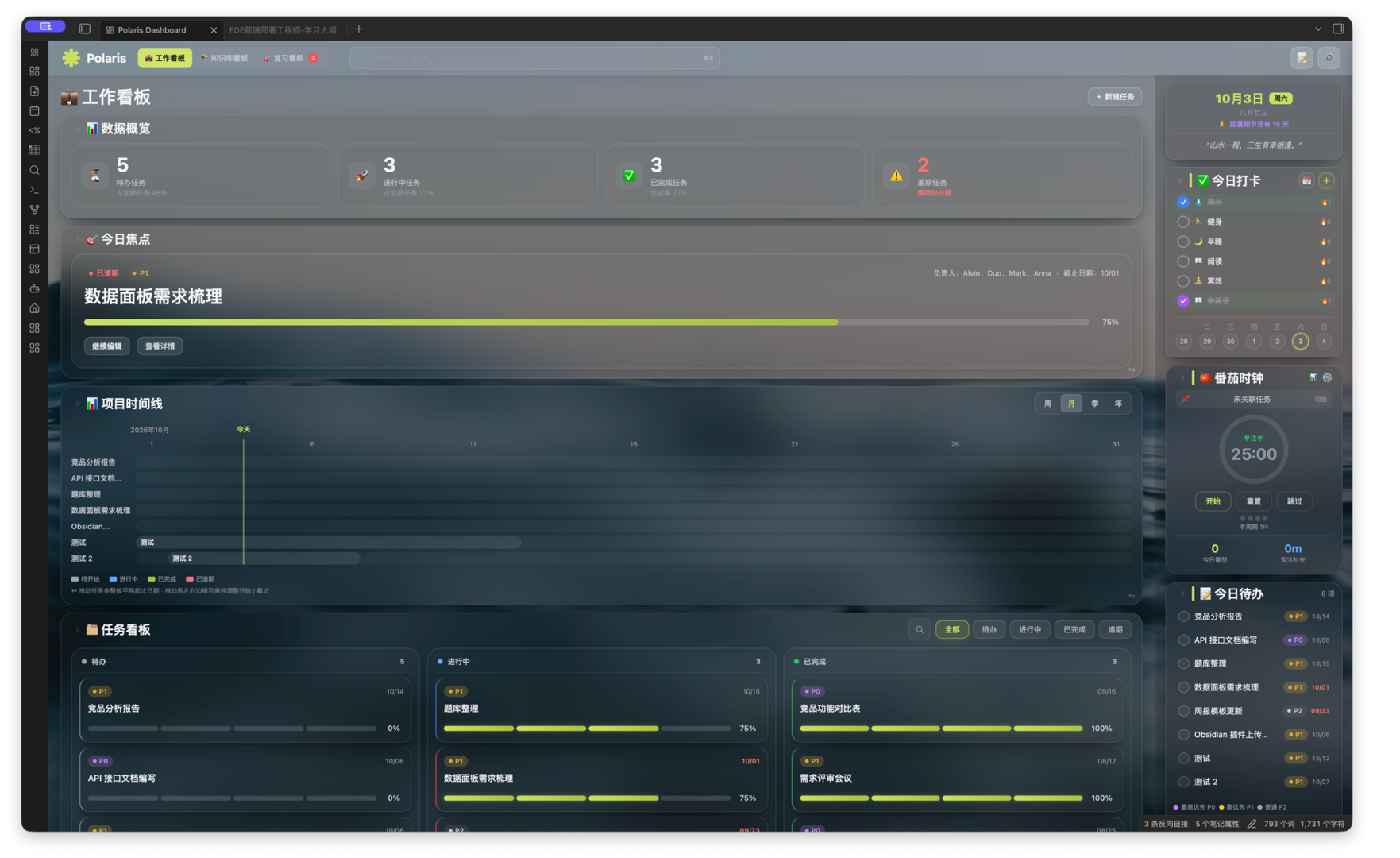
- Work Board — today's todos with priority tags (P0/P1/P2) and overdue highlighting, task kanban, focus items, and a draggable gantt project timeline (week/month/quarter/year).
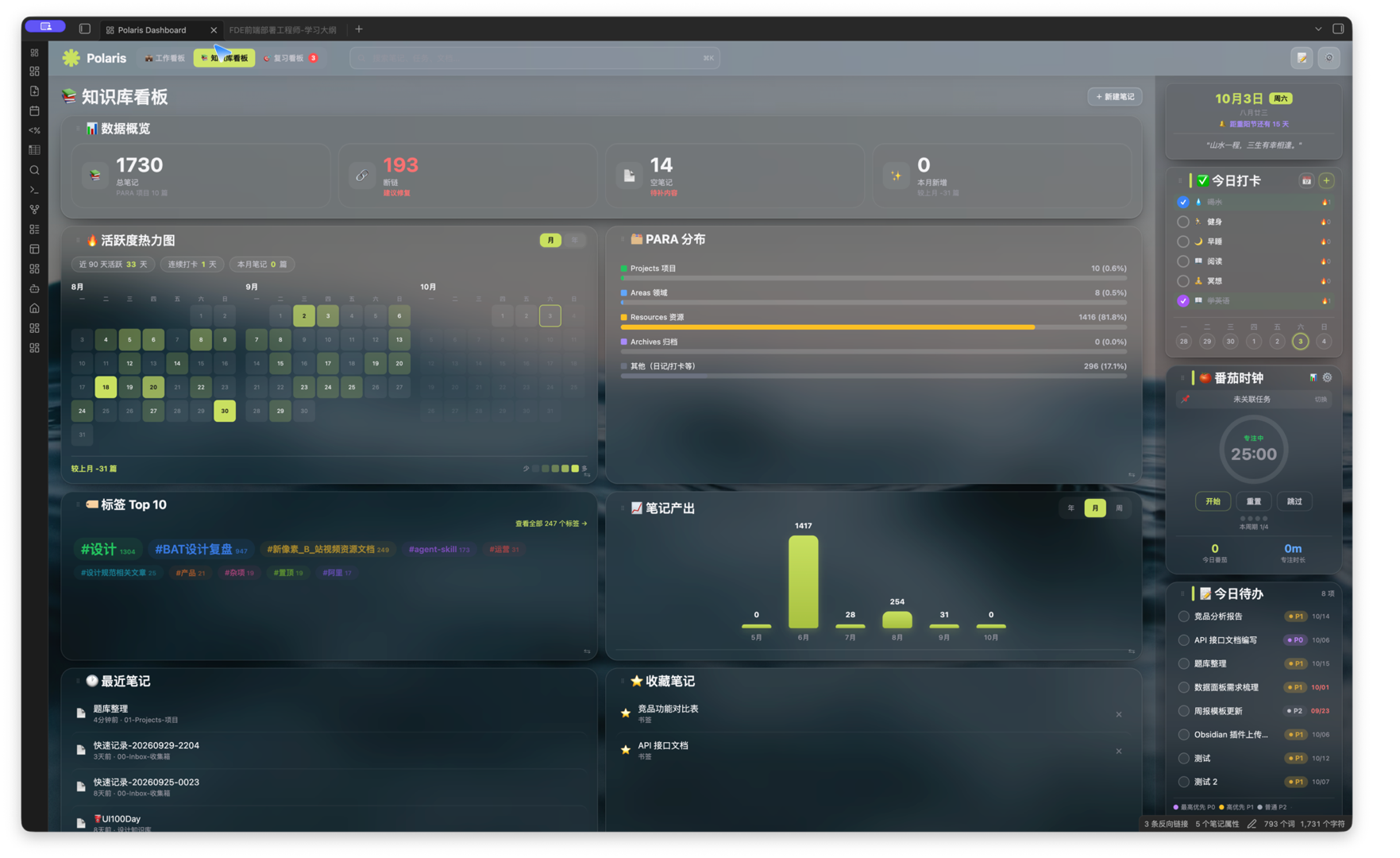
- Knowledge Board — activity heatmap, PARA distribution, top tags, weekly learning progress, daily habit check-ins and a calendar.
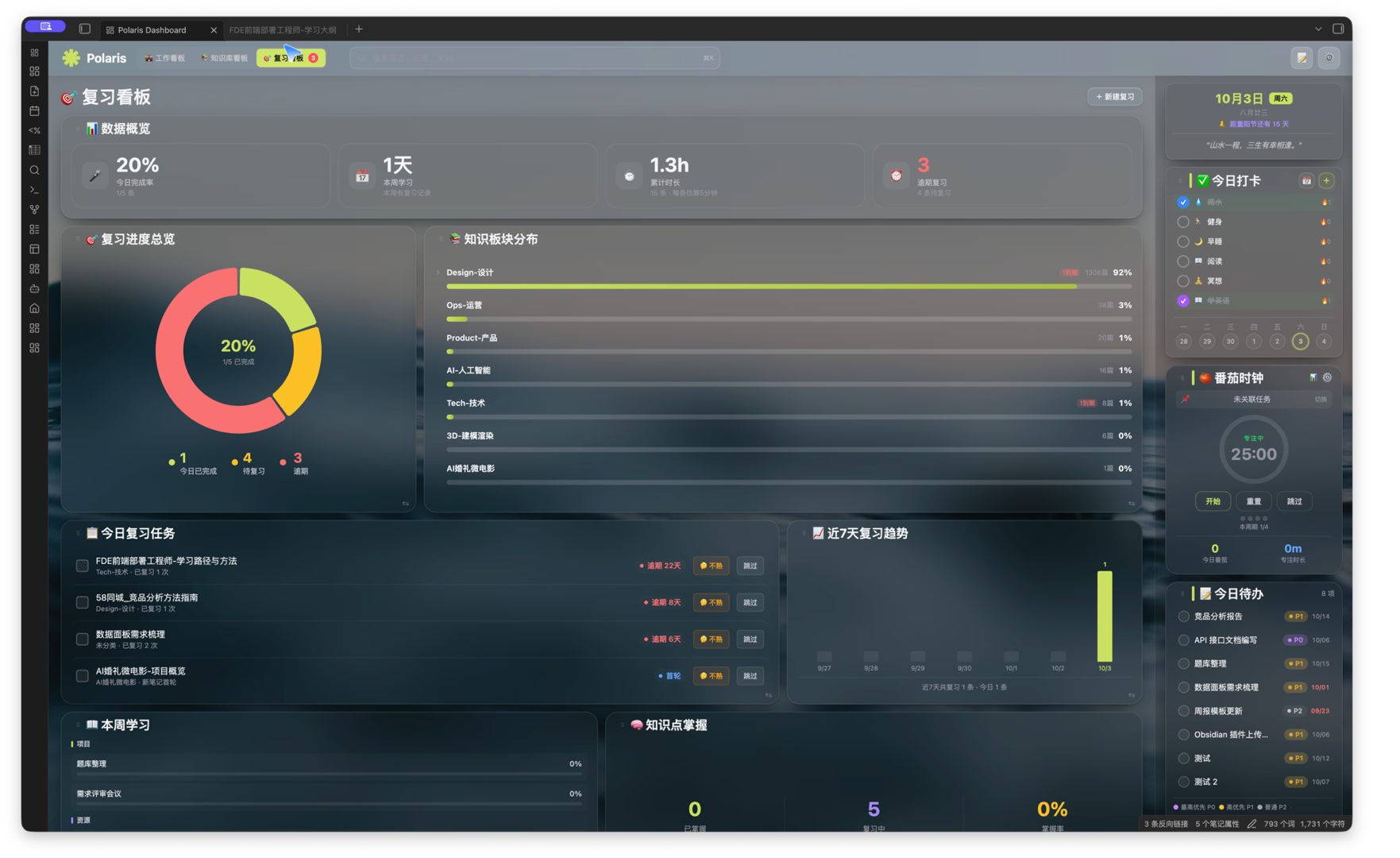
- Review Board — review progress overview, knowledge area distribution, expected review planning and 7-day trends.
It also includes a pomodoro timer (focus/break modes with statistics), a global note search bar, draggable card layouts, and a dark/light theme switcher. Requires Obsidian 1.4+ and the Dataview community plugin.
✨ 功能特性 / Features
🗂️ 三大看板 / Three Boards
| 看板 | 内容 |
|---|---|
| 💼 工作看板 | 今日待办、今日焦点、任务看板(待办/进行中/已完成/逾期)、项目时间线甘特图 |
| 📚 知识库看板 | 数据概览、日历、今日打卡、本周学习、知识板块分布、笔记搜索 |
| 🔁 复习看板 | 复习进度总览、知识板块分布、预期复习规划 |
⚡ 核心能力 / Highlights
- 今日待办:单行任务流,优先级胶囊(P0/P1/P2),逾期日期自动变红
- 番茄时钟:专注/短休/长休模式,专注时长统计,本周期进度
- 今日打卡:每日习惯打卡 + 周势图
- 项目时间线:甘特图视图,支持周/月/季/年四档切换
- 本周学习:按 项目 / 领域 / 资源 分组,学习进度条
- 数据概览:今日完成率、本周学习、累计时长、预期复习,点击可下钻
- 顶部搜索:全库笔记 / 断链 / 空笔记 / 本月新增,谷歌式连体下拉
- 可拖拽布局:左右两栏卡片均可拖拽排序,右上角设置可开关各板块
- 双主题:深色玻璃拟态 / 浅色模式,一键切换
📦 安装 / Installation
前提 / Prerequisites
- Obsidian 桌面版(v1.4+)
- 社区插件 Dataview(用于读取 Vault 内的任务/笔记数据)
方式一:手动安装
- 下载本仓库的
main.js与manifest.json - 拷贝到你的笔记库:
你的Vault/.obsidian/plugins/polaris-dashboard/ - 重启 Obsidian,进入 设置 → 第三方插件 → 启用 Polaris Dashboard
方式二:源码构建
npm install
npm run build        # 产出 dist/main.js
插件通过 Dataview 读取使用者自己的 Vault 数据,不含任何云端同步,你的笔记始终留在本地。
🖥️ 界面预览 / Preview
| 💼 工作看板 | 📚 知识库看板 |
|---|---|
 |  |
| 🎯 复习看板 |
|---|
 |
📚 配套文档 / Docs
| 文件 | 说明 |
|---|---|
DESIGN-SYSTEM.md / design-system.html | 完整设计系统规范:色彩、圆角、按钮、间距、组件 |
PRODUCT-DOC.md / product-doc.html | 产品功能说明文档 |
USER-GUIDE.md | 用户指南 |
🛠️ 技术栈 / Tech Stack
TypeScript · esbuild · Obsidian API · Dataview · 原生 DOM/CSS(无框架)
👤 作者 / Author
Alvin — 个人效率工具爱好者,深耕 Obsidian 本地化工作流。
📄 许可 / License
© 2026 Alvin. 保留所有权利(All Rights Reserved)。 如需商用或二次分发,请联系作者。
For plugin developers
Search results and similarity scores are powered by semantic analysis of your plugin's README. If your plugin isn't appearing for searches you'd expect, try updating your README to clearly describe your plugin's purpose, features, and use cases.