by Rob Coles
Whole-note checkbox progress bar via a code block, with configurable checked/unchecked characters.
Note Progress Bar
An Obsidian plugin that shows a progress bar for the checkboxes in the current note.

There are settings to tell the plugin what sort of checkboxes are considered complete.
Usage
Add a code block with the language progress-bar anywhere in a note:

The block renders as a bar with a label such as "Progress: 3/5 completed, 60%". It counts every checkbox in the note and updates as you edit.
Settings
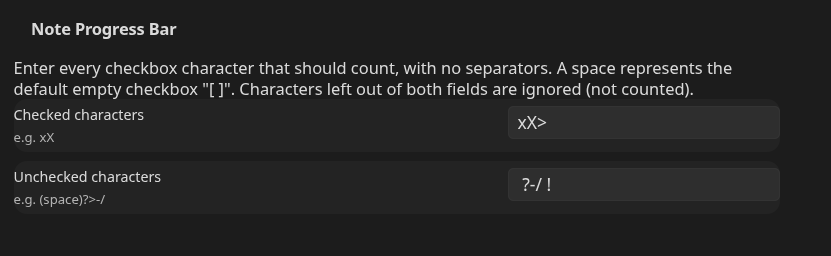
- Checked characters: default
xX - Unchecked characters: default a space plus
?>-/
Enter the characters with no separators. A checkbox whose character appears in neither field is ignored and not counted.
I use extended checkboxes via a CSS snippet and, for example, I consider a "forwarded" checkbox to be "complete". My settings are shown below.
Installation
Install from Settings > Community plugins once the plugin is listed. To install manually, download main.js, manifest.json and styles.css from the latest release and place them in <vault>/.obsidian/plugins/note-progress-bar/.
Licence
MIT
For plugin developers
Search results and similarity scores are powered by semantic analysis of your plugin's README. If your plugin isn't appearing for searches you'd expect, try updating your README to clearly describe your plugin's purpose, features, and use cases.