by liuweiqing
Shows a task progress ring next to each note in the file explorer: one segment per task, filled as you complete them.
Task Progress
Show a task progress ring next to every note in Obsidian's file explorer — one segment per task, filled in as you complete them.
在 Obsidian 的文件栏里,给每个笔记显示一个待办进度圈:一个待办占一格,完成一个填一格。
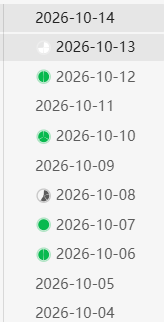
Notes with no tasks show no ring at all. A ring stays grey until every task in that note is done, then turns green.
What it counts
For each markdown file, in this order:
- Inline checkboxes — every
- [ ]/- [x]in the note.xandXcount as done; everything else (/,-,>) counts as not done. - The note itself as a to-do — if there are no inline checkboxes but the front matter has
todo: true, the note gets a single-segment ring. Setcompleted: trueand the ring fills in. - Nothing — notes with no tasks show no ring at all.
Rule 2 exists for vaults that keep one to-do per file (a folder of small notes rather than a checklist inside one note).
Details
- The ring is drawn clockwise from 12 o'clock, with a hairline gap between segments so a 13-segment ring is still countable.
- Hover a ring to see
done/totalas a tooltip. - Updates live as you edit, and follows the file explorer through folding, renaming and scrolling.
- Works on desktop and mobile.
Install
Not yet in the community directory. To install manually:
- Download
main.js,manifest.jsonandstyles.cssfrom the latest release. - Put them in
<your vault>/.obsidian/plugins/task-progress/. - Reload Obsidian, then enable Task Progress in Settings → Community plugins.
Notes and limitations
- Completion is read from Obsidian's metadata cache, so the plugin does not touch your notes — it is read-only.
- A note that has both inline checkboxes and
todo: trueis counted by its checkboxes. A note like "things to buy" with a real checklist inside is a checklist, not a single to-do. - Tasks inside code blocks are not counted, because Obsidian's own parser does not treat them as list items.
- Folder-level totals are not shown yet.
Development
npm install
npm run dev     # watch mode
npm run build   # type-check and produce main.js
License
MIT
For plugin developers
Search results and similarity scores are powered by semantic analysis of your plugin's README. If your plugin isn't appearing for searches you'd expect, try updating your README to clearly describe your plugin's purpose, features, and use cases.