NoteRelay
approvedby super meng
将 Obsidian 笔记排版后复制到公众号、小红书和 X。 - This plugin has not been manually reviewed by Obsidian staff.
NoteRelay



NoteRelay is an Obsidian desktop plugin for Markdown creators. It turns the active note into platform-specific previews and clipboard content for WeChat Official Accounts, Toutiao, Xiaohongshu, and X. It does not sign in to social platforms, store publishing credentials, or publish content automatically.
Features
| Platform | Preview and formatting | Output |
|---|---|---|
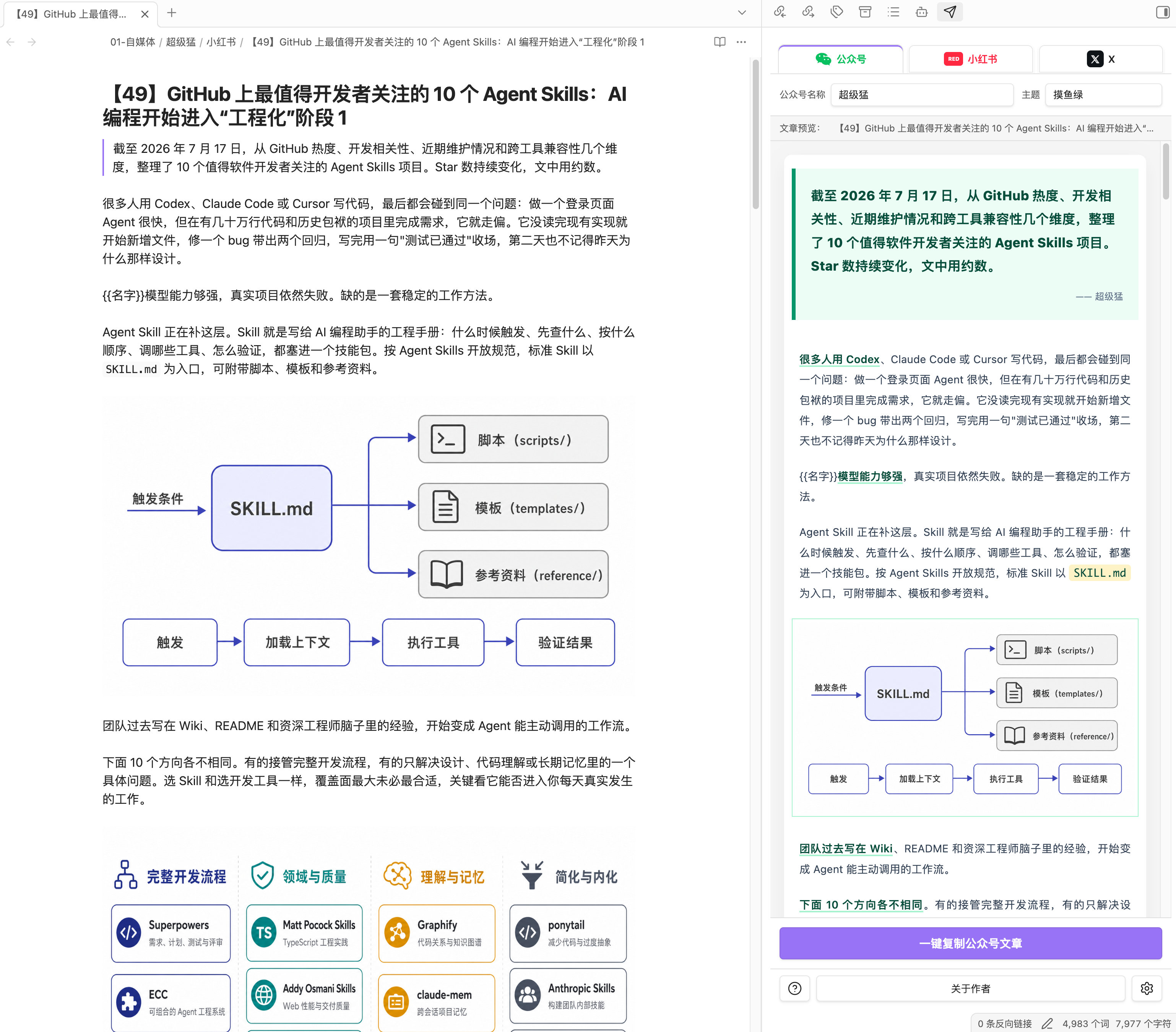
| WeChat Official Accounts | Six built-in themes, validated AI-generated JSON themes, Markdown rich text, account variables, images, and code blocks | Copy inline-styled HTML with a plain-text fallback |
| Toutiao | A fixed native preview modeled on the official editor, account variables, and an ending signature | Copy structured HTML with a plain-text fallback |
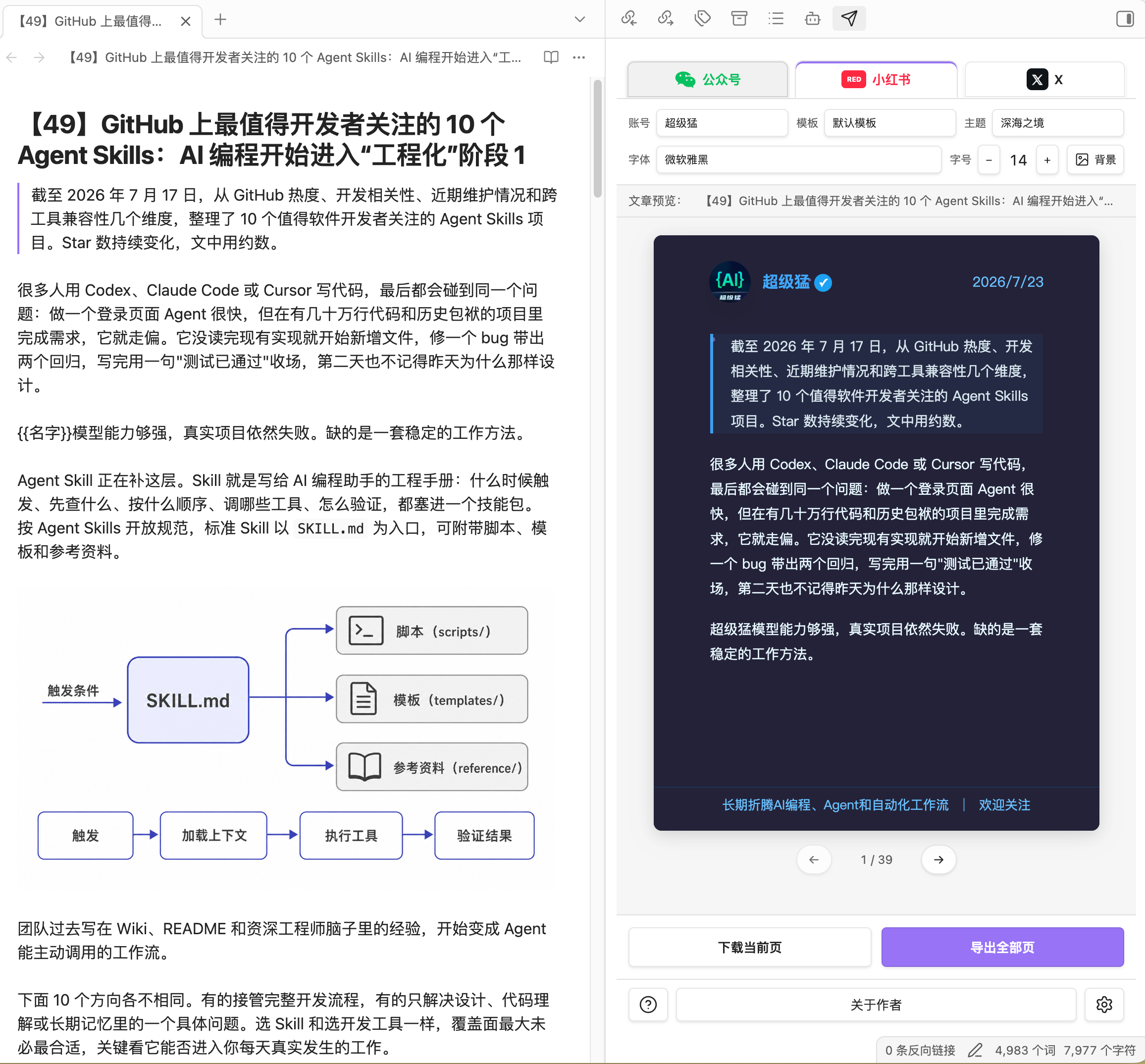
| Xiaohongshu | Fixed 3:4 HD cards, automatic pagination, eleven themes, default and memo templates, backgrounds, avatars, and signatures | Download the current page, copy the current PNG, or export all pages as a ZIP archive |
| X | Long-form rich-text preview, title handling, table-to-list conversion, media position markers, and a media checklist | Copy rich text and plain text; upload images, GIFs, and videos natively in X |
All four platforms support multiple creator profiles. Account details are used only for previews, signatures, and {{variable}} replacement.
Product boundaries
- NoteRelay does not provide one-click publishing, scheduled publishing, or automated login.
- It does not read or store platform passwords, cookies, or tokens.
- It does not call the publishing APIs of WeChat, Toutiao, Xiaohongshu, or X.
- It does not attempt to bypass platform risk controls.
- The user always reviews and completes the final publishing action in the destination editor.
Screenshots
Installation
Manual installation
-
Download or build
main.js,manifest.json, andstyles.css. -
Create this directory in your Vault:
.obsidian/plugins/noterelay/ -
Put the three files in that directory.
-
Open Obsidian → Settings → Community plugins and enable NoteRelay.
NoteRelay currently supports Obsidian desktop only.
Usage
- Open a Markdown note in Obsidian.
- Select the paper-plane icon in the left ribbon to open NoteRelay.
- Choose WeChat, Toutiao, Xiaohongshu, or X.
- Select an account, theme, or template and inspect the preview.
- Copy or export the result.
- Paste it into the destination editor and perform a final pre-publish check.
WeChat Official Accounts
- Select “Copy WeChat article” to copy rich text.
- After pasting, check images, code blocks, long links, and tables.
- Styles are emitted as inline CSS to reduce style loss in the WeChat editor.
Toutiao
- The toolbar exposes account selection only; the plugin uses one fixed preview modeled on Toutiao's official editor.
- Headings, blockquotes, lists, tasks, code, and tables are formatted for pasting into Toutiao's ProseMirror editor.
- The output does not rely on external theme colors, complex cards, gradients, or positioned layouts that the platform may filter.
- The account signature is appended as a plain paragraph; avoid contact details, QR codes, or off-platform promotion.
- Select “Copy Toutiao article,” paste into the Toutiao editor, and perform a final check.
Xiaohongshu
- The default output is
1242 × 1660with a3:4aspect ratio. - Content can be divided by level-one
#or level-two##headings. - Long sections continue onto automatically generated pages.
- Copy or download the current page, or export every page as a ZIP archive.
- Locally uploaded avatars are validated, center-cropped, and compressed to
256 × 256.
X
- Copied content includes rich-text and plain-text formats.
- Markdown tables are converted into lists that work better in the X editor.
- Images, GIFs, videos, and X posts generate a media checklist and insertion markers.
- Because the X editor cannot reliably turn HTML images into uploaded media, add media with X's native upload controls.
Accounts and variables
Each platform can have multiple accounts and shows only the fields used by its renderer:
- WeChat: account name, account description/signature, and custom variables.
- Toutiao: account name, account description/signature, and custom variables.
- Xiaohongshu: creator name, creator ID, avatar, bio/promo text, and custom variables.
- X: display name, username/ID, ending signature, and custom variables.
Enter one variable per line in Settings:
Column=AI Watch
AuthorName=NoteRelay
Closing=Follow me for more practical AI notes
Topics=#AI #Obsidian
Use the variables in Markdown:
# {{Column}}

Author: {{AuthorName}}

{{Closing}}
Variables without configured values remain as {{VariableName}}, making omissions easy to spot in the preview.
Supported Markdown
- Headings, paragraphs, bold, italic, and strikethrough
- Ordered and unordered lists
- Blockquotes, fenced code blocks, and inline code
- Links, images, and horizontal rules
- Tables
- YAML frontmatter
- Obsidian local image links
Each platform applies compatibility handling based on the capabilities of its editor. Always treat the final result in the destination editor as authoritative.
Local development
Node.js and npm are required.
npm install
npm run dev
Run the release checks before publishing:
npm run check
node --check main.js
Build artifacts:
main.js
manifest.json
styles.css
Using a separate test Vault and symlinking the build artifacts into .obsidian/plugins/noterelay/ can shorten the development loop.
☕ Sponsorship and support
If NoteRelay is useful to you and you would like to support its ongoing maintenance, you can send a tip through WeChat Pay.
WeChat Pay

Releases
The generated main.js file is not committed to the repository. When a maintainer pushes a semantic-version tag matching both manifest.json and package.json, GitHub Actions runs the checks and build, then attaches these files to the GitHub Release:
main.jsmanifest.jsonstyles.css
For example, to release 0.1.8:
git tag 0.1.8
git push origin 0.1.8
Project structure
src/
├── core/                  # Shared account variables, images, clipboard, and platform utilities
├── platforms/
│   ├── wechat/           # WeChat parsing, themes, and compatible output
│   ├── toutiao/          # Toutiao rich-text rendering and compatible output
│   ├── rednote/          # Xiaohongshu templates, themes, pagination, and image export
│   └── x/                # X long-form preview, media checklist, and copy output
├── themes/               # Built-in theme registry and lookup
├── ui/                   # Obsidian views, settings, and modals
├── defaults.ts           # Default settings
├── main.ts               # Plugin wiring and lifecycle
└── types.ts              # Shared domain models
Referenced projects and copyright
NoteRelay uses or references the following open-source projects:
- gzh-design-skill: the primary source for the six WeChat themes and parts of the compatible layout structure; licensed under
AGPL-3.0-or-later. - Note to RED: the primary source for Xiaohongshu templates, themes, pagination, and preview interactions; licensed under the MIT License.
- Spider Media: the reference for Toutiao structure, styling, and ProseMirror paste compatibility; licensed under the MIT License.
- ximen-notetomp: referenced for its multi-platform product organization; NoteRelay does not directly copy its source code.
- md-to-x-article-skill: referenced for its X long-form “rich-text copy plus native media upload” workflow; NoteRelay does not directly copy its source code.
See THIRD_PARTY_NOTICES.md for complete copyright notices, modification notes, and third-party license texts.
Runtime dependencies markdown-it, html-to-image, and fflate use open-source licenses compatible with this project.
License
NoteRelay is licensed under the GNU Affero General Public License v3.0 or later.
Because the project includes modifications and adaptations of AGPL-3.0-or-later components and theme structures, NoteRelay no longer uses the MIT License for the project as a whole. Distributing a modified version or providing it as a network service requires making the corresponding source code available under the AGPL-3.0-or-later and retaining copyright and license notices.
Third-party components under the MIT License retain their original MIT copyright notices. See THIRD_PARTY_NOTICES.md.
Follow the author
Personal WeChat

WeChat Official Account

For plugin developers
Search results and similarity scores are powered by semantic analysis of your plugin's README. If your plugin isn't appearing for searches you'd expect, try updating your README to clearly describe your plugin's purpose, features, and use cases.