Nudge
approvedby Peter
Manage tasks in a single plain-text todo.txt file, with lists, due dates, priorities, and recurrence. - This plugin has not been manually reviewed by Obsidian staff.
Nudge
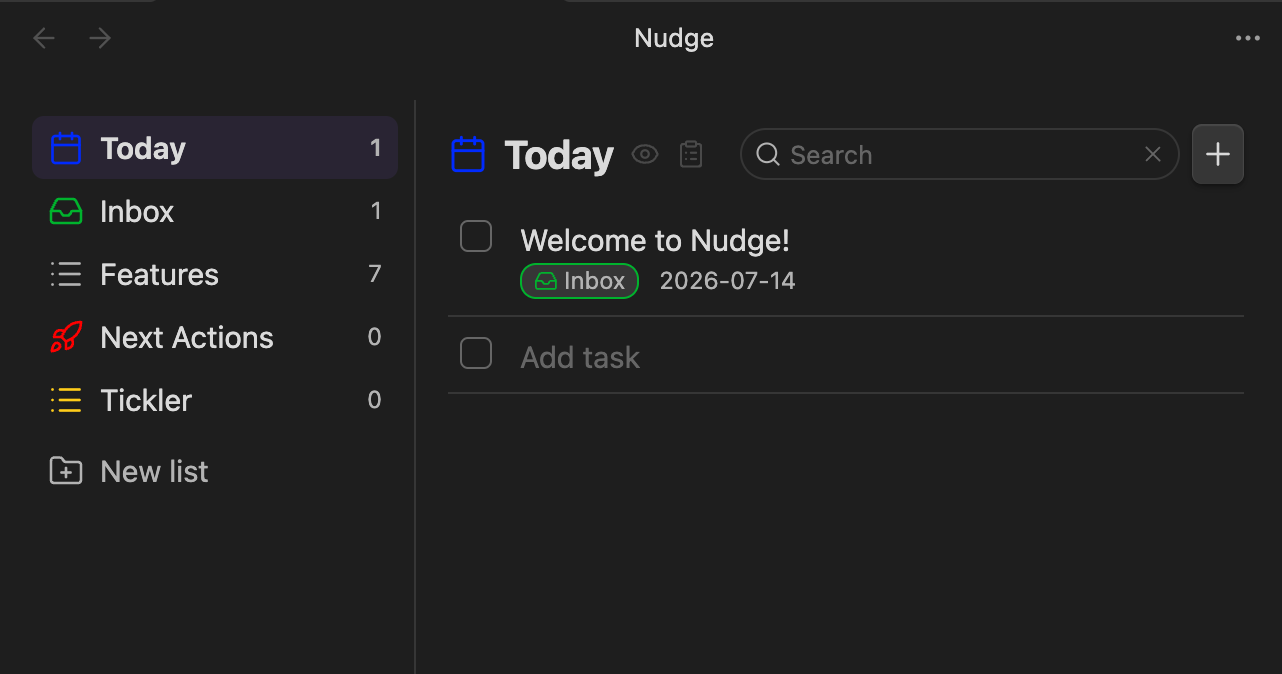
A task manager for Obsidian, backed by a single
todo.txt file. Desktop-only (macOS). Passive by
design — items just surface in Today when their due date arrives; there are
no OS notifications.
See SPEC.md for the full design.
Features
- Custom view with a Today filter plus one list per
+projecttag. - A configurable Default list (default
Inbox), always pinned under Today. - Structured create/edit modal — no hand-typed todo.txt syntax. Fields: text,
list, due date, priority, link, and a recurrence picker (stored as
rec:<RRULE>). - Completing a recurring item spawns its next occurrence, anchored on the original due date.
- Drag and drop to reorder, move between lists, or drop into Today.
- Fuzzy search across all lists (the magnifying glass in the header, or a configurable hotkey — e.g. Cmd+F — set in the plugin settings): live results as you type, matching item text and link URLs, with matched characters highlighted. Esc returns to the previous view.
- Every change is a read-modify-write against the file, so external edits
(e.g. an agent rewriting
todo.txt) show up automatically. - Optional macOS Dock badge (off by default) counting overdue tasks — optionally including tasks due today, which matches the Today view count.
Install (unpacked dev plugin)
- Build the plugin:
npm install npm run build # or: npm run dev (watch mode) - Copy/symlink the plugin folder into your vault's plugins directory so it
contains
manifest.json,main.js, andstyles.css:ln -s "$(pwd)" "<YourVault>/.obsidian/plugins/nudge" - In Obsidian: Settings → Community plugins, disable Restricted mode, then enable Nudge.
Adding items
- The + button in the panel header (on every view, including Today).
- The New task ribbon icon or command.
- A configurable global hotkey (default
Cmd+N), set in the plugin settings. It uses a capture-phase listener so it can override Obsidian's own binding for that combo. - Single-click a row to complete/uncomplete it; use the pencil button to edit.
Creating items via Obsidian URI
The plugin registers a protocol handler so external tools, shortcuts, or links can create tasks:
obsidian://nudge?text=Buy%20milk&list=Groceries&due=2026-07-20&priority=high&link=https%3A%2F%2Fexample.com
| Arg | Maps to | Notes |
|---|---|---|
text | description | If present, the item is created directly. If omitted, the prefilled modal opens instead. |
list | +Project | Whitespace is stripped. Defaults to the configured Default list. |
due | due: | YYYY-MM-DD. |
priority | (A)/(B)/(C) | Accepts high/med/low or A/B/C (case-insensitive). |
link | link: | URL. |
rec | rec: | A raw RRULE, e.g. FREQ=WEEKLY;BYDAY=MO. |
modal | — | modal=1 opens the prefilled create modal instead of creating directly. |
Modes:
- Direct create — when
textis provided (andmodalis not set): the item is appended (with today's creation date), a notice is shown, and open views refresh. - Prefilled modal — when
textis omitted ormodal=1: the create modal opens with the given fields filled in for review.
Encoding notes: URL-encode all values — especially the rec RRULE's ;
and =, and :// in links. With multiple vaults, add &vault=<name> to
route to the right one.
For plugin developers
Search results and similarity scores are powered by semantic analysis of your plugin's README. If your plugin isn't appearing for searches you'd expect, try updating your README to clearly describe your plugin's purpose, features, and use cases.