CircuitJS
approvedby stevengann
Embed CircuitJS circuit simulations into notes.
CircuitJS
An Obsidian.md plugin to embed CircuitJS circuit simulations directly into your notes.
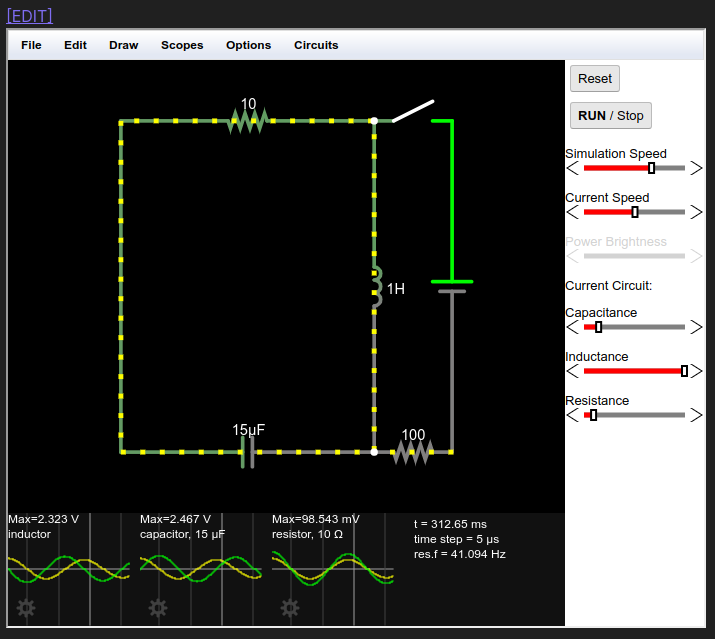
Table of Contents
- Purpose
- Features
- Installation
- Usage
- Settings
- Limitations
- Development
- Releasing
- Project Structure
- Architecture
- License
Purpose
This plugin bridges the gap between circuit design and documentation. CircuitJS is an excellent tool for sketching out circuit designs, and this plugin allows you to:
- Version Control: Keep circuit designs in version control alongside your Obsidian vault
- Documentation: Embed circuits directly in Markdown with extensive notes
- Organization: Reference and organize circuits within your knowledge base
- Backup: Circuits are backed up with the rest of your vault
Features
- Offline Mode (NEW in v2.0): Run simulations without internet using bundled CircuitJS
- Embedded Simulations: View fully interactive CircuitJS simulations directly in your notes
- Live Interaction: Interact with running simulations in Reading view
- Quick Editing: One-click link to open circuits in full CircuitJS browser
- LZ Compression: Efficient URL encoding using LZ-string compression
- Configurable: Customizable settings for editability and CircuitJS URL
Installation
From Obsidian Community Plugins (Recommended)
- Open Obsidian Settings
- Navigate to Community plugins
- Click Browse and search for "CircuitJS"
- Click Install, then Enable
Manual Installation
- Download the latest release from the releases page
- Extract the files to your vault's plugins folder:
<vault>/.obsidian/plugins/circuitjs/ - Reload Obsidian
- Enable the plugin in Settings → Community plugins
Usage
Basic Workflow
- Design your circuit in CircuitJS
- Export the circuit using
File → Export As Text... - Paste into Obsidian in a fenced code block with the
circuitjstag:
```circuitjs
$ 1 0.000005 10.20027730826997 50 5 43 5e-11
r 176 80 384 80 0 10
s 384 80 448 80 0 1 false
w 176 80 176 352 0
c 384 352 176 352 0 0.000015 -9.16123055990675 -10
l 384 80 384 352 0 1 -0.01424104005209455 0
v 448 352 448 80 0 0 40 5 0 0 0.5
r 384 352 448 352 0 100
o 4 64 0 4099 20 0.05 0 2 4 3
o 3 64 0 4099 20 0.05 1 2 3 3
o 0 64 0 4099 0.625 0.05 2 2 0 3
38 3 F1 0 0.000001 0.000101 -1 Capacitance
38 4 F1 0 0.01 1.01 -1 Inductance
38 0 F1 0 1 101 -1 Resistance
h 1 4 3
```
- Switch to Reading view to see the embedded simulation
CircuitJS Text Format Reference
The circuit text format uses single-letter codes for components:
| Code | Component |
|---|---|
$ | Header/settings line |
r | Resistor |
c | Capacitor |
l | Inductor |
v | Voltage source |
s | Switch |
w | Wire |
o | Oscilloscope/Output |
38 | Slider control |
h | Hint/display |
For complete documentation, see the CircuitJS documentation.
Settings
| Setting | Description | Default |
|---|---|---|
| Offline mode | Use bundled CircuitJS for offline support (desktop only) | true |
| Editable | Whether the embedded simulation can be interacted with | true |
| Show edit link | Show [EDIT] link to open circuit in full browser | true |
| CircuitJS URL | Base URL for the CircuitJS application (used when offline mode is disabled) | https://falstad.com/circuit/circuitjs.html |
| Code block tag | Code block tag to trigger rendering | circuitjs |
Limitations
- Desktop Only: Offline mode requires Electron's webview (desktop Obsidian only)
- No Auto-Save: Changes made in the embedded simulation are not saved back to the code block
- Manual Export: To persist changes, use
File → Export As Text...in the simulation and paste the updated code back into your note - Mobile: Mobile users must disable offline mode and use the remote CircuitJS URL
Development
Prerequisites
Setup
# Clone the repository
git clone https://github.com/StevenGann/obsidian-circuitjs.git
cd obsidian-circuitjs

# Install dependencies
pnpm install

# Start development build (with watch mode)
pnpm dev

# Production build
pnpm build

# Run linting
pnpm lint
Development Workflow
- Create a symbolic link or copy the plugin folder to your test vault's
.obsidian/plugins/directory - Run
pnpm devto start the development build with hot reloading - Enable the plugin in Obsidian and use
Ctrl+Rto reload after changes
Releasing
This project uses GitHub Actions for automated releases. Releases are deliberately triggered — not every commit creates a release.
CI Pipeline
Every push and pull request runs the CI workflow which:
- Installs dependencies
- Runs linting (
npm run lint) - Builds the plugin (
npm run build) - Verifies the build output
Creating a Release
-
Update the version in
package.json:npm version patch # for bug fixes (1.0.0 → 1.0.1) npm version minor # for new features (1.0.0 → 1.1.0) npm version major # for breaking changes (1.0.0 → 2.0.0)This automatically updates
package.json,manifest.json, andversions.json. -
Push the changes and tag:
git push && git push --tags -
Create a GitHub Release:
- Go to the Releases page
- Click "Draft a new release"
- Select the tag you just pushed (e.g.,
1.0.1) - Add release notes describing the changes
- Click "Publish release"
-
Automated deployment:
- The release workflow automatically builds the plugin
- Attaches
main.js,manifest.json, andstyles.cssto the release - Obsidian's plugin registry automatically picks up the new version
How Obsidian Finds Updates
Obsidian's community plugin registry reads from your GitHub Releases. When you publish a release:
- The tag version must match the version in
manifest.json - The release must include
main.js,manifest.json, and optionallystyles.css - Users will see the update available in Obsidian's settings
Project Structure
circuitjs/
├── src/
│   ├── main.ts              # Plugin entry point
│   ├── settings.ts          # Settings interface and tab
│   └── circuitRenderer.ts   # Circuit rendering and iframe logic
├── styles.css               # Plugin styles
├── manifest.json            # Obsidian plugin manifest
├── package.json             # Node.js dependencies and scripts
├── tsconfig.json            # TypeScript configuration
├── esbuild.config.mjs       # Build configuration
├── eslint.config.mjs        # ESLint configuration
├── version-bump.mjs         # Version bump script
├── versions.json            # Version compatibility mapping
├── docs/
│   ├── screenshot.png       # Documentation screenshot
│   └── MODERNIZATION.md     # Modernization guide
└── README.md                # This file
Architecture
Core Components
src/main.ts - Plugin Entry Point
The main plugin class CircuitJsPlugin extends Obsidian's Plugin class and:
- Loads/saves plugin settings
- Registers the settings tab
- Registers the markdown code block processor for
circuitjsblocks - Delegates rendering to
CircuitRenderChild
src/settings.ts - Settings Management
Contains the settings interface, default values, and the settings tab UI:
interface CircuitJsSettings {
    editable: boolean;      // Allow simulation interaction
    editLink: boolean;      // Show edit link
    circuitJsUrl: string;   // CircuitJS base URL
    circuitTag: string;     // Code block tag
}
src/circuitRenderer.ts - Rendering Engine
The CircuitRenderChild class extends MarkdownRenderChild and handles:
- Compression: Uses LZ-string to compress circuit code for URL encoding
- URL Generation: Constructs CircuitJS URL with compressed circuit data
- DOM Creation: Creates iframe and optional edit link
- Lifecycle: Manages component mounting/unmounting
Data Flow:
Circuit Code → LZ Compression → URL Parameter → iframe src
Dependencies
| Package | Purpose |
|---|---|
obsidian | Obsidian API types and base classes |
lz-string | LZ-based compression for URL encoding |
esbuild | Fast TypeScript bundler |
typescript | TypeScript compiler |
typescript-eslint | ESLint TypeScript support |
Build Process
The plugin uses esbuild for building:
- Development:
pnpm dev- Builds with watch mode and inline source maps - Production:
pnpm build- Type-checked, optimized build with tree shaking and minification
Output is a single main.js file in CommonJS format targeting ES2018.
Contributing
- Fork the repository
- Create a feature branch:
git checkout -b feature/my-feature - Make your changes
- Run linting:
pnpm lint - Test in a local Obsidian vault
- Submit a pull request
License
This project is licensed under the MIT License.
Credits
- CircuitJS by Paul Falstad
- Obsidian by Obsidian.md team
- Plugin developed by Steven Gann
For plugin developers
Search results and similarity scores are powered by semantic analysis of your plugin's README. If your plugin isn't appearing for searches you'd expect, try updating your README to clearly describe your plugin's purpose, features, and use cases.