Extract PDF Annotations
approvedby munach
Extract PDF annotations (notes and highlights) and sort them by topic.
Obsidian Extract PDF Annotations Plugin
This is a plugin for Obsidian. It extracts all types of annotations (highlight, underline, squiggle, note, free text, etc.) from PDF files inside and outside the Obsidian Vault.
It can be used on single PDF files (see Extract PDF Annotations on single file and Extract PDF Annotations from single file from path in clipboard) or even on a whole directory containing PDFs (see Extract PDF Annotations) for batch extraction.
Features
Extract PDF AnnotationsWorks when editing a markdown note. Searches all PDF files in current Folder for annotations, and inserts them at the current position of the open note.Extract PDF Annotations on single fileWorks while displaying a PDF file inside the Obsidian PDF-Viewer. Extracts annotations from this file and writes them to the noteAnnotations for <filename>Extract PDF Annotations from single file from path in clipboardWorks when editing a markdown note. Looks for a file path of a PDF in clipboard, extracts annotations from it and inserts them at the current position of the open note. This command can be used for external PDF files, which are not part of the Obsidian Vault. Helpful, if you do not want to copy your PDFs inside your vault.
Plugin Settings
- Desired annotations
- Select your desired annotation types that should be extracted from the PDF, if it includes other types that you don't need
- Styling settings
- Template settings for different types of notes: notes from internal or external PDFs and highlights from internal or external PDFs. The distinction between internal and external exists, if one wants to use different links (internal
[[]]links vs. externalfile://links). The following template variables are available and can be used by following the Handlebars syntax:- {{highlightedText}}: 'Highlighted text from PDF',
- {{folder}}: 'Folder of PDF file',
- {{file}}: 'Binary content of file',
- {{filepath}}: 'Path of PDF file',
- {{pageNumber}}: 'Page number of annotation with reference to PDF pages',
- {{author}}: 'Author of annotation',
- {{body}}: 'Body of annotation'
- Structure settings
- Use structuring headlines or not, if you only want to display annotations in the specified template
- Use the first line of the comment as 'Topic' (and sort accordingly), or not
- Use folder name or PDF-Filename for sorting
- Template settings for different types of notes: notes from internal or external PDFs and highlights from internal or external PDFs. The distinction between internal and external exists, if one wants to use different links (internal
- Settings for
Extract PDF Annotations on single file- Specify the export path for the command
- Specify the export name for the command
- Create one note per annotation
- Specify the export name for each note per annotation
How it works
Extract PDF Annotations
This command visits all PDF files in the current directory and extracts comments and highlights from the PDF files into the open note. It treats the first line of every comment as Topic for grouping the comments.
Assume we have in a folder in our Vault containing PDF files, e.g:
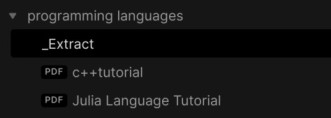
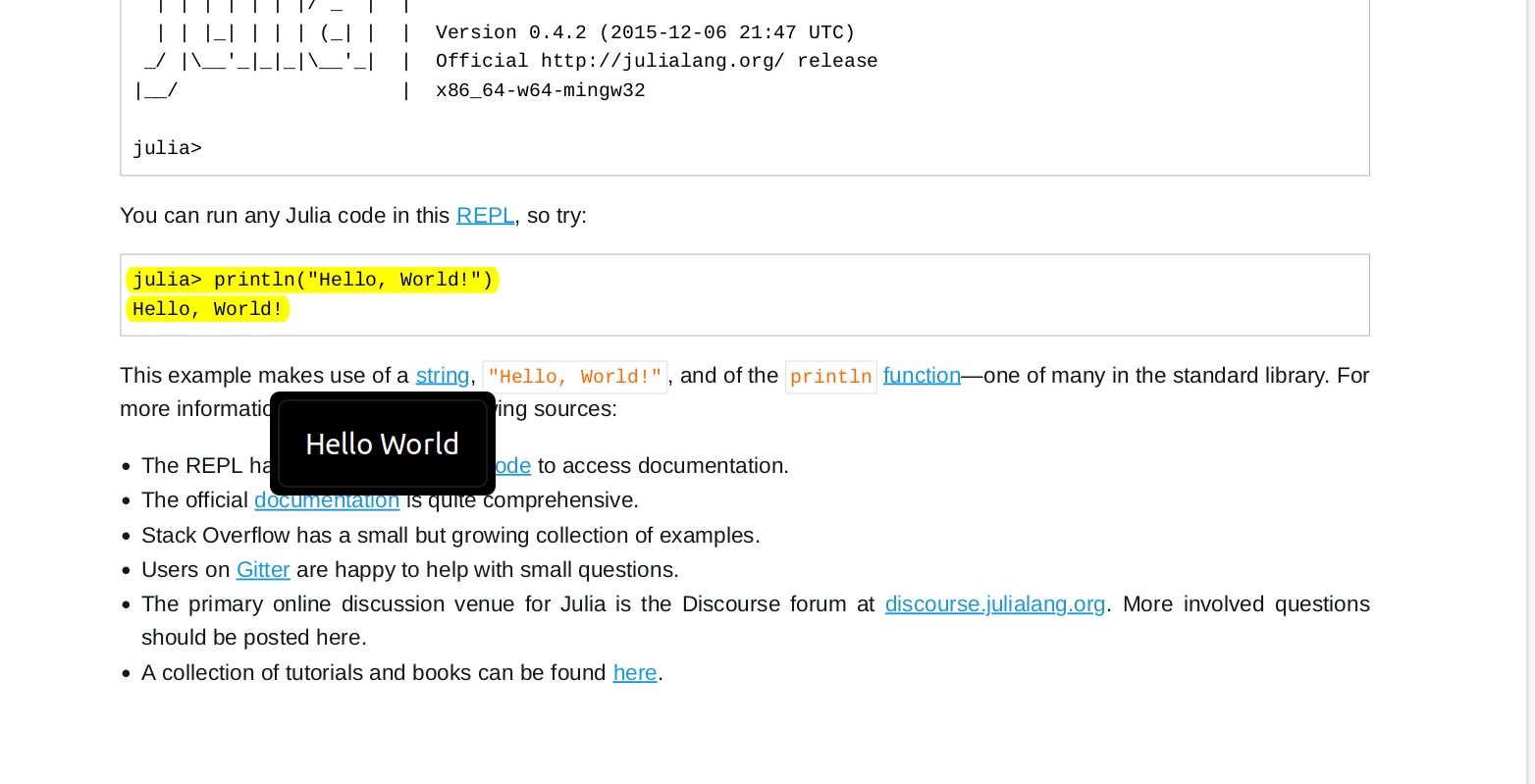
and we have highlighted the Julia Hello World Programm with a note 'Hello World':
In the editor (e.g. _Extract) we run the plugin's command Extract PDF Annotations (Hotkey Ctrl-P for all Commands). This will fetch all annotations in the PDF files in the current folder and sort them by Topic:
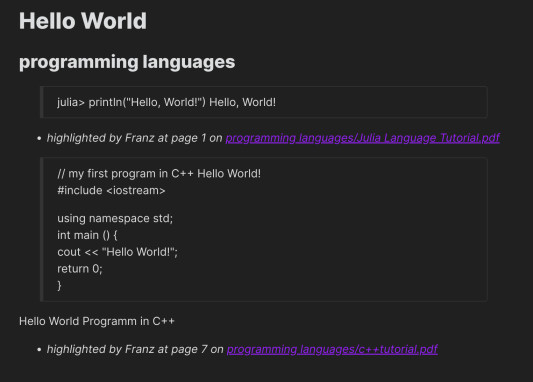
As such, you can relate comments for your topics (here 'Hello World') from several PDF files.
Versions
1.9.5 add setting to export clipboard path extraction to file, enabling one-note-per-annotation and tag extraction for external PDFs
1.9.4 extract from file path on clipboard can handle single quotes
1.9.3 use pdfjs-dist like Obsidian does
1.9.2 add new template attribute for page labels
1.9.1 avoid duplicate tags, when using option to extract tags from annotation body
1.9.0 update packages
1.8.2 remove placeholder text Extracting PDF Comments from... for Extract PDF Annotations
1.8.1 add option to extract tags from annotation body and setting to overwrite existing export note
1.8.0 add option to export each extracted annotation to a separate note
1.7.0 add settings for dynamic export path (next to PDF) and export name
1.6.0 fix bug after pdfjs api change
1.5.0 add setting for export path
1.4.0 add support for squiggle annotations
1.3.2 bugfix for free text, which is now treated in the same way as a note
1.3.1 bugfix for desired annotations setting
1.3.0 add support for free text annotations
1.2.1 improved annotation extraction
1.2.0 added template settings
1.1.0 add new function Extract PDF Annotations from single file from path in clipboard to extract annotations from PDFs outside Obsidian vault
1.0.4 clean up hyphenation https://github.com/munach/obsidian-extract-pdf-annotations/issues/5
1.0.3 updated highlight fetching to use QuadPoints instead of Rectangles
Installation / Build
Fetch repository:
$ git clone https://github.com/munach/obsidian-extract-pdf-annotations.git
$ cd obsidian-extract-pdf-annotations
Install dependencies:
$ npm i
Transpile main.ts:
$ npm run build
Then create the plugin directory and copy the files main.js and manifest.json, e.g.;
$ mkdir ~/MyVault/.obsidian/plugins/obsidian-extract-pdf-annotations
$ cp main.js manifest.json ~/MyVault/.obsidian/plugins/obsidian-extract-pdf-annotations/
Enable the plugin in Obsidan's setting.
Issues / Bugs
[] works only on left-to-right highlights
Credits
This plugin builds on ideas from Alexis Rondeaus Plugin https://github.com/akaalias/obsidian-extract-pdf-highlights, but uses obsidians build-in pdf.js library.
Author
Franz Achermann and Florian Stöckl
For plugin developers
Search results and similarity scores are powered by semantic analysis of your plugin's README. If your plugin isn't appearing for searches you'd expect, try updating your README to clearly describe your plugin's purpose, features, and use cases.