Grandfather
approvedby noatpad
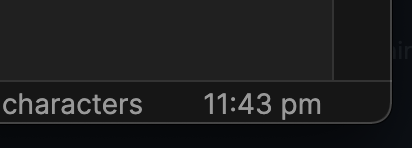
Display the time and date in the status bar.
Grandfather
A rather simple plugin that displays the time (and date, if you desire) on your status bar. I just made this to dabble with the Obsidian API as I migrate my notes to it.
You can select from a list of predefined time formats, or use a custom format that you can define youself, which you can find information about here.
Installation
From Obsidian
- Within Obsidian, browse community plugins in Settings -> Community plugins & search for this plugin
- Install and enable the Grandfather plugin
From GitHub Releases
- Go to the latest release here, & download the
grandfather.zipfile - Extract the zip's contents to your vault's plugin folder:
<vault>/.obsidian/plugins - Reload Obsidian & enable the plugin in Settings -> Community Plugins
From GitHub repo
- Clone the repo
- Run
npm i && npm run buildto build the plugin file locally - Copy
manifest.jsonanddist/main.jsto a new folder in your vault's plugin folder:<vault>/.obsidian/plugins - Reload Obsidian & enable the plugin in Settings -> Community Plugins
Development
You can also continue to develop and customize the plugin to your liking (it's still a simple clock though, so I'd be surprised honestly):
- Clone the repo
- Run
npm ito install dependencies - Run
npm run devto run a watch script that'll automatically move changes to your plugins folder- Remember to change
TEST_VAULTinrollup.config.dev.jsto the vault you'll be testing the plugin on
- Remember to change
- Reload Obsidian if necessary
For plugin developers
Search results and similarity scores are powered by semantic analysis of your plugin's README. If your plugin isn't appearing for searches you'd expect, try updating your README to clearly describe your plugin's purpose, features, and use cases.