Obsidian Graphviz
approvedby qamichaelpeng
Render Graphviz diagrams.
★ 98 stars↓ 17,083 downloadsUpdated 3y agoMIT
Obsidian Graphviz




Render Graphviz Diagrams in Obsidian
This plugin uses local graphviz dot executable for rendering.
Usage
- Install graphviz if you haven't yet or use the experimental d3-graphviz support. To download and install graphviz, follow official instructions.
- Inside Obsidian options dialog,
PLUGIN OPTIONS > Obsidian Graphviz > Dot Path, set path to your dot file. - Create a fenced codeblock using
dotas the language. Specify your graphviz code inside. Then preview it. Documentation on Graphviz can be found on graphviz.org
Examples
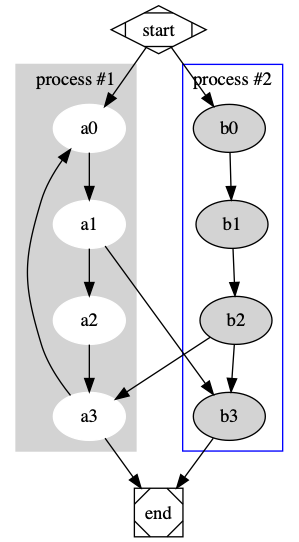
    ``` dot
    digraph G {

      subgraph cluster_0 {
        style=filled;
        color=lightgrey;
        node [style=filled,color=white];
        a0 -> a1 -> a2 -> a3;
        label = "process #1";
      }

      subgraph cluster_1 {
        node [style=filled];
        b0 -> b1 -> b2 -> b3;
        label = "process #2";
        color=blue
      }
      start -> a0;
      start -> b0;
      a1 -> b3;
      b2 -> a3;
      a3 -> a0;
      a3 -> end;
      b3 -> end;

      start [shape=Mdiamond];
      end [shape=Msquare];
    }
    ```
results in:
    ```dot
    graph anundirectedgraph {
      layout=neato;
      a -- b -- c;
    }
    ```
Installation
Inside Obsidian
Settings > Third-party plugins > Community Plugins > Browse and search for Graphviz.
Manually installing the plugin
git clone https://github.com/QAMichaelPeng/obsidian-graphviz.git
cd obsidian-graphviz
npm i
VAULT_FOLDER=<Your vault folder>
PLUGIN_FOLDER=$VAULT_FOLDER/.obsidian/plugins/obisidan-graph-viz
[ -d "$PLUGIN_FOLDER" ] || mkdir -p $PLUGIN_FOLDER
npm run build && cp  ./{main.js,styles.css,manifest.json} $PLUGIN_FOLDER
Credits
- Inspired by Johannes Theiner's obsidian-plantuml.
Authors
Feng Peng(@QAMichaelPeng)
With contributions from
- Dos Santos(@d0ssant0s)
- ebdavison(@ebdavison)
For plugin developers
Search results and similarity scores are powered by semantic analysis of your plugin's README. If your plugin isn't appearing for searches you'd expect, try updating your README to clearly describe your plugin's purpose, features, and use cases.