HTML Tags Autocomplete
approvedby bicarlsen
Automatically add closing HTML tags.
Obsidian HTML Tags Autocomplete
Autocomplete HTML tags. It's as simple as that.
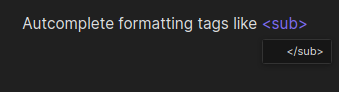
This plugin does three things:
-
Add closing tag. When typing HTML tags for formatting, the closing tag will be suggested. For example, for subscripts in text you type
<sub>and this plugin will add the closing</sub>tag for you. -
Skip over tags. Skip across the entire tag when moving the cursor next to or inside of a tag.
-
(Coming soon) Modify matching tag. If you modify an HTML tag, its matching tag will also be updated.
Commands
Three navigation commands are added with this plugin.
Skipping over tags
To skip across a tag use the Skip over tag backward or Skip over tag forward command. these commands are only available when inside of or next to a tag.
Suggested hotkeys: Ctrl + Meta + <-, Ctrl + Meta + ->
Go to matching tag
When inside of or next to a tag, go to the matching tag, if it exists using the To matching tag command.
Suggested hotkey: Ctrl + m
For plugin developers
Search results and similarity scores are powered by semantic analysis of your plugin's README. If your plugin isn't appearing for searches you'd expect, try updating your README to clearly describe your plugin's purpose, features, and use cases.