Image Layouts
approvedby vertis
Add beautiful image layouts to your notes.
Obsidian Image Layouts





I wanted a way to lay images out inside obsidian notes in a beautiful way. This is my first attempt at that. It's a bit rough around the edges, because it's still quite new, but I hope that it's useful in displaying image heavy notes. I wanted the ability to visually tell stories, and this is a good first step.
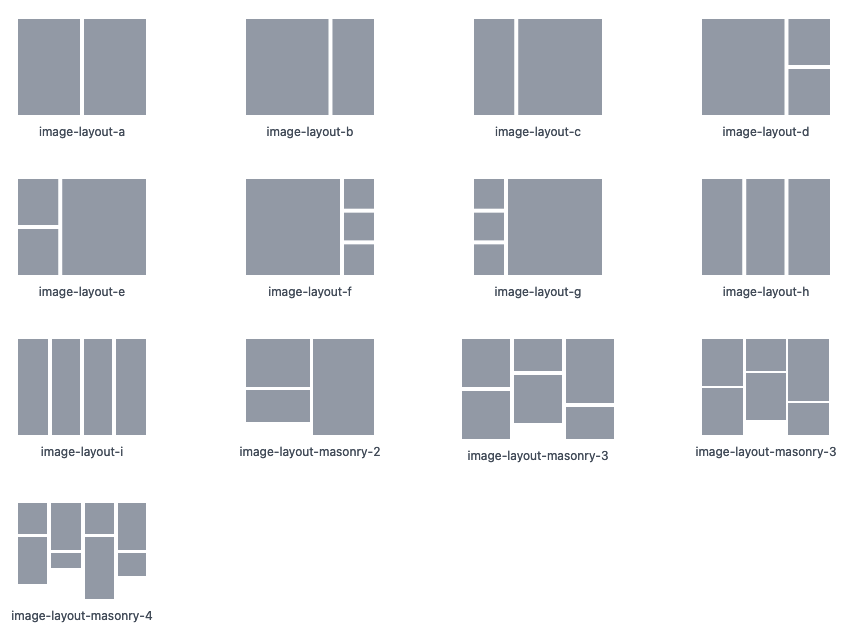
Note: Further examples can be found on the documentation. Masonry 5 and 6 are not shown above.
Usage
In order to get the image layout use ``` followed by the layout you want e.g. ```image-layout-a
Images can either be in wikilink format ![[imagename]] (with optional caption and size, e.g. ![[imagename|My caption]]) in which case it will load from the local vault, or in  format, which will load either the local or remote image as applicable.
The number of images varies depending on the layout. If you don't have enough it will display a placeholder (configurable in settings). If you have too many they'll simply be hidden. You can also pull every image from a vault folder with the fromFolder option.
See the Block Options Reference for everything a layout block accepts.
Roadmap
When I find time I'm hoping to add the following:
- Overlay text on images [DONE]
- Image captions [DONE]
- Permanent overlays [DONE]
- Overlays from markdown links [DONE]
- General gallery to support scrolling through photos [DONE]
- Captions from wikilinks, overlay never/hover/always, folder galleries, alignment and fit options [DONE]
- Visually pick layouts — every layout, in the block and from the command palette [DONE]
- User-definable custom layouts —
layout: customwith ASCII-art grids [DONE - NEW!] - Drag and drop support
Documentation
- Block Options Reference - All options for every layout block: captions, overlays, fit, alignment, folder galleries, carousel options.
- Carousel - A simple carousel that can be used to scroll through images.
- Legacy Layouts - We're moving to a much more capable system, but these are still available. If you used version 0.10.0 or earlier these are the layouts you're probably using. They're still supported and will be for the foreseeable future.
- Legacy Masonry Layouts - As above, these are the original masonry layouts supported.
- Overlaying Text and Captions
For plugin developers
Search results and similarity scores are powered by semantic analysis of your plugin's README. If your plugin isn't appearing for searches you'd expect, try updating your README to clearly describe your plugin's purpose, features, and use cases.