by Gonçalo Cartaxana
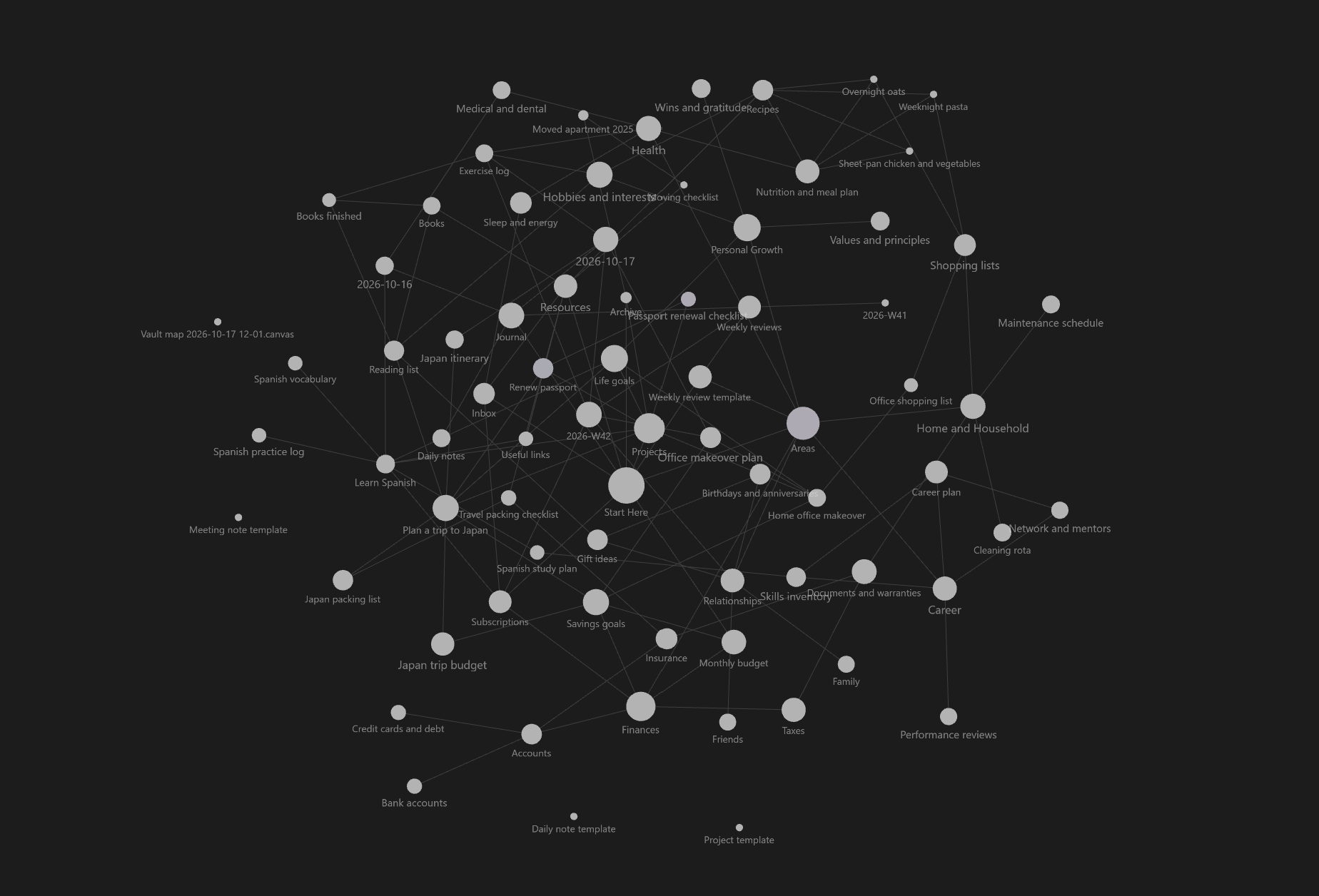
Size graph view nodes by the combined size of the notes they link to. The inverse of backlink importance: notes that link to big notes grow, and notes that link to nothing stay small.
Outlink Node Size
Size graph view nodes by the combined size of the notes they link to.
Obsidian's graph sizes nodes by how many links they have. This plugin does something different: a note grows when it links to big notes, and notes that link to nothing stay small. It is the inverse of how Google ranks pages, where a page is important because others link to it. Here, a note is big because of what it links out to.
It changes only node size. Colors, forces, labels, filters and groups are left alone.
What it's good for
- Spotting hub and index notes (maps of content, overviews, project pages) that gather lots of other material.
- Seeing which notes sit on top of the largest clusters, not just which are most referenced.
- Telling leaf notes (linking to nothing) apart from notes that organize others, at a glance.
How size is computed
Each note gets a size based on the notes it links to:
size(note) = 1 + decay × (sum of size(t) for every note t that this note links to)
- A note with no outgoing links has size 1, the smallest.
- A note that links to bigger notes becomes bigger.
- The calculation repeats
depthtimes, so each note also picks up size from the notes its linked notes link to. Because the number of rounds is fixed, link cycles can never make sizes run away. - The results are mapped onto a display range between your smallest and largest node size.
Sizes are computed from your whole vault, so changing graph filters, search, or local graph depth won't change them. Obsidian's own Node size slider in the graph settings still scales everything.
Installation
From the community plugin directory
Once approved: Settings → Community plugins → Browse, search for Outlink Node Size, then install and enable it.
Manual install
- Download
main.jsandmanifest.jsonfrom the latest release. - Create the folder
<your vault>/.obsidian/plugins/outlink-node-size/and put both files in it. - In Obsidian, go to Settings → Community plugins, reload the list, and enable Outlink Node Size.
- Open the graph view (global or local).
Settings
| Setting | What it does | Default |
|---|---|---|
| Enable outlink sizing | Turn off to get Obsidian's stock node sizes back. | On |
| Propagation depth | How many link-hops are followed. 1 means only a note's direct links count; higher values let it inherit size from notes further down the chain. | 3 |
| Decay | How much of a linked note's size is passed up to the note that links to it. Lower values make distant links matter less. | 0.5 |
| Count repeated links | Count every link to the same target instead of counting each target once. | Off |
| Include attachments | Let links and embeds of images, PDFs and other non-note files add to a note's size. | Off |
| Scale | How size maps onto the display range: logarithmic, square root, linear, or percentile rank. | Logarithmic |
| Smallest node | Display size of a note that links to nothing. Obsidian's default range is roughly 8 to 30. | 6 |
| Largest node | Display size of the note with the greatest aggregate outlink size. | 40 |
There is also a command, Toggle outlink-based node sizing, which you can bind to a hotkey.
Tuning tips
- Only direct links matter: set depth to
1and decay to1. A note's size is then 1 plus its number of outgoing links. - Big hubs dominate everything: use Logarithmic or Percentile rank. Linear scaling lets one huge note flatten all the others.
- Want even more spread between notes: use Percentile rank. It ignores the actual numbers and spreads notes evenly from smallest to largest.
- Everything looks the same size: raise Largest node, or lower Smallest node.
Good to know
- Tag nodes and unresolved-link ("ghost") nodes have no outgoing links, so they are drawn at the smallest size.
- Sizes update automatically when you add, remove, rename or edit links.
- Your links are read from Obsidian's own link index. The plugin makes no network requests and does not modify any notes.
Compatibility and limitations
Obsidian has no public API for customizing the graph, so this plugin hooks the graph renderer's internal node-sizing function. That has two consequences:
- A future Obsidian update could break it. If that happens, the graph should fall back to its stock look. Please open an issue with your Obsidian version.
- It conflicts with other plugins that also change node size, such as the node-size options in Extended Graph. Use one or the other.
Developed against Obsidian desktop. Mobile has not been tested.
Development
git clone https://github.com/goncasCartaxana/outlink-node-size.git
cd outlink-node-size
npm install        # Run to install required external packages
npm run dev        # rebuilds main.js on every change
npm run build      # type-check and produce a minified main.js
To try your build, copy main.js and manifest.json into <vault>/.obsidian/plugins/outlink-node-size/ and reload Obsidian.
The code is small:
src/sizes.tscontains the size calculation. It has no Obsidian dependency.src/main.tscontains the graph hooks and the settings tab.
Releasing
- Run
npm version patch(orminor/major). This updatespackage.json,manifest.jsonandversions.json, then commits and tags the release, for example1.0.1. - Run
git push --follow-tags. - The release workflow builds the plugin and publishes a GitHub release with
main.jsandmanifest.jsonattached.
The release tag must exactly match the version in manifest.json, with no leading v. Obsidian uses this to find the files to install.
Issues and feedback
Found a bug or have an idea? Open an issue. Including your Obsidian version and the plugin settings you used helps a lot.
License
For plugin developers
Search results and similarity scores are powered by semantic analysis of your plugin's README. If your plugin isn't appearing for searches you'd expect, try updating your README to clearly describe your plugin's purpose, features, and use cases.