On-Demand Plugins
pendingby 22-2
Forked from Lazy Plugin Loader
Lazy load plugins by caching their commands. Plugins are enabled on-demand when you trigger their commands (or open specific views), keeping startup fast.
🦥 On‑Demand Plugins
Lazy load plugins by caching their commands. Plugins are enabled on-demand when you trigger their commands (or open specific views), keeping startup fast.
Important note #1: After clicking Apply changes, Obsidian will restart once to apply the speed increase. This is only necessary after making changes to your plugin loading modes.
Important note #2: There is no way for this plugin to know if you've manually disabled or enabled a plugin. If you want disabling a plugin to persist through an Obsidian restart, make sure you disable it inside Lazy Loader's settings page rather than simply disabling the plugin in Obsidian's plugins page.
✅ How to Use
- Open Settings → On‑Demand Plugins.
- In the plugin list, choose a mode for each plugin:
- Lazy on demand: Loads when you run one of its commands, when a specified view type is opened, or when a specific file type (e.g. excalidraw.md) is opened. You can configure
lazy on fileandlazy on viewin the modal. - Lazy on layoutready: Loads once the workspace layout is ready.
- Always enabled: Loads normally at startup.
- Always disabled: Keeps the plugin off.
- Lazy on demand: Loads when you run one of its commands, when a specified view type is opened, or when a specific file type (e.g. excalidraw.md) is opened. You can configure
- Click Apply changes. Obsidian will automatically restart to apply your selections.
✨ Features & How it works
How it works
This plugin achieves dramatic startup speed improvements by:
-
Caching command information for configured plugins and registering "wrapper commands" instead of loading the actual plugin.
-
Skipping the initialization of lazy-loaded plugins during startup.
-
Dynamically loading the real plugin only when a cached command is triggered or a specific view is opened.
-
Directly modifying
.obsidian/community-plugins.jsonduring Apply changes to ensure stable bulk-switching of plugin states. -
On-demand Loading (Lazy on demand): Plugins are loaded when you run one of their commands, when a specified view type is displayed, or when a specific file type (e.g. Excalidraw) is opened. You can configure
lazy on fileandlazy on viewin the modal. -
Automatic View Type Detection: When a plugin is set to Lazy on view, its view types are captured automatically during Apply changes. You do not need to enter view types manually.
-
Customizable Startup Policy: Individual settings for each plugin to decide how they should be loaded.
📷 Screenshot
Add a screenshot of the On‑Demand Plugins settings page to make the setup clearer for reviewers and users.
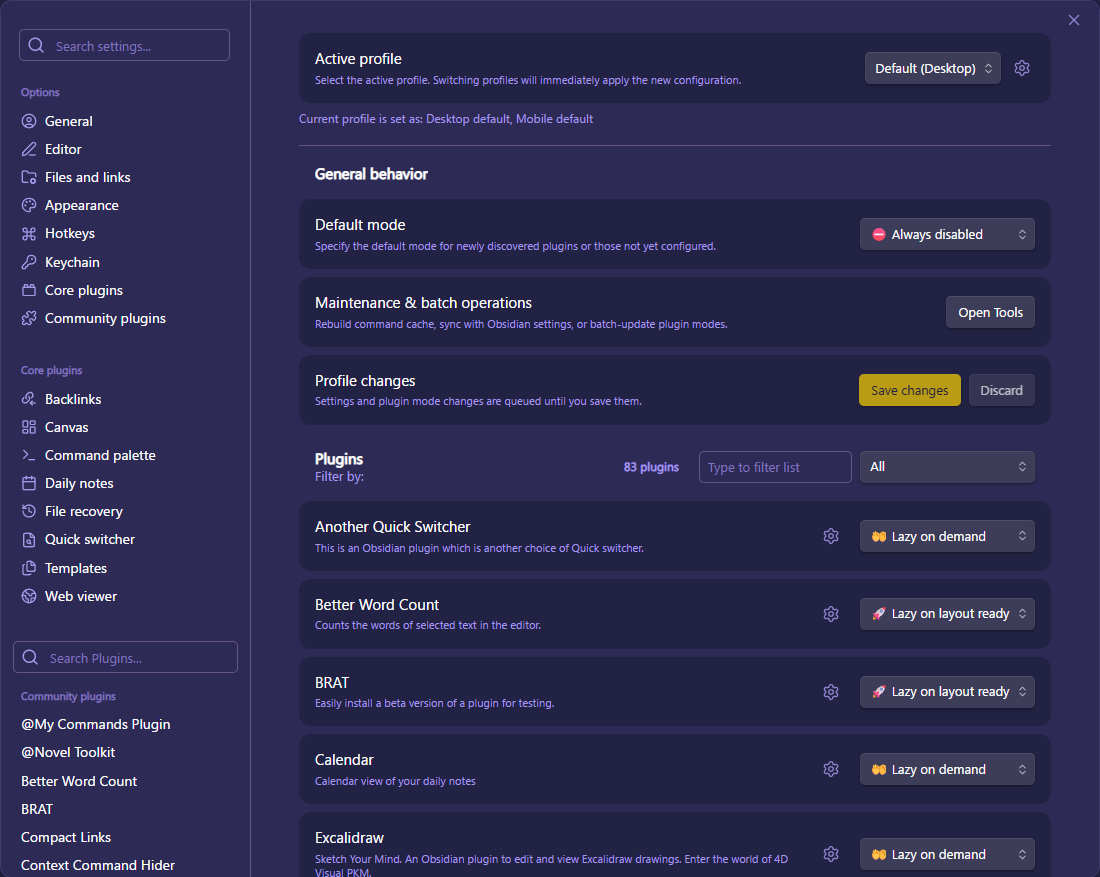 Screenshot of the On‑Demand Plugins settings page.
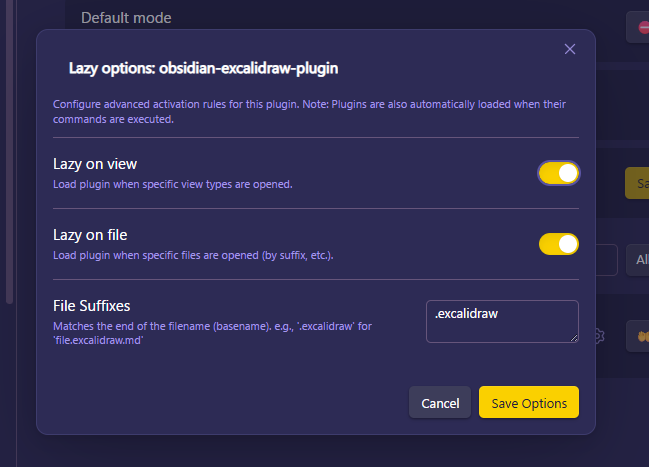 Screenshot of the settings modal.
⚠️ Recommended Usage & Warnings
Important: Backup community-plugins.json
This plugin modifies community-plugins.json directly to enable bulk plugin switching. Before using this plugin, please back up your community-plugins.json file (located in your vault's .obsidian directory) to prevent any potential data loss.
Monkey-patching and Stability
This plugin relies on monkey-patching Obsidian's internal functions to achieve its features. As a result, future Obsidian updates may cause instability or break the plugin's functionality. Please use this plugin with understanding of these risks.
Periodic Execution & Hooks
Plugins that rely on the following are recommended to use Lazy on layout ready:
- Periodic tasks: Plugins using
setIntervalorsetTimeoutfor background sync, backups, or timers. - Global Event Hooks: Plugins that register events like
this.app.vault.on('modify', ...)orthis.app.workspace.on('layout-change', ...)right at startup.
If these plugins are set to Lazy on demand, they are only enabled when triggered, so their background tasks or hooks will not be active until the plugin is loaded.
Note: This plugin does not support embedded or inline views (for example, Dataview embeds). Embedded views may not trigger lazy-loading as expected.
🙏 Acknowledgements
- Obsidian Team: For creating such a flexible and powerful platform.
- Original Idea & Foundation: This project is a fork of and inspired by the original work of Alan Grainger.
For plugin developers
Search results and similarity scores are powered by semantic analysis of your plugin's README. If your plugin isn't appearing for searches you'd expect, try updating your README to clearly describe your plugin's purpose, features, and use cases.