Divide and Conquer
approvedby mikedidomizio
Forked from Divide & Conquer
Commands for bulk enabling/disabling of plugins. Useful for debugging when you have many plugins.
Divide and Conquer




An Obsidian plugin that provides commands for bulk
enabling/disabling of plugins and CSS Snippets. This allows you to quickly
find which plugins are causing bugs or performance problems.
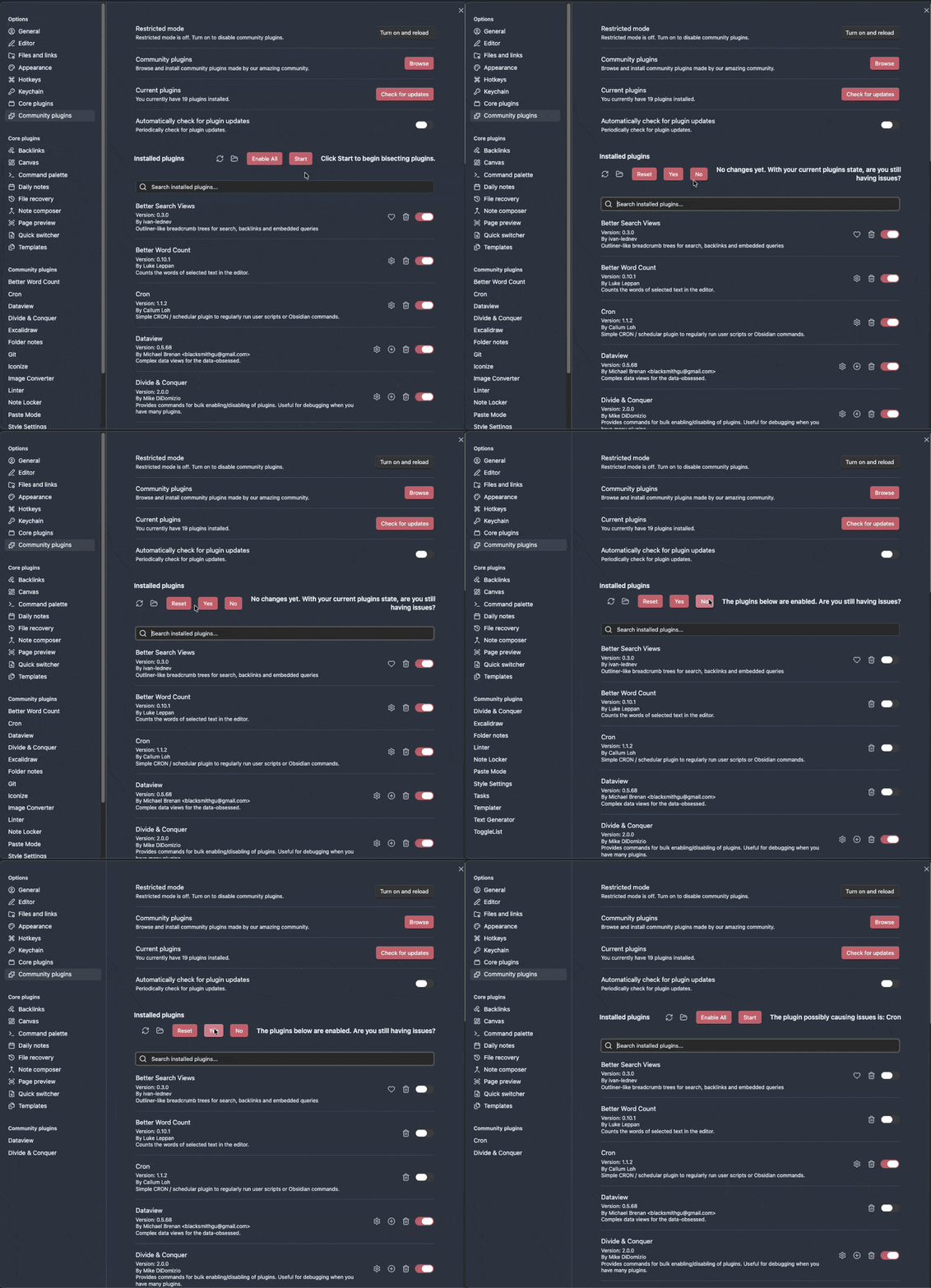
How this helps with Debugging
You have a problem with Obsidian and have confirmed that the issue goes away when enabling safe mode. Now, you have to narrow down which plugin misbehaves. The most efficient method for doing so is called "bisecting", meaning that you disable half of the plugins, and depending on whether the issue still occurs or not, you can rule out one half of plugins.
Even though that process is the quickest method of finding the culprit-plugin, it is still quite cumbersome for power users who have 40, 50 or more plugins. Divide & Conquer provides some useful commands for bulk disabling/enabling of plugins, to make the power user's life easier.
Commands Added
The same set of commands is available for both Plugins and CSS Snippets.
Bulk enable / disable
- Enable All - enable everything, including excluded items
- Enable All Except Excluded - enable everything that isn't on your exclusion list
- Disable All - disable everything, including excluded items
- Disable All Except Excluded - disable everything that isn't on your exclusion list
Bisecting
You can bisect in either direction, depending on which state reproduces your issue:
- Bisect Start (Disable) - the classic direction. Everything starts enabled and DAC disables half. Use this when the problem is present with everything on.
- Bisect Start (Enable) - the reverse direction. Everything starts disabled and DAC enables half of the disabled items. Use this when the problem is absent with everything off and you want to enable your way toward the culprit.
- Bisect Yes - issue is still present with the currently enabled half; keep narrowing this side
- Bisect No - issue is not present with the currently enabled half; eliminate that side and keep narrowing the remaining candidates
When only one possibility remains, DAC shows:
The plugin possibly causing issues is: ...
(or CSS snippet in snippet mode), then shows Start again.
(Note that to be able to fulfill its duty, this plugin will never disable itself. The Hot Reload Plugin will also never be disabled, to avoid interference for developers — this holds even for "Disable All".)
Settings
The plugin/snippet exclusion is
regex
enabled, and you can exclude by author or description as well (e.g. 'command
palette' to exclude any plugins that modify the command palette)

Installation
The plugin is available via Obsidian's Community Plugin Browser:
Settings → Community Plugins → Browse → Search for
"Divide & Conquer".
Development
Please refer to the Contributing Guide if you want to contribute to the project or set up a development environment.
Bugs
- Occasionally, for one reason or another (like updating plugins) a refresh won't be triggered by obsidian and the buttons may disappear. Clicking on the community plugins tab (or appearance if you're in snippets) triggers the refresh and the buttons reappear. You can also close and reoppen settings.
Credits
- Currently maintained by mikedidomizio
- Originally created by chrisgrieser aka pseudometa, previously maintained by geoffreysflaminglasersword.
For plugin developers
Search results and similarity scores are powered by semantic analysis of your plugin's README. If your plugin isn't appearing for searches you'd expect, try updating your README to clearly describe your plugin's purpose, features, and use cases.