Special Callouts
pendingby ahseyg
Advanced callout styling with grid layouts, custom colors, gradients, glow effects, and multi-column support.
Special Callouts
Advanced callout styling for Obsidian. Create grid layouts, custom colors, gradients, glow effects, and multi-column lists with simple inline syntax.
Features
- Grid Layouts - Arrange callouts side-by-side with flexible column control
- Custom Colors - Use hex codes or define named colors
- Gradient Backgrounds - Smooth color transitions
- Glow Effects - Neon-style highlights for emphasis
- Multi-Column Lists - Newspaper-style content layout
- Custom Styles - Save and reuse your own callout designs
Quick Start
Grid Layout
Place callouts side-by-side using (position, columns) syntax:
> [!multi-callout]
>
> > [!note] (1,2) Left Panel
> > Content here
>
> > [!tip] (2,2) Right Panel
> > Content here

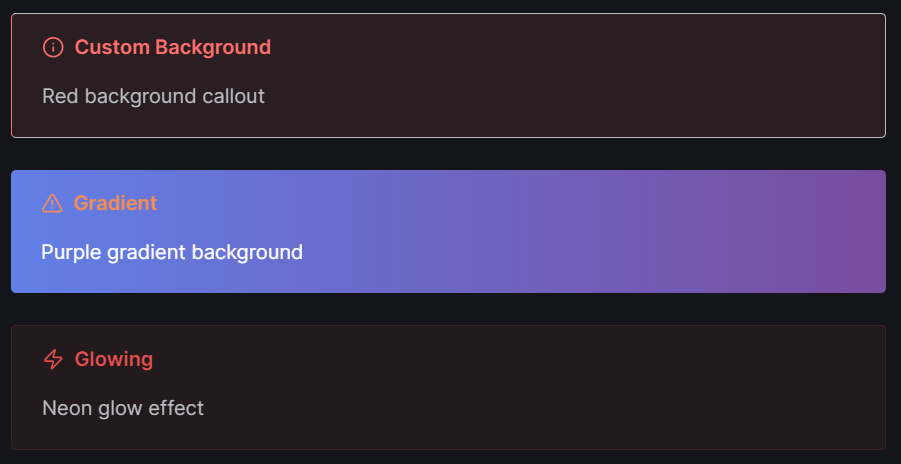
Colors and Effects
> [!info] (bg:#ff6b6b) Custom Background
> Red background callout

> [!warning] (gradient:#667eea-#764ba2) Gradient
> Purple gradient background

> [!danger] (glow:5) Glowing
> Neon glow effect
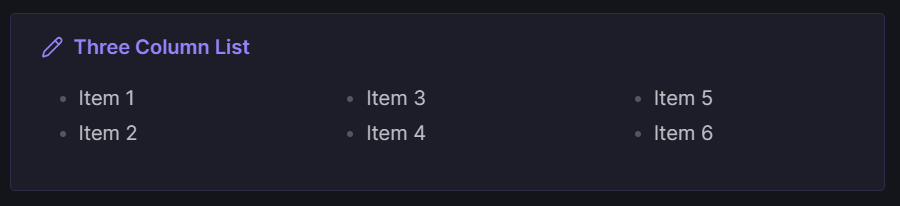
Multi-Column Lists
> [!note] (col:3) Three Column List
> - Item 1
> - Item 2
> - Item 3
> - Item 4
> - Item 5
> - Item 6
Syntax Reference
| Parameter | Example | Description |
|---|---|---|
(pos,cols) | (1,3) | Position 1 of 3 columns |
(pos,cols,row) | (1,2,2) | Position 1, 2 cols, row 2 |
bg: | bg:#ff0000 | Background color |
text: | text:#ffffff | Text color |
gradient: | gradient:#000-#fff | Gradient background |
glow: | glow:5 | Glow intensity (1-10) |
col: | col:3 | List column count |
icon: | icon:rocket | Lucide icon name |
Settings
Access plugin settings to:
- Edit default color hex values (red, blue, green, etc.)
- Create custom named colors
- Design and save custom callout styles
Installation
- Download
main.js,styles.css, andmanifest.json - Create folder:
VaultFolder/.obsidian/plugins/special-callouts/ - Copy files to the folder
- Enable the plugin in Obsidian settings
License
MIT
For plugin developers
Search results and similarity scores are powered by semantic analysis of your plugin's README. If your plugin isn't appearing for searches you'd expect, try updating your README to clearly describe your plugin's purpose, features, and use cases.