Snipsy
pendingby Dimagious
Snipsy adds hotstrings/text expansion to the editor — folders, bulk editing, and Espanso-compatible packs.
Snipsy







Snipsy is a powerful, stable text expansion plugin for Obsidian that brings hotstrings and snippet management to your note-taking workflow. Transform your typing with intelligent text expansion, organized snippet libraries, and seamless integration with your favorite markdown editor.
🎉 Version 1.0.0 - First stable release! After extensive development and testing, Snipsy is now production-ready with comprehensive features, excellent test coverage, and a thriving community.
🎯 What is Snipsy?
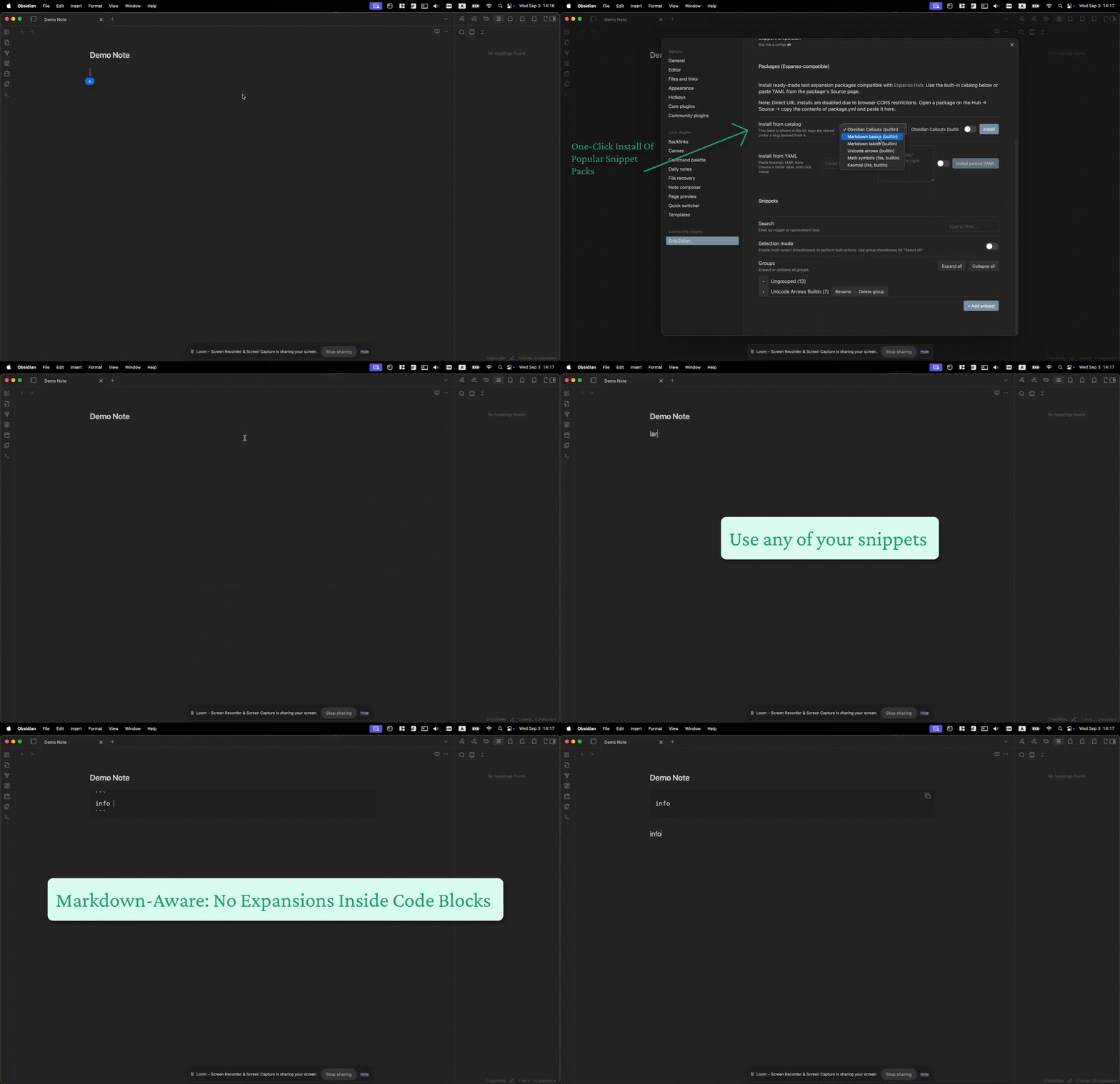
Snipsy transforms your Obsidian experience by allowing you to create text shortcuts that expand into full content. Type :todo and watch it instantly become - [ ]. Type :warn and get a beautiful warning callout block. Organize your snippets, install curated packages, and supercharge your markdown workflow — all without leaving Obsidian.
✨ Key Features
🚀 Smart Text Expansion
- Instant expansion after space, Enter, or punctuation
- Markdown-aware - no expansion inside code blocks or YAML frontmatter
- Word boundary detection to prevent false positives
- Cursor positioning - smart placement after expansion
🎯 Snippet Picker Command (New in v0.8.0)
- Quick access via Command Palette:
Insert Snippet… - Real-time search by trigger or replacement text
- Live preview with placeholder highlighting
- Keyboard navigation for accessibility
- Smart cursor placement and tabstop detection
⚙️ Command Palette Integration (New in v0.8.0)
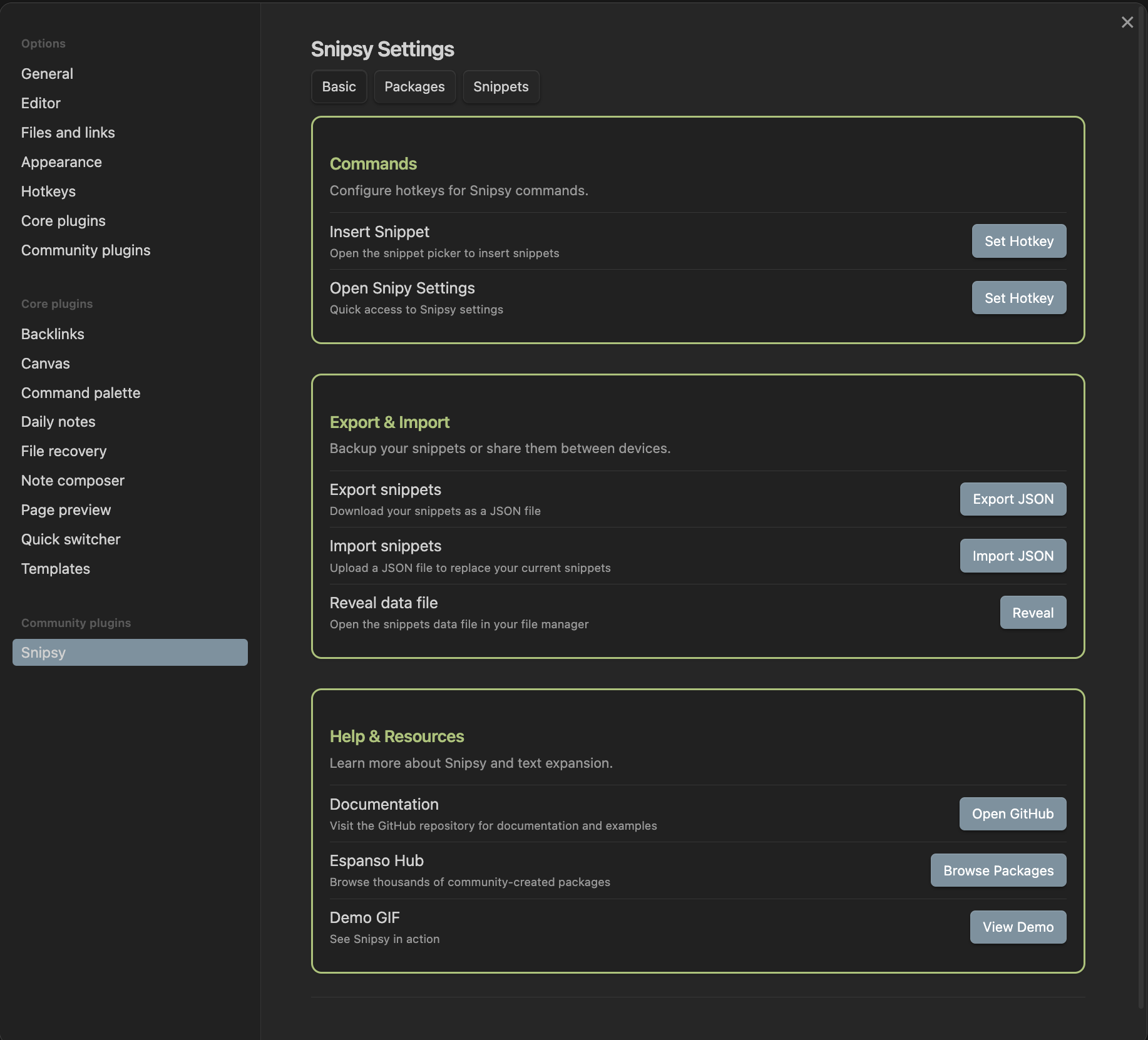
- Insert Snippet - Open snippet picker for quick insertion
- Open Snipy Settings - Direct access to plugin settings
- Hotkey configuration - Set custom shortcuts for both commands
🗂️ Advanced Snippet Management
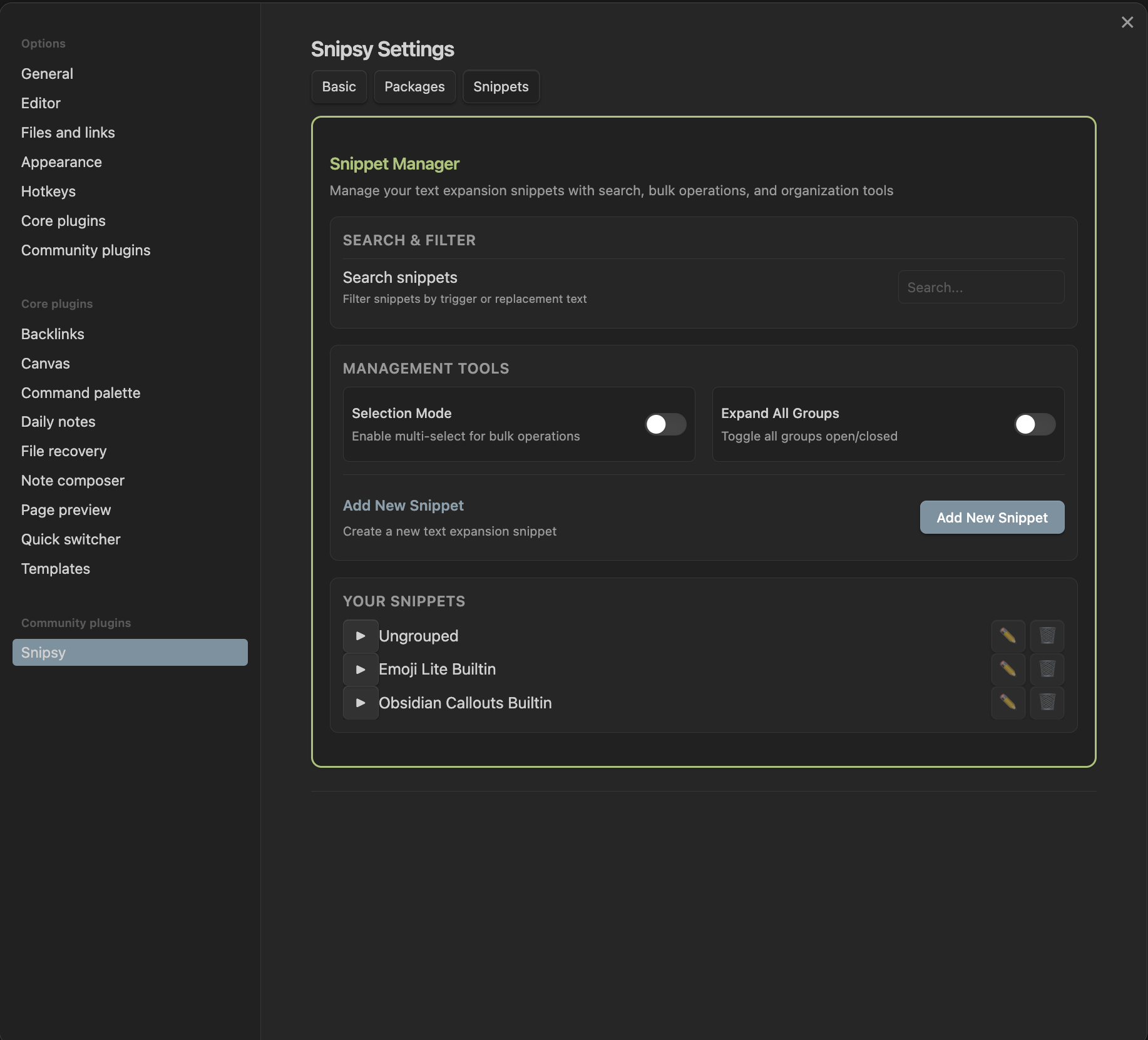
- Organized folders - Group snippets by category or project
- Bulk operations - Multi-select with checkboxes for batch editing
- Move & reorganize - Drag snippets between folders or create new groups
- Search & filter - Find snippets quickly with real-time search
- Expand/collapse - Collapsed groups by default for cleaner interface
📦 Package Manager
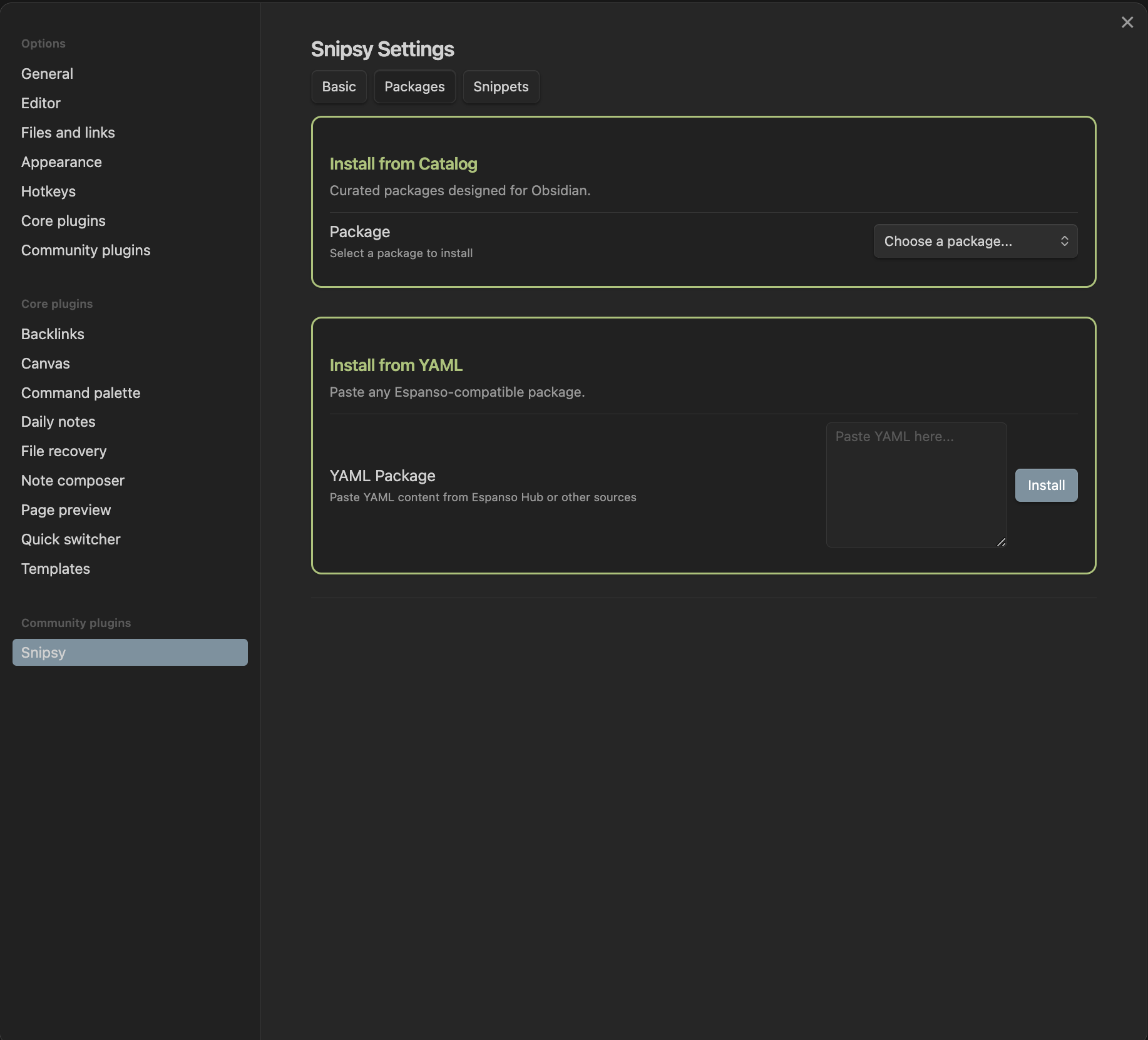
- Community packages - Browse and install packages created by the community
- Google Form submission - Submit your own packages via Google Forms
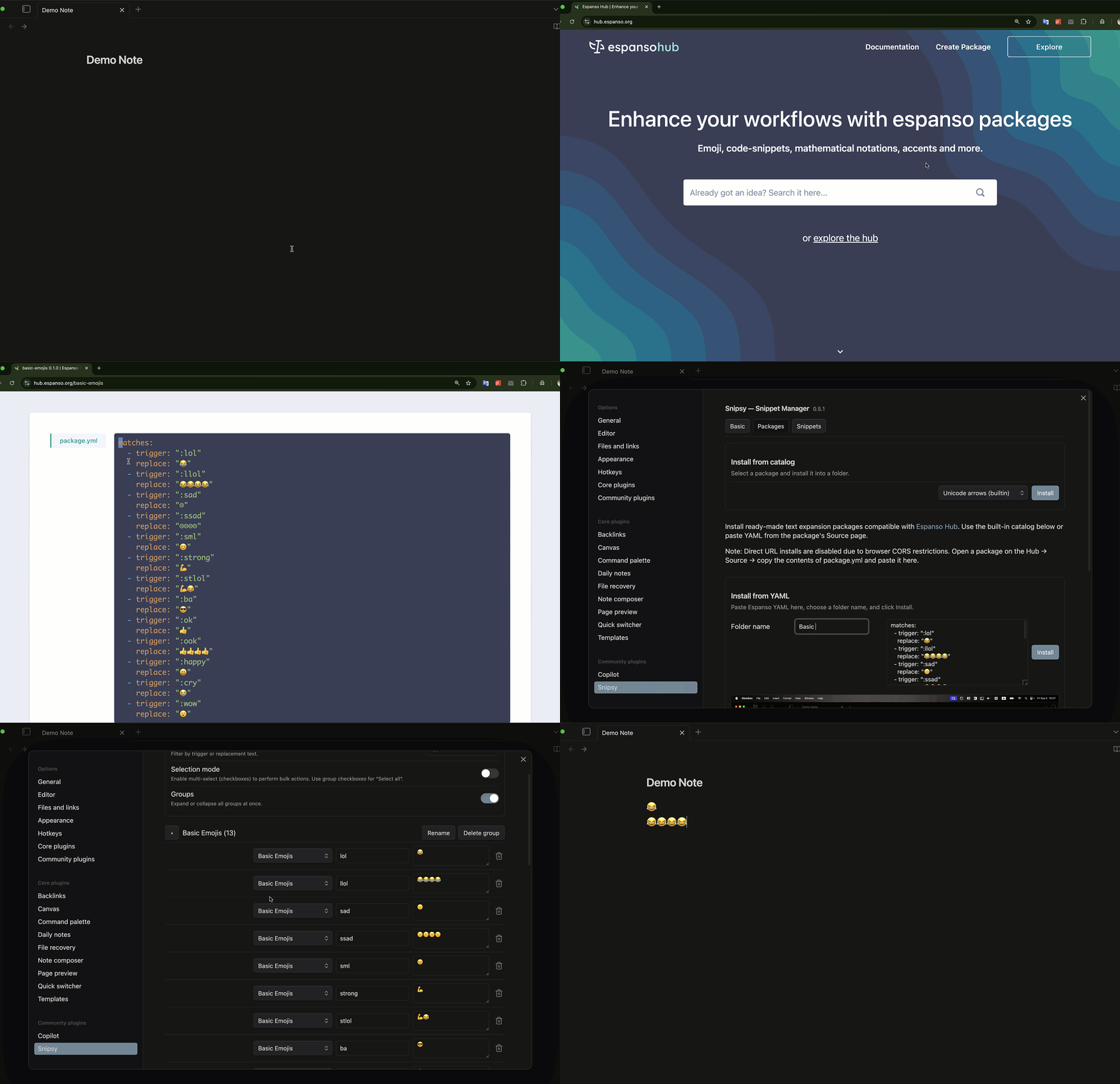
- Espanso compatibility - Paste any YAML from Espanso Hub
- Conflict resolution - Preview and resolve conflicts before installation
- One-click install - Streamlined package installation process
🔄 Import & Export
- JSON export - Backup your snippets as JSON files
- JSON import - Restore snippets from backup files
- Cross-device sync - Snippets sync with your vault across devices
- Default restoration - Add missing default snippets anytime
📚 Built-in Snippet Packages
Snipsy comes with a comprehensive collection of ready-to-use snippets:
| Package | Description | Examples |
|---|---|---|
| 🎭 Emoji (lite) | Popular emojis for quick access | :smile → 😀, :heart → ❤️, :fire → 🔥 |
| ✅ Task States | Todo list management | :todo → - [ ], :done → - [x], :doing → - [/] |
| 📝 Markdown Basics | Essential markdown formatting | :bold → **text**, :italic → _text_, :code → `code` |
| 📊 Markdown Tables | Quick table scaffolding | :table → 3×3 table template |
| ➡️ Unicode Arrows | Directional symbols | :arrow → →, :left → ←, :up → ↑ |
| 🔢 Math Symbols | Mathematical notation | :plus → ±, :times → ×, :leq → ≤, :geq → ≥ |
| 📋 Obsidian Callouts | Callout blocks | :note → > [!note], :warning → > [!warning] |
💡 Need more? Install any Espanso-compatible package by pasting YAML directly into Snipsy.
🚀 Quick Start
1. Installation
- Open Settings → Community plugins in Obsidian
- Search for "Snipsy" and install
- Enable the plugin
2. First Steps
- Go to Settings → Snipsy to open the plugin settings
- Try the Snippet Picker command from the Command Palette (
Ctrl/Cmd + P) - Install a package from the Community Packages tab
- Start typing triggers in your notes!
3. Create Your First Snippet
- Go to Settings → Snipsy → Snippets
- Click "Add New Snippet"
- Set trigger (e.g.,
:email) and replacement (e.g.,your@email.com) - Save and test in your notes!
🎮 Commands & Hotkeys
Snipsy provides two main commands accessible via the Command Palette:
| Command | Description | Default Hotkey |
|---|---|---|
| Insert Snippet… | Open snippet picker for quick insertion | Not set |
| Open Snipy Settings | Direct access to plugin settings | Not set |
Setting Up Hotkeys
- Go to Settings → Hotkeys in Obsidian
- Search for "Snipsy" or "Snipy"
- Set your preferred hotkeys for both commands
- Or use the "Set Hotkey" buttons in Snipsy settings
📐 How Text Expansion Works
Expansion Triggers
Snipsy expands snippets when you type:
- Space after a trigger
- Enter after a trigger
- Punctuation after a trigger (
.,,,!,?, etc.)
Smart Detection
- Word boundaries - Prevents false positives
- Markdown awareness - No expansion inside:
- Code blocks (
```) - Inline code (
`) - YAML frontmatter
- Code blocks (
- Context sensitivity - Respects your writing context
Example Usage
Type: "I need to :todo buy groceries"
Result: "I need to - [ ] buy groceries"

Type: "Remember: :note important meeting"
Result: "Remember: > [!note] important meeting"
🗄️ Data Storage & Sync
File Location
Your snippets are stored in:
.obsidian/plugins/snipsidian/data.json
Sync Behavior
- Automatic sync with your Obsidian vault
- Cross-device compatibility - snippets work on all devices
- Version control friendly - JSON format is human-readable
- Backup included - Export/import functionality for safety
Data Structure
{
  "snippets": {
    "user:hello": "Hello World!",
    "user:email": "your@email.com",
    "builtin-emoji:smile": "😀"
  },
  "ui": {
    "groupOpen": {
      "user": false,
      "builtin-emoji": true
    }
  }
}
🎨 User Interface
Settings Tabs
- Basic - Commands, export/import, help & resources
- Packages - Install from catalog or paste YAML
- Snippets - Manage your snippet library
Visual Design
- Unified green theme across all sections
- Professional appearance without distracting icons
- Collapsed groups by default for cleaner interface
- Responsive design that works on all screen sizes
🛠️ Development
Prerequisites
- Node.js 18+
- npm or yarn
- Obsidian vault for testing
Local Development Setup
-
Clone the repository:
git clone https://github.com/Dimagious/snipsidian.git cd snipsidian -
Install dependencies:
npm install -
Set up vault path (one-time setup):
# macOS/Linux echo 'export VAULT_PLUGIN="<path-to-vault>/.obsidian/plugins/snipsidian"' >> ~/.zshrc source ~/.zshrc # Windows setx VAULT_PLUGIN "<path-to-vault>\.obsidian\plugins\snipsidian" -
Build and test:
npm run build:vault    # Build into your vault
npm run dev:vault      # Watch mode for development
npm test               # Run test suite
Development Commands
npm run build           # Build main.js in repo root
npm run build:vault     # Build directly into vault
npm run dev:vault       # Watch mode for development
npm test                # Run tests with coverage
npm run coverage        # Generate coverage report
npm run release:check   # Pre-release validation
npm run release:zip     # Create release package
Testing
- 221 tests with 87.92% coverage
- Vitest test runner with jsdom environment
- TypeScript strict mode enabled
- CI/CD with GitHub Actions
📸 Screenshots
Settings Interface
Snippet Management
| Snippets Manager | Packages |
|---|---|
 |  |
Package Installation
🤝 Contributing
We welcome contributions! Here's how you can help:
Bug Reports
- Use the GitHub Issues page
- Include steps to reproduce and expected behavior
- Attach relevant screenshots or error messages
Feature Requests
- Open an issue first to discuss the feature
- Provide use cases and examples
- Consider backward compatibility
Pull Requests
- Keep changes small and focused
- Add tests for new functionality
- Update documentation as needed
- Follow the existing code style
Development Guidelines
- TypeScript - Use strict typing
- Testing - Maintain high test coverage
- Documentation - Update README and CHANGELOG
- Performance - Consider bundle size impact
📄 License
This project is licensed under the MIT License - see the LICENSE file for details.
🙏 Acknowledgments
- Espanso - For the inspiration and YAML compatibility
- Obsidian - For the amazing plugin ecosystem
- Community - For feedback, bug reports, and feature suggestions
📊 Project Stats
- Test Coverage: 87.92%
- Bundle Size: ~102.9kb
- TypeScript: Strict mode enabled
- Tests: 221 passing tests
- Dependencies: Minimal and well-maintained
💖 Support
If you find Snipsy helpful, consider:
- ⭐ Starring the repository
- 🐛 Reporting bugs or suggesting features
- ☕ Buying me a coffee to support development
- 📢 Sharing with the Obsidian community
Made with ❤️ for the Obsidian community
For plugin developers
Search results and similarity scores are powered by semantic analysis of your plugin's README. If your plugin isn't appearing for searches you'd expect, try updating your README to clearly describe your plugin's purpose, features, and use cases.