Ribbon Snippets
unlistedby Mark Riechers
Define text blocks and assign each to a ribbon button for one-click insertion
★ 2 starsUpdated 7mo agoMIT
Ribbon Snippets
Define text blocks and assign each to a ribbon button for one-click insertion into your notes.
Features
- Multiple snippets — create as many as you need, each with its own ribbon icon
- Lucide icon picker — choose any Lucide icon for each button (with live preview)
- Insert positions — top of note (after frontmatter), at cursor, or bottom of note
- Duplicate detection — optionally skip insertion if the snippet's first line already exists in the note
- Command palette — every snippet is also available as a command (
Insert: <name>) - Reorder and manage — move snippets up/down or delete them from settings
- Dynamic lifecycle — adding or removing snippets updates the ribbon and command palette immediately (no reload needed)
Use cases
- Insert a Tasks plugin query block with one click
- Stamp a standard template section into any note
- Add boilerplate frontmatter, callouts, or code blocks
- Quick-insert recurring checklists or status headers
Installation
From community plugins (recommended)
- Open Settings > Community plugins
- Click Browse and search for Ribbon Snippets
- Click Install, then Enable
Manual install
- Download
main.js,manifest.json, andstyles.cssfrom the latest release - Create a folder:
<vault>/.obsidian/plugins/ribbon-snippets/ - Copy the three files into that folder
- Reload Obsidian and enable the plugin in Settings > Community plugins
Usage
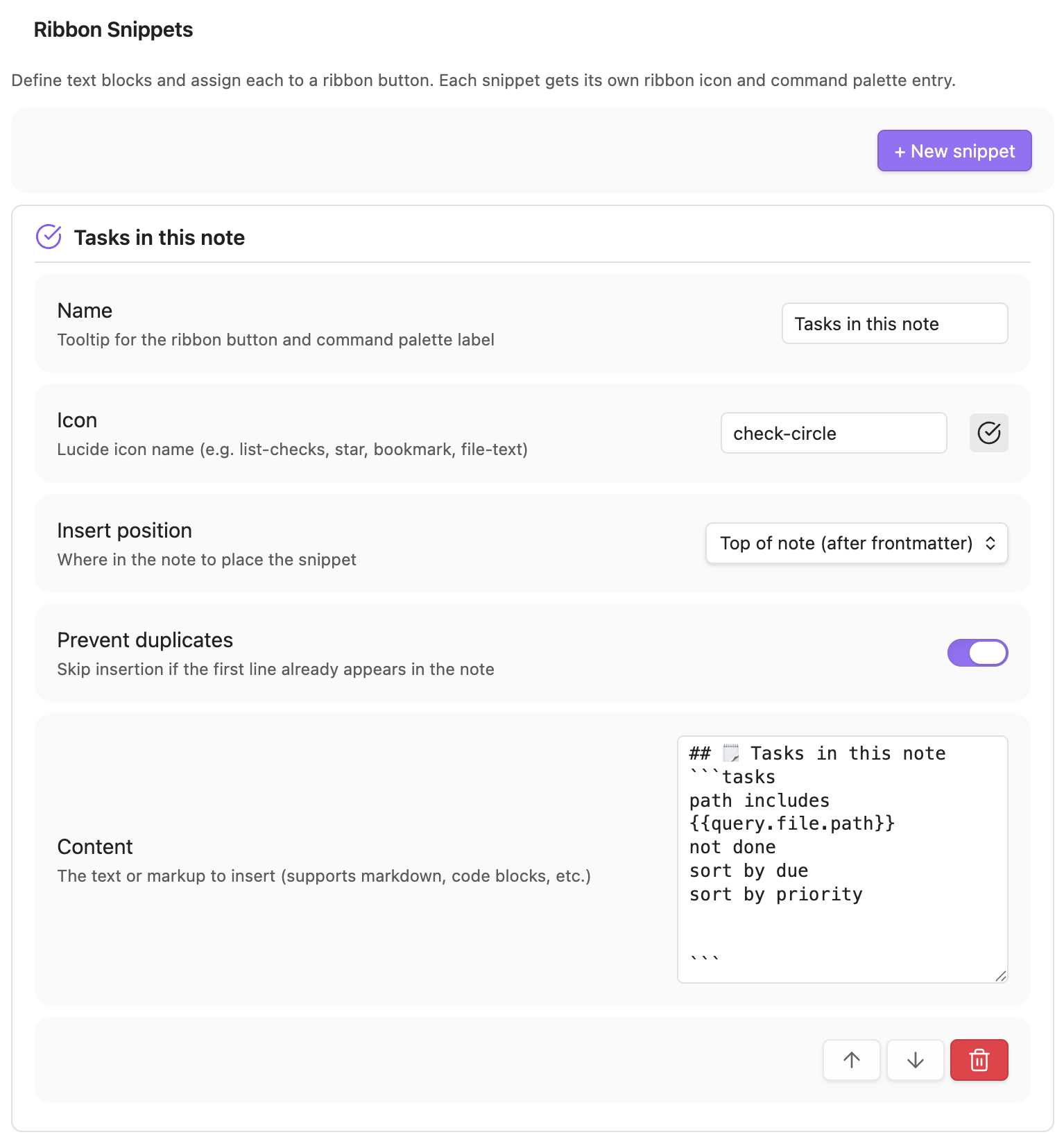
- Go to Settings > Ribbon Snippets
- Click + New snippet
- Configure:
- Name — tooltip for the ribbon button and command palette label
- Icon — any Lucide icon name (e.g.
check-circle,star,bookmark) - Insert position — top of note (after frontmatter), at cursor, or bottom
- Prevent duplicates — skip if the first line already appears in the note
- Content — the markdown text to insert
- A ribbon icon appears immediately. Click it to insert the snippet into the active note.
Compatibility
Requires Obsidian 1.7.2 or later (uses the removeCommand() API for dynamic command lifecycle management).
Works on desktop and mobile.
License
For plugin developers
Search results and similarity scores are powered by semantic analysis of your plugin's README. If your plugin isn't appearing for searches you'd expect, try updating your README to clearly describe your plugin's purpose, features, and use cases.