Table Dashboard
pendingby Data Goose
Create dynamic dashboard visualizations from your markdown tables.
Table Dashboard
Create dynamic dashboard visualizations from your markdown tables. Progress bars, counters, streaks, and more — all powered by your existing data.
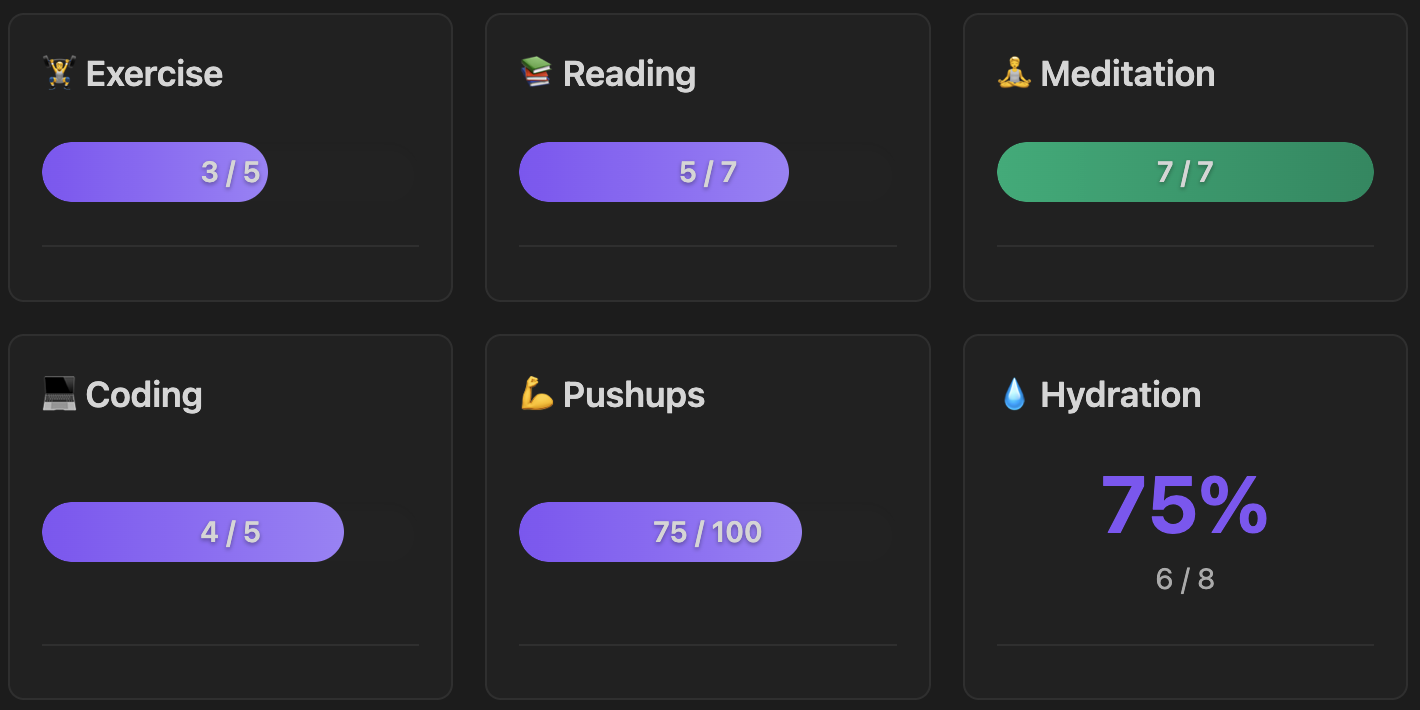
Features
- 📊 Multiple Visualizations: Progress bars, counters, percentages, streaks, line plots
- 📁 Flexible Sources: Current file, specific file, or entire folder
- 📋 Table-Powered: Extract and visualize data from markdown tables
- 🏷️ Table Tagging: Filter which tables to scan using HTML comments
- 🎯 Dynamic Goals: Extract goals from table columns
- 📅 Time Periods: Daily, weekly, monthly, yearly, or all-time filtering
- 🎨 Layout Options: Grid or compact-list for multi-widget dashboards
- ➕ Aggregation: Count, sum, average, min, max
- 🛠️ Helpful Errors: Clear guidance and examples when configuration is incorrect
Installation
Manual Installation
- Download
main.js,manifest.json, andstyles.cssfrom releases - Create folder:
<vault>/.obsidian/plugins/table-dashboard/ - Copy files into that folder
- Reload Obsidian and enable the plugin
From Source
cd <vault>/.obsidian/plugins/
git clone <repo-url> table-dashboard
cd table-dashboard
npm install
npm run build
Quick Start
Simple Table Tracker
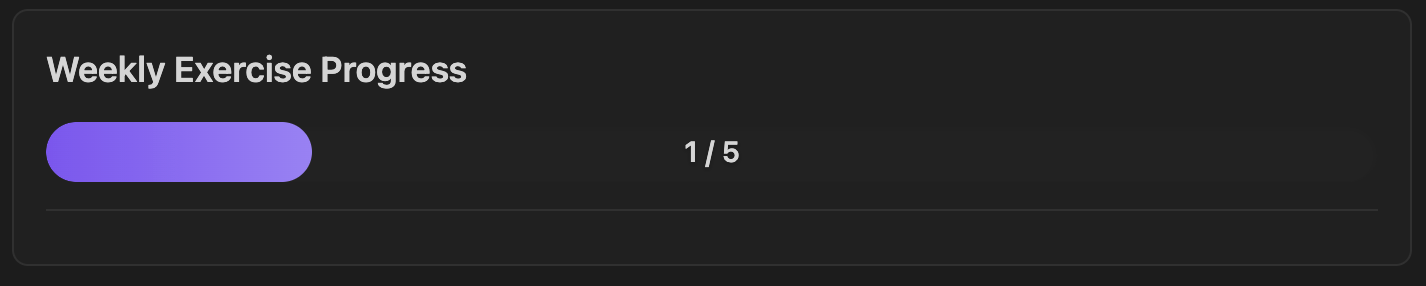
Visualize data from a table in the current file:
<!-- table-tag: weekly -->

| Activity | Done |
|----------|------|
| Exercise | ✓    |
| Reading  | ✓    |
```table-dashboard
type: progress_bar
source: current-file
tableTag: weekly
keyColumn: Activity
key: Exercise
valueColumn: Done
value: "✓"
goal: 5
label: Weekly Exercise
```
Multi-Widget Dashboard
Multiple trackers in one block with compact layout:
````table-dashboard
layout: compact-list
source: current-file
tableTag: weekly

type: progress_bar
keyColumn: Activity
key: Exercise
valueColumn: Done
value: "✓"
goal: 5
label: 🏋️ Exercise

---

type: counter
keyColumn: Activity
key: Reading
valueColumn: Done
value: "✓"
label: 📚 Reading

---

type: counter
keyColumn: Activity
key: Meditation
valueColumn: Done
value: "✓"
label: 🧘 Meditation

## Source Types
### Current File
Scan tables in the file containing the tracker block:
type: progress_bar
source: current-file
keyColumn: Activity
key: Exercise
valueColumn: Done
value: "✓"
label: Exercise Progress
### Specific File

Scan tables in a specific file (useful for dashboards):
type: progress_bar
source: file:Trackers/Monthly Habits.md
keyColumn: Activity
key: Exercise
valueColumn: Done
value: "✓"
goal: 20
label: Monthly Exercise
### Folder (Pattern Mode)

Scan multiple files in a folder, counting text pattern occurrences:
type: streak
source: folder:Daily Notes
pattern: "- [x] Meditation"
period: monthly
label: Meditation Streak
**Note:** For folder mode, filenames should include dates in `YYYY-MM-DD` format for period filtering and streak calculation.

## Table Mode

### Basic Structure

Tables require a **key column** (to identify rows) and a **value column** (to extract data):

```markdown
| Activity | Done |
|----------|------|
| Exercise | ✓    |
| Reading  | ✓    |
```
type: counter
source: current-file
keyColumn: Activity
key: Exercise
valueColumn: Done
value: "✓"
label: Exercise Count
### Table Tagging

Filter which tables to scan using HTML comment tags:

```markdown
<!-- table-tag: weekly -->

| Activity | Done |
|----------|------|
| Exercise | ✓    |

<!-- table-tag: monthly -->

| Activity | Done |
|----------|------|
| Project  | ✓    |
```
type: counter
source: current-file
tableTag: weekly
keyColumn: Activity
key: Exercise
valueColumn: Done
value: "✓"
label: Weekly Exercise
### Value Types

**Text matching** - count cells containing specific text:
```yaml
value: "✓"          # Match checkmark
value: "done"       # Match "done"
value: "yes"        # Match "yes"
```

**Numeric** - extract and aggregate numbers:
```yaml
value: numeric
aggregate: sum      # Sum all numbers
```

**Any** - count any non-empty cell:
```yaml
value: any
```

### Numeric Values

Sum numeric values from a table:

```markdown
<!-- table-tag: reps -->

| Activity | Reps |
|----------|------|
| Pushups  | 25   |
| Situps   | 30   |
```
type: counter
source: current-file
tableTag: reps
keyColumn: Activity
key: Pushups
valueColumn: Reps
value: numeric
aggregate: sum
label: Total Pushups
### Dynamic Goals

Extract goals from a table column:

```markdown
<!-- table-tag: goals -->

| Activity | Current | Goal |
|----------|---------|------|
| Running  | 8       | 20   |
```

```table-dashboard
type: progress_bar
source: current-file
tableTag: goals
keyColumn: Activity
key: Running
valueColumn: Current
value: numeric
aggregate: sum
goalColumn: Goal
label: Running Progress
```

Visualization Types
| Type | Description | Best For |
|---|---|---|
progress_bar | Visual bar showing progress toward goal | Goal tracking |
counter | Simple count display | Totals |
percentage | Percentage of goal completed | Completion rates |
streak | Consecutive days (folder mode) or count | Habit streaks |
line_plot | Trend chart over time (folder mode) | Trends |
Layouts
Grid Layout (Default)
```table-dashboard
layout: grid
gridColumns: 2
source: current-file
tableTag: weekly

type: progress_bar
keyColumn: Activity
key: Exercise
valueColumn: Done
value: "✓"
goal: 5
label: Exercise

---

type: counter
keyColumn: Activity
key: Reading
valueColumn: Done
value: "✓"
label: Reading
```
Compact List
```table-dashboard
layout: compact-list
source: current-file
tableTag: weekly

type: progress_bar
keyColumn: Activity
key: Exercise
valueColumn: Done
value: "✓"
goal: 5
label: Exercise

---

type: progress_bar
keyColumn: Activity
key: Reading
valueColumn: Done
value: "✓"
goal: 3
label: Reading
```
Configuration Reference
Required Parameters
| Parameter | Description |
|---|---|
type | Visualization: progress_bar, counter, percentage, streak, line_plot |
source | Where to scan: current-file, file:<path>, or folder:<path> |
Table Mode Parameters
| Parameter | Required | Description |
|---|---|---|
keyColumn | ✅ | Column containing row identifiers |
valueColumn | ✅ | Column to read values from |
value | ✅ | What to match: numeric, any, or exact text like "✓" |
key | ❌ | Filter to rows containing this value in keyColumn |
tableTag | ❌ | Filter to tables with this HTML comment tag |
goalColumn | ❌ | Column to extract dynamic goal from |
aggregate | ❌ | How to combine values: count (default), sum, average, max, min |
Pattern Mode Parameters
| Parameter | Required | Description |
|---|---|---|
pattern | ✅ | Text to search for in file content |
useRegex | ❌ | Enable regex matching (default: false) |
Common Optional Parameters
| Parameter | Description |
|---|---|
goal | Static goal number |
label | Display label |
period | Time filter (folder mode): daily, weekly, monthly, yearly, all-time |
Block-Level Parameters
Apply to entire dashboard (before first type:):
| Parameter | Description |
|---|---|
layout | grid (default) or compact-list |
gridColumns | Number of columns for grid layout |
source | Default source for all widgets |
tableTag | Default table tag for all widgets |
Examples
See examples/widget-screenshot-demo.md for ready-to-use templates.
Error Handling
When you misconfigure a widget, the plugin displays helpful error messages with guidance on how to fix the issue.
Example: Missing required fields
```table-dashboard
type: counter
source: current-file
keyColumn: Activity
```
This configuration is missing valueColumn and value, which are required for table mode. Instead of a cryptic error, you'll see:
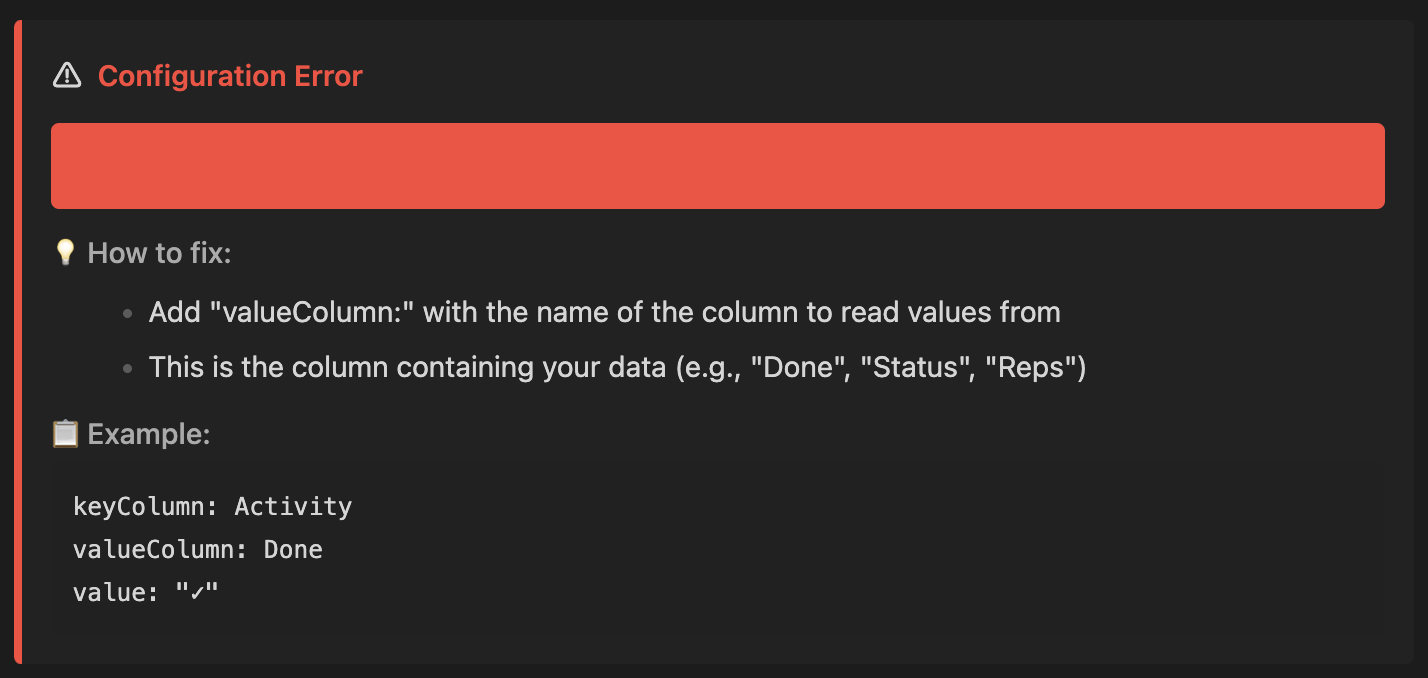
The error display includes:
- ⚠️ Clear description of what's wrong
- 💡 Step-by-step guidance on how to fix it
- 📋 Example code snippet showing correct syntax
Troubleshooting
Tracker shows 0:
- Verify
keyColumnmatches your table header exactly (case-insensitive) - Check that
keyvalue exists in your table - For
tableTag: ensure the HTML comment is above the table - Check
valuematches what's in your cells
Streak shows 0:
- Streaks require folder mode with date-named files (YYYY-MM-DD)
- For current-file mode, streak shows the count instead
Doesn't update:
- Trackers update on file save
- Reload Obsidian (Cmd+R / Ctrl+R) if stuck
Period filtering not working:
- Only works with
source: folder:... - Filenames must include dates in YYYY-MM-DD format
Development
npm install
npm run dev          # Watch mode
npm run build        # Production
npm test             # Run tests
License
MIT License - see LICENSE file for details.
For plugin developers
Search results and similarity scores are powered by semantic analysis of your plugin's README. If your plugin isn't appearing for searches you'd expect, try updating your README to clearly describe your plugin's purpose, features, and use cases.