PDF Annotation Creator
pendingby Ella Zhao
Right-click on PDF files to create annotation notes for use with the Annotator plugin.
PDF Annotation Creator
A simple Obsidian plugin that adds a right-click menu option to create annotation notes for PDF files, designed to work seamlessly with the Annotator plugin.
Features
- 📝 Right-click to create: Right-click any PDF → "Create Annotation Note"
- 🚀 Auto-open Annotator: Automatically opens the annotation view after creating the note
- ⚙️ Customizable template: Configure the note template in settings
- 📁 Same folder: Creates the annotation note in the same folder as the PDF
Requirements
⚠️ Important: This plugin requires the Annotator plugin to be installed and enabled.
Installation
From Community Plugins (Recommended)
- Open Obsidian Settings
- Go to Community Plugins and disable Safe Mode
- Click Browse and search for "PDF Annotation Creator"
- Click Install, then Enable
Manual Installation
- Download
main.jsandmanifest.jsonfrom the latest release - Create a folder:
<vault>/.obsidian/plugins/pdf-annotation-creator/ - Copy the downloaded files into this folder
- Restart Obsidian
- Enable the plugin in Settings → Community Plugins
Usage
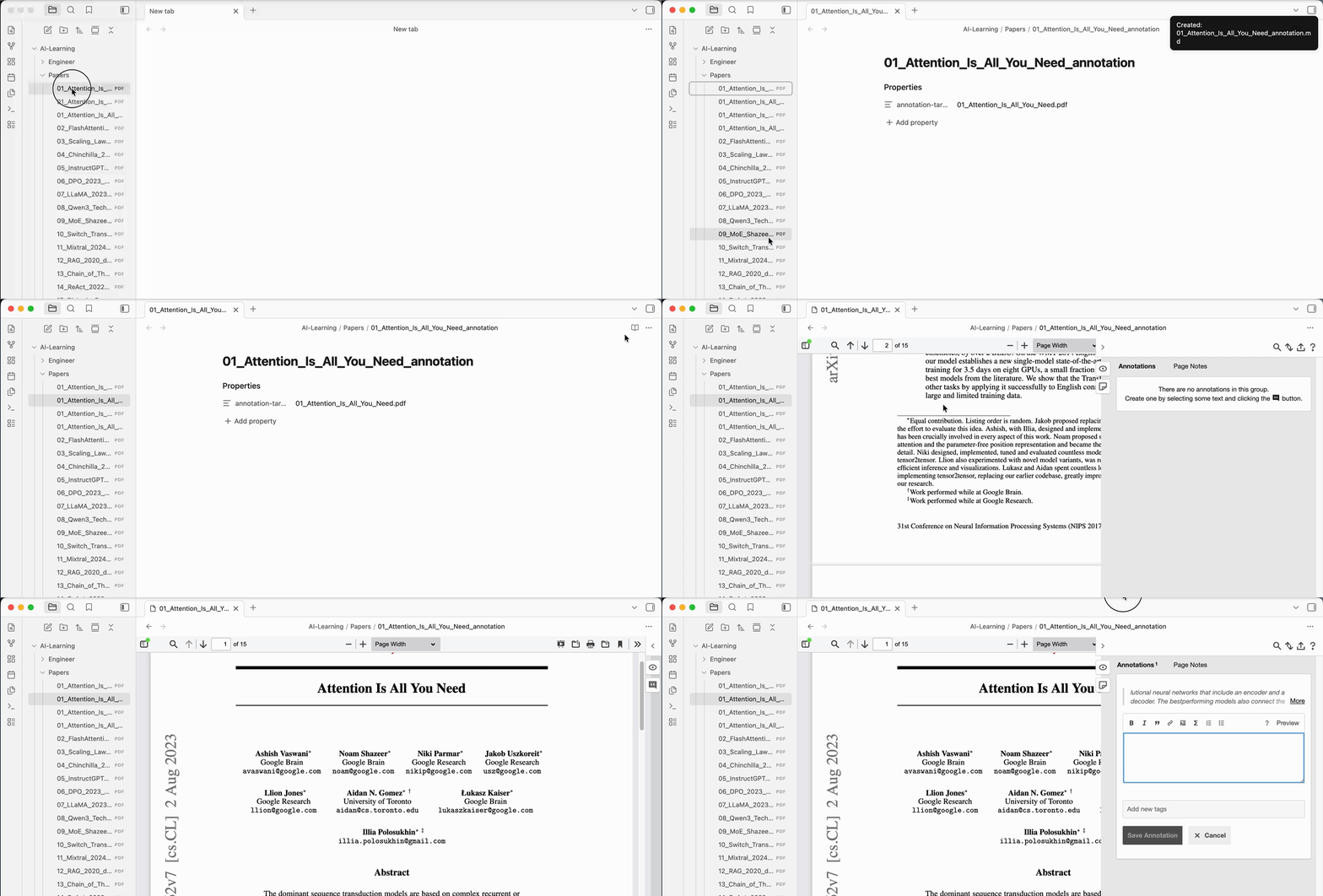
- Make sure you have a PDF file in your vault
- Right-click on the PDF file in the file explorer
- Click "Create Annotation Note"
- The annotation note is created and Annotator opens automatically
Settings
| Setting | Description | Default |
|---|---|---|
| Note suffix | Suffix added to the annotation note filename | _annotation |
| Auto-open Annotator | Automatically open Annotator after creating the note | true |
| Note template | Template for the annotation note | See below |
Default Template
---
annotation-target: {{filename}}
---
Available Placeholders
| Placeholder | Description | Example |
|---|---|---|
{{filename}} | Full filename with extension | paper.pdf |
{{basename}} | Filename without extension | paper |
{{path}} | Full path to the PDF | Papers/paper.pdf |
Example
For a PDF file named Attention_Is_All_You_Need.pdf in the Papers folder:
- Created note:
Papers/Attention_Is_All_You_Need_annotation.md - Note content:
  ---
  annotation-target: Attention_Is_All_You_Need.pdf
  ---
Troubleshooting
Annotator doesn't open automatically
- Make sure Annotator plugin is installed and enabled
- Try disabling and re-enabling "Auto-open Annotator" in settings
- Manually open:
Cmd/Ctrl + P→ "Annotator: Open as Annotation"
"Annotation note already exists" message
The plugin won't overwrite existing annotation notes. If you want to recreate:
- Delete the existing
*_annotation.mdfile - Right-click the PDF again
Contributing
Issues and pull requests are welcome on GitHub.
License
Acknowledgments
For plugin developers
Search results and similarity scores are powered by semantic analysis of your plugin's README. If your plugin isn't appearing for searches you'd expect, try updating your README to clearly describe your plugin's purpose, features, and use cases.