Equation Citator
pendingby Fried Parrot
A powerful LaTeX-like Academic Citation Tool for equations, figures, and more.





A Powerful, Convenient & Elegant Academic Tool for Citation
🚀 Quick Start : see Quick Start for basic rules, syntax, and most important operations. It only takes < 5 mins but will make everything go smoothly.
✨ Complete Features & Updates : see Changelog for details.
📹 Video Tutorial: Coming soon if this plugin has 5000 downloads or this repo gets 50 stars.
📱 Platform support: This plugin is primarily for Windows. Since v1.3.3, both desktop and Android are supported. Some features (e.g., drag-drop citation and certain previews) may be limited on mobile.
🛠️ Installation
Now this plugin is waiting for review in Obsidian community plugins at PR #7298, so you may not find it available in the community plugins list now, but please be patient for it.
-
You can download it from community plugins After this plugin is published in obsidian community plugins (
Settings>Community plugins>Browseand search forequation-citator). -
Or you can just download
main.js,manifest.jsonandstyle.cssin the latest release page and put them in.obsidian/plugins/equation-citatorfolder under your obsidian vault. -
This plugin can also be installed by plugin BRAT, just copy paste the link of this repo in the options tab of BRAT to add it.
👋🏻 Applications & Usages
[!note]
This plugin would be pretty useful if:
- You're writing academic notes in Obsidian and need to manage numerous equations efficiently with automatic numbering and cross-references
- You're drafting research papers or technical documents in Markdown and want LaTeX-style equation citation with accurate numbering
- You derive equations in your notes and need to reference them throughout your derivation process or across multiple files
- You use Obsidian for school or university notes and want quick navigation to cited equations without endless scrolling
- You have figures, tables, or theorem-like content in your notes that requires systematic referencing and organization
[!warning] This plugin is NOT designed for:
- Citing equations or content within PDF files (PDFs are not recognized or processed by the plugin)
- Managing bibliographic references or literature citations (use a dedicated citation management plugin instead)
- Real-time collaborative editing with automatic sync of equation numbers across users
- Processing equations in image files or scanned documents
✨ What this plugin do
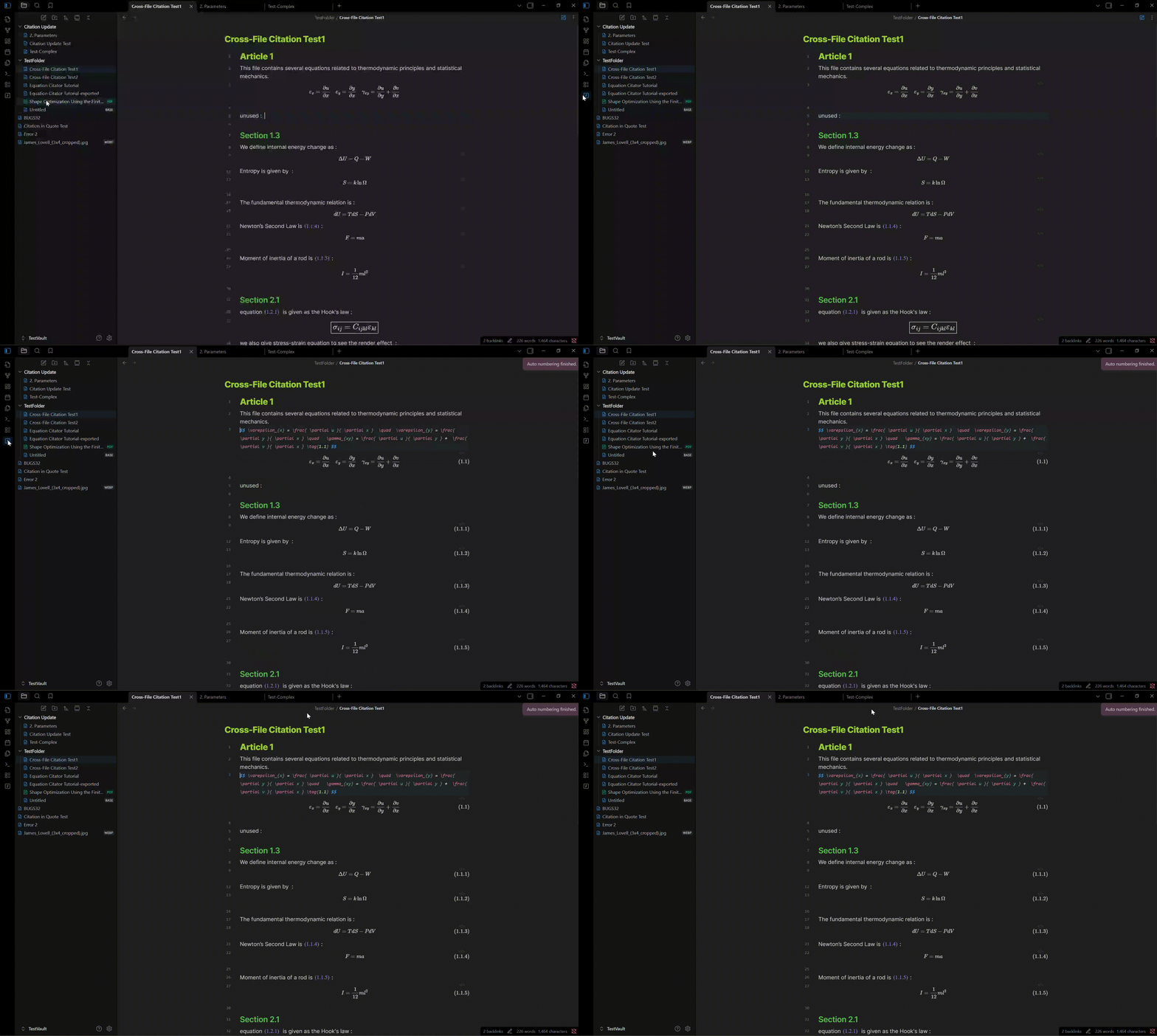
1. ⚡ Auto-number equations by heading level
Auto number all the equations in by simply 1 click on the sidebar icon , making them to be super easy to manage and cite. (Citations will be auto-updated so you can easily insert or delete any equation)
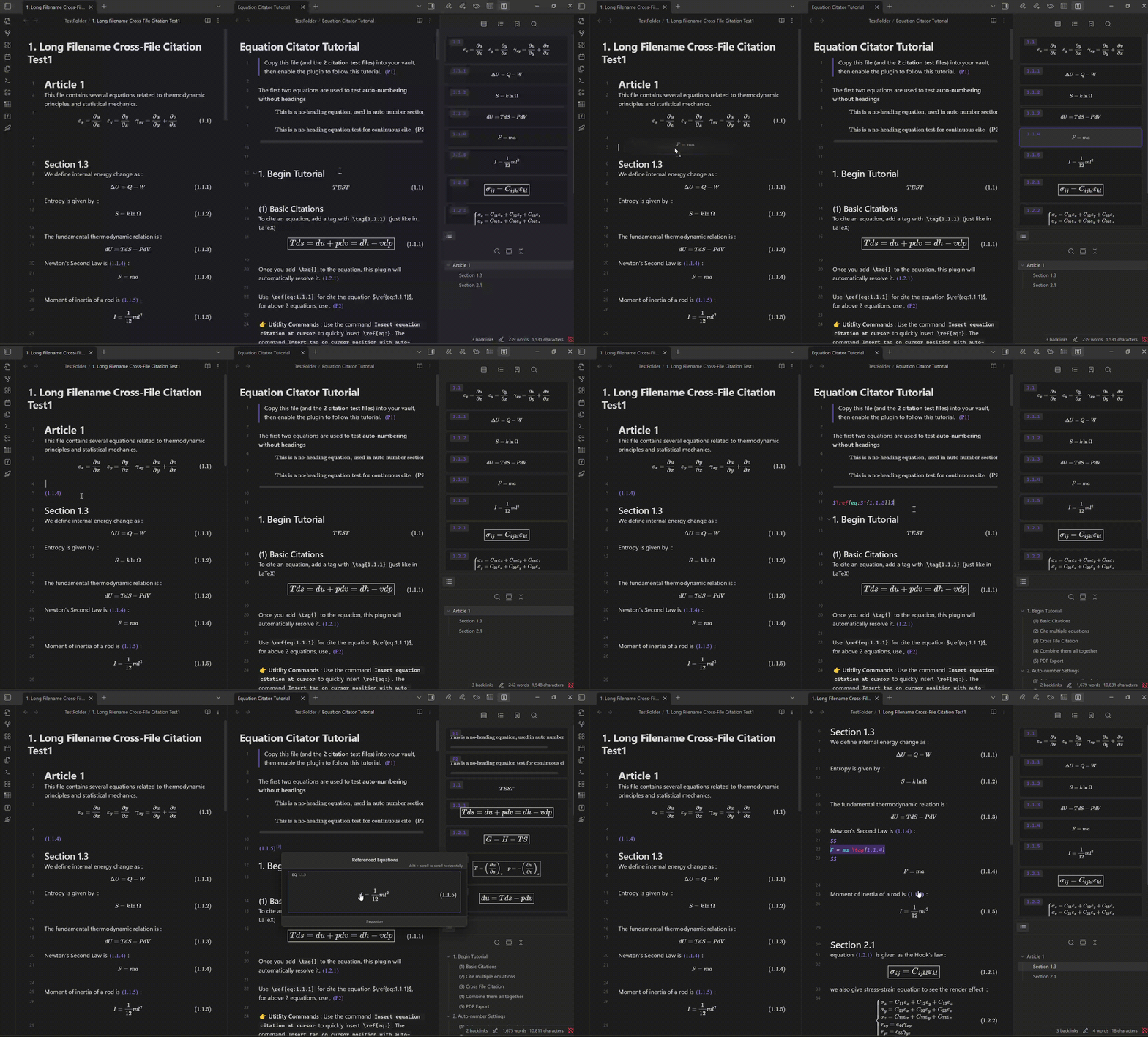
2. 🖥️ Compact Equation Manage Panel, Cite by Drag and Drop
Cite equations by drag and drop from equation manage panel. multiple equation citations and cross-file citation are all supported.
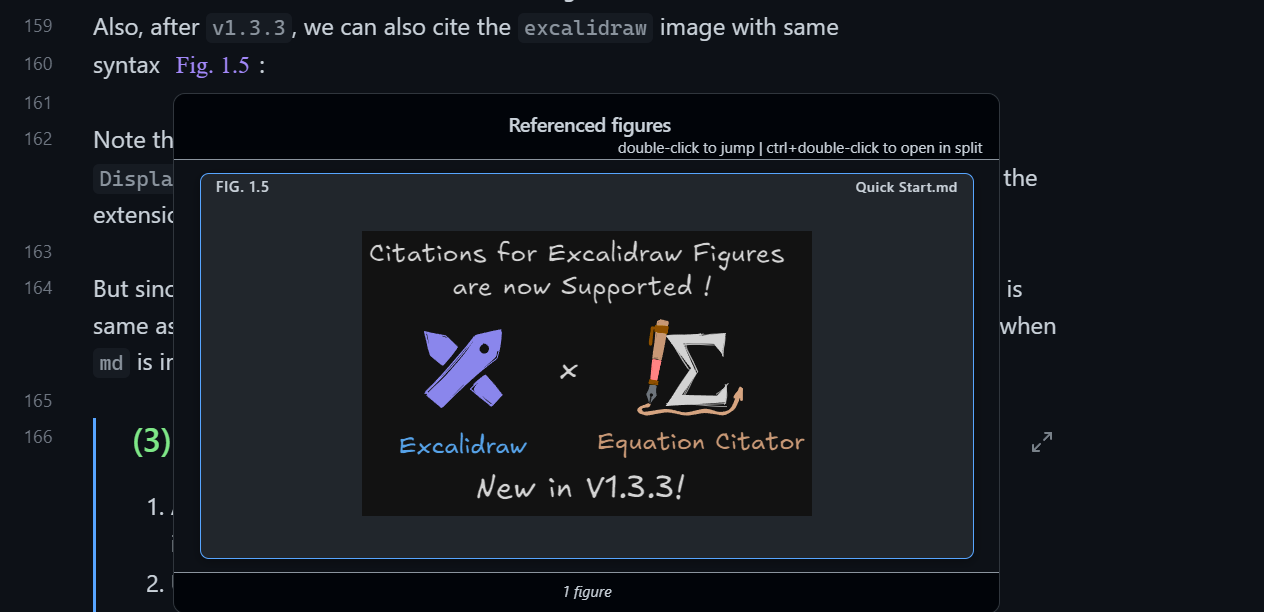
3. 🖼️ Cite Images, Tables and Even Theorems
Cite images by adding field to it. Cite tables and theorems by quote citation feature. Excalidraw images and markdown sections are also supported.
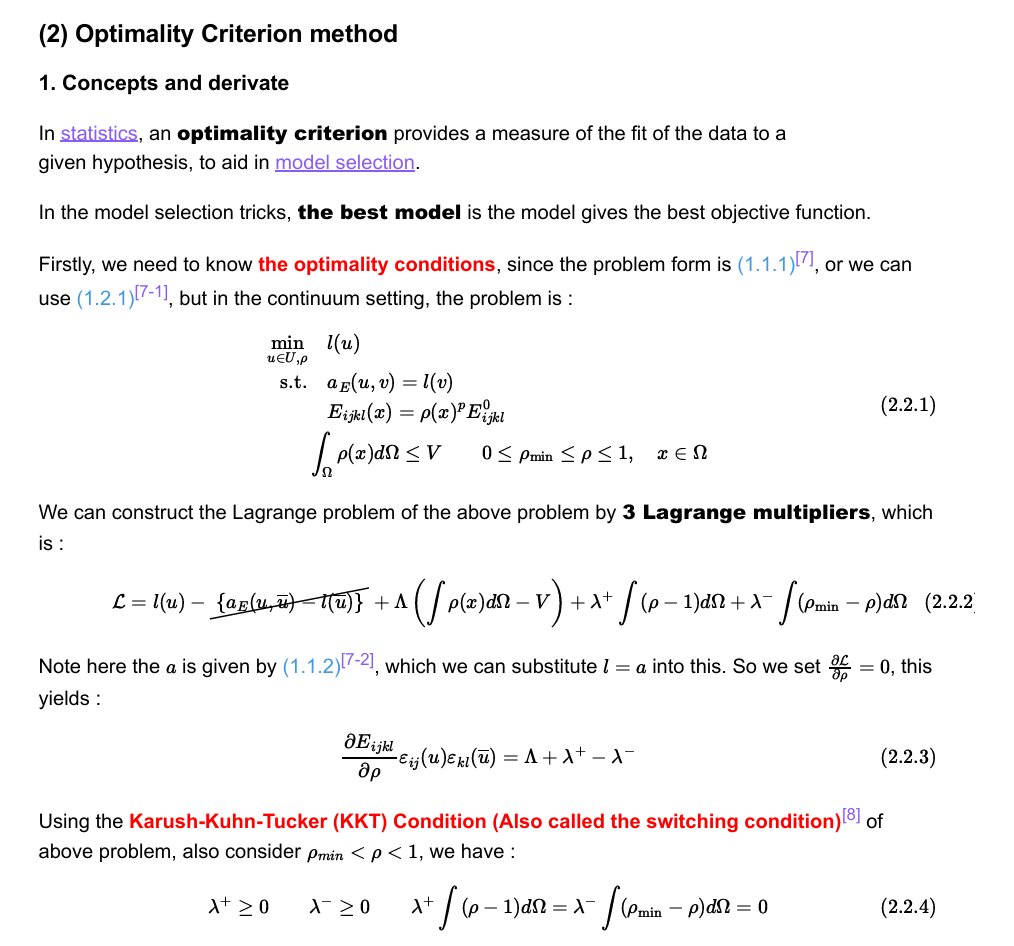
4. 📜PDF export support
Not export PDF directly, Run command Make markdown copy to export PDF to make correct markdown ready for you to export PDF.
The pdf will be like following picture after exporting, with correct citation and reference numbers :
🛒 Compatibility with other plugins
Following plugins often used for math are tested to be compatible with Equation Citator, you can use them together without any problem.
- Excalidraw, Excalidraw is supported in figure citation preview after version 1.3.3, you can cite an excalidraw picture by adding
figfield to it just like normal images. - Typst Mate. This plugin supports typst-style autonumber, and you can use
Settings > Categorical > Others > enable typst modeto enable it. - Latex Suite, it can work seamlessly with this plugin, I really suggest using this for quickly writing long and complex equations.
- Completr, This provide better auto-complete for latex syntax.
- Quick Latex. This provide features like auto-enlarge brackets.
- Better math in callouts & blockquotes. use it directly for better math rendering in callouts.
- No More Flickering Inline Math
🚨 Disclaimer
This plugin can edit and update files in your Obsidian vault.
Although it has been thoroughly tested on multiple versions and used daily on my own vault for several months without data loss, unexpected bugs may still occur — especially when new features are introduced.
To protect your data, I strongly recommend enabling the “File Recovery” core plugin (or keeping regular backups) before using this plugin.
While I cannot take responsibility for data loss caused by bugs or unexpected behavior, I take reports seriously and will investigate and fix any critical issues that cause data loss as quickly as possible.
🐛 Bug & Reports
If you encounter any bug, please provide the following information on the issue page :
- A description of the bug or issue, along with steps to reproduce it.
- The relevant markdown text that triggers the issue.
- Enable debug mode in the settings tab, and provide the console log (Ctrl + Shift + I in Obsidian).
Also, if u have suggestions and questions for this plugin, feel free to leave it in the issue page.
[!TIP] Since this plugin have cache mechanism for better performance, normal delay or no in-time update is a normal cache-related behavior. So you may wait several seconds, or re-open file or restart obsidian to ensure your issue is not just a normal cache-related behavior.
💖 Support and Collaboration
I developed this plugin as a hobby and use it in my daily work. It's completely free for everyone to use.
- 💖 I would be very glad if anyone can help me to maintain this plugin (since I'm busy during school time).
[!NOTE]
Contributors and maintainers are always welcome : You can contribute to this plugin by simply forking this repo and submitting a PR:
- Please test your code carefully before submitting a PR!.
- add what you have done into
CHANGELOG.md. (Use the next patch version number if a neww minor version is not planned inCHANGELOG.md)- We have some CI check before merging PR, please make sure your code passes all the checks.
For submitting a PR, please commit it to
dev-latestbranch, this is the latest development branch, this is for the convenience of us to test and debug, and I will always sync my dev branch to this branch to prevent potential merge conflicts.
Thanks to @azyarashi for collaboration and substantial improvements to the plugin. I also appreciate all the users who suggested useful new features and enhancements.
Finally, if you find this plugin helpful, consider buy me a cup of ☕️:

For plugin developers
Search results and similarity scores are powered by semantic analysis of your plugin's README. If your plugin isn't appearing for searches you'd expect, try updating your README to clearly describe your plugin's purpose, features, and use cases.