LaTeX Formula Support
pendingby YumeAyai
Render LaTeX formulas in edit mode with KaTeX. Supports \( ... \) and \[ ... \] syntax with live preview.
LaTeX Formula Support for Obsidian
Render LaTeX formulas in edit mode with KaTeX. Supports
\(...\)and\[...\]syntax with live preview.
You can use it quite simply—just install it!
This plugin enhances your editing experience by rendering LaTeX mathematical expressions directly within the editor, providing a WYSIWYG (What You See Is What You Get) feel. It uses KaTeX for fast and beautiful math rendering.
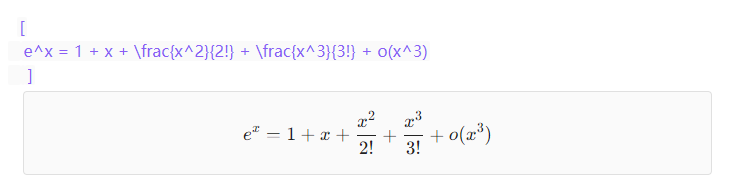
🖼️ Feature Preview
Inline Formulas (\( ... \))

Block Formulas (\[ ... \])
📦 Installation
Via Obsidian Community Plugins (Recommended)
- Open Obsidian.
- Go to
Settings>Community plugins. - Click
Browseand search for "LaTeX Formula Support". - Click
Installand thenEnable.
Manual Installation
- Download the latest release files (
main.js,styles.css,manifest.json) from the Releases page. - Create a folder named
latex-formula-supportinside your Obsidian vault's.obsidian/plugins/directory. - Copy the downloaded files into this folder.
- Restart Obsidian and enable the plugin in
Settings>Community plugins.
💰 Donations
I would be grateful for any donation to support the development of this plugin.

Author
- Author: YumeAyai
- GitHub Profile: YumeAyai
- Donations:

Feel free to contribute to the development of this plugin or report any issues in the GitHub repository.
For plugin developers
Search results and similarity scores are powered by semantic analysis of your plugin's README. If your plugin isn't appearing for searches you'd expect, try updating your README to clearly describe your plugin's purpose, features, and use cases.