Go Board Viewer
pendingby j2masamitu
Displays Go (Weiqi/Baduk) SGF files and code blocks as interactive Go boards with playback controls for desktop and mobile.
Obsidian Go Board Viewer
An Obsidian plugin that displays SGF (Smart Game Format) files and code blocks as interactive Go boards with playback controls.
📱 Works on both desktop and mobile devices - This plugin fully supports desktop and iOS and Android mobile devices.
Features
Core Features
- 📱 Mobile & Desktop Support: Full functionality on iOS, Android, Windows, Mac, and Linux
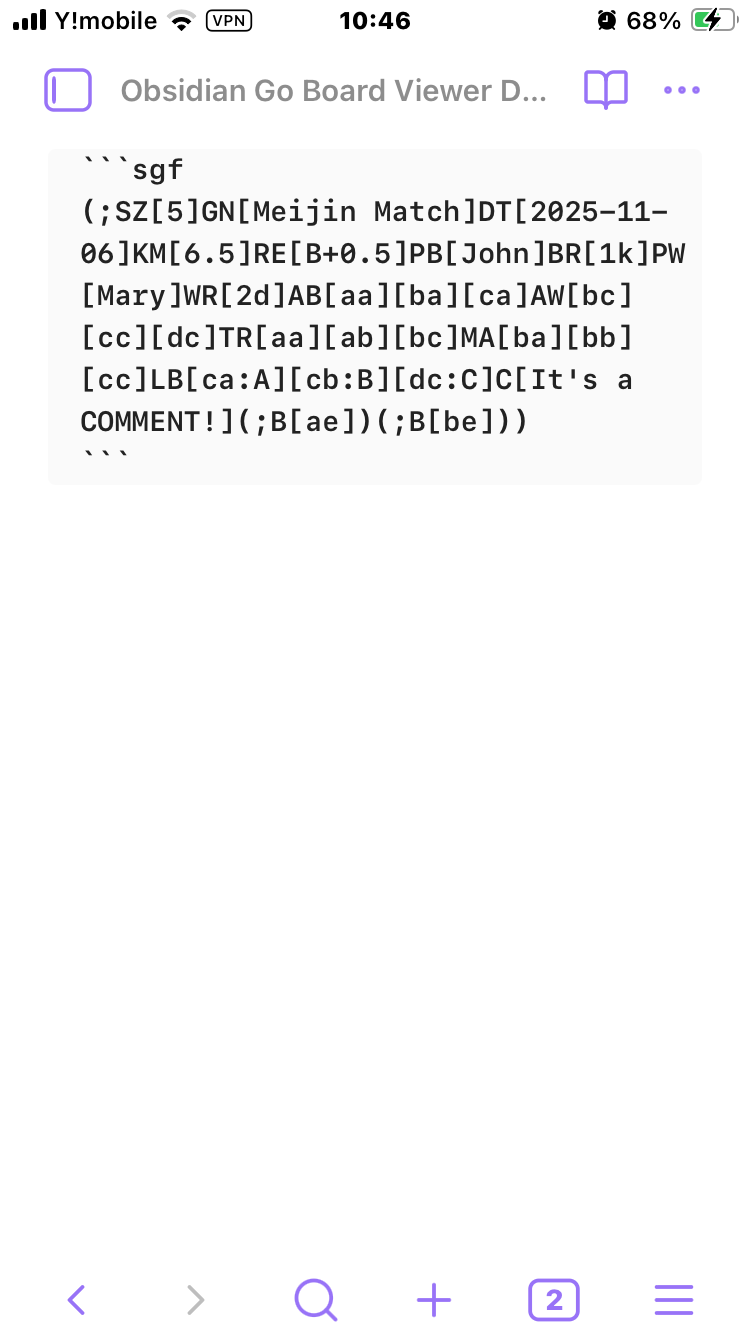
- SGF Code Block Support: Automatically renders SGF text in ````sgf` code blocks as interactive Go boards
- SGF File Embedding: Display
.sgffiles using![[game.sgf]]syntax with optional parametersmoveparameter: Start at a specific move number (e.g.,![[game.sgf|move=10]])
- Direct File Opening: Open
.sgffiles directly in Obsidian - Game Information Display: Shows player names, ranks, event, date, komi, handicap, and result
SGF Editor (New in v2.0.0)
- View/Edit Mode Selection: Choose mode by code block language tag
- ````sgf` - View-only mode (default): Navigate and view games with full playback controls
- ````sgf-edit` - Edit mode: Interactive editing with board manipulation
- Interactive Editing: Click on the board to make changes
- Add stones: Place black or white stones
- Remove stones: Remove existing stones
- Add labels: Add custom text labels to intersections
- Comment Editor: Edit and save comments for the current position
- Game Info Editor: Edit player names, ranks, and game title
- Move Deletion: Delete moves from current position onwards
- SGF Output: View and copy the edited SGF text in real-time
- Auto-play Mode: Automatic move playback with play/pause controls (view mode only)
Playback & Navigation
- Playback Controls: Navigate through game moves with First/Previous/Next/Last buttons
- Move Comments: Display comments associated with each move
- Variation Support: Handle and select between different game variations/branches
SGF Features
- SGF Markers: Full support for SGF markup properties:
- LB (Label): Text labels on intersections
- TR (Triangle): Triangle markers
- SQ (Square): Square markers
- CR (Circle): Circle markers
- MA (Mark): X-mark markers
- Setup Stones: Support for AB (Add Black), AW (Add White), AE (Add Empty)
- Multiple Board Sizes: 19×19, 13×13, 9×9, and custom sizes
Design & Customization
- Responsive Design: Adapts to various screen sizes - perfect for studying Go games on your phone or tablet
- Touch-Friendly: Optimized button sizes and layouts for mobile devices
- Customizable Colors: Full color customization via settings:
- Board background color
- Grid line color (including star points)
- Coordinate label color
- SGF marker color (circles, triangles, squares, labels)
- Variation label color
- Reset to defaults button
Screenshots
Basic Game Display
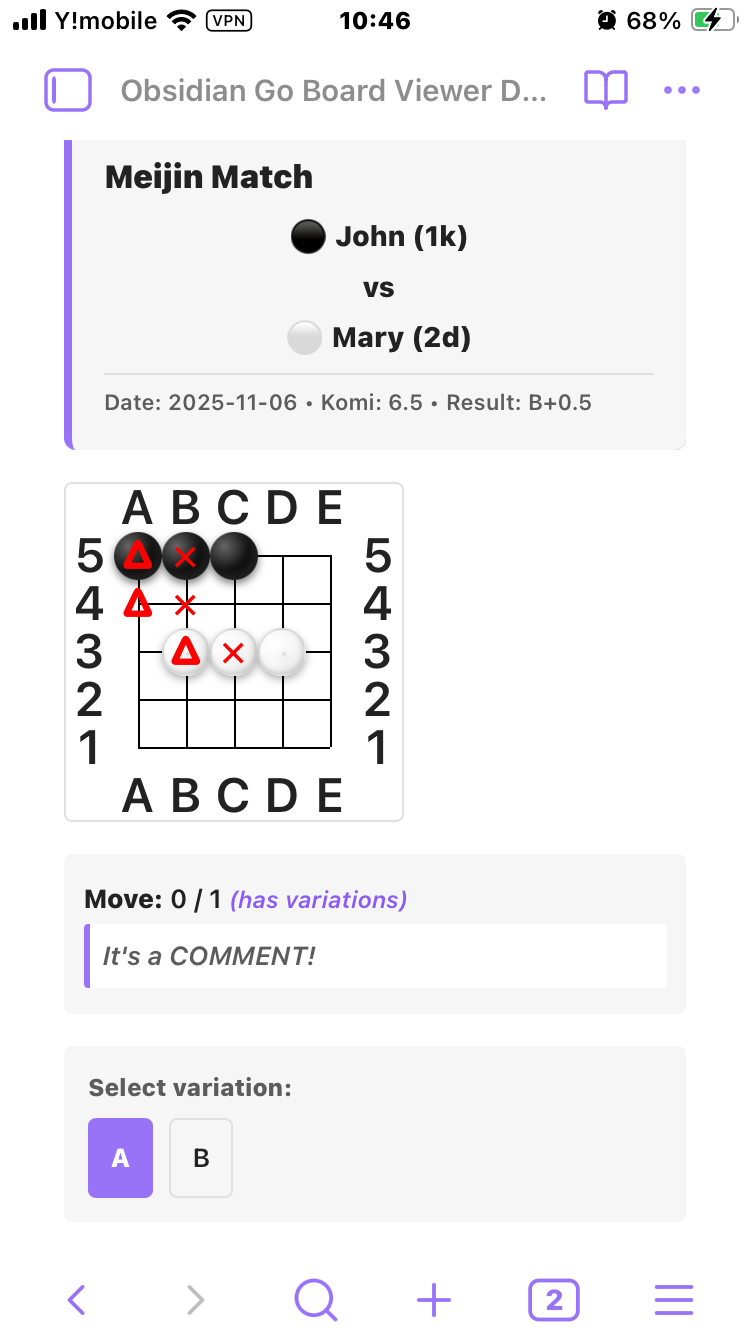
Source Display
Installation
Manual Installation
- Download the latest release from the Releases page
- Extract the files to your Obsidian vault's
.obsidian/plugins/goboard-viewer/directory - Enable the plugin in Obsidian Settings → Community Plugins
Note for Mobile Users with Sync Plugins:
- If you're using a sync plugin like "Remotely Save", you need to temporarily enable "Sync Config Dir" to sync plugins to mobile devices
- Steps:
- Enable "Sync Config Dir" in the sync plugin settings
- Run sync and wait for completion
- Verify the plugin appears on your mobile device
- You can disable "Sync Config Dir" again after installation
- Important: When updating the plugin to a new version, you'll need to enable "Sync Config Dir" again to sync the update
Building from Source
- Clone this repository
- Install dependencies:
npm install - Build the plugin:
npm run build - Copy the following files to
.obsidian/plugins/goboard-viewer/:manifest.jsonmain.jsstyles.css
- Enable the plugin in Obsidian Settings
Development Mode
npm install
npm run dev
Development mode watches for file changes and automatically rebuilds.
Usage
Method 1: SGF Code Block (View Mode)
Add an SGF code block to your markdown note for viewing:
```sgf
(;SZ[19];B[pd]C[Star point]
;W[dp];B[qp];W[dc];B[nq]
;W[qc]C[A direct 3–3 invasion])
```
Method 1b: SGF Code Block (Edit Mode)
Use sgf-edit language tag to enable editing:
```sgf-edit
(;SZ[19];B[pd]C[Star point]
;W[dp];B[qp];W[dc];B[nq]
;W[qc]C[A direct 3–3 invasion])
```
In edit mode, you can:
- Click on intersections to add/remove stones or labels
- Edit comments for the current position
- Edit game information (player names, ranks, etc.)
- Delete moves from the current position
- Copy the edited SGF from the output area
Method 2: Embed SGF File
- Add an
.sgffile to your vault - Embed it in your note:
![[my-game.sgf]]
Using Markers
SGF markers are displayed in red (or blue for variations):
(;SZ[9]AB[aa][ba][ca][da][ea]AW[ac][bc][cc][dc][ec]TR[aa][ab][ac]SQ[ba][bb][bc]MA[ca][cb][cc]CR[da][db][dc]LB[ea:1][eb:2][ec:3])
- TR: Red triangle ▲
- MA: Red X mark ✕
- SQ: Red square □
- CR: Red circle ○
- LB: Red text label
- Variation markers: Blue letters (A, B, C...)
Handling Variations
When a position has multiple variations, the plugin displays:
- Blue letter markers (A, B, C...) on the board showing where each variation begins
- Variation selection buttons below the board
- "(has variations)" indicator next to the move count
Click a variation button to switch between branches.
SGF Examples
Simple Game
(;GM[1]FF[4]SZ[19]KM[6.5]DT[2025-11-08];B[pd]C[star point];W[dp];B[pp];W[dd];B[fq];W[qq]C[direct 3–3 invasion];B[pq];W[qp];B[po];W[rn];B[cf];W[cn];B[fc];W[df];B[dg];W[ef];B[cd];W[cc];B[ce];W[dc];B[hc])
Game with Variations
(;GM[1]FF[4]SZ[19]KM[6.5]DT[2025-11-08];B[pd]C[star point];W[dp];B[pp];W[dd];B[fq](;W[qq]C[direct 3-3 invasion];B[pq];W[qp];B[po];W[rn];B[cf];W[cn];B[fc];W[df];B[dg];W[ef];B[cd];W[cc];B[ce];W[dc];B[hc])(;W[cn]C[knight's move];B[dq];W[cq];B[cr]))
Tsumego Problem with Setup
(;SZ[9]AW[ab][bb][cb][db][da]AB[ec][dc][cc][bc][ac][eb][ea]C[Black to play, White dies.];B[ba]C[3 point nakade])
Technical Details
- @sabaki/shudan: Go board rendering library
- @sabaki/sgf: SGF file parsing
- Preact: Lightweight UI rendering
- Obsidian API: MarkdownPostProcessor and MarkdownCodeBlockProcessor
- Offline: Works without internet connection
Supported SGF Properties
Game Info
- FF (File Format), GM (Game), SZ (Size)
- PB (Player Black), PW (Player White)
- BR (Black Rank), WR (White Rank)
- KM (Komi), HA (Handicap), RU (Rules)
- DT (Date), GN (Game Name), EV (Event), RO (Round), PC (Place)
- RE (Result)
Moves & Setup
- B (Black move), W (White move)
- AB (Add Black), AW (Add White), AE (Add Empty)
- C (Comment)
Markup
- TR (Triangle), SQ (Square), CR (Circle)
- MA (Mark/X), LB (Label)
Variations
- Full support for game tree variations with selection UI
Known Limitations
- Time information (BL, WL) is not displayed
- Some advanced SGF properties may not be fully supported
Contributing
Contributions are welcome! Please feel free to submit issues and pull requests.
- Fork the repository
- Create your feature branch:
git checkout -b feature/my-feature - Commit your changes:
git commit -am 'Add some feature' - Push to the branch:
git push origin feature/my-feature - Submit a pull request
License
MIT License - see LICENSE file for details
Acknowledgments
- Sabaki - Go board rendering library
- SGF File Format - Standard specification
- Obsidian - Knowledge base platform
Links
For plugin developers
Search results and similarity scores are powered by semantic analysis of your plugin's README. If your plugin isn't appearing for searches you'd expect, try updating your README to clearly describe your plugin's purpose, features, and use cases.