Folder Kanban
pendingby jjguve5
Transform folders into Kanban boards with customizable columns and per-board tag colors.
Folder Kanban
An Obsidian plugin that transforms your folder structure into a Kanban board view with automatic card generation from markdown notes.


📸 Screenshots
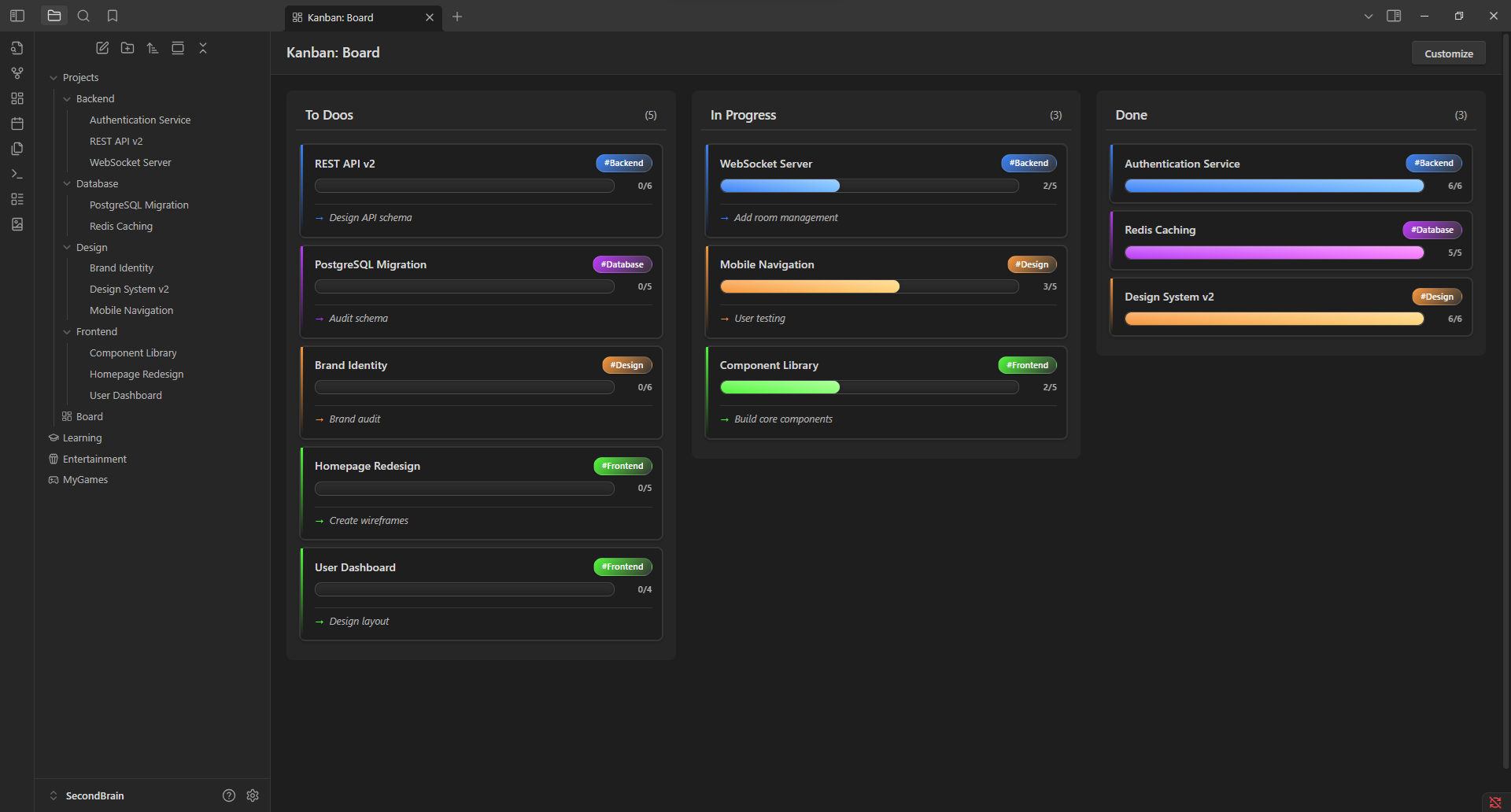
Main board view showing cards organized by column with progress tracking
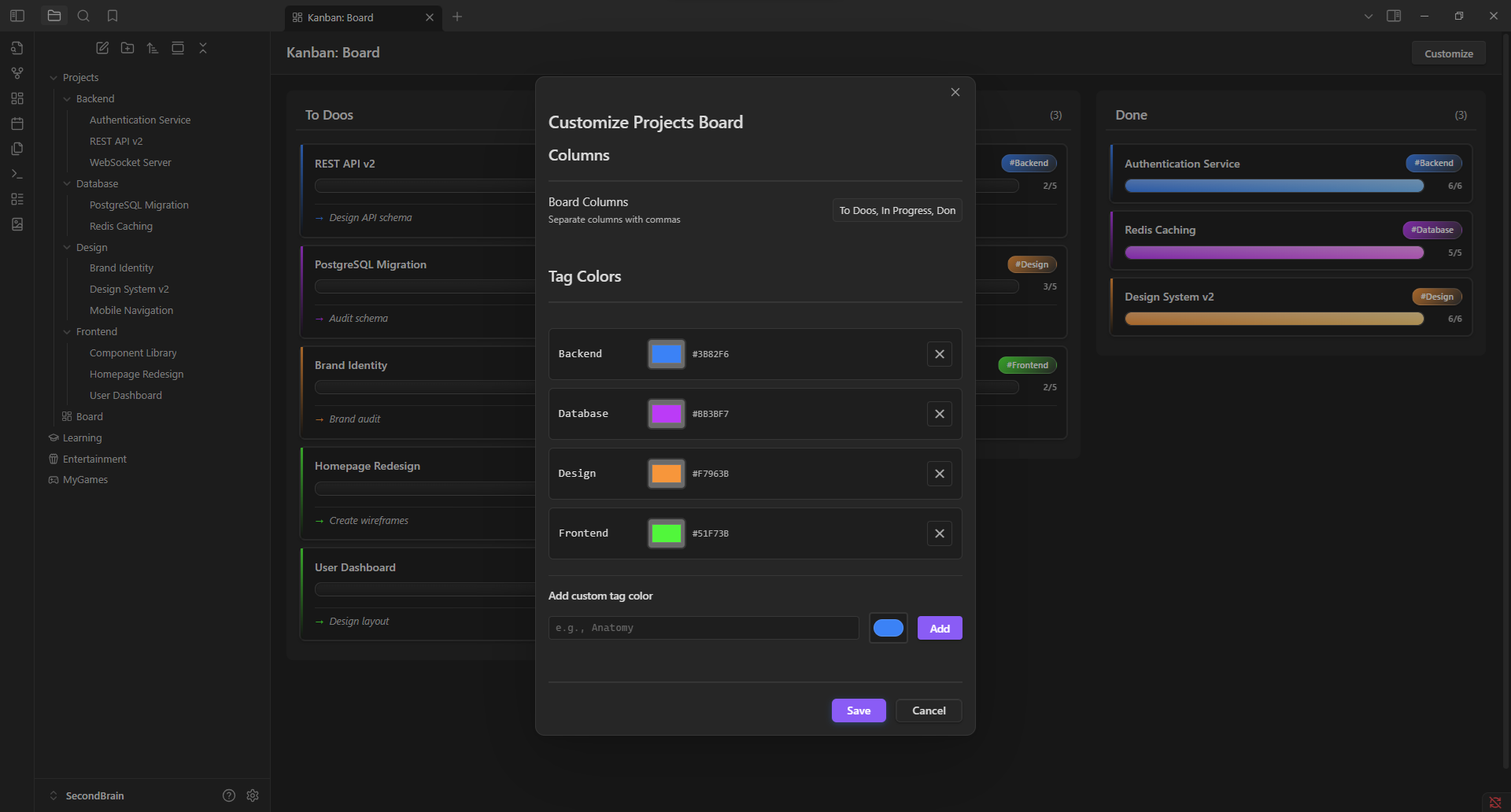
Per-board customization: edit columns and tag colors
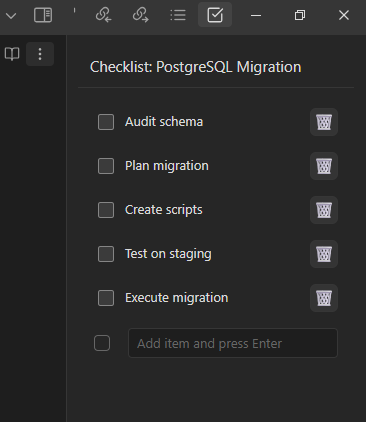
Sidebar checklist view for quick task management
🎯 Features
📊 Folder-Based Kanban Boards
- Create a
Board.mdfile in any folder to view it as a Kanban board - Notes in subfolders automatically become cards
- Tags are derived from the subfolder names (e.g., notes in
Frontend/get thefrontendtag) - Organize your notes visually without changing their file structure
📋 Customizable Columns
- Define column names in the
Board.mdfile using a## Columnssection - Format:
## Columnsfollowed by comma-separated column names (e.g.,Todo, In Progress, Done) - Cards track position by column index, so renaming columns preserves card positions
- Falls back to default columns (To Do, In Progress, Done) if not specified
🎨 Per-Board Tag Colors
- Customize tag colors for each board independently
- Click the "Customize" button on any board to configure colors
- Default color scheme provided for common tags (frontend, backend, database, design)
- Colors stored per-board, so different projects can have different color schemes
✅ Progress Tracking
- Displays progress bars on cards based on checklist completion in notes
- Shows percentage and checked/total count
- Updates in real-time when you edit notes
🔄 Drag & Drop
- Move cards between columns with drag and drop
- Right-click cards to move them via context menu
- Card positions persist across sessions
⚡ Real-Time Sync
- Boards update automatically when files are modified
- Watches for file creation, deletion, and renames
- No manual refresh needed
📝 Next Task Preview
- Shows the first unchecked item from each note's checklist
- Helps you see at a glance what needs to be done next
🎯 Modern UI
- Clean card design with tag badges
- Responsive column layout
- Dark mode compatible
- Smooth drag animations
🚀 Getting Started
Installation
Option 1: From Obsidian Community Plugins (Recommended)
- Open Settings in Obsidian
- Go to Community Plugins and browse
- Search for "Folder Kanban"
- Click Install, then Enable
Option 2: Manual Installation
- Download
main.js,manifest.json, andstyles.cssfrom the latest release - Create folder:
<vault>/.obsidian/plugins/folder-kanban/ - Copy the downloaded files into that folder
- Reload Obsidian (Ctrl+R)
- Go to Settings → Community Plugins and enable "Folder Kanban"
Quick Start
-
Create a Board from a Folder
- Right-click any folder in your vault
- Select "Create Kanban Board from Folder"
- A
Board.mdfile is created and opens as a Kanban board
Or manually create your structure:
Projects/ ├── Board.md # Your board file ├── Frontend/ # Subfolder (creates "frontend" tag) │ └── Task 1.md ├── Backend/ # Subfolder (creates "backend" tag) │ └── Task 2.md └── Database/ # Subfolder (creates "database" tag) └── Task 3.md -
Configure Columns in Board.md
## Columns Todo, In Progress, Done -
Add Checklists to Your Notes (optional)
# Task Title - [ ] First subtask - [ ] Second subtask - [x] Completed subtask -
Open the Kanban Board
- Right-click on
Board.md - Select "Open as Kanban Board"
- Your board appears with all notes as cards!
- Right-click on
-
Customize (optional)
- Click the "Customize" button on the board
- Edit column names
- Set custom tag colors for this board
📝 Usage
How It Works
- Board Detection: Any folder containing a
Board.mdfile can be opened as a Kanban board - Card Generation: All markdown notes in subfolders become cards on the board
- Tagging: Cards are automatically tagged based on their subfolder name
- Column Assignment: Cards start in the first column and can be moved via drag-and-drop or context menu
- Persistence: Card positions are saved per-board and survive column renaming
Organizing Your Work
The plugin works best when you organize notes into subfolders by category/type:
Frontend/- UI-related tasksBackend/- Server-side tasksDatabase/- Data model tasksDesign/- Design tasks
Each subfolder becomes a tag, and you can customize tag colors per-board.
⚙️ Configuration
Customizing Columns
Edit your Board.md file to define columns:
## Columns
Backlog, Todo, In Progress, Review, Done
Columns are comma-separated. The board will update automatically.
Customizing Tag Colors
- Open a board
- Click the "Customize" button
- Pick colors for each tag
- Colors are saved per-board
Settings
Access plugin settings via Settings → Folder Kanban:
- View and edit tag colors for the currently active board
- Colors are organized per-board, not globally
🎨 Card Details
Each card shows:
- Title: The note's filename
- Tag Badge: Color-coded label based on the subfolder (top-right corner)
- Progress Bar: Visual checklist completion indicator (if the note contains tasks)
- Progress Text: Shows percentage and "X/Y checked" count
- Next Task: The first unchecked item from the note's checklist
🔧 Technical Details
Architecture
- Built with TypeScript and Web Components
- Uses Shadow DOM for card rendering
- Efficient real-time file watching via Obsidian's Vault API
Data Storage
- Card positions stored in plugin settings
- Columns defined in
Board.mdfile using markdown - Tag colors stored per-board path
Performance
- Cards indexed by column position (not name) for stability
- Automatic deduplication prevents duplicate cards
- Minimal DOM updates on file changes
🤝 Contributing
Contributions welcome! Please feel free to submit a Pull Request.
Development Setup
# Clone the repository
git clone https://github.com/yourusername/folder-kanban.git

# Install dependencies
npm install

# Build the plugin
npm run build

# For development with auto-rebuild
npm run dev
Project Structure
main.ts- Core plugin logic and Kanban viewcomponents.ts- Web Components (KanbanCard, KanbanProgress, etc.)styles.css- UI styling
📄 License
MIT License - feel free to use this plugin in your workflow!
� Acknowledgments
Built for the Obsidian community.
Enjoying Folder Kanban? Consider giving it a ⭐ on GitHub!
For plugin developers
Search results and similarity scores are powered by semantic analysis of your plugin's README. If your plugin isn't appearing for searches you'd expect, try updating your README to clearly describe your plugin's purpose, features, and use cases.