Kanban Block
pendingby Łukasz Domaradzki
Render todo checkboxes as an interactive kanban board.
Obsidian Kanban Block
A powerful and interactive Kanban board for Obsidian that renders standard markdown checkboxes as a visual board.
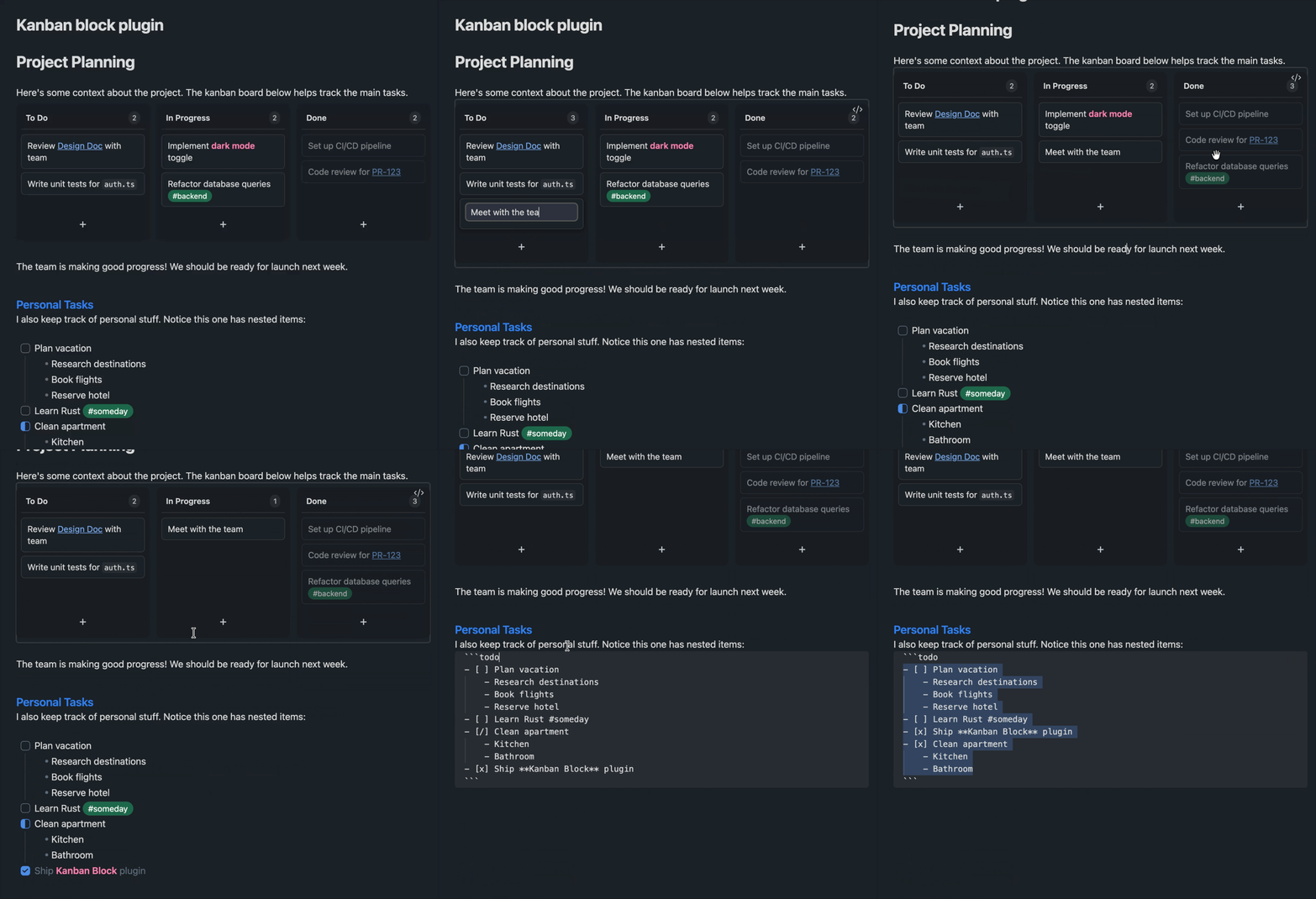
Usage
Simply create a todo code block with checkbox items:
```todo
- [ ] Review [[Design Doc]] with team #planning
- [ ] Write unit tests for `auth.ts`
- [/] Meet with the team
- [x] Set up CI/CD pipeline
- [x] Code review for [[PR-123]]
- [x] Refactor database queries #backend
```
Syntax Mapping
[ ]→ To Do[/]→ In Progress[x]→ Done
Key Features
📋 Interactive Board
- Drag and Drop: Move cards between columns or reorder them within a column.
- Quick Add: Use the
+button at the bottom of any column to quickly add a new card. - Inline Editing: Double-click any card to edit its text directly.
- Drag to Delete: Drag a card outside the board area to delete it instantly. You can configure a deletion delay in settings to prevent accidental deletions.
🔍 Smart Editing
- Autocomplete: Get suggestions for
#tagsand[[internal links]]while editing card text. - Markdown Support: Full support for wiki-links, tags, bold, italic, and inline code.
📂 File Integration
- File Drag-and-Drop: Drag files or folders directly from the Obsidian File Explorer onto the board to create new cards with internal links automatically.
📱 Mobile Ready
- Responsive Design: The board automatically adapts to mobile screens, ensuring a smooth experience on all devices.
🛠️ Easy Insertion
- Context Menu: Right-click in the editor and select "Insert Kanban" to quickly add a board.
- Command Palette: Use the "Insert Kanban Board" command for keyboard-driven insertion.
🌍 Multilingual Support
- Supports English (default), French (Français), and Spanish (Español).
- Settings and UI elements adapt to your chosen language.
⚙️ Customization
- Custom Column Names: Change "To Do", "In Progress", and "Done" to anything you like in the settings.
- Centered Board: Option to center the board horizontally for better focus.
- Robust Persistence: Uses the Obsidian Vault API to ensure changes are saved reliably, even in Reading Mode.
Installation
Using BRAT (Recommended)
The easiest way to install and keep the plugin updated, especially useful for mobile:
- Install the BRAT plugin from Obsidian's Community Plugins
- Open BRAT settings (Settings → BRAT)
- Click "Add Beta plugin"
- Enter:
https://github.com/ldomaradzki/obsidian-kanban-block - Enable the plugin in Settings → Community Plugins
BRAT will automatically check for updates and notify you when new versions are available. Perfect for mobile users who can't manually copy files!
Manual Installation
- Download
main.js,manifest.json, andstyles.cssfrom the latest release. - Create a folder named
obsidian-kanban-blockin your vault's.obsidian/plugins/directory. - Copy the downloaded files into that folder.
- Reload Obsidian and enable the plugin in Settings > Community Plugins.
Development
npm install
npm run dev    # Watch mode
npm run build  # Production build
License
MIT
For plugin developers
Search results and similarity scores are powered by semantic analysis of your plugin's README. If your plugin isn't appearing for searches you'd expect, try updating your README to clearly describe your plugin's purpose, features, and use cases.