Note Bundler
pendingby José Peña
Export bundles of notes into a single markdown file.
Note Bundler
Export filtered Obsidian notes into consolidated Markdown files. Perfect for preparing LLM context, documentation packages, or curated note collections.
Features
- Tag-based filtering with regex support (include/exclude patterns)
- Directory include/exclude rules (recursive, vault-relative)
- AND/OR logic to combine multiple rules
- Manual and scheduled auto-exports (minute/hour/day intervals)
- Vault-relative or absolute output paths (desktop only)
- Cross-platform compatibility
- Device-specific settings (independent configs per device)
Installation
- Clone this repository
npm install && npm run build- Copy
main.jsandmanifest.jsonto.obsidian/plugins/note-bundler/in your vault - Enable in Obsidian → Settings → Community plugins
Development: Symlink the repo folder into .obsidian/plugins/note-bundler and run npm run dev.
Usage
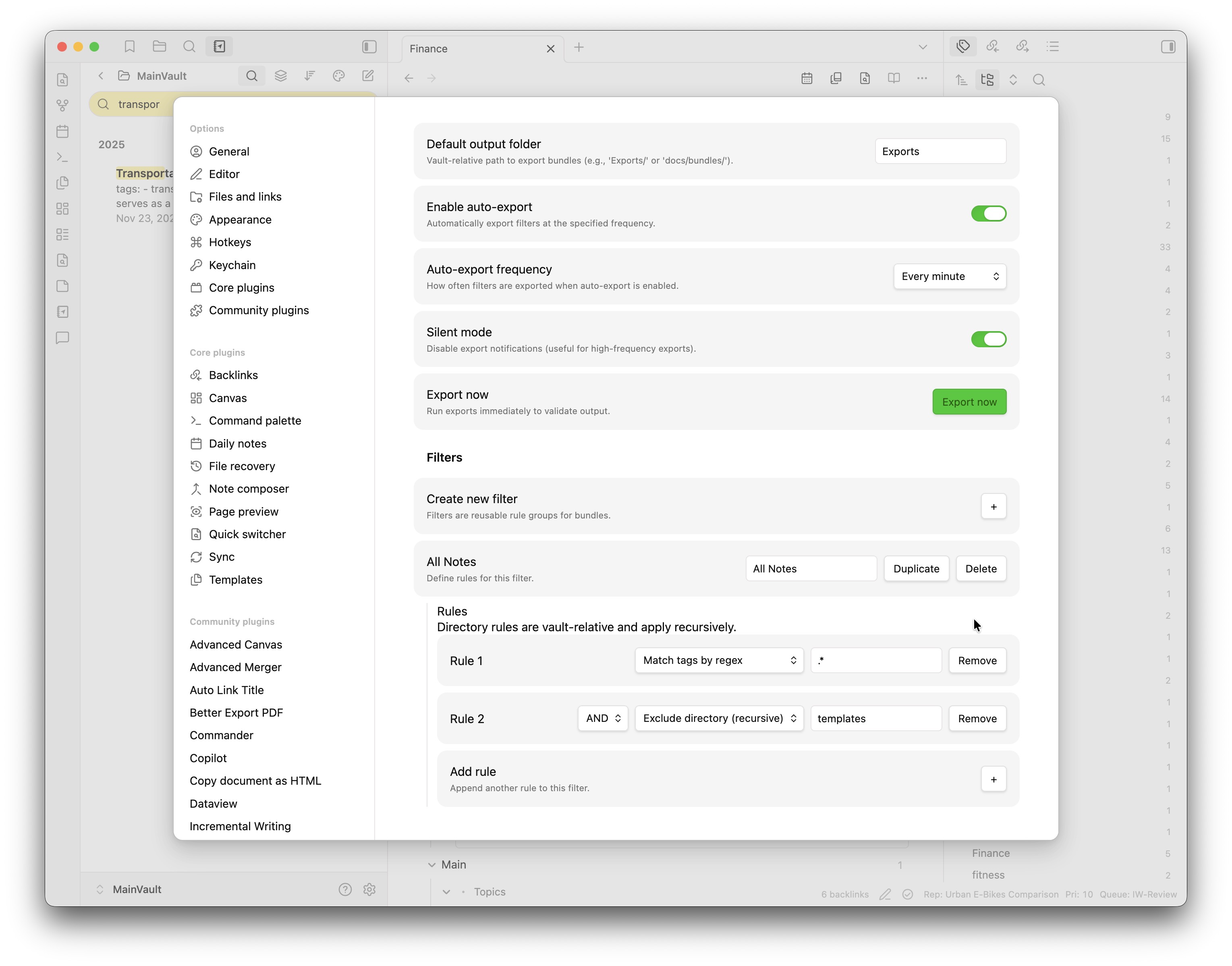
1. Configure Output Location
Settings → Note Bundler → Default output folder
Use vault-relative paths like Exports/ or docs/bundles/. On desktop, you can also use absolute paths like /Users/john-doe/Documents/NoteBundles/.
2. Create Filters
- Click Create new filter
- Name it (e.g., "Project Notes")
- Add rules:
- Match tags by regex - Include matching notes
- Exclude tags matching regex - Exclude matching notes
- Include directory (recursive) - Include notes inside a vault-relative folder
- Exclude directory (recursive) - Exclude notes inside a vault-relative folder
- Combine rules with AND/OR operators
Tag regex examples:
#project- exact tag#project.*- tags starting with #project#(important|urgent)- multiple tags
N.B. Tags are not treated as case-sensitive (e.g., #Project and #project are the same), so you don't need to worry about case in the regex - it will pick up both.
Directory rule examples (vault-relative):
journals/- everything injournals/and subfoldersProjects/ClientA- only that subtree (case-sensitive)
3. Export
Manual: Click Export now in settings
Auto: Enable auto-export and choose frequency (minute/hour/day)
Output Format
# Notes combined on: 2026-01-19 12:00:00

---

# Note title: Project Overview

Project overview content with **formatting** and [[links]] preserved.

---

# Note title: Research Notes

Research findings and citations...
Device-Specific Settings
Each device maintains independent plugin settings automatically - no sync conflicts. Configure different export paths and schedules per device without any setup.
Development
Symlink the repo folder into .obsidian/plugins/note-bundler and run npm run dev for live development with hot reloading.
Troubleshooting
- Export fails: Check output path permissions
- No notes exported: Verify filter rules and tag spelling
- Auto-export not running: Check plugin permissions
- Debugging: Check developer console, test with simple patterns first
Contributing
Contributions welcome! Fork, create a feature branch, and submit a PR.
License
GPL-3.0 - see LICENSE for details.
Changelog
See CHANGELOG.md for version history and updates.
For plugin developers
Search results and similarity scores are powered by semantic analysis of your plugin's README. If your plugin isn't appearing for searches you'd expect, try updating your README to clearly describe your plugin's purpose, features, and use cases.