Word Template Exporter
pendingby LekasNet
Export markdown notes to Microsoft Word (.docx) using customizable templates, including academic standards like APA, IEEE, and GOST (ГОСТ).
Word Template Exporter for Obsidian
Export Obsidian notes to Microsoft Word (.docx) using powerful, customizable templates — from academic standards to fully custom document styles.
Word Template Exporter is an Obsidian plugin that converts Markdown notes into professionally formatted Word documents using template-based formatting rules, not hardcoded styles.
The plugin is designed for:
- academic writing
- technical documentation
- reports, theses, and articles
- structured documents with strict formatting requirements
✨ Key Features
-
📄 Export to DOCX (Microsoft Word compatible)
-
🧩 Template-based formatting (presets, not hardcoded rules)
-
🎨 Visual template editor + raw JSON editor
-
🔁 Instant sync between visual editor and JSON
-
🌍 Multilingual UI (auto-detected from Obsidian)
-
📚 Built-in academic standards
- APA 7
- IEEE
- GOST (Russian standards)
-
📐 Fine-grained control over:
- fonts and font sizes
- paragraph spacing
- alignment and indents
- headings hierarchy
- tables, captions, figures
- page margins and pagination
-
📑 Optional automatic Table of Contents (Word TOC)
-
⚡ Fast export with a single command
Note Built-in templates are provided as ready-to-use presets and can be freely customized.
🧠 How It Works
- You write notes in plain Markdown inside Obsidian
- The plugin parses the document into a structured internal model
- A template (preset) defines how each block type should look in Word
- The document is exported to
.docxusing these rules
This approach avoids:
- fragile Markdown → Word conversions
- manual post-editing in Word
- duplicated styles across documents
🖼 Screenshots
(Screenshots will be added here)
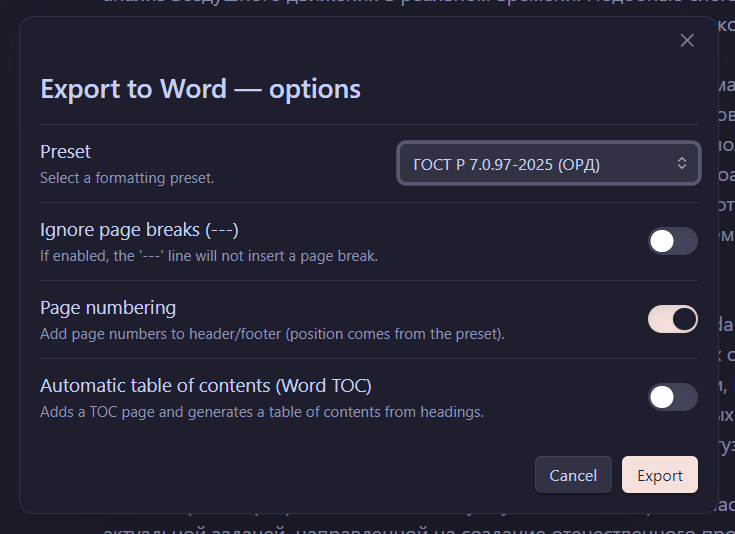
Export options modal
Visual template editor
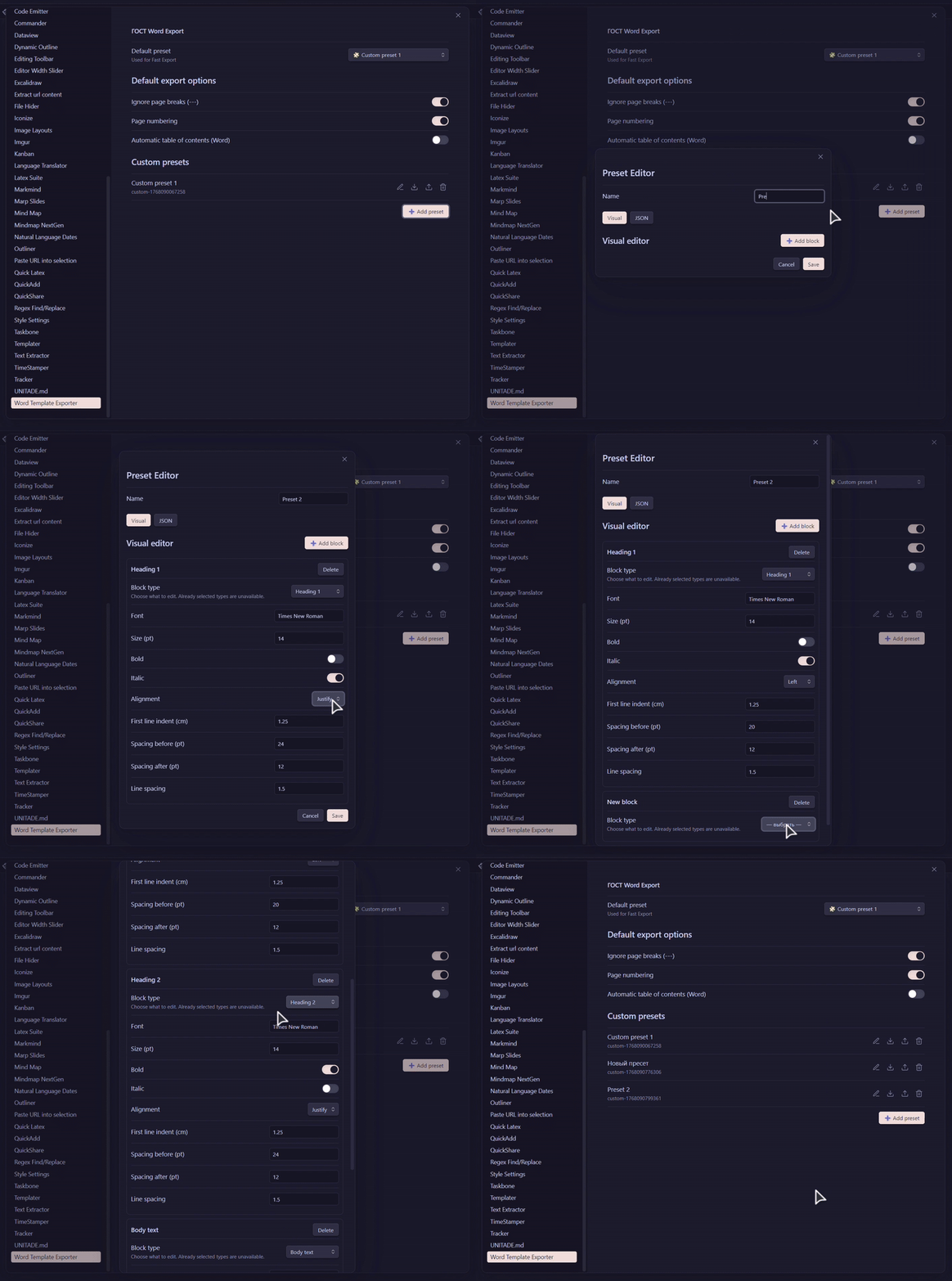
Visual ↔ JSON synchronization
📦 Installation
Manual installation (from GitHub)
-
Download the repository:
https://github.com/LekasNet/obsidian-word-template-exporter -
Rename the plugin folder to:
word-template-exporter -
Copy the folder into your Obsidian vault:
<vault>/.obsidian/plugins/word-template-exporter -
Restart Obsidian
-
Enable Word Template Exporter in Settings → Community Plugins
🚀 Usage
Fast Export
-
Command:
Export note to Word — Fast -
Uses the default template and export settings
Advanced Export
-
Command:
Export note to Word — Advanced… -
Allows configuration of:
- template (preset)
- page numbering
- table of contents
- page break handling
🧩 Templates (Presets)
A template defines how each document block is formatted:
- Headings (H1–H6)
- Body text
- Tables (text, headers, captions)
- Figures and captions
- Code listings
Templates can be:
- edited visually
- edited as JSON
- imported/exported
- reused across projects
📚 Built-in Standards & Templates
Word Template Exporter includes several built-in formatting standards, covering both international and region-specific academic requirements.
These templates are provided as ready-to-use presets and can also serve as a base for custom templates.
🌍 International Standards
APA 7
A template based on the APA 7th edition guidelines, commonly used for:
- academic papers
- research articles
- theses and dissertations
The preset follows standard APA formatting rules for:
- headings hierarchy
- paragraph spacing
- fonts and alignment
- page layout
IEEE
A template inspired by IEEE document formatting, suitable for:
- technical papers
- engineering reports
- conference submissions
The IEEE preset focuses on:
- compact layout
- strict hierarchy
- technical readability
🇷🇺 Russian Standards (GOST)
In addition to international formats, the plugin includes built-in GOST-based templates, widely used in Russian academic and official documentation.
GOST R 7.0.97–2025
A template based on GOST R 7.0.97–2025, commonly used for:
- official documents
- reports
- formal academic texts
This preset reflects:
- page margins
- paragraph indents
- heading formatting
- spacing rules
🎓 MIREA GOST (Why “MIREA”?)
One of the built-in presets is named MIREA, and this is intentional.
This template is based on GOST R 7.0.91–2021, which is commonly required for theses and graduation papers at MIREA (and many other Russian universities with similar internal guidelines).
Why this preset exists:
- the author of the plugin is a MIREA student
- this standard is actively used in real academic work
- university requirements often extend or slightly modify GOST, and this preset reflects those practical constraints
What this means for users:
-
you get a battle-tested academic template
-
even if you are not a MIREA student, the preset can be:
- used as-is
- adapted for another university
- copied as a base for your own standard
The name “MIREA” does not lock the template to a single university — it simply reflects its origin and real-world usage.
🎨 Visual Template Editor
The visual editor allows you to:
- add blocks in any order
- choose a block type from a dropdown
- automatically reorder blocks logically
- edit formatting without touching JSON
Every visual change:
- instantly updates the JSON
- stays in sync when switching tabs
This makes template creation:
- intuitive for non-programmers
- powerful for advanced users
🌍 Localization
-
UI language is automatically detected from Obsidian
-
Supported:
- English (
en) - Russian (
ru)
- English (
-
Fallback order:
- Obsidian language
- system language
- English
Document language is controlled by the template, not the UI.
🛠 Technical Notes
- Written in JavaScript (no TypeScript)
- Uses
docxfor Word generation - Internal structured document model
- No external services — fully local
🗺 Roadmap
- More built-in academic templates
- Template sharing
- Improved image handling
- Section-based templates
- Metadata-driven exports
🤝 Contributing
Issues, feature requests, and pull requests are welcome.
If you:
- write academic papers
- work with strict formatting standards
- export documents to Word regularly
— your feedback is especially valuable.
📄 License
MIT
For plugin developers
Search results and similarity scores are powered by semantic analysis of your plugin's README. If your plugin isn't appearing for searches you'd expect, try updating your README to clearly describe your plugin's purpose, features, and use cases.