DataBlock
pendingby majd3000
Transforms data into customizable views like Kanban board, gallery, and list using code blocks.
DataBlock
Transform your Obsidian vault data into interactive, customizable layouts


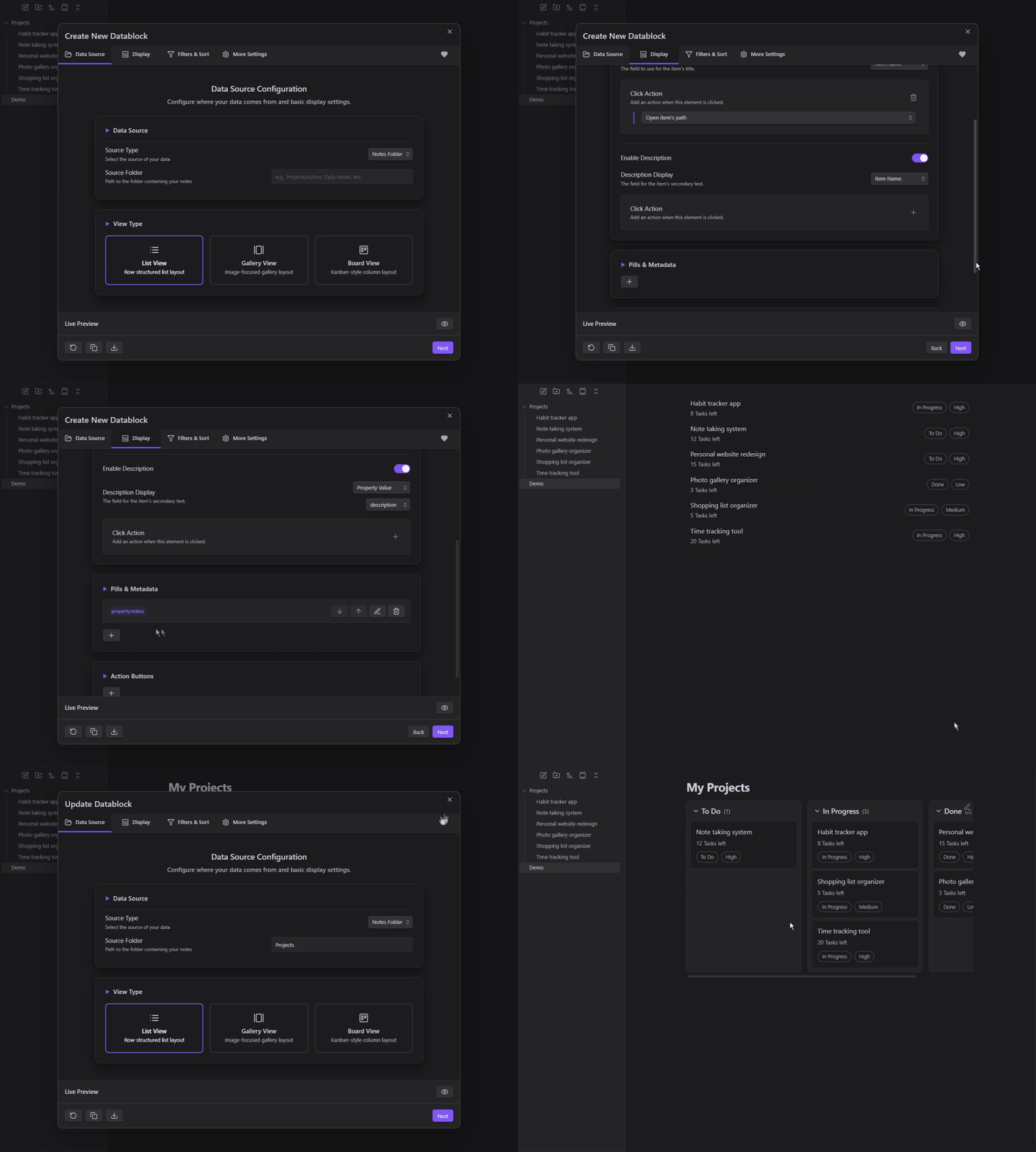
🌟 Overview
This Obsidian plugin offers different view types to display your data as List, Gallery, or Kanban Board layouts. It’s great for displaying tasks, showcasing collections, and tracking project progress in customizable views.
✨ Key Features
- Three View Types - Choose between List, Gallery, and Kanban Board layouts to match your content
- Flexible Data Source - Pull from vault folders or write custom JavaScript for more possibilities
- Smart Filtering - Apply complex filters with AND/OR logic to find exactly what you need
- Interactive Elements - Add clickable pills to show note properties and action buttons for quick tasks
- Edit in Place - Update frontmatter properties directly without opening individual notes
🚀 Quick Start
Manual Installation
- Download the latest release
- Extract to
.obsidian/plugins/datablock/ - Enable in Settings → Community Plugins
Creating Your First Datablock
Using the Configuration Modal (Recommended)
- Press
Ctrl/Cmd + P→ "DataBlock: Create New Datablock" - Configure through tabs, click "Next" until done
Manual Configuration
create a datablock code block directly:
```datablock
view: list
folder: "Your Folder"
```
📋 View Types
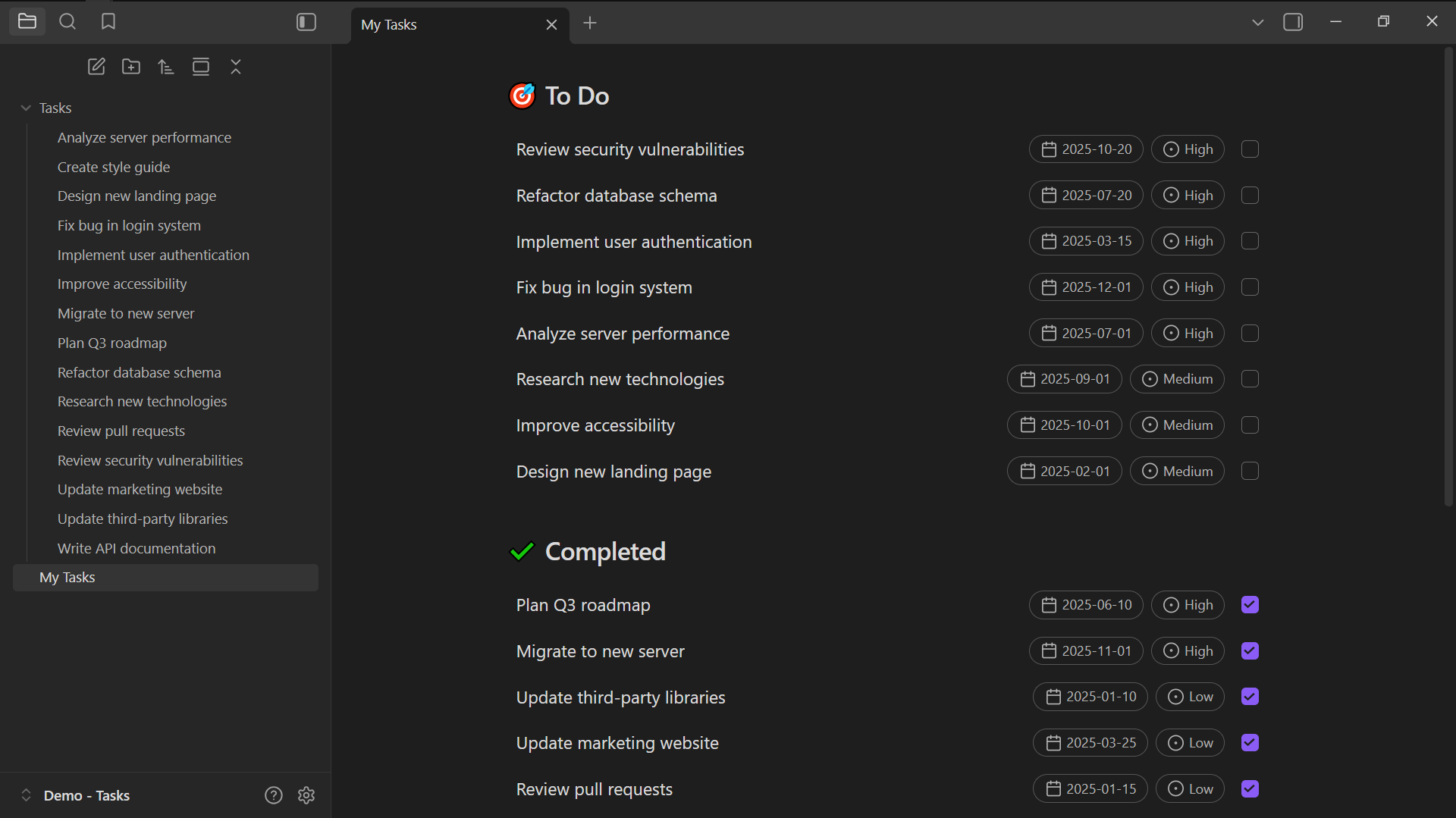
🗂️ List View
Create organized lists with interactive elements, filtering, and sorting.
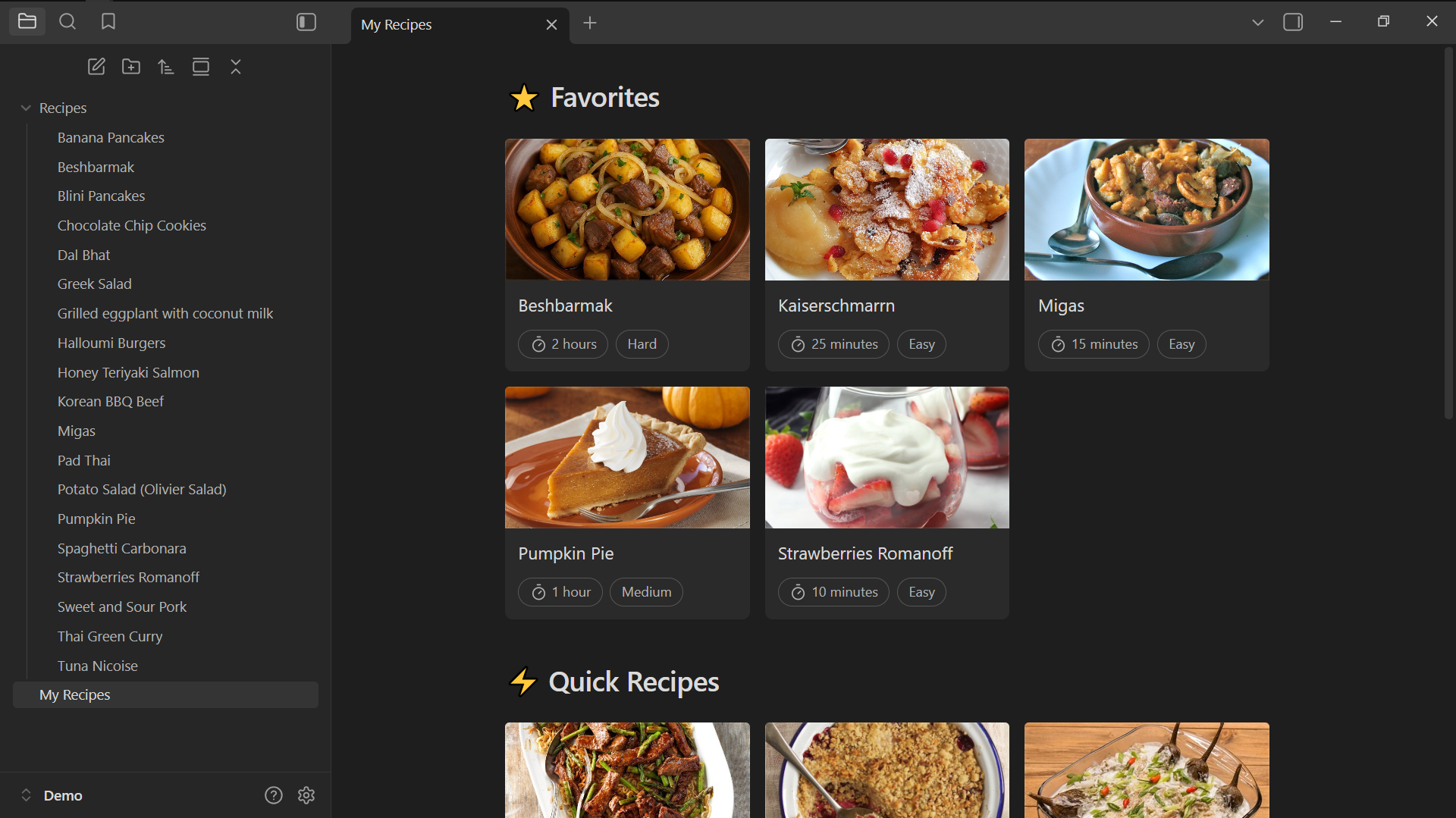
🖼️ Gallery View
Display visual content like images, recipes, portfolios, and media collections.
📊 Board View
Kanban-style boards for project management and workflow visualization
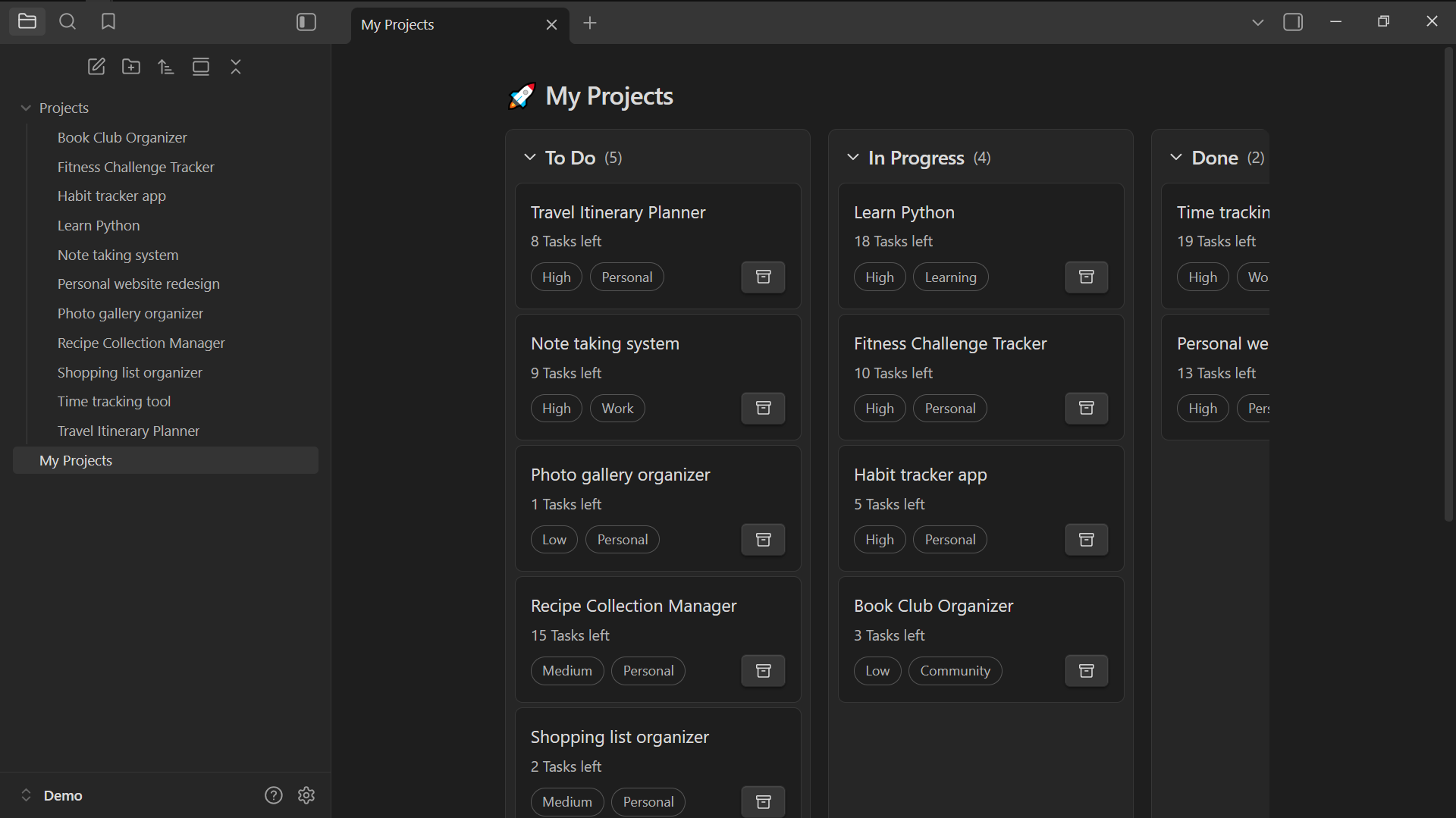
Note: Drag and drop updates the note's frontmatter property automatically
💡 Usage Examples
📝 Tasks
Display your tasks as a list view with due dates and priorities, hiding completed ones.
```datablock
view: list
folder: Tasks
title:
  text: item.name
  action: item.path
pills:
  - text: '{{icon:calendar}} {{property:due}}'
    action: edit-property
    propertyType: Date
  - text: '{{icon:circle-dot}} {{property:priority}}'
    action: edit-property
    propertyType: Select
    options:
      - High
      - Medium
      - Low
buttons:
  - action: edit-property
    property: completed
    propertyType: Boolean
    checkboxMode: true
filters:
  - type: property
    field: completed
    operator: is-not
    value: 'true'
sort:
  by: property:priority
  order: asc
```
📁 Example File Structure
Tasks/
├── Fix bug in login system.md
├── Design new landing page.md
└── Review pull requests.md
Frontmatter Example:
---
completed: false
due: 2025-12-01
priority: High
---
🍳 Recipes
Display your recipes as a gallery view with cooking times and difficulty ratings.
```datablock
view: gallery
folder: Recipes
title:
  text: item.name
  action: item.path
pills:
  - text: "{{icon:timer}} {{property:cook_time}}"
  - text: property:difficulty
coverProperty: image
```
📁 Example File Structure
Recipes/
├── Spaghetti Carbonara.md
├── Chocolate Chip Cookies.md
└── Thai Green Curry.md
Frontmatter Example:
---
image: "https://example.com/carbonara.jpg"
cook_time: "30 minutes"
difficulty: "Medium"
---
📊 Projects
Display your projects as a kanban board with To Do, In Progress, and Done columns.
```datablock
view: board
folder: Projects
title:
  text: item.name
  action: item.path
pills:
  - text: property:status
  - text: property:priority
sort:
  by: property:priority
  order: asc
customGroups:
  property: status
  groups:
    - To Do
    - In Progress
    - Done
```
📁 Example File Structure
Projects/
├── Website Redesign.md
├── Mobile App Development.md
└── Database Migration.md
Frontmatter Example:
---
status: To Do
priority: High
---
🌐 External Data Integration
Fetch and display data from external APIs, like Hacker News headlines.
```datablock
view: list
data: |-
  const api = 'https://hacker-news.firebaseio.com/v0';

  try {
    const topIds = await fetch(`${api}/topstories.json`).then(r => r.json());
    const stories = await Promise.all(
      topIds.slice(0, 10).map(id =>
        fetch(`${api}/item/${id}.json`).then(r => r.json())
      )
    );

    return stories.map(story => ({
      name: story.title,
      score: story.score,
      author: story.by,
      url: story.url,
      comments: story.descendants || 0,
      time: new Date(story.time * 1000).toLocaleDateString()
    }));
  } catch (error) {
    console.error('Failed to fetch news:', error);
    return [];
  }
title:
  text: property:name
  action: function(item) { window.open(item.url, '_blank'); }
pills:
  - text: '{{icon:user}} {{property:author}}'
  - text: '{{icon:arrow-up-circle}} {{property:score}} points'
```
🔧 Configuration Reference
Basic Properties
| Property | Description | Example |
|---|---|---|
view | Display type: list, gallery, board | view: list |
folder | Source folder path | folder: "Projects" |
data | Custom JavaScript data function | data: () => [...] |
filters | Filter conditions array | filters: [...] |
sort | Sorting configuration | sort: [...] |
View-Specific Options
Gallery View
columns: Number of columns (1-6)coverProperty: Property for cover images
Board View
groupByProperty: Property to group bycustomGroups: Custom column definitions
Interactive Elements
| Element | Purpose | Configuration |
|---|---|---|
title | Item headers | Text, click actions |
description | Item descriptions | Text, click actions |
pills | Display metadata tags | Text, click actions, property editing |
buttons | Action triggers | Text, click actions, menu options |
Template Syntax
Use double curly braces for dynamic content:
{{property:fieldName}}- Display frontmatter property value{{icon:iconName}}- Display Lucide icon
🛠️ Capabilities
Custom Data Sources
Write JavaScript to fetch data from APIs or create computed datasets:
data: |-
  // Fetch from API
  const response = await fetch('https://api.example.com/data');
  const data = await response.json();

  // Transform data
  return data.map(item => ({
    name: item.title,
    category: item.type,
    date: new Date(item.created_at).toLocaleDateString()
  }));
Property Editing
Enable inline property editing with type validation:
pills:
  - text: |-
      function(item) {
        return `Status: ${item.status}`
      }
    action: edit-property
    propertyType: Select
    property: status
    options: ["Todo", "In Progress", "Done"]
Filtering and Sorting
Create complex filter conditions:
filters:
  - property: "priority"
    operator: "is"
    value: "High"
  - property: "status"
    operator: "is-not"
    value: true
  - type: "custom"
    function: |-
      return item.tags && item.tags.length > 0;

sort:
  by: property:status
  order: desc
❤️ Support
If you find this plugin helpful, consider supporting its development.

📝 License
This project is licensed under the MIT License.
For plugin developers
Search results and similarity scores are powered by semantic analysis of your plugin's README. If your plugin isn't appearing for searches you'd expect, try updating your README to clearly describe your plugin's purpose, features, and use cases.