Wikilink Types
pendingby Penfield
Type @ inside wikilink aliases to add relationship types, auto-synced to YAML frontmatter
Wikilink Types
An Obsidian plugin that adds typed relationships to wikilinks. Type @ inside a wikilink alias to trigger an autocomplete dropdown of relationship types. On selection, the plugin syncs the relationship to YAML frontmatter automatically — so Dataview, Graph Link Types, Breadcrumbs, and the rest of the ecosystem can consume it without changes.
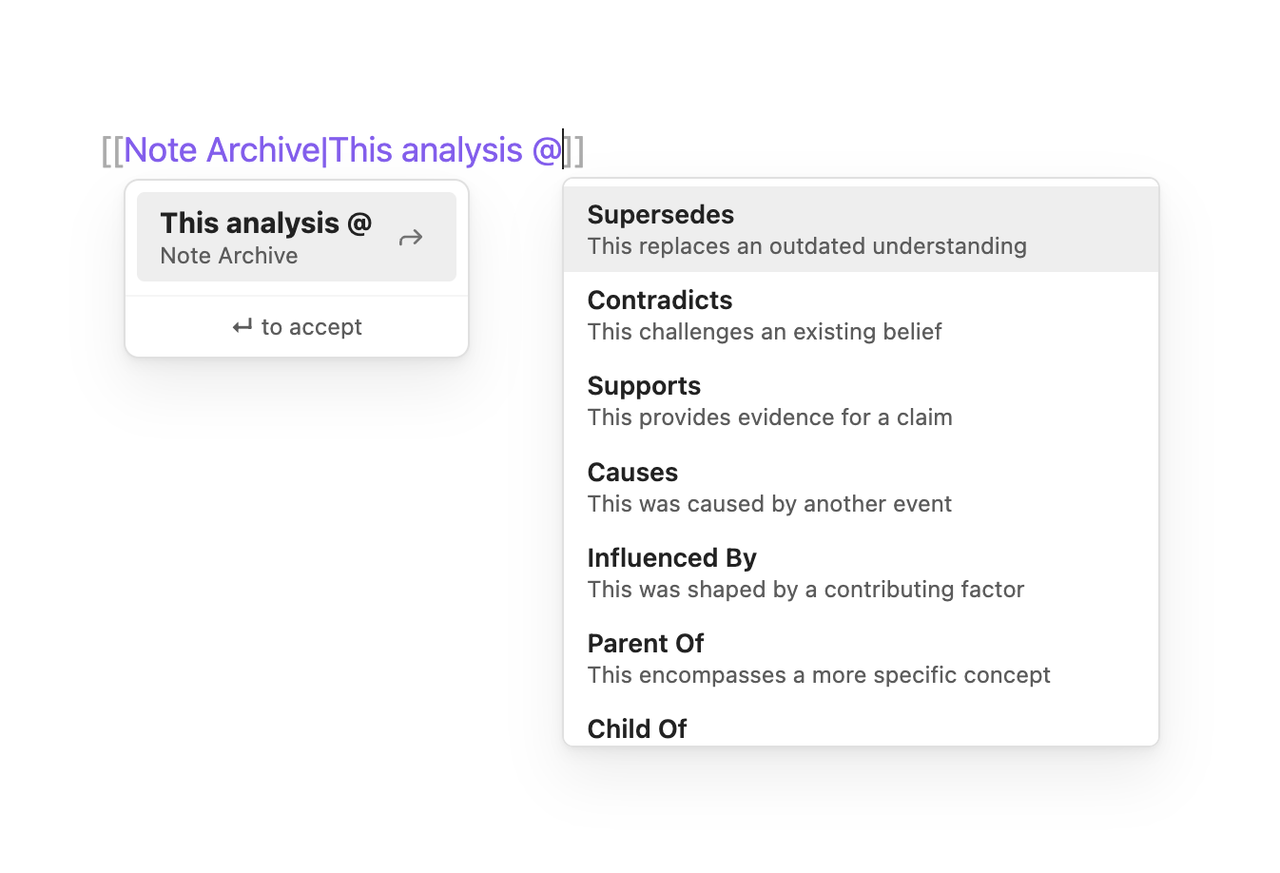
How It Works
Type @ inside a wikilink alias to trigger the autocomplete — either after a space or right after the |. You can use one or multiple relationship types in natural display text:
[[Analysis|The new research @supersedes and @contradicts the previous analysis]]
On save, each @type that matches a configured relationship type is synced to YAML frontmatter:
---
supersedes:
  - "[[Analysis]]"
contradicts:
  - "[[Analysis]]"
---
You never touch YAML. The @ syntax is the authoring interface. The YAML is the storage and compatibility layer. The frontmatter is the authoritative source for all programmatic and AI uses.
Rules
@typemust be preceded by a space or appear at the start of the alias (right after|) —john@causes.comis ignored,text @causesand[[Note|@causes]]both match- Only configured relationship types generate frontmatter —
@monkeyballsin display text is just text - Multiple
@typesper wikilink are supported — each creates its own frontmatter entry @in display text that doesn't match a configured type is left alone for human readability
Authoring Flow
- Type
[[Note Name|Your display text @— the autocomplete dropdown appears - Select a relationship type (or keep typing to filter)
- Continue writing display text, or add another
@type - Close the link with
]] - On save, the plugin syncs matched types to YAML frontmatter
Installation
Community Plugins (coming soon)
- Open Settings → Community Plugins → Browse
- Search for Wikilink Types
- Click Install, then Enable
BRAT (pre-listing)
If the plugin isn't in the Community Plugins directory yet, install via BRAT:
- Install BRAT from Community Plugins
- Open Command Palette → BRAT: Add a beta plugin for testing
- Paste:
penfieldlabs/obsidian-wikilink-types - Click Add Plugin, then enable in Settings → Community Plugins
Manual
- Download
plugin.zipfrom the latest release - Unzip and copy the
wikilink-typesfolder into your vault's.obsidian/plugins/directory - Enable the plugin in Settings → Community Plugins
Tip: Use Settings → Community Plugins → 📁 (Open plugins folder) to open the plugins directory, then drag the
wikilink-typesfolder in.
Configuration
Relationship types are stored in data.json inside the plugin directory (.obsidian/plugins/wikilink-types/data.json). On first run, the plugin writes a default set of 24 types. Edit the JSON directly to add, remove, rename, or reorder types.
Each entry has three fields:
{
  "key": "supersedes",
  "label": "Supersedes",
  "description": "This replaces an outdated understanding"
}
- key — written to the wikilink and used as the YAML frontmatter field name
- label — displayed in the autocomplete dropdown
- description — shown below the label in the dropdown
Compatibility
| Plugin | Works? | How |
|---|---|---|
| Dataview | Yes | Reads YAML frontmatter natively |
| Graph Link Types | Yes | Reads frontmatter via Dataview |
| Breadcrumbs | Yes | Reads frontmatter |
| Juggl | Yes | Reads Dataview metadata |
| Templater | Yes | No conflicts |
| Excalidraw | Yes | No conflicts |
Graceful Degradation
If you uninstall the plugin:
- YAML frontmatter remains — no data loss
@typetext stays visible in wikilink aliases — readable, just not styled- All Dataview queries continue to work
- Graph Link Types continues to work
AI-Assisted Relationship Discovery
The Vault Linker skill lets AI agents (Claude Code, OpenClaw, etc.) analyze your vault and discover relationships between notes. The agent reads your notes, identifies connections you might have missed, and writes them in the Wikilink Types format — with your approval.
See skill/SKILL.md for the full skill specification.
For autonomous/overnight linking of entire vaults, see prompts/autonomous-vault-linking.md.
License
For plugin developers
Search results and similarity scores are powered by semantic analysis of your plugin's README. If your plugin isn't appearing for searches you'd expect, try updating your README to clearly describe your plugin's purpose, features, and use cases.