Periodix Planner
pendingby Real1tyy
Intelligent periodic note generation with hierarchical time allocation, budget tracking, and interconnected daily/weekly/monthly/quarterly/yearly planning.
Periodix-Planner



Turn Obsidian into a time-aware planning system: automatic periodic notes + time budgets that make trade-offs visible.
🎬 Video: Full feature breakdown

📸 Screenshots
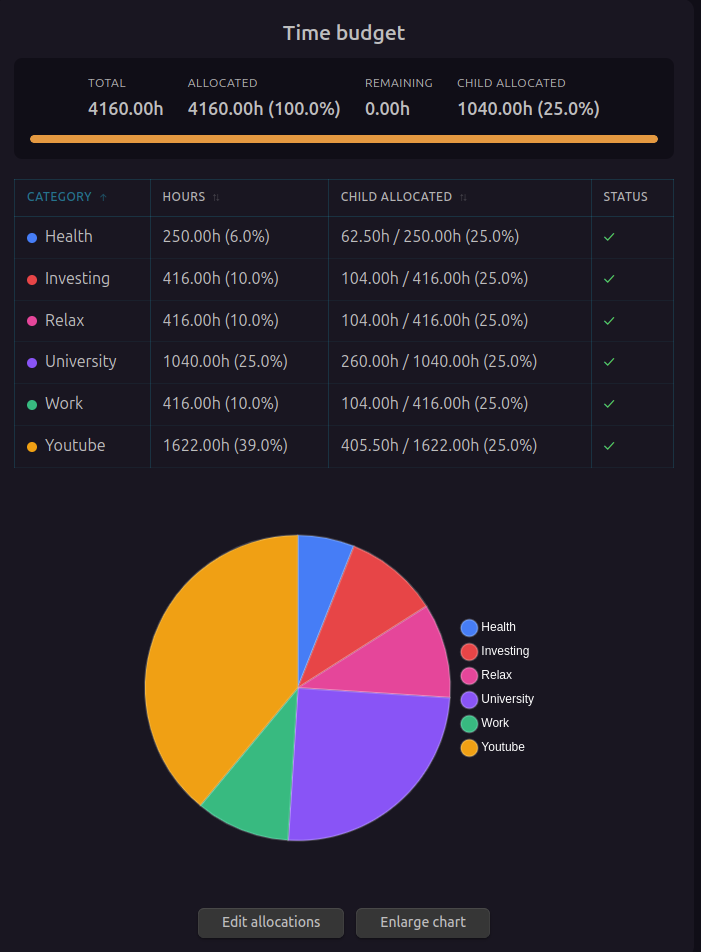
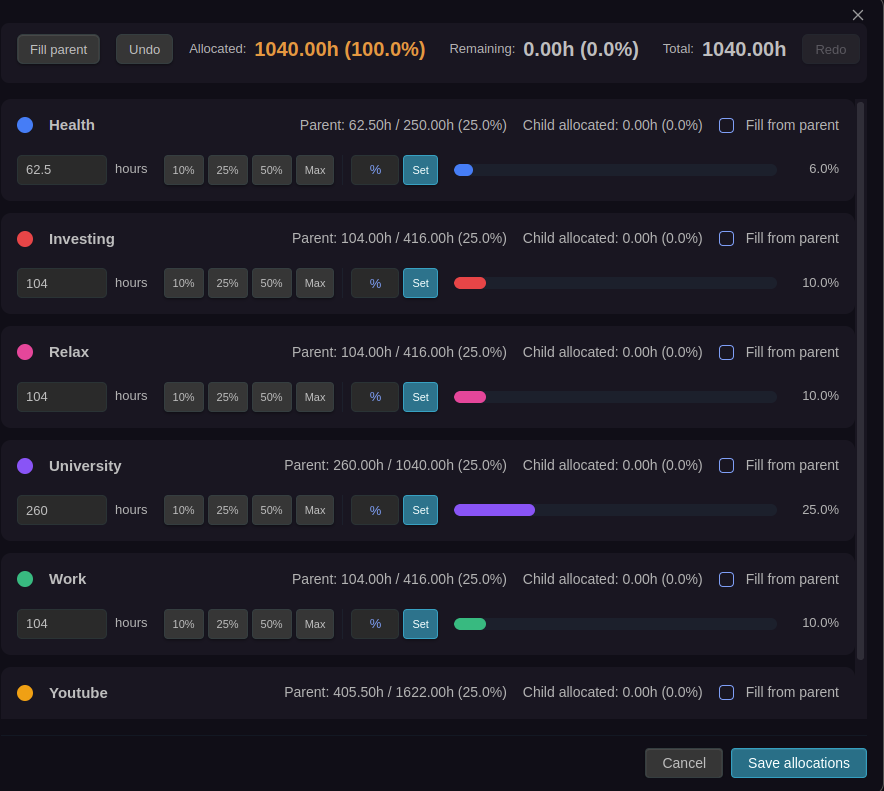
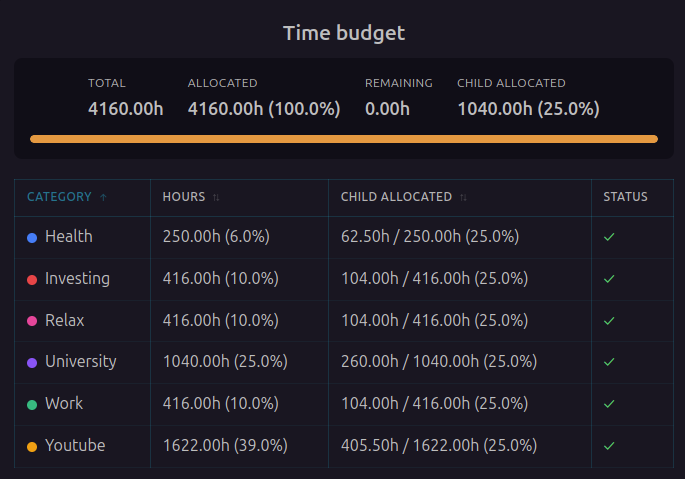
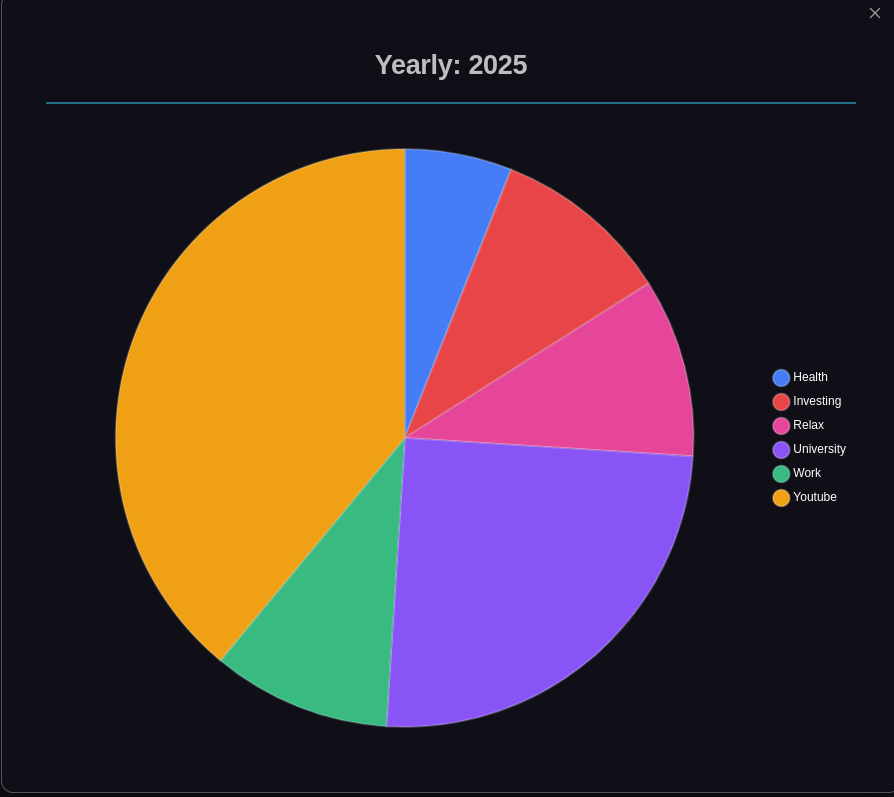
Check out the Screenshots Gallery in the documentation to see all plugin visuals and features in action.
Why Periodix-Planner exists
Time is your scarcest resource. You can’t do everything — and most “planning” fails because it avoids the trade-offs.
Periodix-Planner helps you plan time, not just tasks. It treats time like a finite investment portfolio:
- You allocate hours into categories (work, learning, health, relationships, projects)
- You observe where time actually goes over time
- You decide whether those investments are worth the returns you’re getting
This plugin is not a task manager. Tasks are result-oriented. Periodix-Planner is time-oriented.
It complements your task manager by helping you decide what deserves your time in the first place.
What it does
📅 Automatic Periodic Note Generation
The plugin automatically creates notes for each time period, always staying one step ahead by generating the next period's note in advance.
- Daily notes → Generated for today and tomorrow
- Weekly notes → Generated for this week and next
- Monthly notes → Generated for this month and next
- Quarterly notes → Generated for this quarter and next
- Yearly notes → Generated for this year and next
Each note is created in its designated folder with consistent naming conventions.
🔗 Interconnected Note Web
All periodic notes are intelligently linked through frontmatter properties:
---
# Daily Note Example (2025-01-15)
Previous: "[[2025-01-14]]"
Next: "[[2025-01-16]]"
Week: "[[2025-W03]]"
Month: "[[2025-01]]"
Quarter: "[[2025-Q1]]"
Year: "[[2025]]"
---
Navigation Links:
Previous/Next→ Navigate chronologically within the same period type- Hierarchical links → Jump from daily → weekly → monthly → quarterly → yearly
This creates a powerful navigable web of time that lets you zoom in and out of your planning horizon effortlessly.
⏱️ Time Budget System
Define how many hours you have available and delegate them across categories (time investments), with budgets flowing down the hierarchy:
Yearly Time Pool
Total Hours/Year: 10,000 hours
├── YouTube:          2,000 hours (20%)
├── Business:         5,000 hours (50%)
└── Health & Relationships: 3,000 hours (30%)
Cascading Allocation
Time budgets flow down through the hierarchy:
- Yearly → Define total category budgets
- Quarterly → Allocate portions of yearly budgets (plugin tracks remaining)
- Monthly → Allocate from quarterly budgets
- Weekly → Allocate from monthly budgets
- Daily → See available time and track actuals
Smart Tracking
- 🟢 Within budget → Green indicators
- 🟡 Approaching limit → Yellow warnings
- 🔴 Over budget → Red alerts with clear messaging
📊 Visual Statistics
- Pie charts → Category distribution at each time level
- Tables → Detailed breakdown with allocated vs. remaining
- Progress bars → Visual tracking of time consumption
Interactive Allocation Editor
Powerful modal for editing time allocations:
- Drag-to-adjust percentage bars
- Quick-fill buttons (10%, 25%, 50%, Max)
- Custom percentage input
- Parent budget warnings
- Undo/redo support
- Keyboard shortcuts
ActivityWatch Integration
Automatically track and visualize your computer usage in daily notes:
- Automatic data collection from ActivityWatch API
- Interactive visualizations with pie charts and sortable tables
- Privacy-first - all data stays local
- Desktop only - works with locally-running ActivityWatch
Learn more about integrations →
Quick Start
- Install the plugin from Obsidian Community Plugins or BRAT
- Configure your folder structure and naming preferences in settings
- Set up your time budget categories
- Generate your first set of periodic notes
- Allocate time using the interactive allocation editor
See the Installation Guide and Quick Start Guide for detailed setup instructions.
📦 Installation
- Installation: https://real1tyy.github.io/Periodix-Planner/installation
- Quick Start: https://real1tyy.github.io/Periodix-Planner/quickstart
Use Cases
Personal Productivity
- Plan your year with clear time investments
- Track where your time actually goes
- Balance work, health, and relationships
Goal Achievement
- Allocate dedicated hours to learning
- Track progress toward time-based goals
- Adjust allocations based on priorities
Business Planning
- Quarterly OKR time budgets
- Project time allocation
- Resource planning across time horizons
📚 Documentation
Comprehensive documentation is available at: docs.periodix-planner.com
- Installation Guide
- Quick Start
- Features Overview
- Time Budgeting
- Allocation Editor
- Configuration
- FAQ
- Troubleshooting
Contributing
Contributions are welcome! Please see our Contributing Guide for details.
License
AGPL-3.0 License - see LICENSE for details.
Support & Sponsorship
If you find Periodix-Planner useful and want to support its ongoing development, please consider becoming a sponsor. Your contribution helps ensure continuous maintenance, bug fixes, and the introduction of new features.
Every contribution, no matter the size, is greatly appreciated!
For plugin developers
Search results and similarity scores are powered by semantic analysis of your plugin's README. If your plugin isn't appearing for searches you'd expect, try updating your README to clearly describe your plugin's purpose, features, and use cases.