Journal Bases
unlistedby Sébastien Dubois
Custom Base views for journaling and periodic reviews
Journal Bases Plugin for Obsidian
Navigate and manage your journal and periodic reviews with purpose-built Base views. This Obsidian plugin adds two custom view types for daily, weekly, monthly, quarterly, and yearly notes.
Why This Plugin?
Journaling and periodic reviews are powerful practices for personal growth, but they can be labor-intensive. The core process is simple but requires discipline:
- Review daily notes once a week to extract key learnings, discoveries, challenges faced, achievements, things you're grateful for, etc., and create a weekly note as a result
- Review weekly notes once a month to extract key learnings, discoveries, and create a monthly note
- Review monthly notes once a quarter to create a quarterly note
- Review quarterly notes once a year to create a yearly note
Thanks to this process, at the end of a full year, you get a single yearly note that is a valuable summary of that year, giving you clarity about what you achieved, mistakes you've made, and things you've learned.
In addition to capturing information about the past, periodic notes also enable looking forward and planning ahead.
This plugin aims to codify and ease this process by providing dedicated views that make journaling and periodic reviews a breeze.
Overview Video
https://www.youtube.com/watch?v=VHdccDohK10
The Two Views
This plugin provides two specialized Base view types, each designed for a specific workflow:
| View | Purpose | Workflow |
|---|---|---|
| Periodic Notes | Daily journaling | Navigate, view, edit, and create notes of a single period type |
| Periodic Review | Periodic reviews | Side-by-side comparison across all period types for extracting insights |
Periodic Notes Base
The Periodic Notes view is designed to support daily journaling with easier navigation between notes of a specific category (daily, weekly, monthly, quarterly, or yearly).
What It Does
- Lists all notes for the selected period type in descending order (newest first)
- Enables folding/expanding individual notes to focus on what matters
- Provides inline editing so you can write without leaving the view
- Allows creating new notes for future periods
- Shows placeholders for missing notes in the sequence with one-click creation
- Highlights the current period so you always know where "today" is
Use Cases
- Morning journaling routine
- Quick review of recent daily entries
- Batch-creating notes for upcoming days/weeks
- Filling in gaps when you missed a day
Screenshot
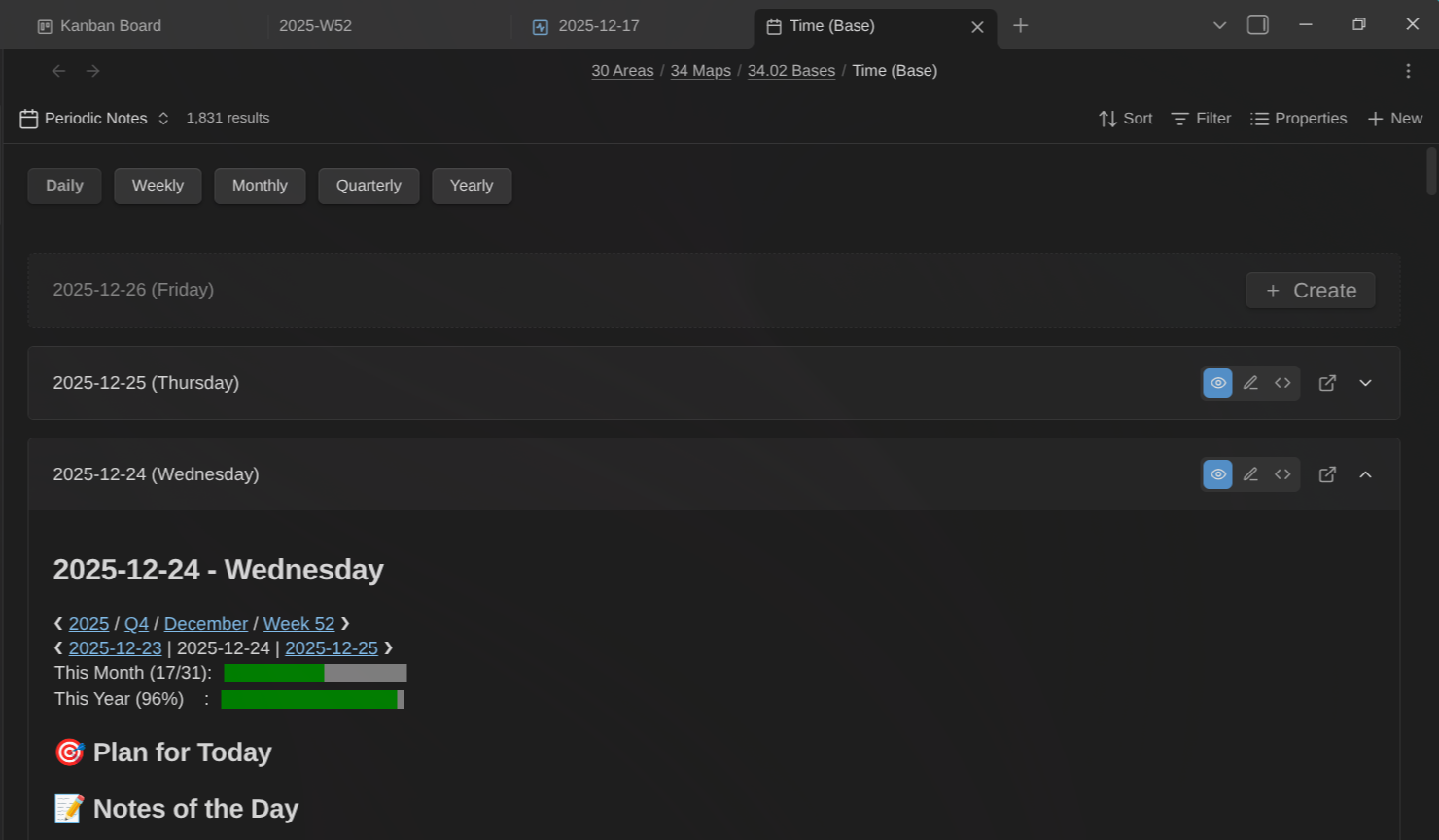
Browse your daily notes as expandable cards with inline editing. Toggle between Reading, Live Preview, and Source mode.
View Options
| Option | Description |
|---|---|
| Period type | Which period type to display (daily, weekly, monthly, quarterly, yearly) |
| Future periods | Number of future periods to show (0-12) |
| Expand first card | Auto-expand the most recent note on load |
| Show missing periods | Show create buttons for missing notes in the sequence |
Periodic Review Base
The Periodic Review view has a different goal: serve during periodic reviews (weekly, monthly, quarterly, and yearly reviews) and make it a breeze to integrate information from daily notes into weekly notes, weekly into monthly, monthly into quarterly, and quarterly into yearly.
What It Does
This view provides a multi-column layout (inspired by Andy Matuschak's sliding panes) where you can:
- Select or create a yearly note, then
- Select or create a quarterly note, then
- Select or create a monthly note, then
- Select or create a weekly note, then
- See all daily notes for that week
The magic is in the hierarchical drilling:
- Select a certain week → see all daily notes from that week in the column to the left
- Select a certain month → see all weeks in that month
- Select a certain quarter → see all months in that quarter
- Select a certain year → see all quarters in that year
This makes it effortless to review your daily notes, extract the key insights, and write them into your weekly summary. Then review your weekly summaries and extract insights into your monthly note. And so on up the hierarchy.
The Periodic Review Workflow
- Open the Periodic Review view at the start of your weekly/monthly/quarterly/yearly review
- Navigate to the period you want to review (e.g., select last week)
- Read through the child notes in the left column (e.g., daily notes for that week)
- Extract key learnings into the parent note (e.g., your weekly summary)
- Mark the review as done for that period (optional)
- Repeat at each level of the hierarchy
Use Cases
- Weekly reviews: synthesizing daily notes into a weekly summary
- Monthly reviews: extracting themes from weekly notes
- Quarterly reviews: identifying patterns across months
- Yearly reviews: creating your annual summary
Screenshot
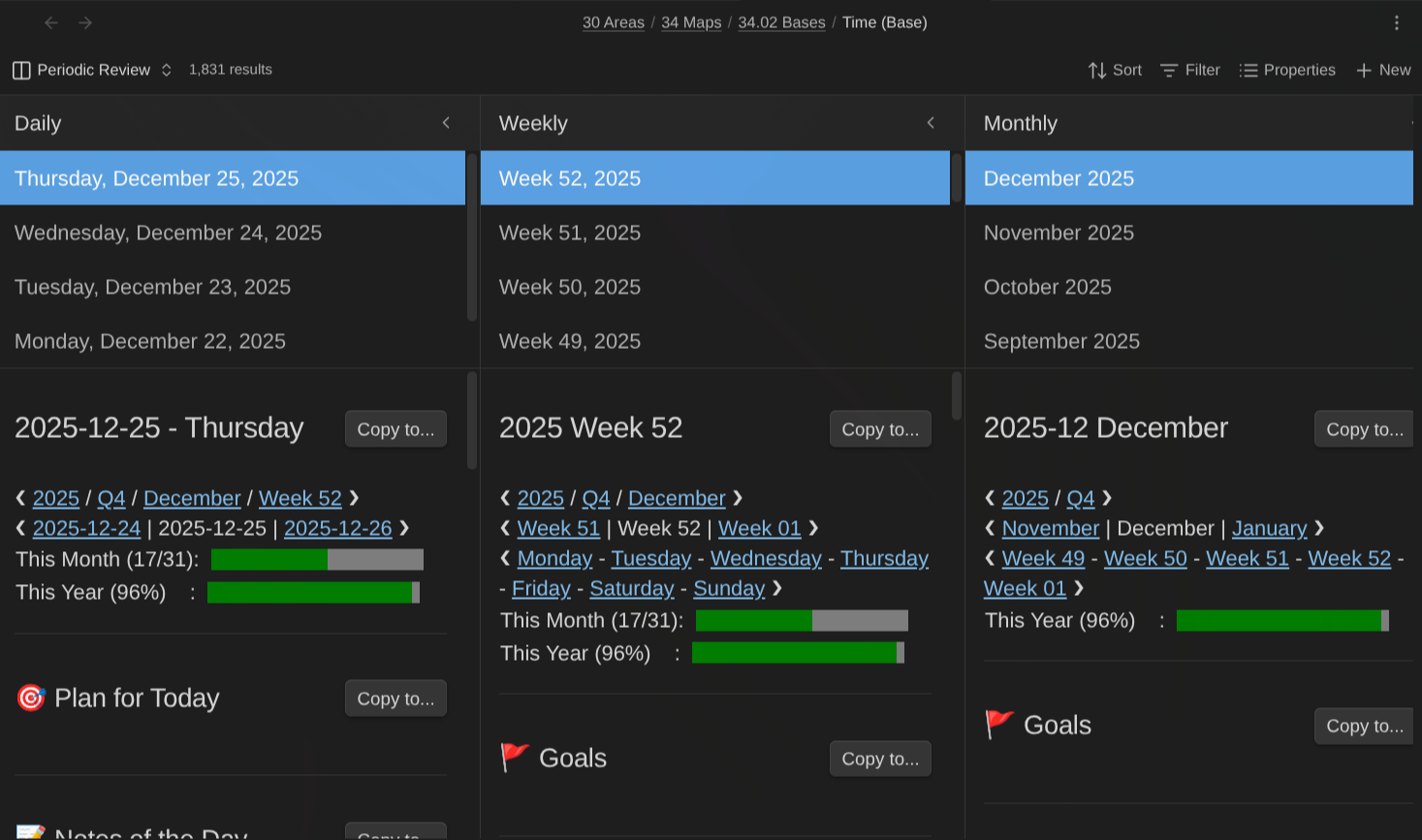
Review and edit notes across multiple period types in a multi-column layout. Each column shows a note card with full inline editing support. Click a period to drill down into its children.
Additional Screenshots
Mark Reviews as DONE
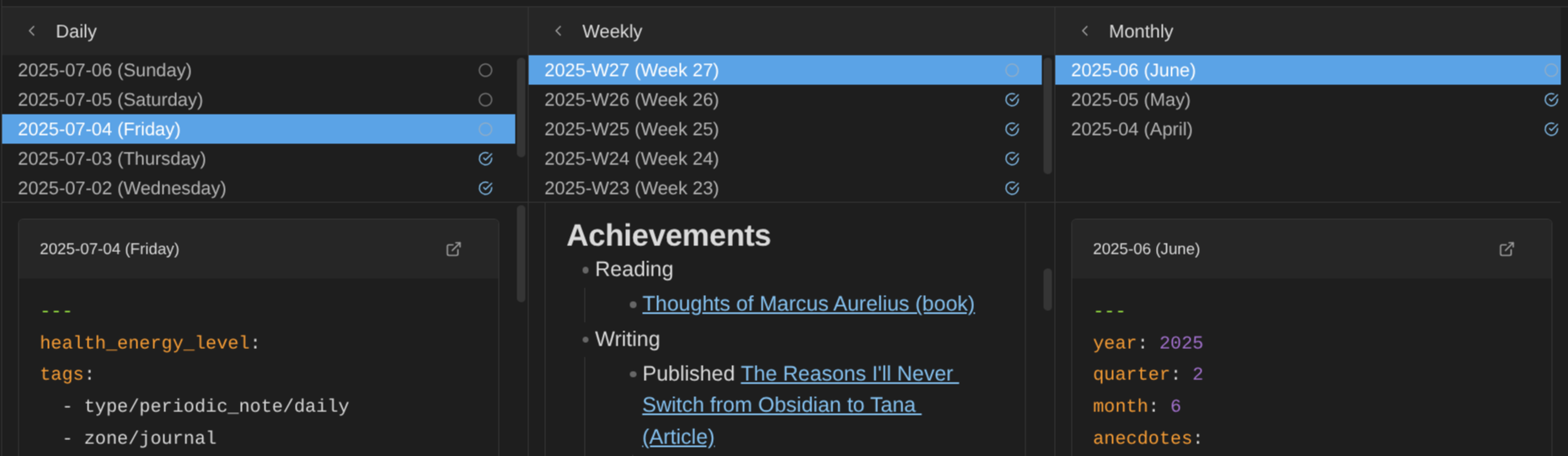 Mark reviews as done to know where you left things off
Minimize Columns
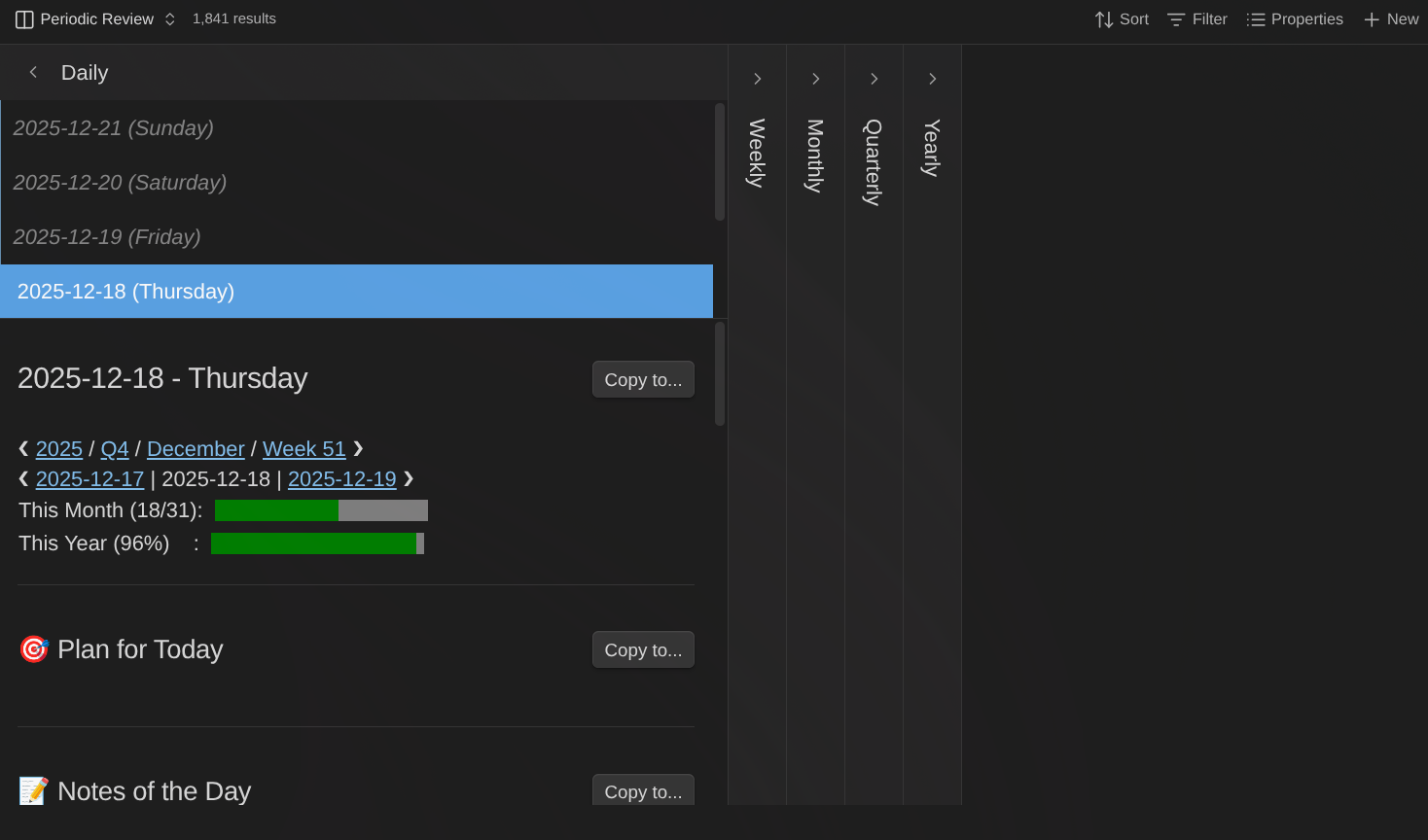 Collapse columns to focus on specific period types. Click the fold button to expand/collapse.
Create Missing Notes
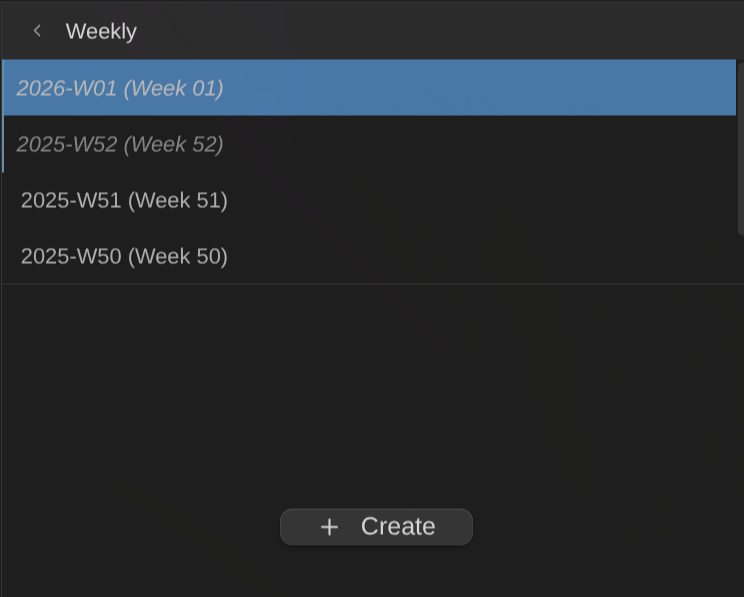 Create buttons appear for periods without notes. Uses Templater templates when configured.
Create Future Yearly Notes
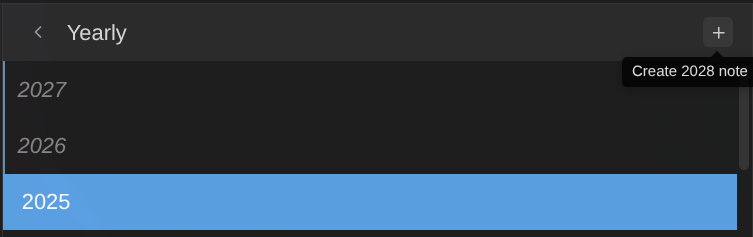 Create next year's note directly from the yearly column header.
View Options
| Option | Description |
|---|---|
| Show columns | Toggle visibility for each period type |
| Column width | Width of each column in pixels (300-600) |
Common Features
Both views share these capabilities:
Note Cards
- Inline editing: Edit notes directly within the view without opening a separate tab
- Auto-save: Changes saved automatically with 1-second debounce
- Current period highlight: Visual indicator for today's/current period's note
- Seamless updates: Content updates smoothly without flickering when files change externally
Note Creation
- Missing note placeholders: Create buttons for periods without notes
- Template support: Uses Templater for template-based note creation
- Folder creation: Automatically creates nested folder structures
Integration
- Periodic Notes plugin sync: Automatically syncs settings when Periodic Notes plugin is enabled
- Templater support: Full integration for template-based note creation
- Life Tracker integration: Provides daily notes for Life Tracker commands (works in both views)
Getting Started
Prerequisites
- Obsidian v1.9.0 or later (requires Bases feature)
- (Optional) Periodic Notes plugin for settings sync
- (Optional) Templater plugin for template support
Installation
- Open Settings → Community plugins
- Click Browse and search for "Journal Bases"
- Click Install, then Enable
Configuration
- Go to Settings → Journal Bases
- Configure each period type:
- Folder: Where notes are stored (e.g.,
Journal/Daily) - Format: Filename format using Moment.js tokens (e.g.,
YYYY-MM-DD) - Template: Path to Templater template file (optional)
- Folder: Where notes are stored (e.g.,
If you have the Periodic Notes plugin enabled, settings will sync automatically.
Using the Views
- Create a new Base (or open an existing one)
- Configure the Base query to include your periodic notes folder
- Click the view type dropdown and select Periodic Notes or Periodic Review
- Configure view-specific options via the settings menu
Date Format Reference
Uses Moment.js format tokens:
| Token | Output | Example |
|---|---|---|
YYYY | 4-digit year | 2025 |
MM | 2-digit month | 01-12 |
DD | 2-digit day | 01-31 |
gggg | ISO week year | 2025 |
ww | ISO week | 01-53 |
[Q] | Literal "Q" | Q |
Q | Quarter | 1-4 |
[text] | Literal text | text |
Default formats:
- Daily:
YYYY-MM-DD - Weekly:
gggg-[W]ww - Monthly:
YYYY-MM - Quarterly:
YYYY-[Q]Q - Yearly:
YYYY
Formats can include path separators: YYYY/MM/YYYY-MM-DD creates 2025/12/2025-12-18.md
Contributing
This is a free and open source project. All contributions are welcome:
- Code improvements and new features
- Ideas and feature requests
- Documentation improvements
- Bug reports
See the issues and discussions in this repository.
News & Support
To stay up to date about this plugin, Obsidian in general, Personal Knowledge Management and note-taking, subscribe to my newsletter. The best way to support my work is to become a paid subscriber ❤️.
This plugin is included in the Obsidian Starter Kit.
For plugin developers
Search results and similarity scores are powered by semantic analysis of your plugin's README. If your plugin isn't appearing for searches you'd expect, try updating your README to clearly describe your plugin's purpose, features, and use cases.