X Clipper
pendingby UNPySide
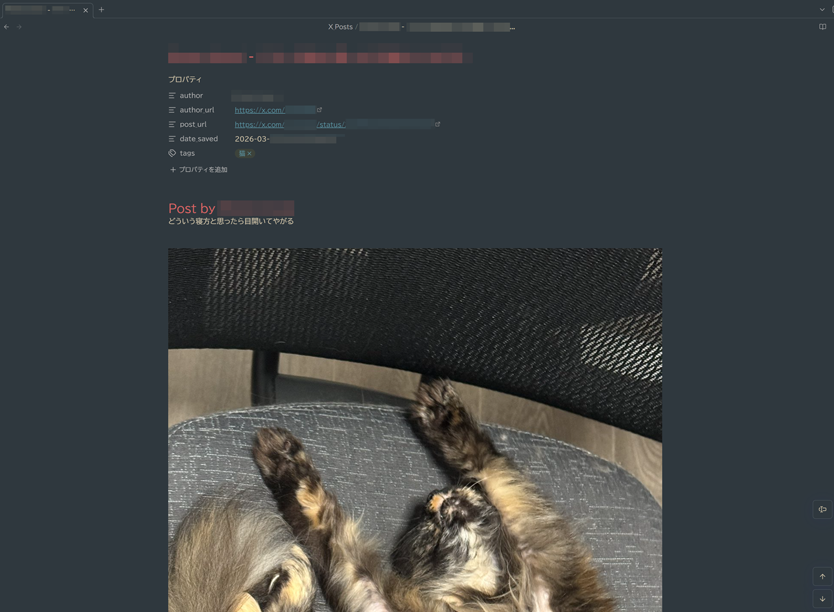
Save X (Twitter) posts as notes with images and videos included.
X Clipper
Save X (Twitter) posts to Obsidian as Markdown notes — with images, videos, and hashtags automatically included.
English README → README.md
Features
- Clip posts from X (Twitter) by pasting the URL
- Download images and videos directly into your vault's attachments folder
- Auto-extract hashtags from post text and save them as tags (both frontmatter and inline)
- Tag suggestions with toggle buttons based on your usage history
- Previous tags remembered — manually selected tags from your last save are pre-activated
- Clear all button to quickly reset tag selections
- Custom X icon in the ribbon for quick access
- Japanese language support for filenames and tags
- Fallback API — automatically tries vxtwitter if fxtwitter is unavailable
Installation
From Community Plugins (Recommended)
- Open Settings → Community plugins
- Click Browse and search for "X Clipper"
- Click Install, then Enable
Manual Installation
- Download
main.js,manifest.json, andstyles.cssfrom the latest release - Create a folder
.obsidian/plugins/x-clipper/in your vault - Copy the downloaded files into that folder
- Restart Obsidian and enable the plugin in Settings → Community plugins
Usage
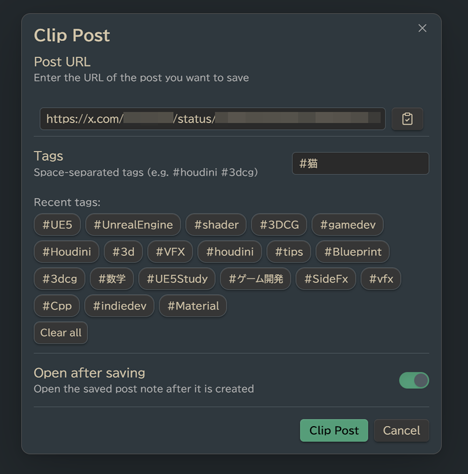
- Click the 𝕏 icon in the ribbon, or run the Clip Post command from the command palette
- Paste the post URL (e.g.
https://x.com/username/status/123456789) - Optionally add or toggle tags
- Click Clip Post
The plugin will:
- Fetch the post text and author info
- Download any attached images/videos to
{Posts folder}/attachments/ - Create a Markdown note with frontmatter, embedded media, and tags
Settings
| Setting | Description | Default |
|---|---|---|
| Posts folder | Where to save clipped posts | X_Posts |
| Copy note path to clipboard | Auto-copy [[note]] link after saving | On |
| Open saved note after saving | Open the note immediately | Off |
Saved Note Format
---
author: "Author Name"
author_url: "https://x.com/username"
post_url: "https://x.com/username/status/123"
date_saved: 2025-01-01T12:00:00.000Z
tags: ["houdini", "3dcg", "VFX"]
---
# Post by Author Name
Post text content here...

![[post_img_1234567890_1.jpg]]

---
#houdini #3dcg #VFX

**Author:** [Author Name](https://x.com/username)
**Original Post:** [View on X](https://x.com/username/status/123)
**Saved:** 2025年1月1日 12:00
API
This plugin uses the fxtwitter API (with vxtwitter as fallback) to fetch post data. No authentication or API keys are required.
For plugin developers
Search results and similarity scores are powered by semantic analysis of your plugin's README. If your plugin isn't appearing for searches you'd expect, try updating your README to clearly describe your plugin's purpose, features, and use cases.