Today Alias
pendingby tanoshia
Shows configurable aliases (e.g. "Today" / "Yesterday") for notes with date prefix in the file explorer. Hides date prefixes from all other notes. Sort order is preserved.
Today Alias — Obsidian Plugin
Version 2.0.4
Configure how a title's date prefix appears in the browser/tab name!
Shows configurable aliases (e.g. ✘ Today, Mar 10th / ↩ Yesterday, Mar 9th) for today's and yesterday's notes in the file explorer, and hides the leading date prefix from all other notes. Works out of the box with Obsidian's default Daily Notes format (YYYY-MM-DD). This is a purely visual change; no files are ever renamed or modified.
Quick Start
1. Install the Plugin
Via Obsidian Community Plugins (coming soon)
- Open Settings → Community plugins
- Search for "Today Alias"
- Install and enable
Via BRAT (for beta testing) (GitHub page)
- Install BRAT
- Add beta plugin:
tanoshia/obsidian-today-alias
Features
- Date prefix hiding — strips the configured date prefix from the displayed title in the file explorer
- Moment.js format strings — uses the same format system as Obsidian's own Templates and Templater plugins (
YYYY,MM,DD,HH,mm,Do,MMMM, etc.); no regex required - Sort order preserved — Obsidian browser still sorts by the actual filename; only what you see changes. Ordering by date still applies!
- "Today" label — a Daily Note whose filename matches today's date is shown with a configurable label (default
✘ Today, Mar 10th), updating automatically when the day rolls over via a window-focus listener, a 60-second background check, and a precise midnight timeout - "Yesterday" label — yesterday's bare Daily Note and pattern-matched notes each get their own configurable label/prefix (default
↩ Yesterday, Mar 9th/↩ Yesterday's), mirroring the Today feature exactly - Ignore patterns — Moment.js format patterns to keep certain filenames fully untouched; bare Daily Notes and Meetings notes are pre-filled by default;
*is supported as a wildcard; a live preview of each pattern with today's date updates in real time - Custom ignore Today label — ignored-pattern matches that start with today's date get their own configurable label prefix (default
✘ Today's) - Live preview — every format field shows a real-time preview of how today's date renders with the current string
- Live rename support — display updates correctly on every filename rename, no lag or skipped updates
- Tab title aliasing — open editor tabs (tab strip + header bar) show the same alias or date-stripped title as the file explorer, updating automatically when tabs are opened, switched, or renamed
- Auto-migration — settings saved with the old
{TOKEN}syntax are silently upgraded to Moment.js equivalents on first load - Clean unload — all elements are restored to plain text when the plugin is disabled or unloaded
Example
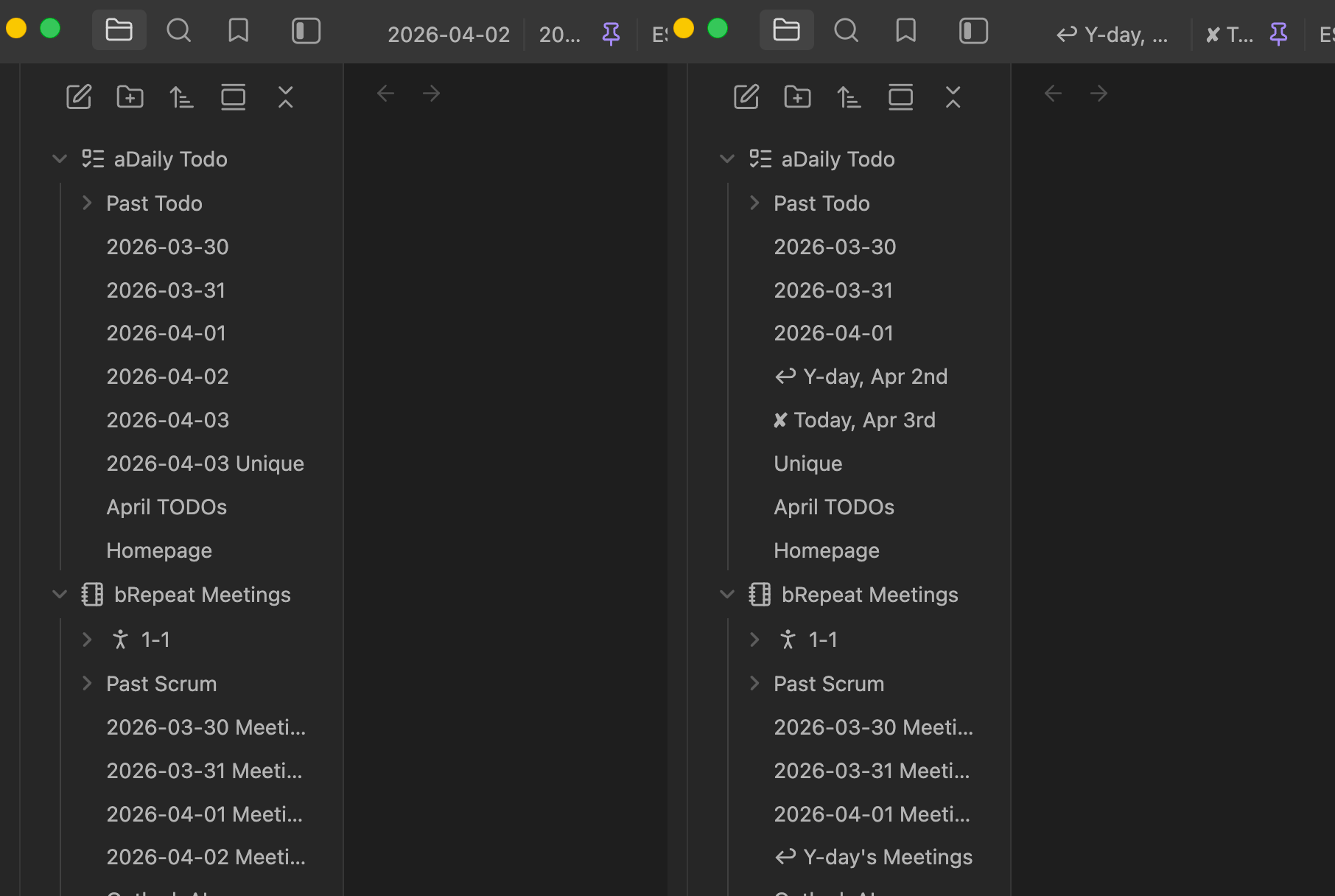
| Filename on disk | Shown in explorer |
|---|---|
2026-03-10 (today, bare daily note) | ✘ Today, Mar 10th |
2026-03-10 Meetings (today, ignored pattern) | ✘ Today's Meetings |
2026-03-09 (yesterday, bare daily note) | ↩ Yesterday, Mar 9th |
2026-03-09 Meetings (yesterday, pattern-matched) | ↩ Yesterday's Meetings |
2026-03-08 Meetings (ignored pattern, not today/yesterday) | 2026-03-08 Meetings (unchanged) |
2026-03-08 M! Alice meeting email planning | M! Alice meeting email planning |
2026-01-15 Project kickoff | Project kickoff |
2026-02-03 (bare daily note, ignored) | 2026-02-03 (unchanged) |
How it works
- On load the plugin attaches a
MutationObserverto the file-explorer container, watching for all DOM mutations (child additions, text swaps, character data changes). - A
vault.on('rename')listener acts as a safety net to catch any edge cases the observer misses. - Whenever a
.nav-file-title-contentelement is painted or updated:- If the filename exactly equals today's date and Today bare-note toggle is on → replaced with the configured Today label (e.g.
✘ Today, Mar 10th) - If the filename exactly equals yesterday's date and Yesterday bare-note toggle is on → replaced with the configured Yesterday label (e.g.
↩ Yesterday, Mar 9th) - If the filename matches any ignore pattern and the Today pattern-prefix toggle is on and it starts with today's date → replaced with the configured prefix + the rest of the filename
- If the filename matches any ignore pattern and the Yesterday pattern-prefix toggle is on and it starts with yesterday's date → replaced with the configured prefix + the rest of the filename
- If the filename matches any ignore pattern otherwise → left completely untouched
- Otherwise the date prefix is wrapped in a hidden
<span class="ta-date">and the rest shown in<span class="ta-rest">
- If the filename exactly equals today's date and Today bare-note toggle is on → replaced with the configured Today label (e.g.
- Day-rollover is detected by three complementary triggers: a window focus listener (fires when you switch back to Obsidian or the system wakes from sleep), a 60-second interval (catches windows left open without regaining focus), and a precise midnight timeout (fires at 00:00:05 for fully-awake sessions). Any trigger that detects a date change calls a shared
checkDateChange()which prevents duplicate refreshes. - On unload every element is restored to its original plain-text form; no trace is left behind.
Format reference
All format fields use Moment.js format strings — the same system Obsidian's own Templates and Templater plugins use.
| Token | Meaning | Example |
|---|---|---|
YYYY | 4-digit year | 2026 |
MM | 2-digit month | 03 |
DD | 2-digit day | 04 |
Do | Day with ordinal | 4th |
MMMM | Full month name | March |
HH | 24-hour hour | 14 |
mm | Minutes | 05 |
[text] | Literal (escaped) text | [Today -] |
Full reference: momentjs.com/docs/#/displaying/format/
Settings
Wrap literal text in square brackets to prevent it being treated as a token (e.g. [Today -]DD).
| Setting | Default | Description |
|---|---|---|
| Enable | true | Toggle date-prefix hiding without uninstalling. |
| Date format | YYYY-MM-DD | Moment.js format of the date prefix at the start of filenames. Matches Obsidian's default Daily Notes format. Example for full datetime: YYYY-MM-DD[T]HH[:]mm[:]ss[Z]. |
| Today | (4 inline controls) | Bare-note toggle + format, pattern-prefix toggle + format. Bare toggle: shows ✘ Today, Mar 10th for a bare today note. Prefix toggle: prepends ✘ Today's to pattern-matched today notes. Both inputs disabled when their toggle is off. |
| Yesterday | (4 inline controls) | Same structure as Today but for yesterday's date. Defaults: [↩ Yesterday, ]MMM Do and [↩ Yesterday's ]. |
| Other pattern matching | YYYY-MM-DD / YYYY-MM-DD [Meetings] | One Moment.js pattern per line matched against the full filename. Files that match are left untouched. Use * as a wildcard and [...] to escape literal words — e.g. YYYY-MM-DD [Meetings] (without brackets, M would be parsed as a month token). Remove YYYY-MM-DD to let the plugin hide the date on bare daily notes (leaving them blank in the explorer). A live preview of each pattern rendered with today's date is shown beneath the field. |
Installation (manual / development)
cd ~/MiscCode/obsidian-today-alias
npm install
npm run build          # produces main.js
Copy main.js, manifest.json, and styles.css into your vault's plugin folder:
<your vault>/.obsidian/plugins/today-alias/
Reload Obsidian (Ctrl/Cmd+R in developer mode, or close and reopen), then go to Settings → Community plugins and enable Today Alias.
Upgrading from v1.3.x
Settings using the old {YYYY}-{MM}-{DD} token syntax are automatically migrated to Moment.js equivalents on first load — no manual action needed.
Why not rename the files?
Renaming would break internal links and require vault reorganisation. This plugin is purely visual — filenames, links, frontmatter and every other Obsidian feature are never touched.
Planned
-
Handle custom patterns to ignore (like "YYYY-MM-DD Meetings") -
Format date as Obi daily note does (moment.js) -
MIT license (v1.4.5b) -
fix: Update "Today" for old notes; issue: prior day's note still displays as custom "today" format next day, needs manual update to fix currently -
feat: Addyesterdaytag (similar to Today unique handling) (v1.5.3) -
feat: Rename affected tabs too (consistency) (v1.6.0) -
Publish/submit to Obsidian Community Plugins (v2.0.0) - Handle future dated notes differently?
- Option to pin Today/Yesterday notes to top (of partent folder)
- Option to pin folders to top (relatively)
For plugin developers
Search results and similarity scores are powered by semantic analysis of your plugin's README. If your plugin isn't appearing for searches you'd expect, try updating your README to clearly describe your plugin's purpose, features, and use cases.