Random Quran Verse
pendingby taskfork
Dynamic widget that retrieves a random verse from the Holy Quran.
Random Quran Verse
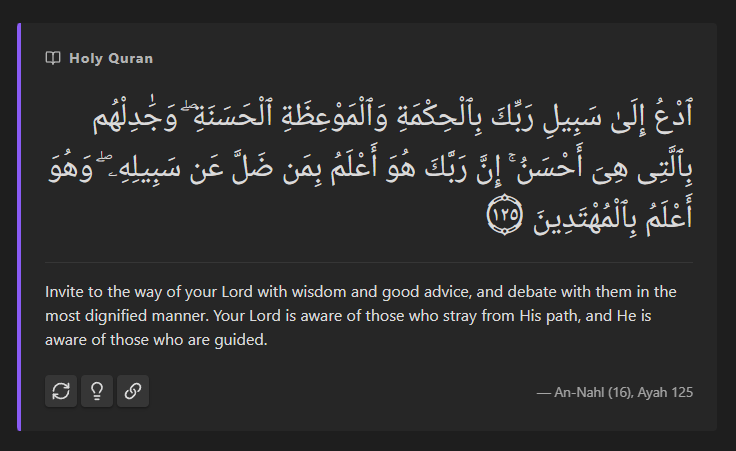
A simple, native-feeling Obsidian plugin that allows you to embed a dynamic card that retrieves a random verse from the Holy Quran every time you open your note. It features custom styling, automatic translation fetching, and Uthmanic font support.
Features
- Code block embedding: Use simple quran code blocks to insert verses. These refresh everytime you open your note, perfect for your home page or other dashboards.
- Dynamic styling: Customize background colors, accent borders, fonts, text sizes directly from the settings.
- Translation support: Choose from multiple languages and specific translation editions (powered by the Al Quran Cloud API).
- Tafsir commentary: Click on the button for your tafsir of choice on that verse, right in Obsidian.
- Copy to clipboard: Easily copy the Arabic text and translation for use elsewhere.
Usage
Simply insert the following code block into your note:
	```quran-verse
	```
Installation
From Community Plugins (Pending Review)
- Open Obsidian Settings.
- Go to Community plugins > Browse.
- Search for "Random Quran Verse".
- Click Install, then Enable.
Manual Installation
- Download the latest release (main.js, manifest.json, styles.css).
- Create a folder named random-quran-verse in your vault's .obsidian/plugins/ directory.
- Move the downloaded files into that folder.
- Reload Obsidian and enable the plugin in Community plugins.
Planned Features
- More Arabic font choices.
- Increased customization options.
- Compact version of verse card.
Attributions
This plugin would not be possible with the incredible free APIs out there for the Quran.
Al Quran Cloud APIs
The Quran verses are retrieved using the Al Quran Cloud APIs. An open-source Quran API made by the Islamic Network and respective contributors.
spa5k Tafsir API
The tafsir commentaries are retrieved from the open-source spa5k tafsir API.
License
This project is licensed under the MIT License.
For plugin developers
Search results and similarity scores are powered by semantic analysis of your plugin's README. If your plugin isn't appearing for searches you'd expect, try updating your README to clearly describe your plugin's purpose, features, and use cases.