Furigana Pro
pendingby TBR117
Rich furigana rendering with auto kanji→hiragana, custom styling, and visibility toggle.
Furigana Pro — Obsidian Plugin
An enhanced continuation of obsidian-markdown-furigana by Steven Kraft, with richer rendering, automatic kanji→hiragana generation, full appearance customisation, and a visibility toggle.
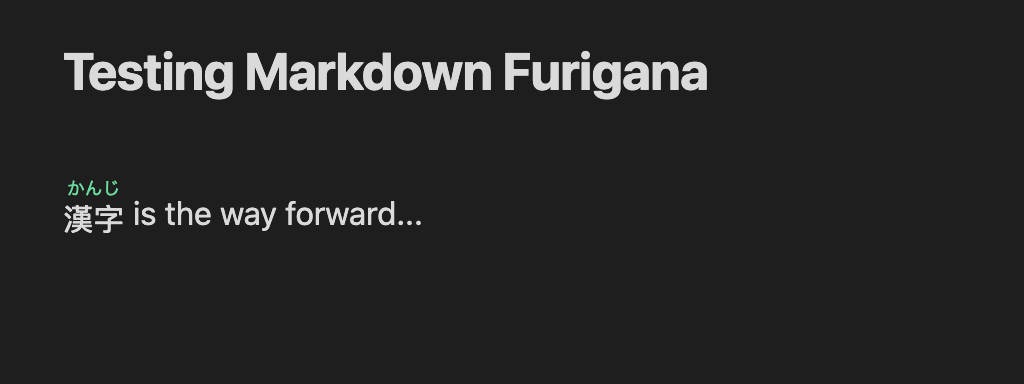
Furigana Pro renders {kanji|reading} syntax as proper text with the reading above the kanjis in Obsidian's Reading View, Live Preview, and Source Mode.
On the desktop version of Obsidian it can also generate the readings for you automatically using a bundled Japanese morphological analyser.
Table of Contents
- Syntax
- Commands
- Settings
- Auto-Reading (kuromoji)
- Installation
- Development & Deployment
- Requirements
- Credits
Syntax
Write furigana inline using curly braces. Both ASCII and full-width (IME-friendly) brackets are accepted.
Whole-word annotation
{漢字|かんじ}
A single reading is placed above the entire base word.
Per-character annotation
{漢字|かん|じ}
The base text comes first, followed by one reading per character. The number of readings must match the number of base characters.
Non-Japanese readings
{北京|Běi|jīng}
{漢字|kanji}
{カタカナ|katakana}
Any script works as a reading — romaji, pinyin, bopomofo, etc.
Full-width bracket equivalents
All examples above that use {, |, } can also be written with their full-width equivalents {, |, }, which are easier to type on a Japanese IME without switching input modes.
Commands
Access all commands via Settings → Hotkeys and search for Furigana Pro, or open the Command Palette (Cmd/Ctrl + P).
| Command | Description |
|---|---|
| Annotate Japanese at cursor | Automatically wraps Japanese text with furigana using kuromoji. Detects context: annotates a selection, completes a partial {kanji| block, or wraps the word under the cursor. |
| Toggle furigana visibility | Instantly shows or hides all furigana without disabling the plugin. State is persisted. |
| Remove furigana from selection | Strips {kanji|reading} syntax from the selected text, leaving only the base kanji. |
| Insert furigana template | Inserts a blank {|} at the cursor so you can type manually. |
A ribbon icon (Languages) also triggers Annotate Japanese at cursor for quick access.
Settings
Open Settings → Furigana Pro to configure the plugin.
Rendering
| Setting | Default | Description |
|---|---|---|
| Show furigana in Source Mode | On | Render decorations while editing in Source Mode. |
| Show furigana in Live Preview | On | Render decorations in Live Preview. |
Appearance
All appearance settings write CSS custom properties to the document and take effect instantly — no reload required.
| Setting | Default | Description |
|---|---|---|
| Furigana font size | 0.6 em | Size of the reading text, relative to the base text. |
| Furigana opacity | 100 % | Opacity of the reading text when visible. |
| Furigana color | inherit | Color of the reading text. Click ↺ to inherit from the active theme. |
| Furigana font family | inherit | Font family for the reading text, e.g. "Noto Sans JP", sans-serif. |
| Base text color | inherit | Color of the kanji/base text. Click ↺ to inherit from the active theme. |
| Base text font family | inherit | Font family for the kanji/base text, e.g. "Noto Serif JP", serif. |
Auto Reading
| Setting | Default | Description |
|---|---|---|
| Enable auto kanji → hiragana | On | Use the bundled kuromoji analyser to generate readings automatically. Desktop only. Requires the dict/ folder to be present in the plugin directory. |
Auto-Reading (kuromoji)
When Enable auto kanji → hiragana is on, the Annotate Japanese at cursor command uses kuromoji — a Japanese morphological analyser — to tokenise text and look up the hiragana reading for each kanji token.
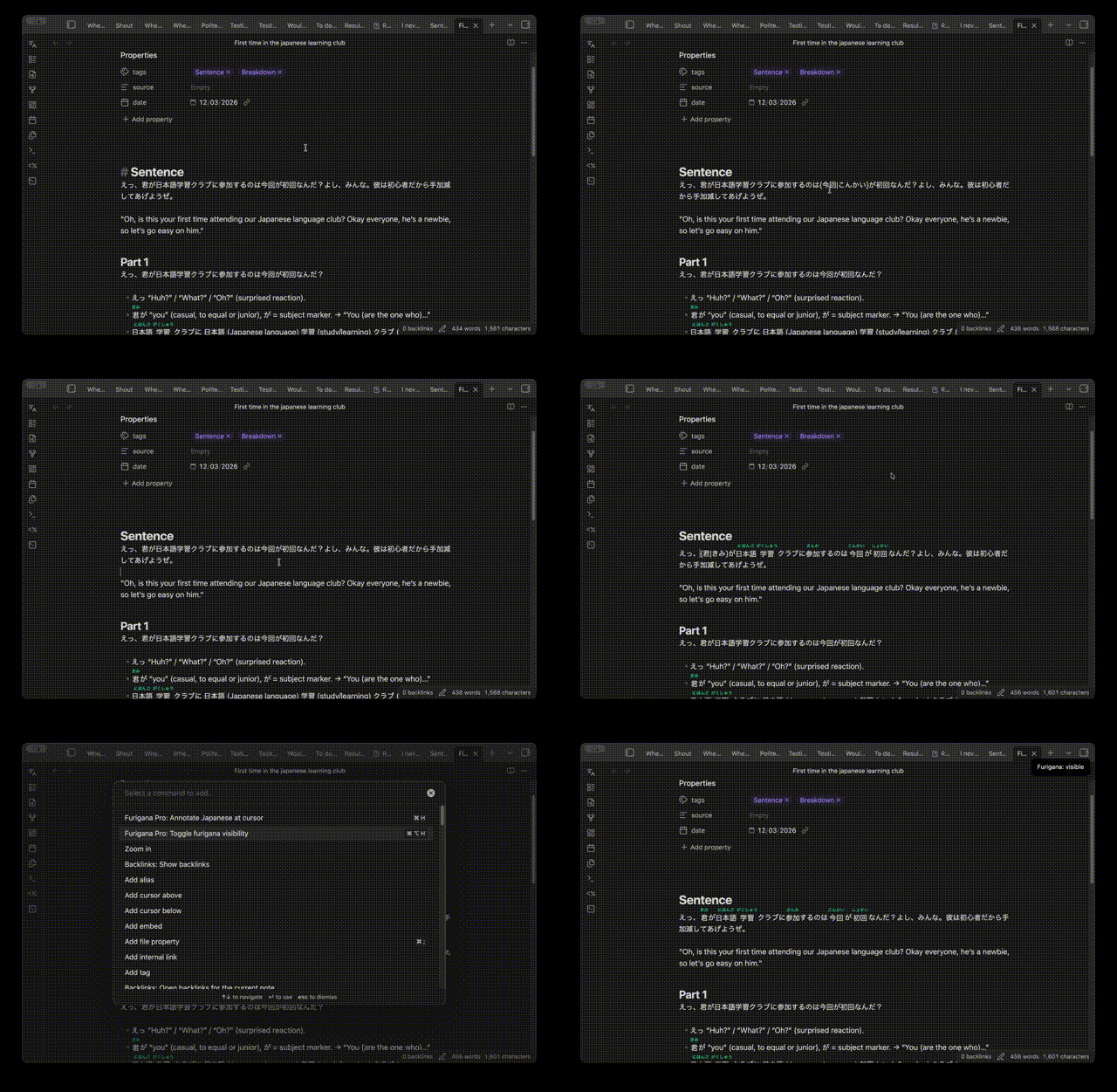
How it works:
- The selected text (or word at the cursor) is tokenised into morphemes.
- Tokens that contain kanji receive their reading, converted from katakana to hiragana via wanakana.
- Pure kana, punctuation, and Latin tokens are passed through unchanged.
- The result is written back as
{surface|hiragana}syntax.
Performance:
- The dictionary is pre-warmed in the background when the plugin loads, so the first annotation command is fast.
- The dictionary (~17 MB) must be present in
.obsidian/plugins/Markdown-Furigana/dict/. See Installation.
Mobile: Auto-reading is not available on mobile (no file-system access for kuromoji). All other features — rendering, manual annotation, visibility toggle — work on mobile.
Installation
Manual installation
- Download or build
main.js,manifest.json,styles.css, and thedict/folder (see Development & Deployment). - Create the plugin folder inside your vault:
<vault>/.obsidian/plugins/Markdown-Furigana/ - Place the following files there:
.obsidian/plugins/Markdown-Furigana/ ├── main.js ├── manifest.json ├── styles.css └── dict/ ├── base.dat.gz ├── cc.dat.gz ├── check.dat.gz ├── tid.dat.gz ├── tid_map.dat.gz └── … - In Obsidian open Settings → Community Plugins, disable Safe Mode if prompted, and enable Furigana Pro.
The
dict/folder is required for auto-reading. If you only need manual syntax rendering, you can omit it and disable Enable auto kanji → hiragana in settings.
Development & Deployment
Prerequisites
- Node.js ≥ 18
- npm
Setup
git clone https://github.com/your-username/Markdown-Furigana.git
cd Markdown-Furigana
npm install
npm run copy-dict   # copies kuromoji dictionary files into dict/
Scripts
| Script | Command | Description |
|---|---|---|
| Build | npm run build | Production bundle → main.js |
| Watch | npm run dev | Rebuild on every file save |
| Copy dict | npm run copy-dict | Copy kuromoji .dat.gz files from node_modules to dict/ |
| Deploy | npm run deploy | Build and copy main.js, styles.css, manifest.json to your Obsidian plugin folder |
Configuring the deploy target
Edit the deploy script in package.json to point at your vault's plugin folder:
"deploy": "rollup --config rollup.config.mjs --environment BUILD:production && cp main.js styles.css manifest.json \"/path/to/your/vault/.obsidian/plugins/Markdown-Furigana/\""
Then a full build-and-install is just:
npm run deploy
Reload the plugin in Obsidian (Settings → Community Plugins → toggle off/on, or use Reload app without saving from the Command Palette).
Note: The
dict/folder only needs to be copied once (or when upgrading kuromoji). It does not change between builds.
Requirements
| Requirement | Version |
|---|---|
| Obsidian | ≥ 1.4.0 |
| Node.js (dev only) | ≥ 18 |
Credits
Furigana Pro is an improved continuation of obsidian-markdown-furigana by Steven Kraft, which pioneered the {kanji|reading} syntax for Obsidian.
Improvements in Furigana Pro:
- Automatic kanji → hiragana generation via kuromoji
- Per-character annotation (
{漢|かん|字|じ}) - Full-width bracket support (
{|}) for IME users - Live Preview and Source Mode rendering (CodeMirror 6)
- Full appearance customisation via CSS variables
- Furigana visibility toggle (show/hide without disabling the plugin)
- Smart cursor-context annotation command
Dependencies:
- kuromoji — Japanese morphological analyser (Apache 2.0)
- wanakana — Kana conversion (MIT)
- Obsidian API (MIT)
For plugin developers
Search results and similarity scores are powered by semantic analysis of your plugin's README. If your plugin isn't appearing for searches you'd expect, try updating your README to clearly describe your plugin's purpose, features, and use cases.