Bases Lock
pendingby tcyeee
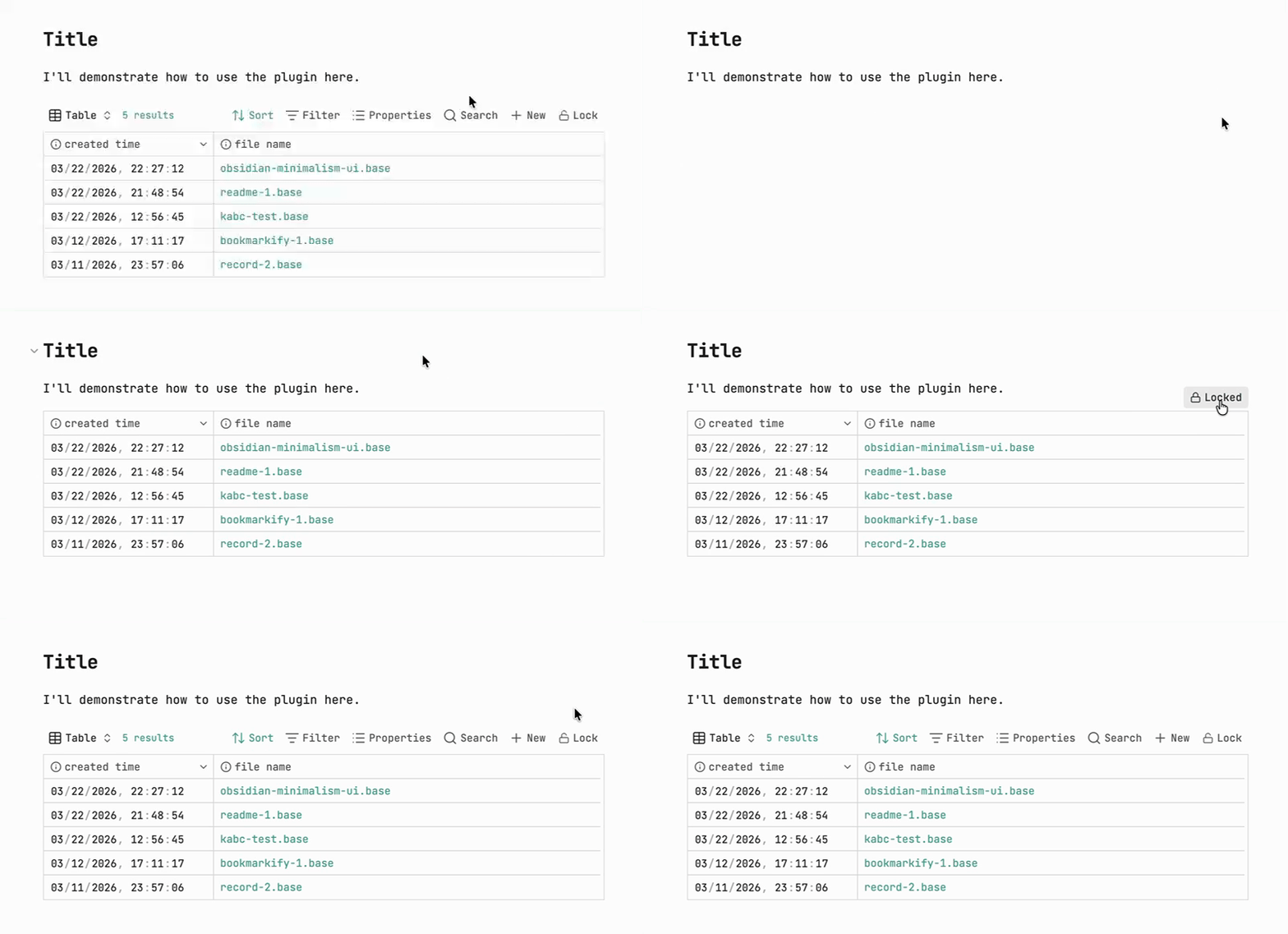
Hides the action bar at the top of the Bases view.





A small Obsidian plugin to hide the Obsidian Bases toolbar and lock header interaction on demand.
You can quickly switch the state by clicking the Lock / Unlock button.
Note: The plugin only works in Reading view.
⬇️ Installation
From community plugins (recommended)
You can install this plugin directly from Obsidian’s community plugins browser:
- Open Obsidian and go to Settings → Community plugins
- Select Browse and search for “Bases lock”
- Click Install, then enable the plugin
You can also install it directly from the community plugins page:
Install from community plugins
Manual install (local/dev build)
- Create the plugin folder inside your vault:
<Vault>/.obsidian/plugins/obsidian-bases-lock/
-
Copy these files into that folder:
main.jsmanifest.jsonstyles.css
-
Open Obsidian:
- Go to Settings → Community plugins → Installed plugins
- Enable Bases Lock
-
Make sure the official Bases core plugin is enabled.
⭐ Usage
- Move your mouse over a Base; a locked button will appear.
- Click it to toggle lock / unlock.
Development & build
- Install dependencies:
npm install
- Development mode (watch build):
npm run dev
- Production build:
npm run build
After building, the latest main.js will be generated in the plugin root folder for Obsidian to load.
Notes
- The plugin only renders the button and controls toolbar / header behavior in Reading view.
- The selectors (such as
.bases-toolbar,.bases-header,.bases-thead, etc.) depend on the current Obsidian Bases DOM structure:- If a future Obsidian update changes these classes, you can inspect the actual classes via DevTools and adjust the selectors in
styles.css.
- If a future Obsidian update changes these classes, you can inspect the actual classes via DevTools and adjust the selectors in
- The plugin only looks at the
.baseembed syntax (|x/|o) in the current document and does not scan or modify other notes.
Design rationale
Assume src/a.base is embedded in any of the following forms:
![[src/a.base]]
After clicking the button:
- From unlocked → locked
- Any of the forms above will be normalized to:

- If there was no display name (for example
![[src/a.base]]), the file name (without the.basesuffix) will be used:
![[src/a.base]] → 
- From locked → unlocked
- If the current syntax is
, it will be changed to:
- If the current syntax is

At the same time:
x→ hide toolbar + disable.bases-theadclick, button text shows lockedo→ restore toolbar and header interaction, button text shows unlocked
For plugin developers
Search results and similarity scores are powered by semantic analysis of your plugin's README. If your plugin isn't appearing for searches you'd expect, try updating your README to clearly describe your plugin's purpose, features, and use cases.