Paper Summary
pendingby Cho, Min Kyu
Generate structured paper summary notes from PDFs.
Paper Summary
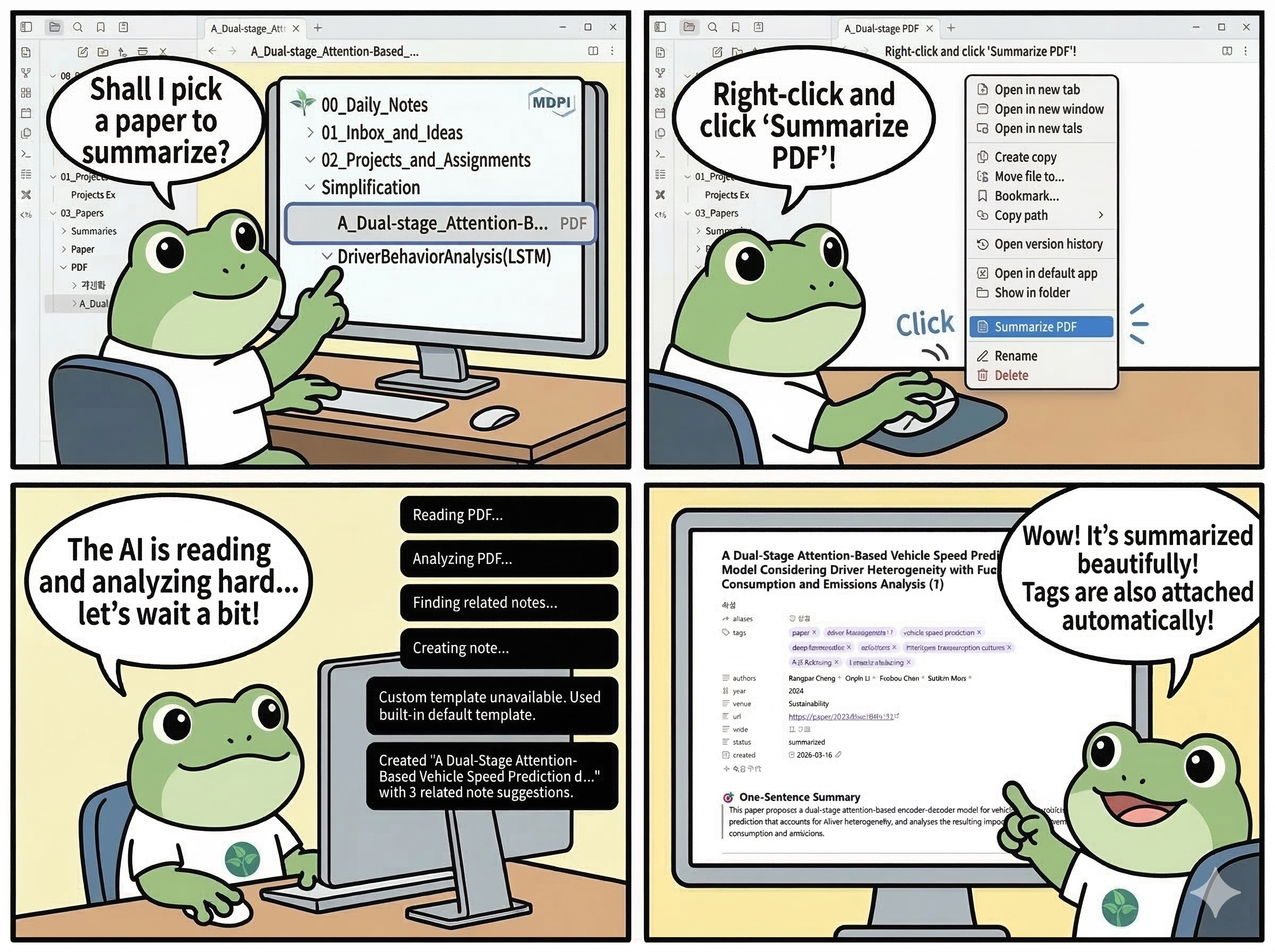
Paper Summary turns a PDF already stored in your Obsidian vault into a structured paper note with frontmatter, summary sections, and local related-paper links.
Inspired by Obsidian Extract PDF, Obsidian LLM Summary, Obsidian AI Tagger, Smart Connections, and Paper Clipper.
Features
- Summarize a vault PDF into a ready-to-read Markdown note from the command palette or the PDF file menu.
- Generate a consistent built-in paper note with frontmatter, summary sections, and related-note links.
- Use the built-in template or a custom vault Markdown template with placeholder-based rendering.
- Choose output language for generated summary prose: English, Korean, Auto, or Custom.
- Add local paper-to-paper links using tags, title similarity, author overlap, venue and year signals, and section-keyword overlap.
- Keep filenames safe for Obsidian and automatically create
name (1).md,name (2).md, and so on when a target name already exists.
Supported Providers
openai: standard OpenAI-style hosted API path.openrouter: OpenAI-compatible path plus OpenRouter-specific routing options.gemini: Google's OpenAI-compatible Gemini endpoint.claude: Anthropic's OpenAI compatibility layer. Structured output is best-effort here.ollama: local OpenAI-compatible Ollama endpoint. Behavior depends on the installed model and runtime.others: generic OpenAI-compatible endpoint for custom providers and gateways.
Paper Summary currently uses one OpenAI-compatible request pipeline for all providers, with OpenRouter as the only provider that adds explicit request extras.
Installation
Paper Summary currently documents manual release installation as the primary path.
- Download
manifest.json,main.js, andstyles.cssfrom the latest release. - Create this folder inside your vault:
<your-vault>/.obsidian/plugins/paper-summary/
- Copy the three release files into that folder.
- In Obsidian, open
Settings -> Community plugins. - Enable Paper Summary.
How to Use
- Put the PDF you want to summarize inside your vault.
- Open
Settings -> Paper Summaryand configure at least your provider, API key if your provider needs one, and model. - Optionally set the output language, output template, output folder, and paper notes scope for related linking.
- Open the PDF and run either
Summarize active PDFfrom the command palette orSummarize PDFfrom the PDF file menu. - The plugin extracts text, analyzes the paper, finds related paper notes, and creates a Markdown note in your output folder.
- If
Open generated noteis enabled, the new note opens automatically.
For built-in notes, you can later run Refresh related paper links on the active summary note to recompute the Related Notes section from your current vault papers.
Settings Overview
Provider,API key,Base URL, andModelcontrol the remote API endpoint and model selection.Structured output modechooses betweenJSON objectandJSON schema.JSON objectis the safer compatibility default.Output languagecontrols generated summary prose.Automeans the paper's dominant language, not the Obsidian UI language.Output templatelets you keep the built-in format or point to a custom vault Markdown template.Output foldersets where new paper notes are created.Paper notes scopecontrols which folder is scanned for existing paper summaries when related links are generated or refreshed.Maximum PDF pagesandMaximum characterslimit extraction size before analysis.Paper tag,Default status, andRelated notes limitshape the generated note metadata and linking behavior.- OpenRouter adds extra settings for routing, attribution headers, and fallback behavior only when
openrouteris selected.
Generated Note Structure
The built-in note format keeps a stable paper-summary structure.
Frontmatter includes:
aliasestagsauthorssource_pdfsource_pdf_linkreading_statusyearvenueurlcodestatuscreated
The built-in body includes these sections:
- One-Sentence Summary
- Key Contributions
- Methodology & Architecture
- Results & Performance
- Limitations & Future Work
- My Thoughts & Ideas
- Related Notes
reading_status defaults to unread. status stays separate and uses your configured default status. The source PDF path and wiki link are written into frontmatter only.
Limitations and Troubleshooting
- The plugin works on PDFs that are already inside your vault.
claude,ollama, andothersare best-effort through the current OpenAI-compatible request path. Some structured-output behaviors can vary by provider or model.Custom templatemode falls back to the built-in template if the template path is missing, unreadable, empty, or invalid.Refresh related paper linksonly rewrites the built-in paper-note format. It does not rewrite custom-template notes.- Related-note suggestions are local heuristic matches, not embeddings. Common tags or weak metadata can still produce imperfect links.
- If generation fails, first check the provider, API key, base URL, model, and whether the selected model supports your chosen structured output mode well enough.
More Details
For plugin developers
Search results and similarity scores are powered by semantic analysis of your plugin's README. If your plugin isn't appearing for searches you'd expect, try updating your README to clearly describe your plugin's purpose, features, and use cases.