Scholar
approvedby lolipopshock
Manage research library and streamline research workflow.
Obsidian Scholar
Usage
Streamlined Library Management
Add Paper from External Link
Upon seeing a paper on the web (Slack, Twitter, etc.), you can add the paper to your local library: running this tool can download the paper PDF, and create the corresponding paper note with paper metadata.
https://github.com/user-attachments/assets/792f4612-5bbf-4885-9e04-24ece50e6729
Search and Retrieval
You can quickly search and retrieve the papers in your library, as well as optionally query and find papers from SemanticScholar directly if they are not in your library.
https://github.com/user-attachments/assets/55470ce5-5081-4bcd-b033-a762bacd8c2d
- When you select between papers, you can hit
Tabto show and hide the paper abstract. - If you want to use SemanticScholar to search the paper, you can hit
shift + enter
Enhanced Paper Reading
Check Paper Reference
Obsidian Scholar allows you checking the details of the referred papers without leaving the tool.
https://github.com/user-attachments/assets/95f6749c-dd54-4c98-a2d3-18ae5e08fe05
Copy Paper BibTex
https://github.com/user-attachments/assets/10668d77-e681-4c68-9147-38a83a30cfa5
Google-Scholar PDF reader like popover and library management
https://github.com/user-attachments/assets/4b4681d8-6f8e-4e8f-b16a-7e8e8c21934e
When you have a paper PDF it can display the citation information directly in-place. It allows for checking the paper in the obsidian scholar ecosystem.
[!Note] This is used in conjunction with the amazing PDF Reader plugin tool Obsidian PDF++. Right now I am trying to add the PR into their repo (track the status here); for now you can install the plugin on your own https://github.com/lolipopshock/obsidian-pdf-plus/tree/add-scholar-support.
Note-taking with Obsidian PDF++
https://github.com/user-attachments/assets/06f3f2e7-9a33-45c3-bb82-afd7f8ed36fb
By enabling auto-paste in Obsidian PDF++, the note will be automatically synced to the corresponding scholar note file for a paper PDF.
Installation
Install from Obsidian Plugin Library
This plugin is released on the Obsidian Plugin Library. You can install it directly from the Obsidian app by searching Scholar in the community plugins.
Manual Installation
- Open the
.obsidian/pluginsfolder in your vault - Create a folder called
scholar - Download the three files
manifest.json,styles.css, andmain.jsfrom the latest release, and put the files in the.obsidian/plugins/scholarfolder you just created. - Open Obsidian and in
settings > community plugins, findScholarand enable the plugin. Be sure to change theScholarsettings properly before use.
Documentation
Settings
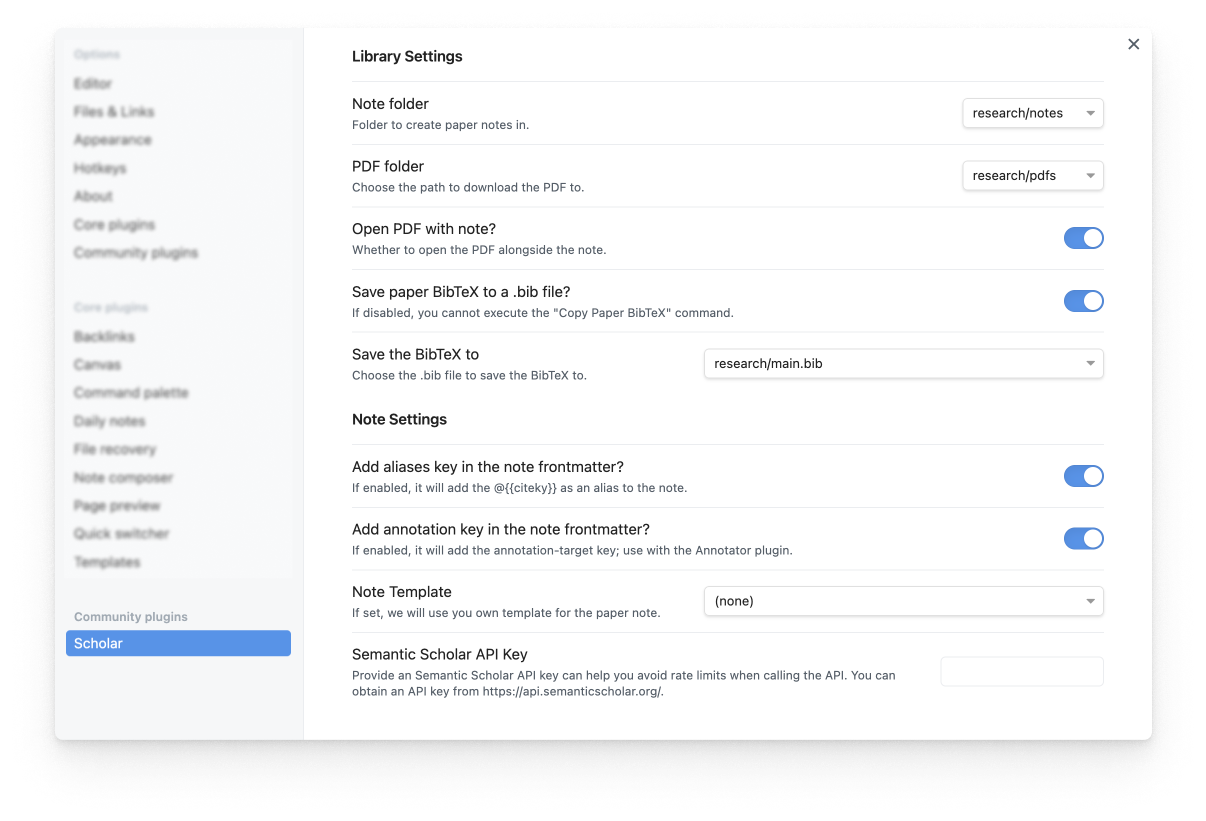
- Adding an SemanticScholar API Key Sometimes you might experience rate limiting when querying papers from SemanticScholar. To avoid this, you can add your own SemanticScholar API key in the settings. You can obtain the API Key here.
Motivation and Acknowledgement
The goal of Obsidian Scholar is to create a smooth experience that spans from paper reading, note taking, and reflection and synthesis. The construction is based on two powerful ideas.
- Annotated Bibliography that takes short notes for papers and summarizes the key points in your personal bibliography.
- Zettlekasten note taking system that aims to take atomic and short notes and link them together.
In Obsidian Scholar, we treat each paper as an individual note---we make it painless to ingest the paper PDF and create the note file---and the Obsidian app makes it easy to link paper notes and helps you to reflect and synthesize the knowledge.
The development of the tools are inspired by many predecessors that are implemented in EMACS.
- citar: A reference manager work in EMACS.
- elfeed: A RSS reader in EMACS.
- elfeed-score: A RSS reader with scoring function in EMACS.
Also thanks the following people for their excellent blogposts and tutorials illustrating their paper reading workflow:
- Managing a research workflow (bibliographies, note-taking, and arXiv) by Ahmed Khaled
- Managing ArXiv RSS Feeds in Emacs by Chris Cundy
Some of the code is based on a previous project called paper-note-filer by Claudia Hauff.
API Documentation
The Scholar plugin exposes a JavaScript API that can be used by other plugins or through Obsidian URIs. Access the API through this.app.plugins.plugins.scholar.api.
Available Methods
createPaperNoteFromUrl(url: string)
Creates a paper note from a URL. Supports ArXiv and SemanticScholar URLs.
Parameters:
url(string): The URL of the paper to create a note from
Returns: Promise<void>
Example:
await this.app.plugins.plugins.scholar.api.createPaperNoteFromUrl("https://arxiv.org/abs/1706.03762");
isPaperInLibrary(searchParams: PaperLibrarySearchParams)
Checks if a paper exists in your library and returns detailed information about it.
Parameters:
searchParams(object): Search parameters with the following optional fields:url?: string- Paper URLtitle?: string- Paper titlecitekey?: string- BibTeX cite keybibstring?: string- BibTeX string
Returns: Promise<PaperLibraryCheckResult>
isInLibrary: boolean- Whether the paper exists in your libraryfilePath?: string- Path to the paper note file (if found)paperData?: StructuredPaperData- Complete paper metadata (if found)
Example:
// Search by title
const result = await this.app.plugins.plugins.scholar.api.isPaperInLibrary({
    title: "Attention Is All You Need"
});

// Search by URL
const result = await this.app.plugins.plugins.scholar.api.isPaperInLibrary({
    url: "https://arxiv.org/abs/1706.03762"
});

// Search by citekey
const result = await this.app.plugins.plugins.scholar.api.isPaperInLibrary({
    citekey: "vaswani2017attention"
});
openPaper(searchParams: OpenPaperParams)
Opens the paper search modal with pre-filled query or creates a paper note directly from URL.
Parameters:
searchParams(object): Search parameters with the following optional fields:title?: string- Paper title to search forbibstring?: string- BibTeX string to parseurl?: string- Paper URL to create note from directly
Returns: Promise<void>
Example:
// Open search modal with title
await this.app.plugins.plugins.scholar.api.openPaper({
    title: "attention is all you need"
});

// Create paper note from URL
await this.app.plugins.plugins.scholar.api.openPaper({
    url: "https://arxiv.org/abs/1706.03762"
});

// Parse BibTeX and open appropriate action
await this.app.plugins.plugins.scholar.api.openPaper({
    bibstring: "Tom B Brown, Benjamin Mann, Nick Ryder, Melanie Subbiah, Jared Kaplan, Prafulla Dhariwal, Arvind Neelakantan, Pranav Shyam, Girish Sastry, Amanda Askell, et al. 2020. Language models"
});
Quick Testing with Obsidian URIs
You can test the API directly through Obsidian URIs. Copy and paste these URLs into your browser (while Obsidian is running) to test the functionality:
Test if a paper is in your library by title:
obsidian://adv-uri?eval=this.app.plugins.plugins.scholar.api.isPaperInLibrary%28%7Btitle%3A%22attention%20transformer%22%7D%29.then%28result%20%3D%3E%20console.log%28result%29%29
Test if a paper is in your library by URL:
obsidian://adv-uri?eval=this.app.plugins.plugins.scholar.api.isPaperInLibrary%28%7Burl%3A%22https%3A%2F%2Farxiv.org%2Fabs%2F1706.03762%22%7D%29.then%28result%20%3D%3E%20console.log%28result%29%29
Create a paper note from ArXiv URL:
obsidian://adv-uri?eval=this.app.plugins.plugins.scholar.api.createPaperNoteFromUrl%28%22https%3A%2F%2Farxiv.org%2Fabs%2F1706.03762%22%29.then%28%28%29%20%3D%3E%20console.log%28%22Paper%20created%22%29%29
Open search modal with pre-filled title:
obsidian://adv-uri?eval=this.app.plugins.plugins.scholar.api.openPaper%28%7Btitle%3A%22attention%20is%20all%20you%20need%22%7D%29.then%28%28%29%20%3D%3E%20console.log%28%22Modal%20opened%22%29%29
Test with BibTeX string:
obsidian://adv-uri?eval=this.app.plugins.plugins.scholar.api.openPaper%28%7Bbibstring%3A%22Tom%20B%20Brown%2C%20Benjamin%20Mann%2C%20Nick%20Ryder%2C%20Melanie%20Subbiah%2C%20Jared%20Kaplan%2C%20Prafulla%20Dhariwal%2C%20Arvind%20Neelakantan%2C%20Pranav%20Shyam%2C%20Girish%20Sastry%2C%20Amanda%20Askell%2C%20et%20al.%202020.%20Language%20models%22%7D%29.then%28%28%29%20%3D%3E%20console.log%28%22Action%20completed%22%29%29
Note: The URI examples above require the Advanced URI plugin to be installed and enabled.
For plugin developers
Search results and similarity scores are powered by semantic analysis of your plugin's README. If your plugin isn't appearing for searches you'd expect, try updating your README to clearly describe your plugin's purpose, features, and use cases.