by Andy Luo
Share the open note, cursor and selection in your vault with pi (npm pi-ide-context).
pi-ide-context
/idefor pi — like Claude Code's IDE integration, but for Neovim, VS Code and Obsidian.


Select text in Neovim (or VS Code / Obsidian), switch to pi — pi already knows which
file you're in, where your cursor is, and what you selected. No copy-paste. No
:PiAsk. It just works.
Install
Pi extension
pi install npm:pi-ide-context
Then /reload in pi.
Neovim plugin (lazy.nvim)
{
  "Andy8647/pi-ide-context",
  lazy = false,
}
VS Code extension
Not published to the marketplace yet — build and install locally:
cd editors/vscode
npm install && npm run build
code --extensionDevelopmentPath="$PWD"   # dev instance, or package + install a vsix
Obsidian plugin
In the community plugin directory — search pi-ide-context under Settings → Community plugins → Browse, or install from community.obsidian.md/plugins/pi-ide-context.
To build from source instead:
cd editors/obsidian
npm install && npm run build
mkdir -p "<vault>/.obsidian/plugins/pi-ide-context"
cp main.js manifest.json "<vault>/.obsidian/plugins/pi-ide-context/"
Then enable pi-ide-context under Settings → Community plugins.
Usage
Nothing connects on its own — you decide per session:
pi starts (no IDE attached, ever)
  ↓
/ide → lists every live editor (nvim / VS Code / Obsidian), wherever it was
started from — no project/cwd filtering; you pick the relevant one
  ↓
status shows `in main.ts`; select lines → `5 lines selected in main.ts`
  ↓
ask pi → context injected automatically (selection fresh for 60s)
  ↓
/ide off (or pick "Disconnect" in the /ide list) → disconnect
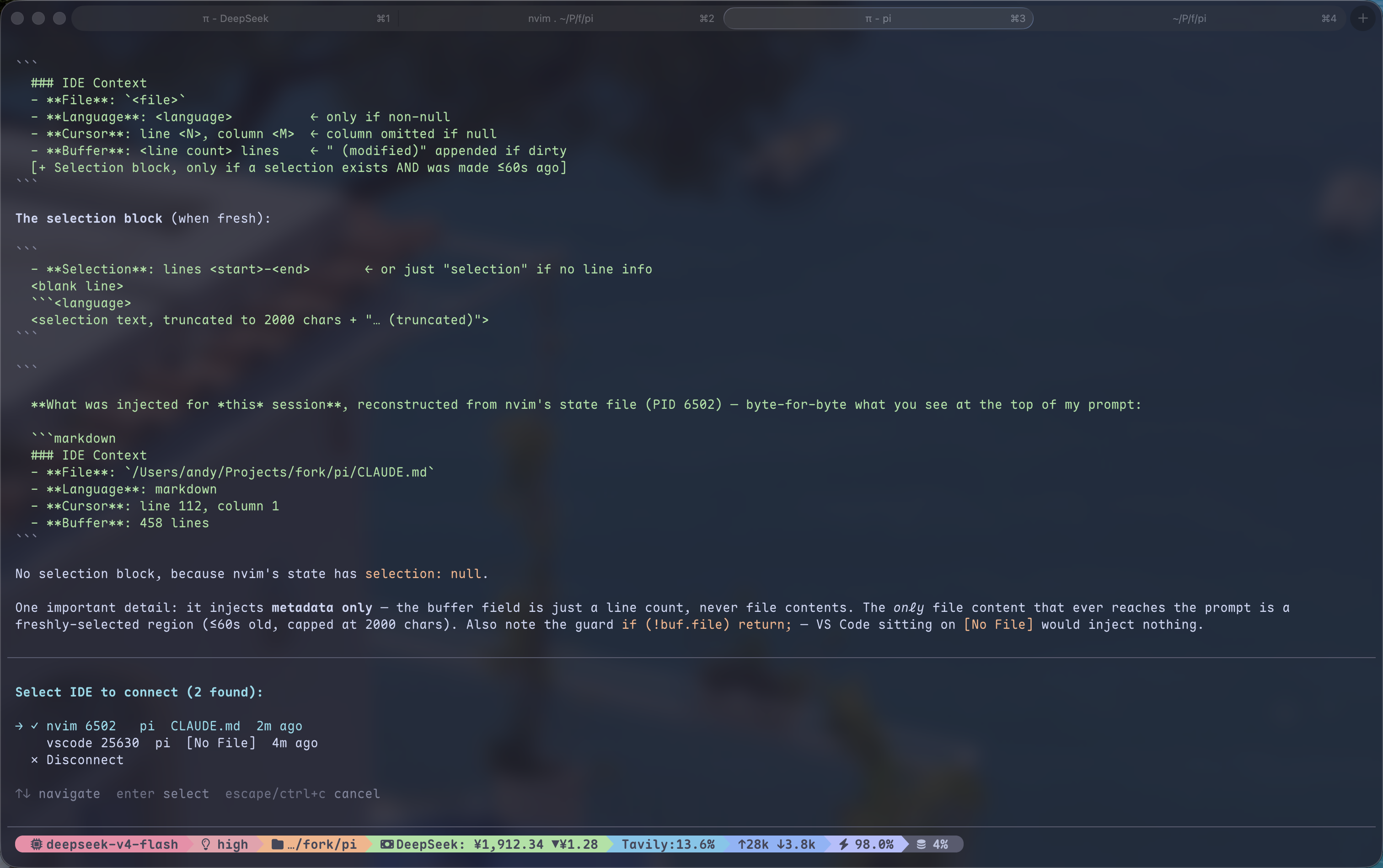
When connected, every message you send to pi automatically includes:
### IDE Context
- File: /Users/andy/my-project/src/main.ts
- Language: typescript
- Cursor: line 42, column 10
- Buffer: 200 lines (modified)
- Selection: lines 40–45
  ```typescript
  const foo = bar();
  // ...
Selection text is injected only while fresh (within 60s of making it); after
that the file/cursor context is still sent but the selection text is not — same
as Claude Code's chip disappearing. When you send a message while a selection
is fresh, the sent message also shows the selection as a gray quote line
(`│ ↳ main.ts:40-45 · …`) inside its own box, so you can see exactly what was
attached. Status text is pure ASCII (no Nerd Font
needed). The `/ide` list shows each editor's directory and launch args
(`nvim pi/` vs `nvim pi-ide-context/`) so several instances are easy to tell
apart; a bare `nvim .` shows the directory name. If the connected editor exits,
the session disconnects with a notice — run `/ide` again to reconnect.

## How it works
┌──────────┐ writes JSON ┌──────────────┐ reads JSON ┌────────┐ │ Neovim │ ─────────────► │ /tmp/pi-ide/ │ ◄──────────── │ pi │ │ autocmd │ debounced │ .json │ before_ │ auto │ │ hooks │ every 200ms │ │ agent_start │ inject │ └──────────┘ └──────────────┘ └────────┘
**Neovim side**: autocmd on CursorMoved / TextChanged / BufEnter / ModeChanged / DirChanged writes
editor state to a JSON file. Zero dependencies — a single Lua file. Sends its launch
args (`argv`) so same-cwd instances can be told apart.

**Pi side**: `before_agent_start` reads the JSON for the connected editor and injects
formatted editor context (lightweight file/cursor/buffer every time; selection text
only while fresh). Connecting is fully manual: `/ide` lists every live editor
without project filtering, publishes `in main.ts` / `N lines selected in main.ts`
through `ctx.ui.setStatus("pi-ide", …)`, and `/ide off` disconnects.

With [pi-starline](https://github.com/Andy8647/pi-starline) installed, set
`"extensionStatuses": { "placements": { "pi-ide": "editor" } }` to move that
text to the editor's bottom-right metadata row instead of the footer.

Full protocol in [`docs/protocol.md`](docs/protocol.md).

## Protocol

Editor state is written to `/tmp/pi-ide/<pid>.json`:

```json
{
  "pid": 12345,
  "cwd": "/Users/andy/my-project",
  "timestamp": 1700000000,
  "app": "nvim",
  "argv": ["pi-ide-context/"],
  "active_buffer": {
    "file": "/Users/andy/my-project/src/main.ts",
    "name": "main.ts",
    "language": "typescript",
    "cursor": { "line": 42, "column": 10 },
    "selection": {
      "start": { "line": 40, "column": 1 },
      "end": { "line": 45, "column": 20 },
      "text": "selected code here...",
      "selected_at": 1700000000
    },
    "modified": false,
    "lines_total": 200
  }
}
Columns are 1-based. selected_at drives the freshness window (60s on the pi
side). The same protocol works for VS Code / Obsidian — just write this JSON. The pi
extension is editor-agnostic; all three clients (Neovim, VS Code, Obsidian)
write it. See editors/ for the VS Code and Obsidian clients.
License
MIT
For plugin developers
Search results and similarity scores are powered by semantic analysis of your plugin's README. If your plugin isn't appearing for searches you'd expect, try updating your README to clearly describe your plugin's purpose, features, and use cases.