Piem
approvedby shangxin
Agentic AI side panel that edits your vault, delegates to subagents, and suggests what to ask next. - This plugin has not been manually reviewed by Obsidian staff.

Piem
Hand over the vault chore you keep putting off.
An AI coding agent that lives in an Obsidian side panel and actually edits your notes.
Not a chat box that hands you text to paste back.




English · 简体中文
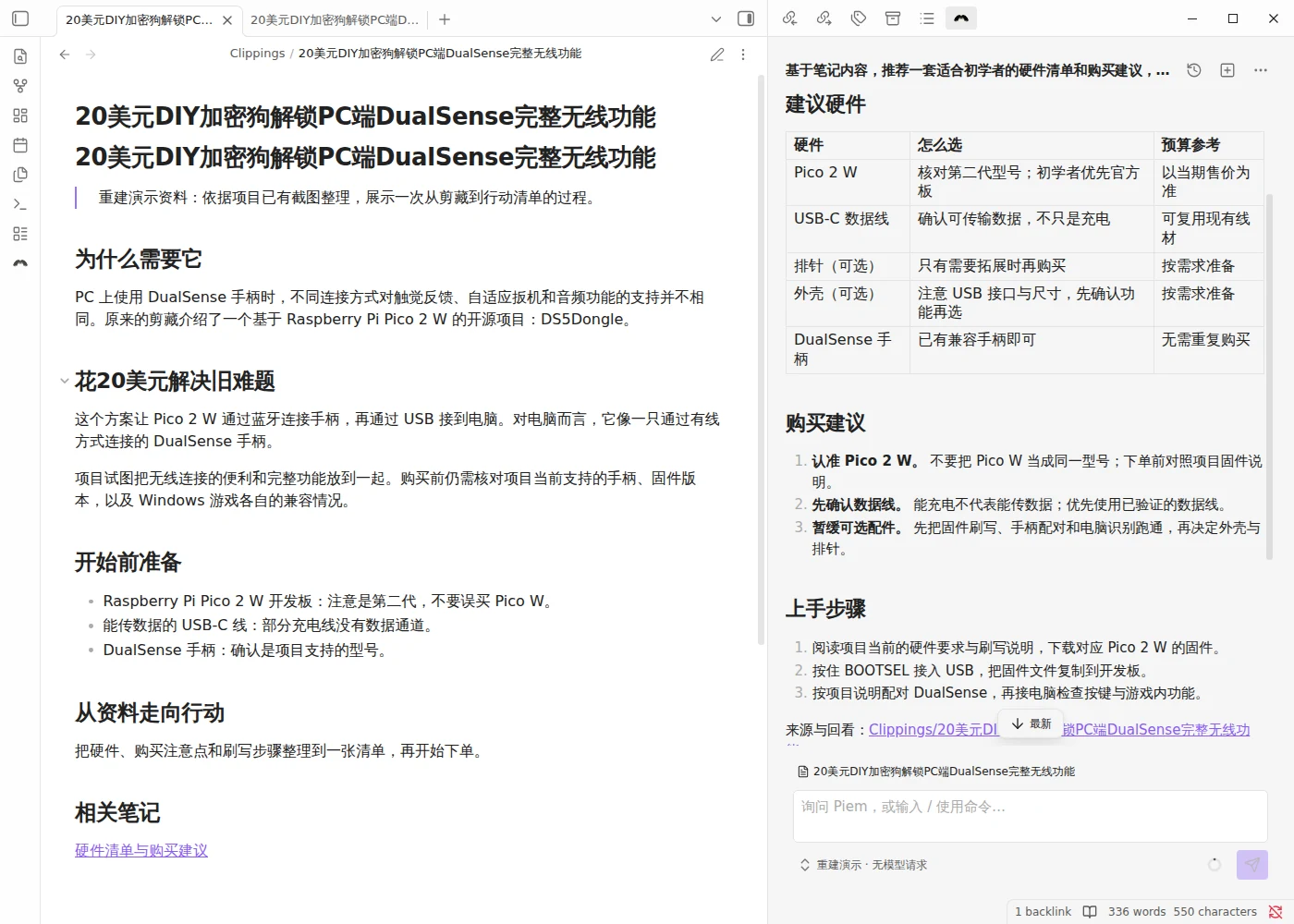
Your note on the left, the agent on the right. Reconstructed demo, real plugin file operations; UI shown in Simplified Chinese.
▶️ One errand, start to finish
You have a clipped article open. Saved months ago, never acted on. You type into the side panel:
Based on this note, recommend a beginner's hardware list with buying advice.
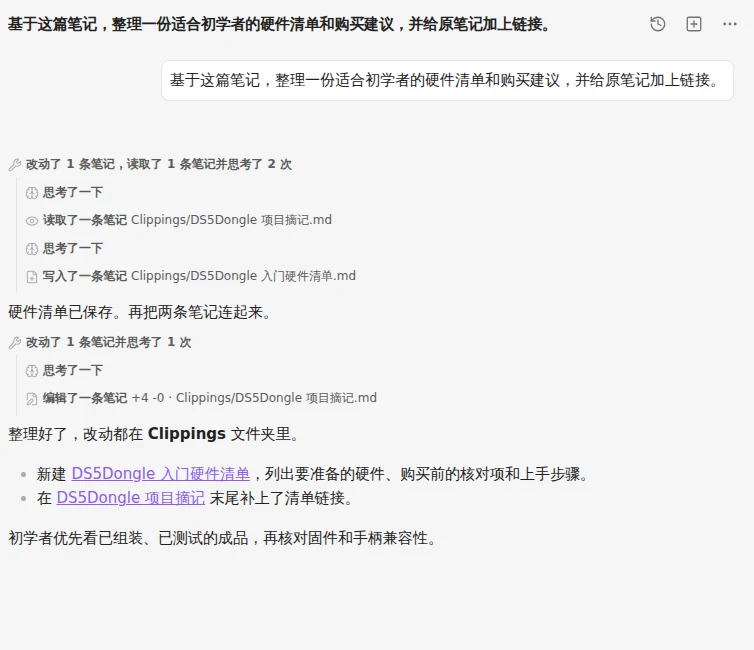
Current UI captured in an isolated Obsidian demo vault. The conversation is scripted; the plugin's read, write and edit tools actually ran.
It read the note. Wrote a new one beside it — hardware table, buying
advice, beginner steps. Then went back to the original and added a
[[wikilink]] pointing at the new note, so the graph knows they belong
together.
Two files touched: a hardware checklist saved, a backlink added (+4 −0 on the original). Thinking and tool calls share folded groups; open one to see each step. The reply names the notes it changed.
You never opened a file. You read the receipt and got on with your day.
That is the whole idea. Piem has hands — two dozen vault tools — and it uses them.
☕ If it just saved you an afternoon
Piem is free, MIT licensed, and staying that way. It is one person's evenings-and-weekends project. If it just did an hour of work you had been dreading, coffee is a fair trade.

疯狂星期四,V 我 50。🍗
🧰 What else it has in hand
| Two dozen vault tools | read, search, write, edit, move, trash, walk links, rewrite frontmatter, sweep tasks, drive the editor — see them all |
| Subagents, in parallel | hand off a self-contained task; isolated transcript, capped at three levels by construction, not by a check — how they work |
| MCP servers | remote tools merge into the agent's own tool set, name-spaced so a transcript never lies about where a tool came from — connect one |
| Skills | reusable instructions from bundled, from your vault, or from the ~/.pi folders you already use with pi. Type / — write one |
| Context that follows you | the note you have open — path and body — rides along with every turn, and the conversation compacts itself when the window fills |
| Actions where you need them | an empty panel offers first moves shaped by your open note; every reply offers copy, insert at cursor, append to the note, or ask again in place |
| Your endpoint, your key | any OpenAI-compatible or Anthropic-messages base URL, sixteen presets to start from, capabilities auto-filled — configure it |
| Images | paste or drop them into the composer and they ride along |
| English & 简体中文 | follows Obsidian's own language, with an override when you want otherwise |
⏱️ Up and running in five minutes
1. Install it. Easiest path is BRAT:
install BRAT from Obsidian's community plugins, then Add beta plugin →
YoungSx/piem. It handles updates for you.
Prefer to do it by hand? Grab main.js, manifest.json, and styles.css from
the latest release, drop them
into <vault>/.obsidian/plugins/piem/, reload Obsidian, and enable Piem
under Settings → Community plugins.
2. Give it a brain. Open Settings → Piem → Models, add a provider and an API key. DeepSeek is the default suggestion; anything OpenAI-compatible or Anthropic-messages works, and the Test button probes your endpoint over the same transport your chats will use.
3. Ask it something. Command palette → Piem: Open chat. Then say the thing you have been avoiding. Ctrl/⌘+Enter sends — or switch it to plain Enter in General.
Building from source instead? CONTRIBUTING.md has the five commands.
📱 Your phone counts as a real computer
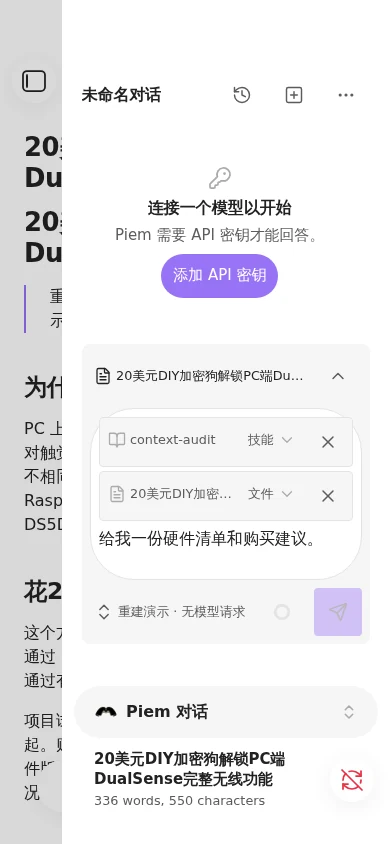
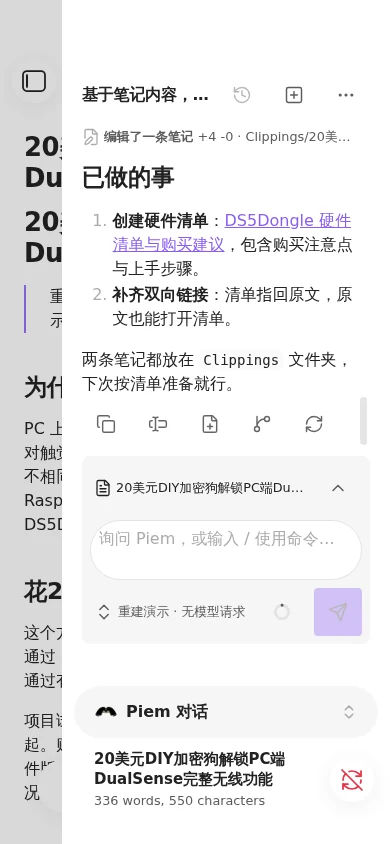
Before and after: a skill and note reference in the input, then the completed example. Both captures use Obsidian's official phone emulation.
Piem ships with isDesktopOnly: false and means it. Tools, subagents, skills,
images — all of it works on a phone. So does streaming, once you turn it on.
That commitment costs something, and it is worth knowing what.
MCP servers are remote only. A stdio transport would spawn child processes and a phone cannot. A capability that cannot exist on mobile gets refused for everyone rather than shipped as a desktop-only surprise.
Token-by-token streaming is off by default. Obsidian's requestUrl is the
only request path free of CORS on every platform, and it has no incremental
read at all — a reply lands whole, when it finishes. Real streaming means the
browser's own fetch, which most endpoints do accept; it is one setting away
(Models → Network → Network transport). It stays the non-default because
whether it works is the endpoint's call rather than ours, and a locally hosted
model usually has to be told to allow it.
🔓 Before you install: it edits without asking
There is no confirmation step before write or edit. No dialog, no diff
to approve. You ask, and your notes change.
That is deliberate, and it is the deal: an agent that asks permission twelve times is an agent you stop using. What it asks of you in return:
- point it at a vault you are willing to have changed, and to have sent to your model provider — a search that touches a file sends that file;
- read the transcript afterwards. Every change came from a tool call, and every tool call is right there, in the open;
- keep the vault in version control, or lean on Obsidian's file recovery.
trash_notegoes through Obsidian's trash, so deletions come back the ordinary way.
Your API keys are sealed with your OS keychain on desktop, and stored in plaintext on mobile — because there is nothing to seal with there, and saying so is better than implying otherwise. Release builds carry signed provenance, so the bytes you downloaded can be traced back to this repo.
Error reports and performance data go to Piem's maintainers by default; you can turn sharing off in Extensions. Content capture is off, but error messages may include note text. Security and privacy explains what is sent.
📚 Go deeper
| The agent's tools | Every tool, what it cannot do, and how subagents work |
| Extending Piem | Skills, prompt templates, MCP servers |
| Settings | Providers and models, chat behavior, commands, where sessions live |
| Security and privacy | What leaves your vault, where keys live, the capabilities Obsidian's review flags |
Contributing? CONTRIBUTING.md for the workflow, AGENTS.md for the conventions.
🙏 Standing on shoulders
Piem runs on @earendil-works/pi-agent-core,
the pi agent runtime — which is why the skills you already wrote for pi work
here unchanged.
It grew from lhr0909/pi-obsidian.
Thank you for that starting point.
MIT licensed. Third-party notices in THIRD_PARTY_NOTICES.md.
For plugin developers
Search results and similarity scores are powered by semantic analysis of your plugin's README. If your plugin isn't appearing for searches you'd expect, try updating your README to clearly describe your plugin's purpose, features, and use cases.