Pimate
approvedby Gorazen
Pimate embeds Pi Coding Agent into Obsidian as an AI collaborator for your vault. - This plugin has not been manually reviewed by Obsidian staff.
Pimate
An autonomous coding & knowledge agent for Obsidian, powered by Pi Coding Agent and Google Antigravity CLI.
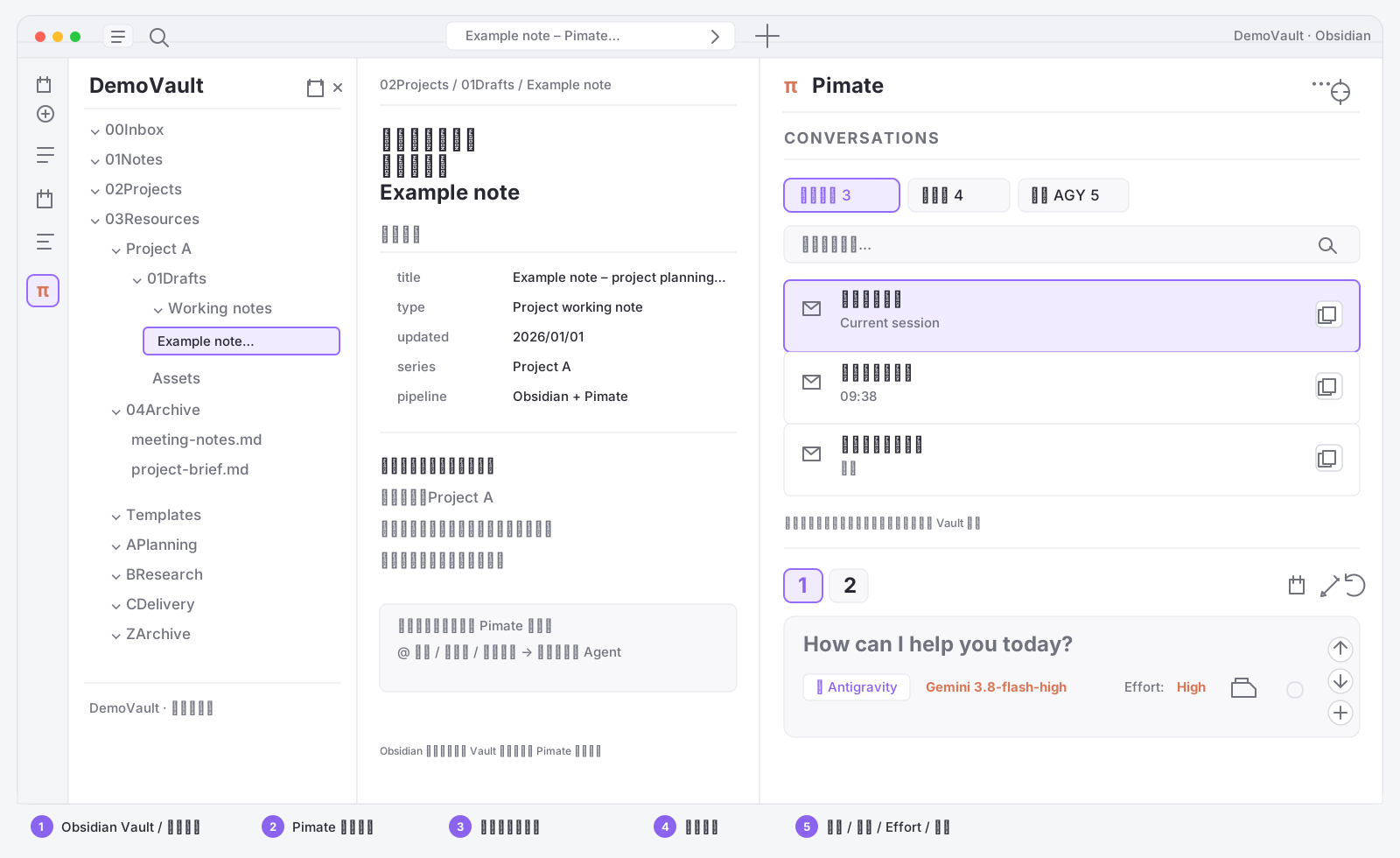




Pimate embeds local coding agents directly into your Obsidian workspace. Rather than acting as a standard text-completion chatbot, Pimate acts as a full-fledged agent capable of inspecting vault files, running grep/find searches, drafting precise diffs, executing shell tools, and maintaining multi-turn task state — all within Obsidian.
The interface map above is based on the current Pimate page in Obsidian: the Vault file tree and active note remain visible on the left, while Pimate runs in the right pane. All names, note text, and counts shown in the image are generic examples and contain no user Vault data.
Actual interface at a glance
- Vault context — Keep the active note and file tree visible while sending a file, folder, or selection to the agent.
- Pimate history — Browse
当前空间(This vault),未归属(Unassigned), or全部 AGY(All AGY) conversations and search by title or preview. - Conversation scope — Move an AGY conversation to
未归属without deleting its native AGY record; assign it back to the current Vault when needed. - Session cards — Keep multiple Pi or Antigravity conversations open as numbered tabs.
- Composer controls — Select the engine, model, effort, file context, and send messages from the bottom composer.
🇨🇳 中文说明 / Chinese Overview
Pimate 是一个面向 Obsidian 的本地自主 AI Agent 协作者插件。它不仅支持在侧栏对话,更具备读写笔记、全库检索、局部 Diff 审查、命令执行与会话分支能力。
- 双引擎驱动(Pi 为主,Antigravity 为辅):
- Pi Coding Agent:主力后端,聚合全网主流模型(Claude 3.7 Sonnet / Thinking、DeepSeek-R1/V3、OpenAI、MiniMax、SiliconFlow 等),支持自定义 Prompt 与本地 Skills 扩展。
- Antigravity CLI:Google 官方自主 Agent 终端,复用系统 Google 账号 OAuth 授权,无需手动配置 API Key 即可使用 Gemini 旗舰模型。
- 无损局部 Diff 审查:选中文本一键发送重构,生成红绿增删对比,逐条审查接受或拒绝,避免暴力覆写整篇笔记。
- Agent 本地工具链:内置
read,write,edit,grep,find,bash,支持跨笔记检索与资料整合。 - 分支探索 (
🌿 Fork):在任意历史消息节点一键分叉会话,方便多思路对比与回溯。 - 长任务智能自检 (Smart Review):可选的规则检测环路,自动识别长任务未完成状态并驱动 Agent 持续执行。
Key Features
- Dual-Engine Architecture:
- Pi Coding Agent (
pi) (Default): Full multi-provider support (Claude 3.7 with extended thinking, DeepSeek-R1/V3, OpenAI, MiniMax, etc.), custom system prompts, and Pi skills. - Antigravity CLI (
agy): Google's autonomous agent CLI. Uses local Google OAuth credentials — no API keys required.
- Pi Coding Agent (
- Vault-Aware Agent Tools: Built-in
read,write,edit,grep,find, andbashexecution. The agent can search notes, check cross-references, and gather context autonomously. - Precision Inline Diff Review: Highlight text in any note and send it to Pimate. Review color-coded diffs before applying changes, protecting your existing document structure and backlinks.
- Visualized Reasoning (Thinking Blocks): Streaming visibility into model reasoning chains, with configurable thinking effort levels (Off / Low / Medium / High / Max).
- Session Branching (
🌿 Fork): Branch off from any previous user turn in your conversation history to explore alternative prompts without losing context. - Smart Review Loop: Automatically inspects assistant completions for unfinished markers and sends continuation prompts until multi-step tasks are truly finished.
- Context Management: Use
@to fuzzy-search and attach vault notes/folders, compact long conversations with/compact, or export sessions as Markdown notes with/export.
Quick Start
Pimate runs as an Obsidian desktop plugin and communicates with your local CLI agent over a background stdio/RPC process.
Option 1: Pi Coding Agent (Recommended · Multi-Provider & Skills)
- Install Pi globally (requires Node.js 18+):
npm install -g --ignore-scripts @earendil-works/pi-coding-agent - Authenticate with your preferred provider:
# Run interactive login pi /login # Or export an API key directly in your shell profile: # export ANTHROPIC_API_KEY=sk-ant-... # export DEEPSEEK_API_KEY=sk-... - Verify Pi works:
pi --version
Option 2: Google Antigravity CLI (Keyless · Google OAuth)
- Install Antigravity CLI (
agy) on your machine. - Authorize Google Account:
Run
agyonce in your terminal and complete the browser OAuth sign-in. - Enable in Pimate:
Open Obsidian → Settings → Pimate → ✦ Antigravity (OAuth). Verify status shows
🟢 Authenticated.
Installation
Via BRAT (Recommended for latest updates)
- Install and enable the Obsidian BRAT plugin.
- Open BRAT settings → click Add Beta plugin.
- Enter repository:
gorazenxu/pimate - Click Add Plugin, then enable Pimate under Community Plugins.
Manual Release
- Download
main.js,manifest.json, andstyles.cssfrom the latest GitHub Release. - Create a folder named
pimateinside<vault>/.obsidian/plugins/. - Place the downloaded files into that directory.
- Reload Obsidian Community Plugins and enable Pimate.
Shortcuts & Commands
| Shortcut / Command | Action |
|---|---|
Enter | Send message (queues follow-up if agent is streaming) |
Shift + Enter | Insert newline in composer |
Esc | Abort current agent response or tool execution |
Ctrl/Cmd + K | Open Slash Command & Skill picker |
Ctrl/Cmd + N | Open a new chat session tab |
Ctrl/Cmd + Shift + D | Jump to the latest diff view |
Ctrl/Cmd + Shift + E | Toggle expand/collapse for tool output |
/compact | Summarize session history to preserve tokens |
/export | Export the current session as a Markdown note |
/reload | Hot-reload extensions and skill templates |
Configuration
Customizable via Obsidian Settings → Pimate:
- Default Engine: Select whether new sessions default to
Pi Coding AgentorAntigravity CLI. - Pi Settings: Set default provider, model ID, thinking effort level, custom system prompts, and API keys.
- Antigravity Settings: Set default Gemini model, effort level, and auto-approve permissions flag.
- Smart Review: Toggle the completion-checking heuristic and configure max auto-continuation turns (1–10).
- Auto-Title: Automatically summarize and rename new sessions after the first prompt.
- Language: Switch UI between English and Simplified Chinese (简体中文).
Security & Permissions
- Local-Only Execution: Pimate runs agent processes directly on your local system as child processes. No intermediary cloud servers are used.
- File System Access (
fs): Used to read/write notes you target, parse@attachments, and store local session indices. - Subprocess Execution (
child_process): Used to spawnpiandagybinaries. The agent can use command tools (likegrep,bash) within your workspace only when instructed. - API Credentials: Stored securely in Obsidian's plugin settings or read from your local environment.
Development
git clone https://github.com/gorazenxu/pimate.git
cd pimate
npm install
npm run dev     # Watch mode
npm run build   # Production build
Feedback & License
- Issues & Features: GitHub Issues
- License: GNU General Public License v3.0 (GPL-3.0)
Created by Gorazen & the Pimate Community.
For plugin developers
Search results and similarity scores are powered by semantic analysis of your plugin's README. If your plugin isn't appearing for searches you'd expect, try updating your README to clearly describe your plugin's purpose, features, and use cases.