Pivi
approvedby shuuul
Bring AI agents into your vault with fine-grained context controls. - This plugin has not been manually reviewed by Obsidian staff.

Pivi — Pi as the Vault Intelligence
An AI agent that lives inside Obsidian — no separate app, no terminal, no coding-mode interruptions. Chat with your notes, edit with precision, and extend through tools built for knowledge work, not software engineering.



Quick start
Install from Obsidian Community Plugins, add an API key in Settings → Pivi, and start chatting.
See Pivi in action
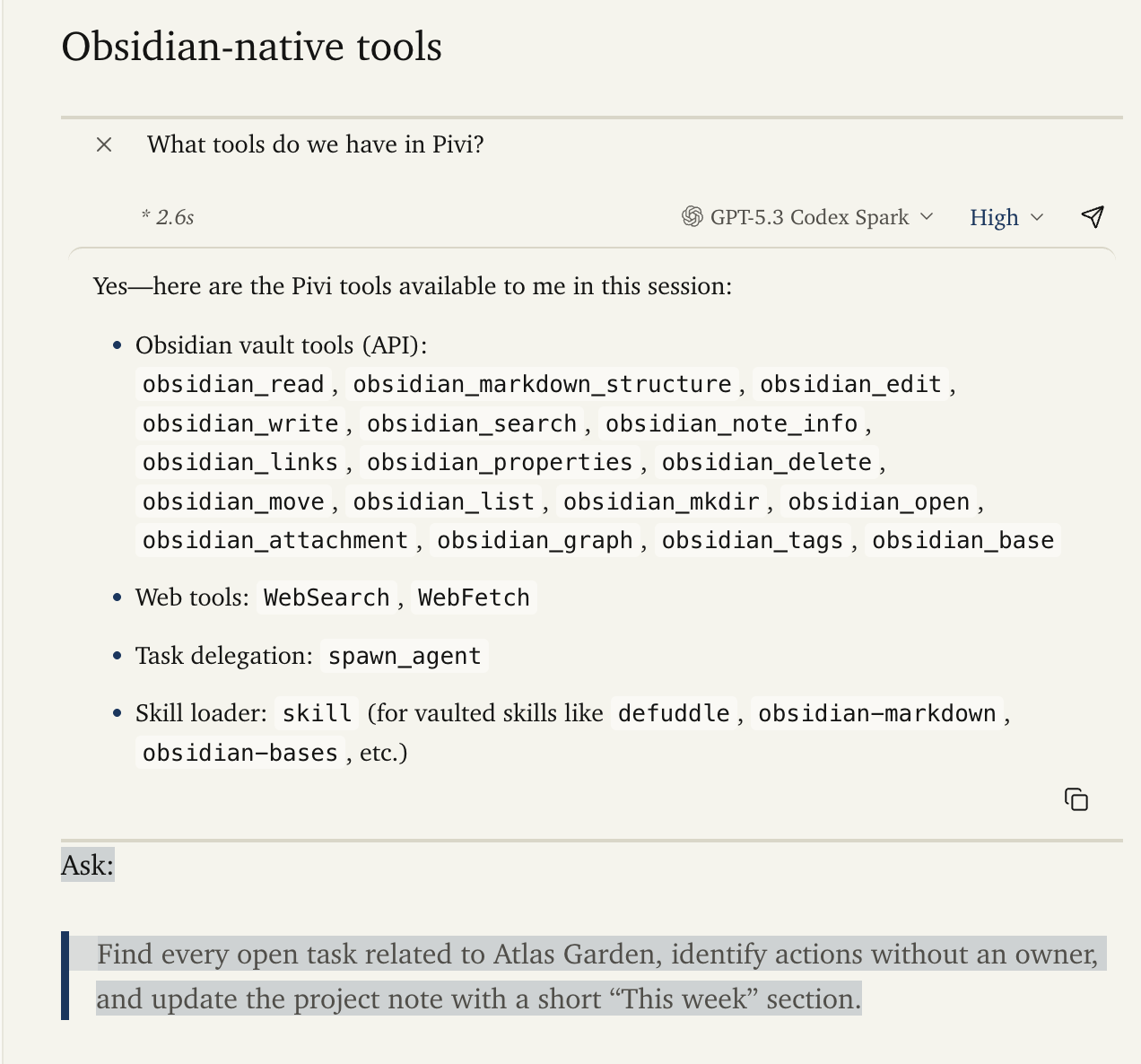
Work from the note already open in Obsidian, then bring in linked notes, vault tools, reusable skills, and commands without leaving the workspace.
|
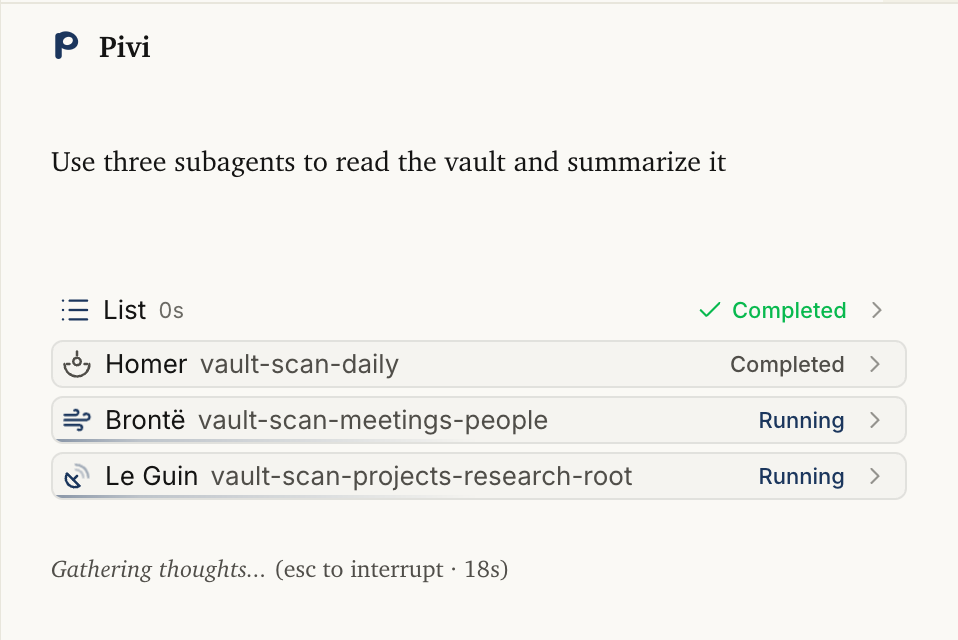
Delegate with subagentsSplit large vault work across concurrent subagents — each with its own objective, tools, and progress — while you keep chatting in the same session. |
|
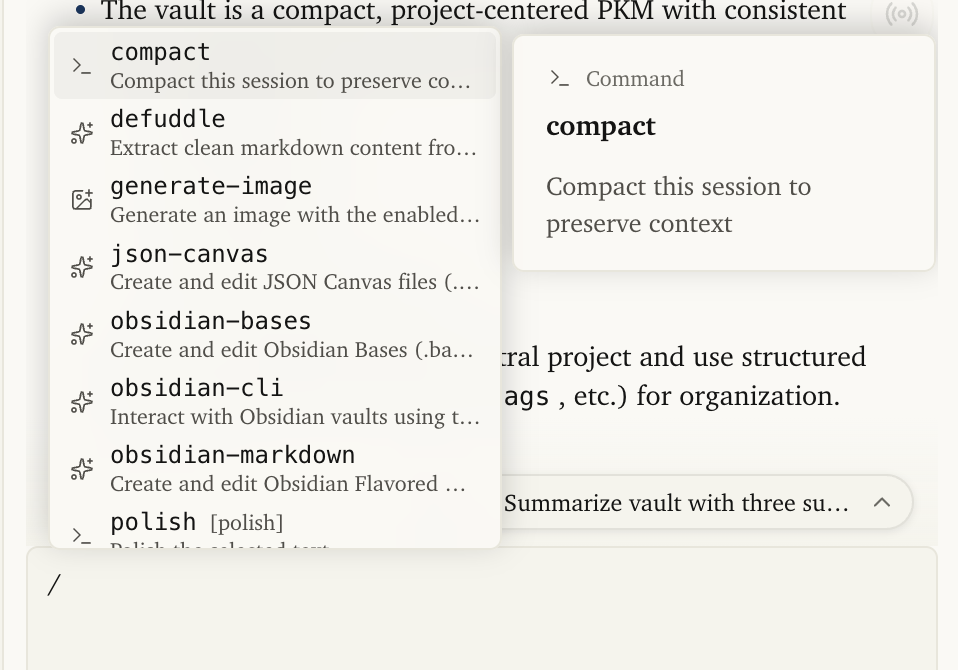
Discover capabilities from the composerType |
|
Edit selections inlineSelect text in an open note and polish, refine, or run vault skills from Pivi's built-in editor toolbar without leaving the editor. |
|
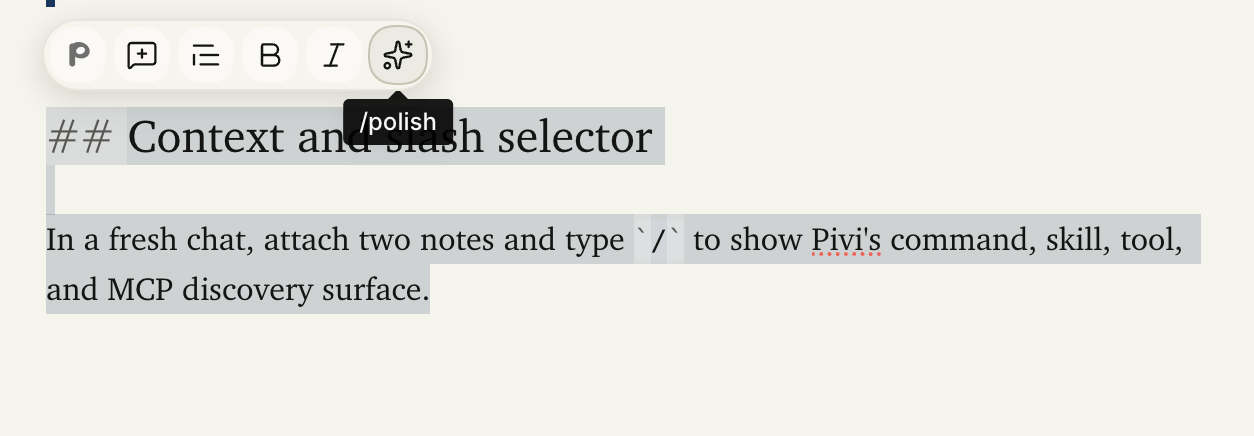
Customize your toolbarEnable and reorder shortcuts in Settings → Toolbar — Pivi commands, vault skills, and Obsidian editor actions appear on selected text in any note. |
Why Pivi?
✦ No separate app, not a repurposed coding agent — Pivi runs inside Obsidian as a vault-native AI — no desktop app, no terminal, no Claude Code / Codex mode. Built on Pi for knowledge work, not software engineering.
✦ Obsidian-native tools — Read, search, edit, link, and manage notes through tools that understand wikilinks, frontmatter, backlinks — not file paths.
✦ Trusted automation — Routine vault-native work does not require coding-agent plan approvals. Higher-risk capabilities are explicit: external reads, Bash commands, and Obsidian command execution show Deny / Allow once / Always approval when no matching grant exists, and Bash and command execution are off by default. Persistent grants stay on this device; command grants match an exact Obsidian command ID. Existing Markdown and Canvas content is snapshotted through Obsidian File Recovery before Pivi mutates it; if that snapshot cannot be created, the mutation is blocked.
✦ Vault skills — Install kepano/obsidian-skills or other Agent Skills into .pivi/skills/ to teach the agent your workflows.
✦ MCP support — Wire in vault-local MCP servers (.pivi/mcp.json), remote servers with OAuth, and use /server or /server/tool slash tokens in chat.
✦ Privacy first — API keys stored in Obsidian's secretStorage (Electron safeStorage). Or run fully local with Ollama, LM Studio, or llama.cpp. No Pivi telemetry.
Features
💬 Sidebar chat
Multi-tab conversational AI with streaming, file context, slash commands, and model switching. Sessions persist as Pi-compatible JSONL under .pivi/sessions/ — resume a complete linear session or fork a new session file from an earlier entry.
Attach vault files or explicitly allowed external folders as turn context. Select text in an open note to add its exact range to the input panel as a removable context badge. External folders require external read access and can be pinned on this device without syncing their absolute paths into settings or session history.
🧩 Map a custom model to the built-in catalog
Self-hosted and OpenAI-compatible servers do not always advertise reasoning metadata from /v1/models. To give a custom model the same thinking levels as an equivalent built-in model:
- Open the Pi Model Catalog and search for the model name.
- If several providers list it, filter by the provider whose API behavior your server mirrors.
- Copy the exact model ID shown under the model name — for example,
glm-5.3-flash, not the display nameGLM-5.3-Flash. Do not add the provider shown in the catalog filter; keep slashes that are already part of the model ID, such asz-ai/glm-5.2for an OpenRouter model. - Open Settings → Pivi → Models, expand the custom provider and model, then paste the value into Catalog model ID. Leave the field to save it, then reselect the model if the composer is already open.
For example, a self-hosted model exposed as GLM-5.3-Flash-EXL3 can map to glm-5.3-flash. Pivi keeps sending the server's original model ID while inheriting the catalog model's reasoning capability, supported thinking levels, and default thinking level. The catalog ID must match an existing model ID, not a display name; an unknown value such as GLM-5.4-Flash cannot be inherited.
Recommended: fetch the server's model list and set Catalog model ID first. Only enter the individual advanced compatibility fields when the server metadata or catalog mapping is missing or wrong for that endpoint. Server-advertised reasoning metadata takes precedence over the catalog mapping.
Pivi's built-in catalog comes from pi-ai. Its generated catalog uses models.dev as a major metadata source, but also merges provider-native sources such as OpenRouter and Vercel AI Gateway, then applies Pi-specific filtering, corrections, compatibility metadata, and static entries. The Pi Model Catalog therefore shows the effective IDs Pivi can match; do not copy a models.dev ID unless the same ID appears there.
Catalog mapping does not change the provider endpoint or credentials. It currently inherits reasoning behavior, not the context window or output-token limit; those normally come from the custom server's /v1/models response and remain available as manual overrides.
🛠️ Obsidian-native tools
Vault note operations prefer Obsidian's public plugin APIs. Capabilities that Obsidian does not expose publicly use explicit CLI, network-provider, MCP, or allowlisted process integrations as noted below.
All tools
| Tool | What it does |
|---|---|
read | Read vault notes, unindexed vault files such as .pivi/, and authorized absolute paths with bounded line or character pagination |
obsidian_markdown_structure | Extract headings and section sizes from a note |
search | Literal substring and tag: search within a required note or non-root folder; optional case-sensitive matching |
obsidian_note_info | Metadata, tags, links, frontmatter |
obsidian_links | Outgoing links and backlinks for a note |
ls | List vault, unindexed, or authorized absolute folders |
obsidian_attachment | Attachment metadata and paths |
obsidian_daily | Read, append to, or open the daily note (requires the official Obsidian CLI) |
obsidian_graph | Analyze orphans, dead ends, and unresolved links |
obsidian_tags | List tags and inspect tagged notes |
obsidian_base | List Bases, inspect views, or query views through the official CLI |
obsidian_templates | List/read templates through CLI; insert into a bound Markdown editor after a recovery snapshot |
obsidian_bookmarks | List bookmarks or add file, folder, search, and URL bookmarks through the official CLI |
edit | Replace exact local text, including inserting Markdown line breaks |
write | Create, overwrite, append, or prepend notes; template-based creation requires CLI |
obsidian_properties | List, read, set typed values, or remove frontmatter properties; inspect aliases with bounded output |
delete | Move files or folders to trash |
move | Rename or move files, update links |
mkdir | Create a vault folder |
obsidian_history | List, read, compare, and restore file-history snapshots (requires the official Obsidian CLI) |
obsidian_tasks | List or update Markdown task status (requires the official Obsidian CLI) |
obsidian_open | Open a file in the Obsidian workspace |
read / ls (external paths) | Absolute paths outside the vault stay off by default; sidebar prompt on unlisted roots |
bash | Run an allowlisted shell command via login shell (off by default; sidebar prompt on unlisted commands) |
obsidian_command | Discover commands/hotkeys through CLI; execution is separately off by default and requires an exact-ID grant or sidebar approval |
obsidian_generate_image | Generate images with Codex, save as attachments |
WebSearch | Search the web (Brave, Tavily, Exa, AnySearch) |
WebFetch | Fetch readable content from a URL |
mcp | Call vault-local MCP servers |
skill | Load vault-local Agent Skills |
spawn_agent | Delegate tasks to a subagent |
🔌 Skills & MCP
- Vault skills: Install Agent Skills into
.pivi/skills/after confirmation. When the pinned Skills CLI is needed, Pivi temporarily materializes its bundled code in the operating system's temporary directory and removes it after the command finishes. - MCP servers: Configure in
.pivi/mcp.jsonwith OAuth support. Test connections, inspect available tools, and enable or disable individual tools from settings. Pivi supports only remote MCP servers over Streamable HTTP or SSE. Stdio MCP is not supported; this remote-only contract was introduced in v0.25.0. /serverslash tokens: Type/serveror/server/toolin chat to emphasize an MCP server or tool; settings-enabled servers are already available to the agent./generate-imagetool token: When Codex image generation is connected andobsidian_generate_imageis enabled under Tools, the slash selector inserts this durable token. Pivi expands it only in the API prompt; the composer and session keep/generate-imageunchanged.
🧠 Subagents
Run concurrent subagents with configurable limits (maxConcurrentSubagents) and background permissions (allowBackground). Delegate research, analysis, or writing tasks while you keep working.
🌐 Web search & fetch
Query Brave, Tavily, Exa, or AnySearch in the configured provider order. Fetch URL content through the same ordered provider queue. Public Exa search and direct HTTP fetch remain terminal fallbacks.
🎨 Image generation
With openai-codex credentials connected, generate images, save them as vault attachments, and insert standard Markdown image embeds into notes.
📂 Session history
Pi-compatible JSONL session persistence. Sessions are linear per tab; fork creates a new session file from a selected entry. All session state is rebuildable from .pivi/sessions/.
🎛️ Style Settings support
With the Style Settings plugin installed, customize chat typography — message, composer, welcome, and assistant heading font sizes. Open it directly from Settings → Pivi → Integrations → Style Settings.
🧰 Note Toolbar support
Add the current editor selection or a custom Pivi command to an installed Note Toolbar selected-text toolbar. Pivi can add commands through the official Obsidian CLI, or guide you through manual setup.
⚙️ Obsidian CLI integration
Optional integration with the official Obsidian CLI powers history, tasks, daily-note resolution/reads, templates, bookmarks, Base queries, command discovery and approved execution, and Note Toolbar command-item setup. Daily append/prepend resolves the exact daily path through CLI, then writes through the Vault API. The binary path and timeout are configurable in Built-in Tools settings. Command execution remains separately gated: exact-ID grants execute immediately; missing grants, including an empty allowlist, trigger Deny / Allow once / Always approval. Always grants are device-local. Daily notes, templates, and bookmarks also require their owning core plugin.
[!NOTE] Upgrade note: installations that never saved an Obsidian CLI preference now treat the integration as disabled. Re-enable it in Pivi settings to restore CLI-backed history, tasks, daily-note, Base-query, and command features.
Installation
Install from Obsidian Community Plugins.
Beta testing
Pre-release builds ship as GitHub Pre-releases and install through BRAT (Beta Reviewer's Auto-update Tool), not the community plugin directory. Beta builds may be unstable.
- Install and enable BRAT from Community Plugins.
- Open the command palette and run BRAT: Add a beta plugin for testing.
- Enter
shuuul/obsidian-pivi. - Enable Pivi in Settings → Community plugins.
To update a beta install, run BRAT: Check for updates to beta plugins and UPDATE. For the stable release channel, remove Pivi from BRAT tracking and install from Community Plugins instead.
Maintainers: see Beta / pre-release route in the developer handbook.
On first launch with no vault skills installed, Pivi asks before installing kepano/obsidian-skills into .pivi/skills/. You can skip the prompt and install skills later from settings.
Requirements
- Obsidian v1.13.0+ (desktop only)
- Platforms: macOS Supported; Windows and Linux Preview; iOS and Android Not supported. See the support matrix for current CI and smoke-test scope.
Documentation
- Recipes — review-first prompts for literature triage, weekly review, vault cleanup, meeting follow-up, and project kickoff
- Developer handbook — architecture, technology choices, feature flows, and contribution routes
- Input panel and context — composer, selectors, context indicators, and prompt construction
- Tabs, sessions, and history — tab switcher, persistence, restore, and fork
- Subagents, streaming, and rendering — delegated execution, concurrency, events, and persistence
- Tools, skills, MCP, and integrations — capability registry, security gates, and Note Toolbar
- AGENTS.md — repo operations and coding standards
Security & privacy
| Area | Policy |
|---|---|
| API keys | Required for hosted AI providers. Stored via Obsidian secretStorage (Electron safeStorage), not in plugin JSON or .pivi/mcp.json. Environment and MCP secret values use the same store (pivi-env-*, pivi-mcp-v-*). |
| Network use | Prompts, vault context, attachments, tool results, and MCP results may be sent to the selected model provider. |
| Image generation | Available only with openai-codex credentials. Prompts go to ChatGPT / Codex backend. Images saved as vault attachments. |
| MCP | User-provided remote servers may receive inventory requests during startup/settings refresh. See the canonical transport contract above. |
| Skills | Listing, installing, or updating remote skills uses the host process runner. Default prompt accesses kepano/obsidian-skills only after confirmation. |
| External file access | Disabled by default. Allowed absolute roots come from this device's vault-local overlay or folders attached for the current turn; they are not synced through .pivi/settings.json or session JSONL. |
| Bash access | Disabled by default. Exact-command or shell-safe argv-prefix grants; runs through user login shell; vault cwd only. |
| Obsidian CLI | Disabled by default. When enabled, Pivi starts the configured official Obsidian CLI for the specific CLI-backed tools listed above. |
| Vault index | File mentions, search, graph, tags, and properties enumerate vault metadata and file paths locally; Pivi does not send an index to its author. |
| System environment | Read only at desktop integration boundaries for configured provider credentials, MCP authentication variables, the official CLI, and Skills tooling. Pivi does not transmit machine identity to its author. |
| Clipboard | Writes occur only after explicit copy actions. MCP settings do not read the clipboard. |
| MCP config location | Vault-local — .pivi/mcp.json only. OAuth tokens under .pivi/mcp-oauth/. |
| Skills location | Vault-local — .pivi/skills/. No cross-vault or global directories. |
| File recovery | Before Pivi edits, overwrites, moves, deletes, or restores existing .md / .canvas files, it must snapshot their current content into Obsidian File Recovery. A missing/disabled recovery plugin or failed private forceAdd call blocks the operation. Folder move/delete snapshots every supported descendant before mutation; new files need no prior snapshot. Deletes also go to trash, and obsidian_history can list/read/restore retained snapshots. |
| Telemetry | Pivi sends none to the plugin author or this project. |
Full trust-boundary, disclosure, credential matrix, network, prompt-injection, and Skills/MCP responsibility details: SECURITY.md.
Community
- Contribute — development setup, validation, and pull request flow
- Discussions — questions and ideas
- Show and tell — share recipes and vault workflows
- Support — choose the right route for help, bugs, features, or security reports
- Fund development — recurring support through Patreon or support through Afdian
Acknowledgments
- Pi agent core — The Pi agent runtime that powers Pivi
- kepano/obsidian-skills — Agent Skills for Obsidian
- Claudian — Code lineage this version is adapted from
- Agent Skills — The Agent Skills specification
- skills.sh — Skills distribution CLI
- obsidianmd/obsidian-api — Obsidian plugin API
- lobe-icons — Provider and model icon set
- lucide-animated — Inspiration for lightweight animated subagent status icons
Built for writers who want AI collaboration with nanometer precision, not black-box generation.
For plugin developers
Search results and similarity scores are powered by semantic analysis of your plugin's README. If your plugin isn't appearing for searches you'd expect, try updating your README to clearly describe your plugin's purpose, features, and use cases.