Poneglyph
approvedby kausthub-kannan
AI-powered research tool that turns your notes into a living knowledge graph. - This plugin has not been manually reviewed by Obsidian staff.
𓂀 Poneglyph
Poneglyph is a research-first Obsidian plugin that transforms your knowledge graph into a living, cited research artifact — powered by a local deep research agent.
Find the plugin in offical Communtiy registry via: Poneglyph Plugin Community Registry Link





Disclaimer
Poneglyph is an AI-assisted research tool, not a replacement for actual research or a literature survey.
The deep research agent accelerates your ability to explore and map a research space, but it is not infallible. Generated nodes may contain hallucinated citations, outdated information, or shallow treatment of complex topics. Human verification is a first-class citizen of this plugin's design — the verified status tag exists precisely because no AI output should be trusted without review.
Use Poneglyph to accelerate your research mapping, not to replace the rigour of reading primary sources.
Overview
Poneglyph turns every markdown node in your Obsidian graph into a deeply researched, cited artifact — generated by a local research agent. The graph itself becomes a navigable, living map of your research understanding.
Each node is a markdown file. Nodes are connected relationally, tagged by lifecycle status and topic, and anchored to a vault-wide citation ledger (SOURCES.md). You drive the research; the agent does the heavy lifting.
Prerequisites
Poneglyph does not require any external database installation (like ChromaDB). It uses an inbuilt, native vector database (Vectra) that runs directly within the plugin.
To use Poneglyph, you only need an LLM and an Embedding Provider.
Supported Providers
| Provider | Main Model Support | Embedding Support | Requires API Key |
|---|---|---|---|
| Ollama | ✅ | ✅ | ❌ |
| Ollama Cloud | ✅ | ✅ | ✅ |
| OpenAI | ✅ | ✅ | ✅ |
| Mistral | ✅ | ✅ | ✅ |
| Anthropic | ✅ | ❌ | ✅ |
- Local: Ollama can be used for both local inference and local embeddings without an API key.
- Cloud: Third-party providers can be used for both the main model and embeddings (no local Ollama installation required).
Features
Deep Research Node Creation
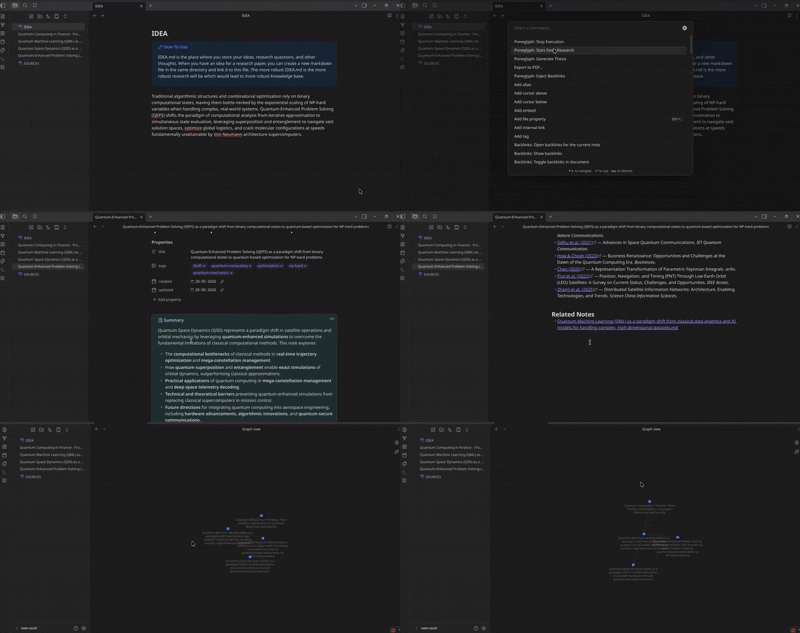
In the IDEA.md markdown, write your thesis/idea. The agent uses it to perform research and generate a fully cited markdown file. Generated nodes begin as draft and get's shifted to researched once the markdown is written.
Thesis Generation
Tag nodes which you want to research about as extract-idea. The plugin traverses the graph from that node back through its ancestry, identifies what is missing — topics referenced but unexplored, contradictions unresolved, threads not yet followed — and generates a focused research suggestion grounded in that gap. You decide whether to pursue it by creating a new node. You can trigger Generate Thesis to surface research gaps.
Paste the thesis which you want to research about in the IDEA.md file to trigger back the deep research.
Semantic Backlinking
When a new node is created, Poneglyph uses the inbuilt native vector database to compare it semantically against every existing node in the vault. If sufficiently similar nodes are found, bidirectional links are automatically inserted — surfacing conceptual connections that a manual graph would miss. This keeps your graph dense and meaningful as it grows.
Graph Visualization
Poneglyph maps node metadata to visual properties via CSS snippets or the Style Settings plugin:
| Metadata | Visual Property | Values |
|---|---|---|
| Lifecycle status | Node colour | amber (draft) · blue (researched) · green (verified) |
Your graph becomes a semantic map — colour and connection carry meaning at a glance.
Citation Ledger — SOURCES.md
Every node creation automatically updates SOURCES.md, a single deduplicated citation table sorted by h-index:
| Key | Title | Authors | Year | Journal | H-Index | DOI / Link |
|---|---|---|---|---|---|---|
smith2021 | Attention Is All You Need | Vaswani, A. et al. | 2017 | NeurIPS | 94 | 10.48550/arXiv.1706.03762 |
Sources are keyed (e.g. smith2021) and referenced directly from node frontmatter. SOURCES.md is never used as agent context.
Vault Structure
A Poneglyph vault revolves around three special files alongside your research nodes:
vault/
├── SOURCES.md            ← Central citation ledger,
├── IDEA.md               ← Your thesis or research idea
├── TEMP.md               ← Scratch file created and deleted by the agent during runs
├── Root Topic.md         ← Foundational seed node
├── Sub-topic A.md        ← Researched child node
├── Sub-topic B.md        ← Draft child node (awaiting ratification)
└── ...
IDEA.md is the one file you author directly. It defines the research question or thesis that gives your graph its direction. TEMP.md is managed entirely by the agent and should not be edited manually.
Node Metadata
Every node carries the following frontmatter, automatically managed by the plugin:
---
title: "The title of the note"
tags:
  - draft
  - <topic-tag>
created: YYYY-MM-DD
updated: YYYY-MM-DD
---
Lifecycle Status
Nodes move through three stages. Only the final promotion is a human action.
| Status | Meaning | Set by |
|---|---|---|
draft | Node created; content not yet added | Auto — on creation |
researched | Research complete; content generated | Auto — post-generation |
verified | Human has reviewed and approved | Human only — always manual |
Topic Tags
In addition to lifecycle status, each node is tagged with one or more topic labels derived automatically from its content. These drive the semantic backlinking system and help you filter and navigate large graphs by research area.
Configuration
Navigate to Settings → Poneglyph after enabling the plugin. See the settings panel for the full list of options, including:
- LLM provider, API key, and model ID (supports OpenAI, Anthropic, Gemini, Groq, Mistral, and local Ollama models)
- Unpaywall email for open-access paper discovery
- Draft ratification toggle — require human approval before draft nodes can expand
Installation
Community Plugins
- Open Settings → Community Plugins
- Search for
Poneglyph - Click Install, then Enable
Manual Installation
- Download the latest release from GitHub Releases
- Extract and copy the folder to your vault's
.obsidian/plugins/directory - Reload Obsidian
- Enable the plugin under Settings → Community Plugins
Configure your model and embedding provider in settings before first use — see Prerequisites.
Roadmap
- Community Plugin store release
- Zotero integration for citation and source management
- LaTeX export of the research graph as a structured literature review
- Automatic contradiction identification across the graph, surfaced alongside thesis generation
Contributing
Please refer to CONTRIBUTING.md for detailed instructions.
License
MIT License — see LICENSE for details.
Privacy & Security Disclosure
- Network Requests: Poneglyph uses
fetchor Obsidian'srequestUrlto communicate with LLM/Embedding API providers, and to fetch open-access scientific papers via Unpaywall, arXiv, or Sci-Hub (Sci-Hub integration is in beta). - API Key Safety: API keys are securely stored locally within Obsidian's standard configuration storage and are obscured in the settings user interface for safety. Poneglyph does not send your keys, tokens, or personal vault data to any third-party analytics or telemetry services.
For plugin developers
Search results and similarity scores are powered by semantic analysis of your plugin's README. If your plugin isn't appearing for searches you'd expect, try updating your README to clearly describe your plugin's purpose, features, and use cases.