QuickAdd
approvedby chhoumann
Quickly add new notes or content to your vault.

One hotkey to log a line, create a note, or run a whole workflow.
Install · Documentation · Examples · Discussions · Changelog
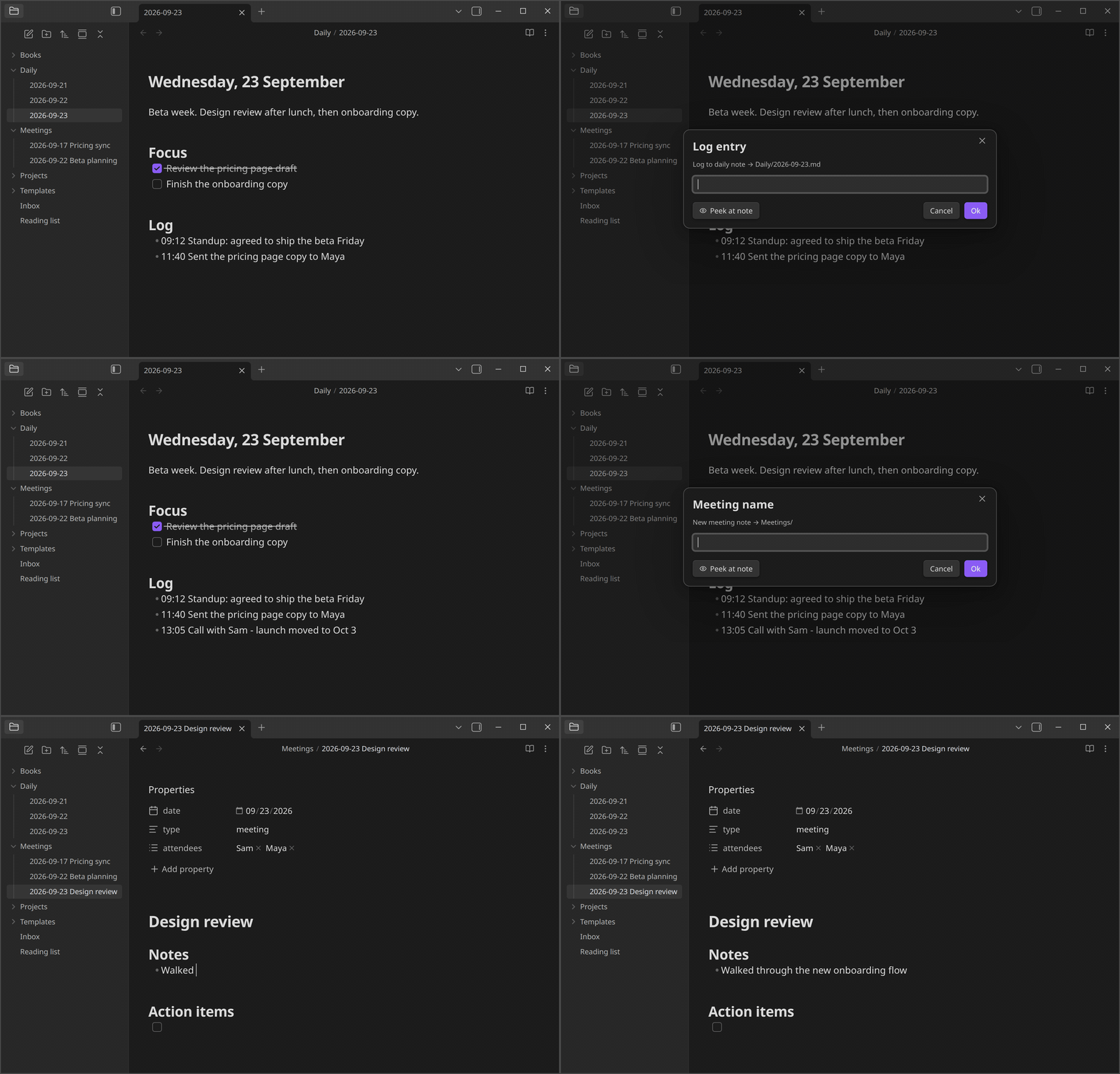
What you can build
Each workflow you set up in QuickAdd is called a choice. There are four kinds:
- Template creates a note from a template, with its name, folder, and properties filled in. For example, a meeting note named with today's date in your Meetings folder.
- Capture adds text to a note without opening it. For example, a timestamped line under the Log heading of today's daily note.
- Macro runs several steps in a row: other choices, Obsidian commands, scripts, and AI prompts. For example, look up a book online and create a note with its details.
- Multi groups choices into a folder in the QuickAdd menu. For example, a Journal folder holding your daily log and gratitude captures.
Placeholders fill in the details each time a choice runs: {{DATE}} inserts today's date, {{VALUE}} asks you for text, and {{FIELD:project}} suggests the project values your notes already use. Others insert links, your selection, or the clipboard. See format syntax for all of them.
QuickAdd also has:
- Forms: collect every input on one page, with dropdowns, date pickers, and sliders.
- Scripts: run your own JavaScript as user scripts, and call the QuickAdd API from scripts, Templater, or other plugins.
- Triggers: run choices from
obsidian://quickaddlinks, Apple Shortcuts, launchers and schedulers, or the Obsidian CLI. - AI: send prompts to OpenAI, Anthropic, Gemini, or any OpenAI-compatible provider, including local models, with the AI Assistant. AI features stay off until you turn them on.
- Packages: export your choices as a package and import them into another vault.
QuickAdd works on desktop and mobile. The Obsidian CLI is desktop-only.
Get started
- In Obsidian, open Settings → Community plugins, search for QuickAdd, then install and enable it.
- Build your first choice with the one-minute first workflow guide.
- In Settings → QuickAdd, click the ⚡ next to a choice to add it to the command palette (on mobile, tap ⋮ → Enable in command palette). Then give it a hotkey in Settings → Hotkeys. You can also run any choice with the QuickAdd: Run command.
Using Templater? Add your template folder in QuickAdd's settings and QuickAdd: New note from template works right away. Coming from Templater shows the QuickAdd way to do each Templater job.
Learn more
- Examples: complete workflows for daily notes, inboxes, meetings, books, movies, and more.
- Scripting guide: writing your own scripts when the built-in steps aren't enough.
- FAQ: answers to common questions.
- llms.txt and the MCP server at
https://quickadd.obsidian.guide/mcp: the docs in a form AI assistants can read.
Help and feedback
- Ask questions and share workflows in Discussions.
- Report bugs and request features in Issues.
- Report security problems privately, as described in the security policy.
Contributing
Contributions are welcome. Read CONTRIBUTING.md before you start: comment on the issue you want to work on and wait for a go-ahead before writing code.
Support QuickAdd
If QuickAdd saves you time, you can buy me a coffee.
License
For plugin developers
Search results and similarity scores are powered by semantic analysis of your plugin's README. If your plugin isn't appearing for searches you'd expect, try updating your README to clearly describe your plugin's purpose, features, and use cases.