by tarnish233
A calmer workspace with rounded panes, soft colors, aligned tabs, and optional distraction controls.
Quiet Chat
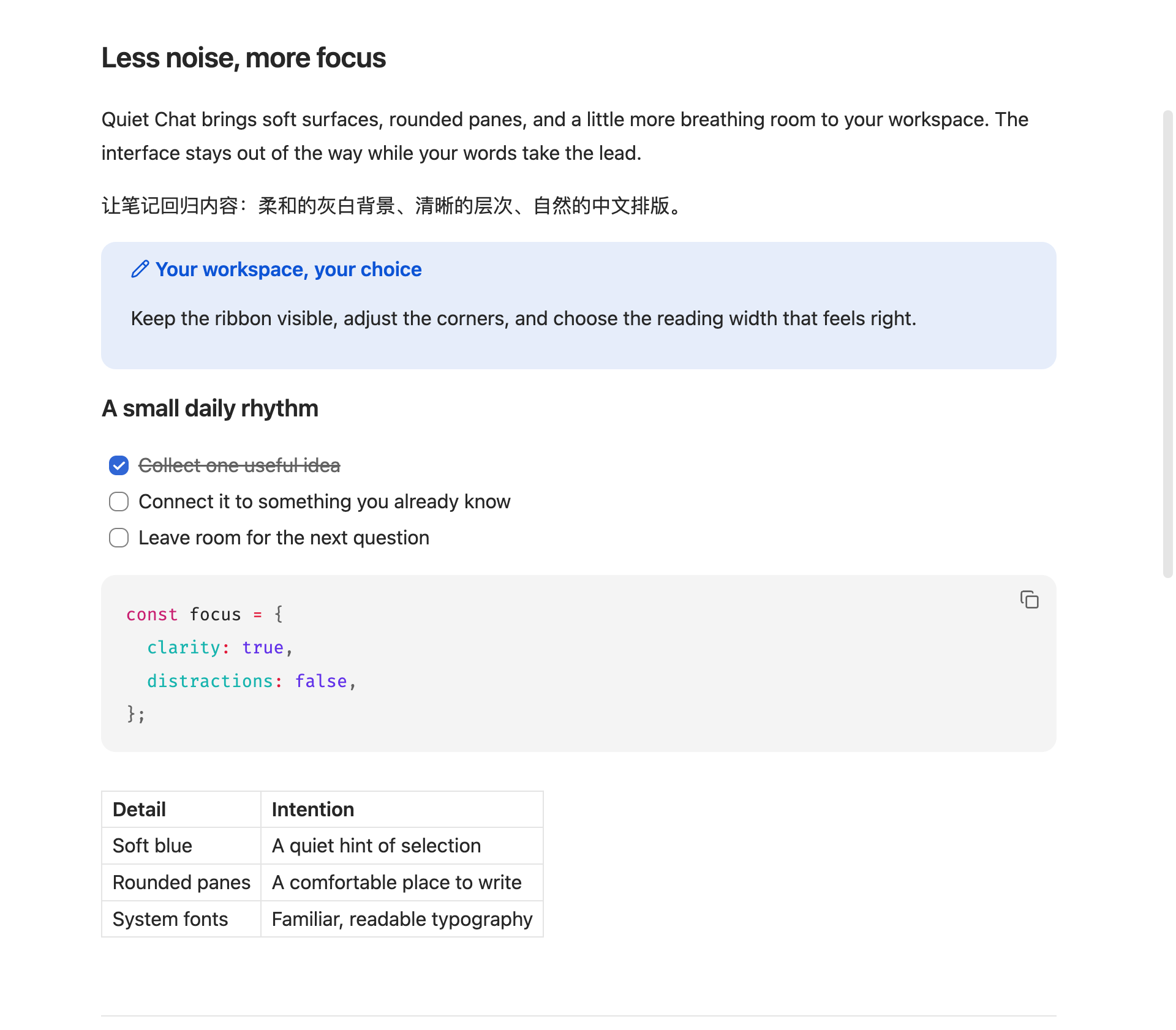
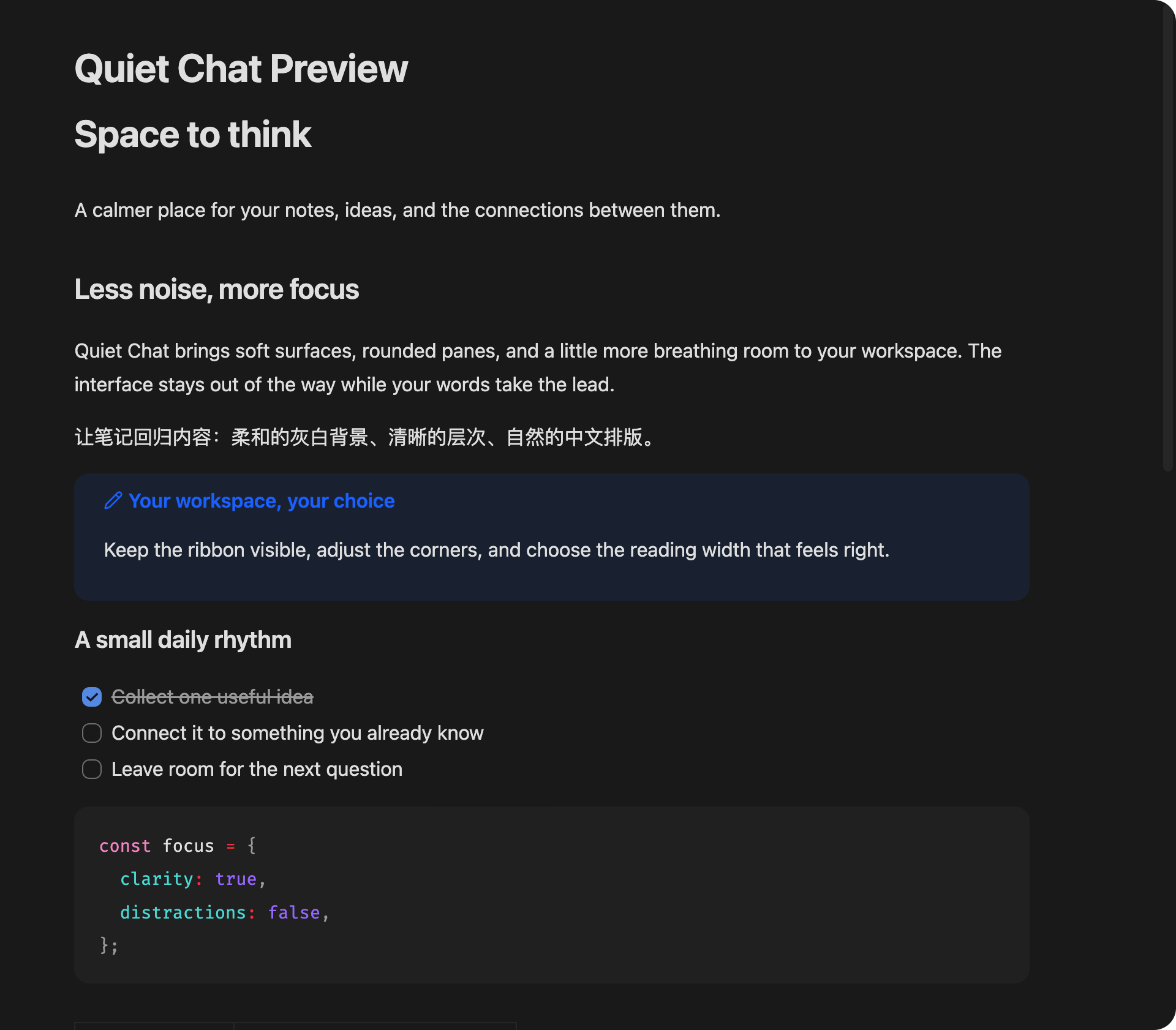
A calmer, ChatGPT-inspired workspace for Obsidian: rounded editor panes, soft gray sidebars, light blue selection, and aligned tabs. Includes light and dark appearances.
为 Obsidian 带来更安静的界面:圆角编辑区、浅灰侧栏、淡蓝选中状态、统一对齐的顶部栏。支持浅色与深色模式。
Preview / 预览
Screenshots use synthetic example content, not a real vault.
Dark appearance / 深色预览
Features / 功能
- Rounded panes, menus, quick switcher and code blocks. Pane side and bottom insets stay at a consistent 10px, including when sidebars are collapsed.
- File-tab icons matching the sidebar and Quick Switcher, with vertical centering and cleanup on unload.
- Vertically aligned Quick Switcher file icons, reusing Material Icon Theme when enabled and falling back to a standard file icon.
- Aligned file-tree padding with constrained spacer widths to prevent sideways scrolling.
- Typora GitHub-inspired document proportions: 16px text, 1.6 line height, 0.8em paragraph spacing, and 36/28/24/20px heading levels. Implemented for Reading view and Live Preview, with borderless headings to match Quiet Chat.
- Adjustable pane radius, readable text width, text size, line height, paragraph spacing, heading scale and heading spacing.
- Separate controls for list item spacing, nested indentation and vertical spacing between list levels. Paragraph spacing applies to Reading view; the editor preserves source blank lines.
- Grouped settings with Chinese and English on separate lines.
- Inset document scroll viewports keep native scrollbars clear of pane corners.
- Optional system fonts for text and UI; your code font is preserved.
- Independent switches for hiding the ribbon, status bar and note header. Hidden Markdown headers retain native view actions in a top-right pill, revealed on corner hover or keyboard focus.
- The ribbon is not hidden by default.
- Appearance can be toggled with a command; disabling it removes its body classes and restores its private inline option properties. No style elements are injected at runtime.
- No network calls, telemetry, note edits, or changes to core settings and shortcuts.
Install / 安装
Requires Obsidian 1.13.0+ on desktop. Mobile is not supported in this release.
Community plugins
Quiet Chat is listed in Obsidian's community plugin directory. Open Settings → Community plugins → Browse, search for Quiet Chat, and install it there.
If it does not appear in Browse yet, use one of the manual methods below.
Manual
- Download
main.js,manifest.json, andstyles.cssfrom Releases. - Create
<vault>/.obsidian/plugins/quiet-chat/and put those three files inside it. - Reload Obsidian, then enable Quiet Chat under Community plugins.
- Use Settings → Quiet Chat to customize the appearance.
BRAT
If you use BRAT, add tarnish233/obsidian-quiet-chat as a beta plugin repository.
BRAT installation has not been separately tested. Directory review status and maintenance notes are documented in the community submission guide.
Recommended setup / 建议配置
- Use Obsidian's Default theme. Other themes may override or conflict with this plugin.
- Enable Editor → Readable line length for the text-width setting to apply.
- If the ribbon is missing, turn on Appearance → Show ribbon and disable this plugin's Hide ribbon option.
- The plugin follows Obsidian's light/dark mode. It does not force a color mode.
- With Hide view header enabled, hover over the top-right corner of a note for the edit/reading toggle and more-options menu. This also works when Obsidian's own view-header setting is off. Non-hover displays show the buttons permanently. 开启「隐藏笔记标题栏」后,将鼠标移到笔记右上角即可显示编辑/阅读切换和更多菜单;无需开启 Obsidian 自身的标题栏选项。
- Existing custom snippets can affect spacing and colors. Disable conflicting snippets individually.
- Material file icons are an optional, separate plugin; Quiet Chat bundles no third-party icons.
If migrating from the earlier local Quiet Chat theme, switch to the Default theme first. Otherwise that theme will remain visible when this plugin is disabled. Previous core-setting changes (hidden ribbon, font settings, etc.) are not automatically restored by this plugin.
Development
npm ci
npm run check
src/theme.css is the base design; the build scopes its selectors to body.quiet-chat so appearance styles stop applying when disabled. src/typography.css provides the document typography; src/options.css maps private CSS option properties to setting-controlled styles. src/settings.css is scoped to the settings container so it stays usable when the appearance is off. All CSS ships in styles.css; no style elements are created by the plugin. main.js and styles.css are generated release artifacts.
Checks cover TypeScript compilation, settings validation, selector isolation, equal pane insets, hover-header CSS regressions, restoration of existing inline CSS values and priorities, and cleanup across load/toggle/popout/unload. Desktop light/dark mode, tab alignment and split panes were visually checked during development. Obsidian UI selectors may change in future releases; full third-party theme compatibility is not guaranteed.
Attribution
Inspired by the visual language of a user-provided ChatGPT desktop screenshot. An independent project, not affiliated with or endorsed by OpenAI or Obsidian. No OpenAI logos, screenshots, fonts, or other product assets are distributed.
MIT license.
For plugin developers
Search results and similarity scores are powered by semantic analysis of your plugin's README. If your plugin isn't appearing for searches you'd expect, try updating your README to clearly describe your plugin's purpose, features, and use cases.