by HoseinTanha
Track daily Quran recitation by page or surah with a khatm progress map, goals, streaks and reports. Persian interface, data stored in your own notes.
Quran Recitation Tracker
Track your daily Quran recitation in Obsidian, by page or by surah, and watch your khatm (complete reading) progress on a visual map. Everything is stored as plain Markdown in your own vault. The plugin makes no network requests and collects no data.
The interface is in Persian (فارسی) and uses the Jalali calendar. English and Arabic interfaces are planned. Persian documentation follows the English one below.
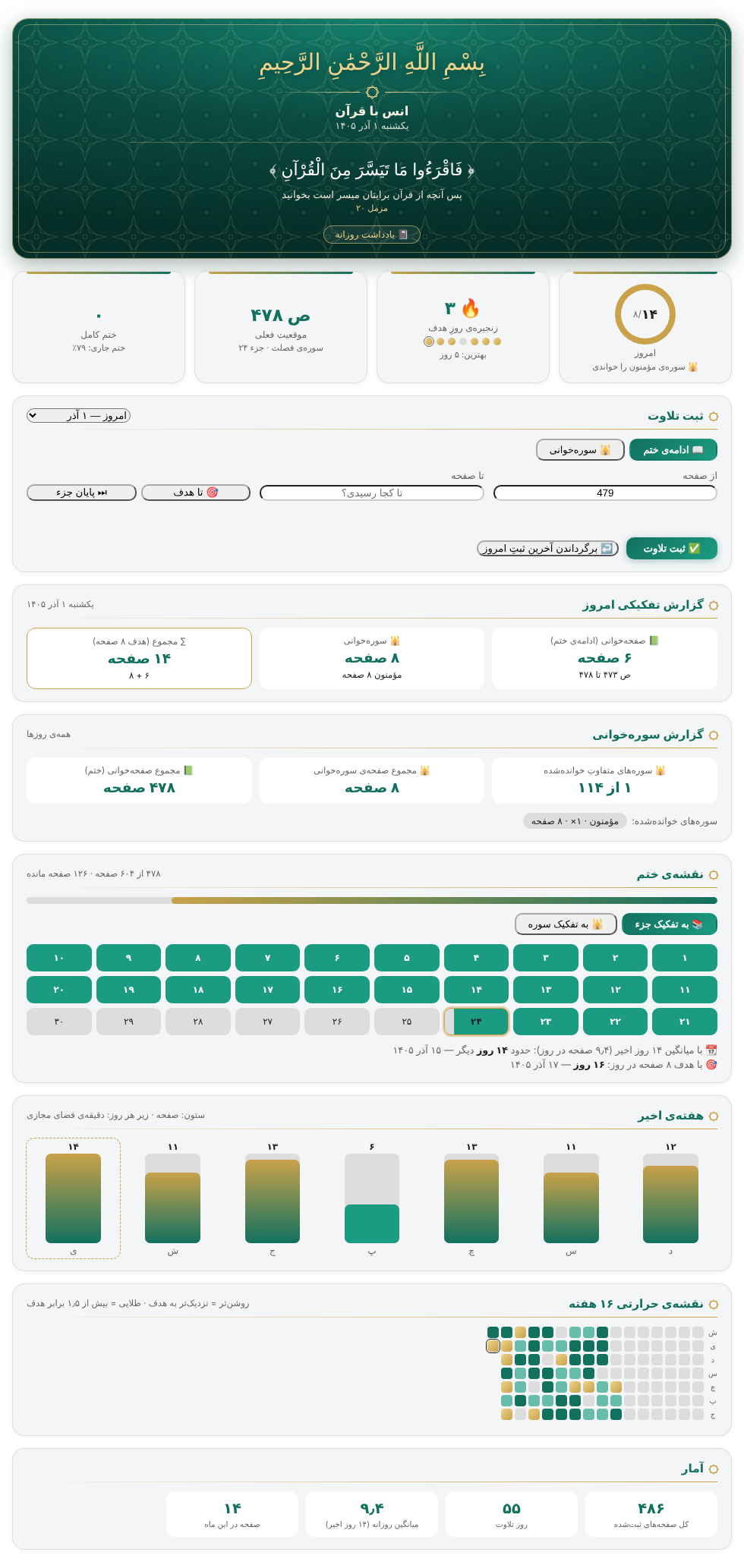
Features
- Log by page: enter the pages you read; the next session continues from where your khatm left off.
- Log by surah: search surahs by name or number (typing "یو" finds Yunus and Yusuf), select several, and log them all at once. Surah recitation is counted in your daily pages but does not move your khatm position, so reading a surah on Friday never disturbs your khatm.
- Khatm map by juz or by surah, with the current position highlighted and an estimated completion date.
- Daily goal (adjustable, optionally different for each weekday), streaks, a weekly chart and a heat map.
- Separate reports for page reading, surah reading and the combined total.
- Favourite surahs as one-tap shortcuts, with suggestions for each weekday (for example Surah al-Waqi'ah and al-Jumu'ah on Thursdays).
- Optional end-of-day reflection questions.
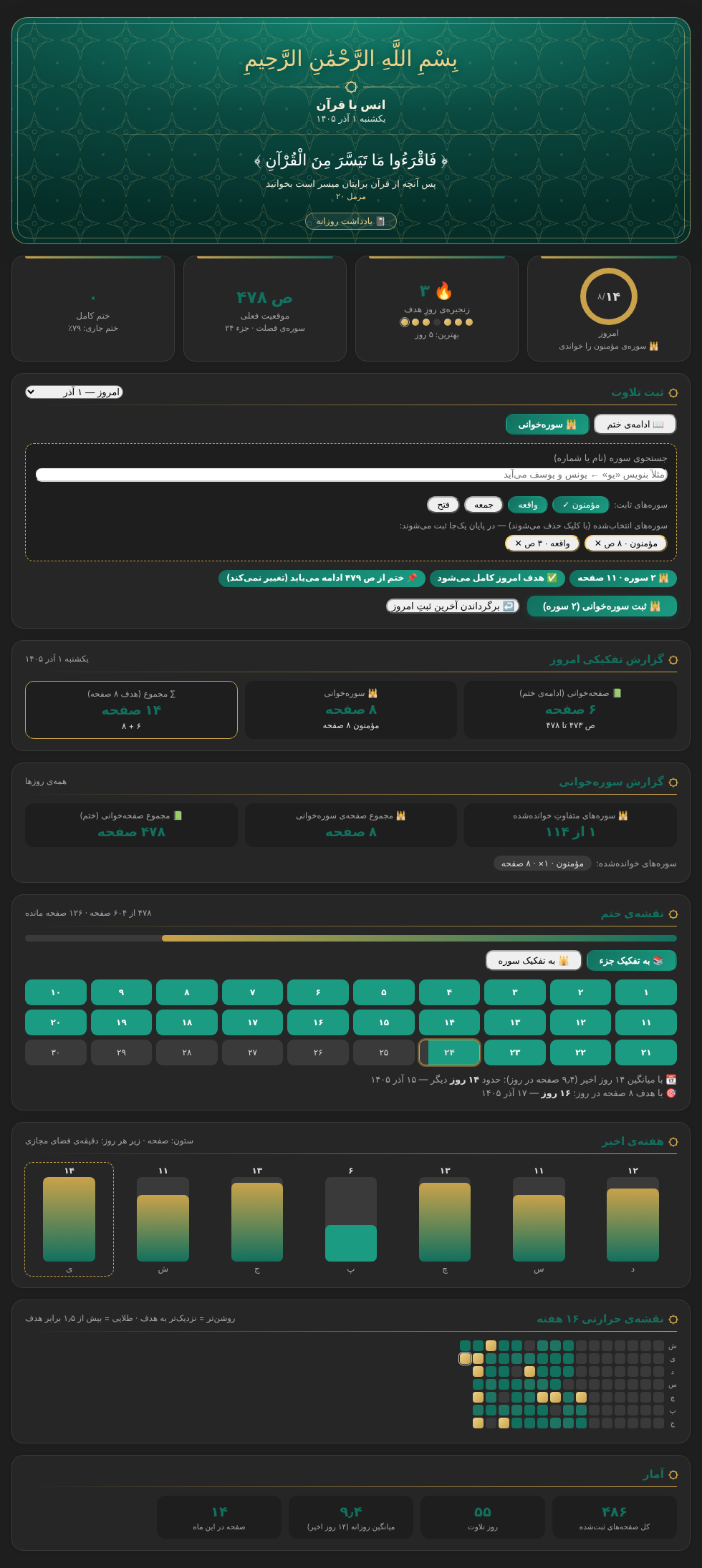
Getting started
- Install the plugin and enable it.
- Open Settings → Quran Recitation Tracker and press ساخت ردیاب تلاوت قرآن (create the tracker note). A note named ردیاب تلاوت قرآن is created and opened, with the tracker already displayed.
- Log your first recitation.
You can also open the tracker in its own tab with the book icon in the ribbon or the command باز کردن ردیاب تلاوت, or place it in any note with a code block:
```quran-tracker
```
Where is my data?
Each day is one Markdown note in the folder set by Daily note path pattern (default Quran Recitation Tracker/{date}.md). A session is a plain list item, so your data is readable, searchable and portable:
## گزارش قرآن
- 📖 ص (از:: 1) تا (تا:: 10) — ۱۰ صفحه · سورهی بقره · جزء ۱
- 📖 ص (از:: 342) تا (تا:: 349) — ۸ صفحه · 🕌 سورهخوانی: مؤمنون (سوره:: 23) · جزء ۱۸
Frontmatter properties (قرآن_صفحات, قرآن_تا_صفحه, قرآن_هدف_محقق) are kept up to date so you can query them with Bases or Dataview.
If you already keep daily notes, set the path pattern to match them (for example Journal/{jy}/Daily/{date}.md). Placeholders: {date} is the Gregorian date such as 2026-11-22; {jy}, {jm} and {jd} are the Jalali year, month and day.
Settings
| Setting | What it does |
|---|---|
| Create tracker note | Creates a note that displays the tracker |
| Daily goal | Pages per day; optionally a different goal for each weekday |
| Favourite surahs and weekday suggestions | Shortcut buttons for surah recitation |
| Display | Persian or Western digits, default map tab, heat map length, sections to show or hide |
| End-of-day questions | Optional questions about distractions; off by default |
| Notes | Daily note path pattern and an optional template note |
Notes
- The page numbers follow the Madinah Mushaf (604 pages).
- Short verses shown on the dashboard include a brief Persian rendering; it can be hidden in the settings.
- No network access, no telemetry, no ads. The plugin only reads and writes the daily notes inside the folder you configure.
Contributing
Issues and pull requests are welcome. To build from source: npm install, then npm run build.
License
MIT
ردیاب تلاوت قرآن (فارسی)
تلاوت روزانهی قرآن را در Obsidian ثبت کن، هم بهصورت صفحه و هم بهصورت سوره، و پیشرفت ختم را روی نقشه ببین. همهچیز به شکل متن ساده در یادداشتهای خودت ذخیره میشود؛ هیچ اتصال اینترنتی و جمعآوری دادهای وجود ندارد.
امکانات
- ثبت صفحهخوانی: صفحههایی را که خواندهای وارد کن؛ نوبت بعد از همان جایی که ختم مانده ادامه پیدا میکند.
- ثبت سورهخوانی: سوره را با نام یا شماره جستجو کن (مثلاً با نوشتن «یو»، یونس و یوسف میآید)، چند سوره انتخاب کن و یکجا ثبت کن. صفحههای سورهخوانی جزو صفحههای همان روز حساب میشوند، ولی جای ختم تو را جابهجا نمیکنند؛ پس سورهی مؤمنونِ جمعه ختم را به هم نمیریزد.
- نقشهی ختم به تفکیک جزء یا سوره، با موقعیت فعلی و پیشبینی روز ختم.
- هدف روزانه (قابل تغییر، حتی جداگانه برای هر روز هفته)، زنجیرهی روزهای هدف، نمودار هفته و نقشهی حرارتی.
- گزارشهای جدا برای صفحهخوانی، سورهخوانی و مجموع.
- سورههای ثابت با دکمهی میانبر و پیشنهاد برای هر روز هفته (مثلاً واقعه و جمعه در پنجشنبهها).
- پرسشهای اختیاریِ پایان روز.
شروع سریع
- افزونه را نصب و فعال کن.
- به تنظیمات ← Quran Recitation Tracker برو و دکمهی ساخت ردیاب تلاوت قرآن را بزن. یادداشتی با همین نام ساخته و باز میشود و ردیاب در آن آماده است.
- اولین تلاوتت را ثبت کن.
برای نمایش ردیاب در هر یادداشتی، این بلوک را بگذار: یک بلوک کد با زبان quran-tracker (مثل نمونهی انگلیسی بالا). همچنین با آیکن کتاب در نوار کناری میتوانی ردیاب را در تب جدا باز کنی.
دادههایم کجاست؟
هر روز یک یادداشت در پوشهی «الگوی مسیر یادداشت روزانه» است (پیشفرض: Quran Recitation Tracker/{date}.md). اگر از قبل یادداشت روزانه داری، الگو را مطابق آن بنویس؛ مثلاً Journal/{jy}/Daily/{date}.md. نشانهها: {date} تاریخ میلادی، و {jy} و {jm} و {jd} سال و ماه و روز شمسی.
مجوز
MIT
For plugin developers
Search results and similarity scores are powered by semantic analysis of your plugin's README. If your plugin isn't appearing for searches you'd expect, try updating your README to clearly describe your plugin's purpose, features, and use cases.