Relative Dates
approvedby munckenh
Relative, color-coded dates. - This plugin has not been manually reviewed by Obsidian staff.
★ 4 stars↓ 617 downloadsUpdated 4mo agoMIT
Relative Dates
A simple plugin for Obsidian that transforms date references in your task lists into color-coded elements that show relative dates.
Features
- Converts date references in the format
@ YYYY-MM-DD(with optional timeHH:MM) into relative dates - Supports changing the default
@prefix through the plugin settings - Works in both Reading mode and Live Preview mode
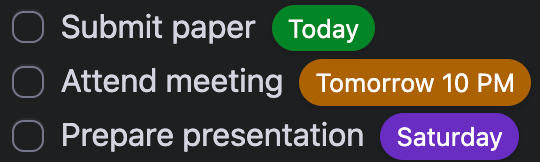
- Color-coded elements based on date proximity (overdue, today, tomorrow, this week, future)
- Customizable colors through the plugin settings
Usage
Add dates in your task lists using the format:
@ 2025-08-12for dates@ 2025-08-12 14:30for dates with time
The plugin will automatically convert these into easy-to-read elements such as:
Installation
- Go to the latest release.
- Download
main.js,manifest.json, andstyles.cssfrom the release assets. - Create this folder in your vault:
.obsidian/plugins/obsidian-relative-dates - Move the downloaded files into that folder.
- Enable the plugin in Obsidian.
Install from source
- Clone the repository to
.obsidian/plugins/:git clone https://github.com/Munckenh/obsidian-relative-dates.git - Install the dependencies and compile:
npm install npm run build - Enable the plugin in Obsidian.
Release
To release a new version of the plugin:
- Update the
minAppVersioninmanifest.jsonif the new release requires a higher minimum Obsidian version. - Run
npm version patch,npm version minor, ornpm version major. This automatically updates the version correctly, creates a version commit, and adds the corresponding git tag. - Push the commit and the new tag to GitHub:
git push --follow-tags - A GitHub Action will automatically run, build the plugin, and create a release draft containing the required binary attachments (
manifest.json,main.js,styles.css). - Go to the GitHub repository's Releases page, review the drafted release notes, and publish the release.
Scripts
To manage the plugin, you can use the following scripts:
- Build the plugin by running
npm run buildor with live reload by runningnpm run dev. - Improve code quality (optional) by running
npm run lint.
For plugin developers
Search results and similarity scores are powered by semantic analysis of your plugin's README. If your plugin isn't appearing for searches you'd expect, try updating your README to clearly describe your plugin's purpose, features, and use cases.