1st Timeline
approvedby lnabc03
A simple, elegant, and Chinese-friendly timeline rendering plugin. - This plugin has not been manually reviewed by Obsidian staff.
1st Timeline
一个简单、优雅、中文友好的 Obsidian 时间轴渲染插件。 A simple, elegant, Chinese-friendly timeline rendering plugin for Obsidian. 当前版本 (Current version): 1.7.0
简介
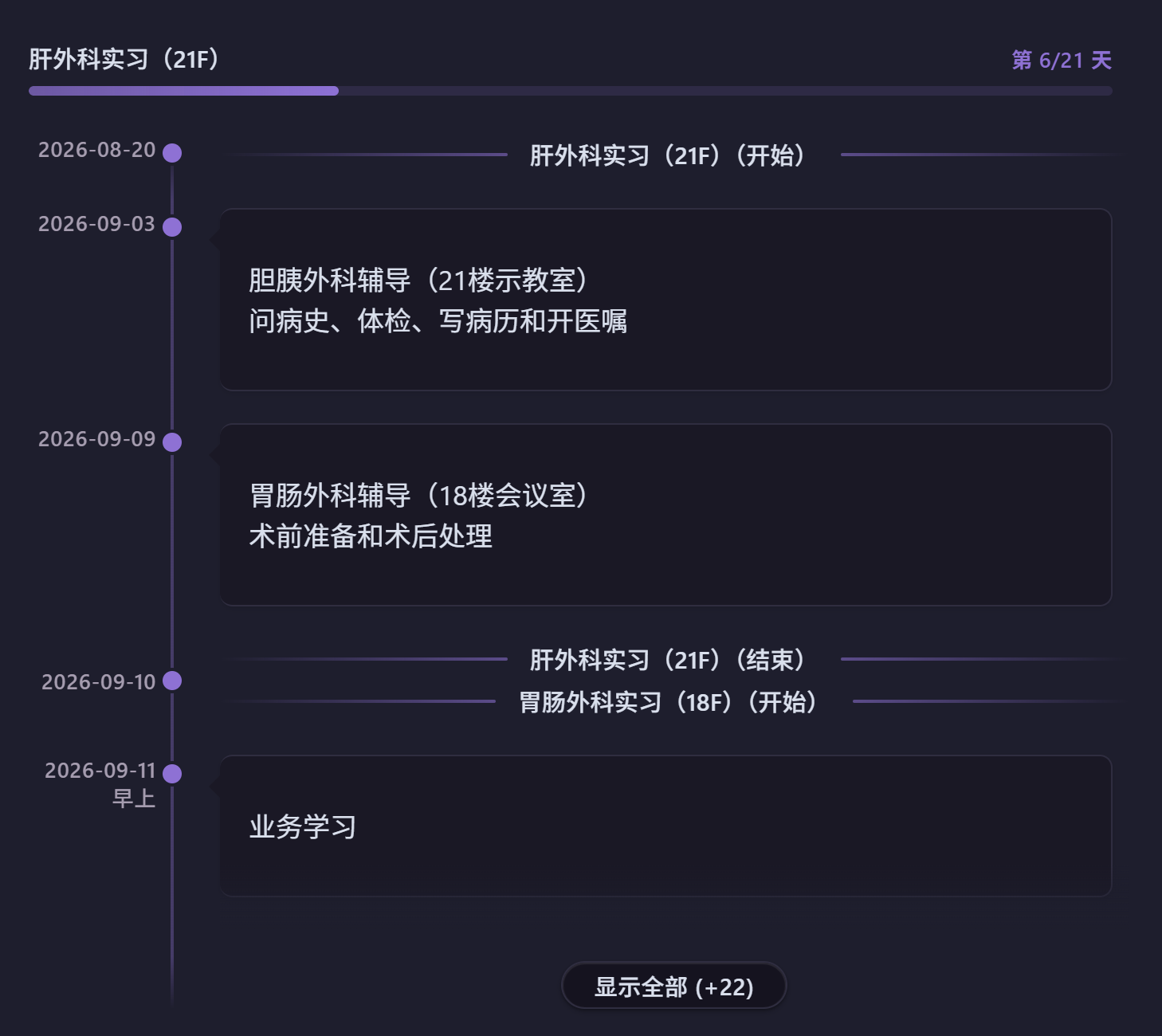
1st Timeline 是一个 Obsidian 插件,可将简单的文本代码块渲染为精美的时间轴视图。支持多种日期格式(含中文日期优先支持),智能日期解析,优雅的视觉呈现——帮助您轻松创建时间线、项目进度视图或日程规划记录。
1st Timeline renders beautiful timeline views from simple text code blocks. It supports multiple date formats with first-class Chinese date support, intelligent parsing, and elegant visual presentation.
安装
从 Obsidian 社区插件市场(推荐)
- 打开 Obsidian 设置 → 社区插件
- 关闭"安全模式"
- 点击"浏览",搜索 "1st Timeline"
- 安装并启用
从 GitHub Releases 安装
- 前往 Releases 页面
- 下载最新版本的
main.js、manifest.json、styles.css - 在 vault 中创建目录
.obsidian/plugins/first-timeline/ - 将三个文件放入该目录
- 重启 Obsidian,在 设置 → 社区插件 中启用
从源码构建
git clone https://github.com/lnabc03/1st-Timeline.git
cd 1st-Timeline
npm install
npm run build
然后将 main.js、manifest.json、styles.css 复制到 .obsidian/plugins/first-timeline/,重启并启用。
注意: 目标目录名必须与
manifest.json中的id字段一致(first-timeline)。
使用方法
在 Obsidian 笔记中插入 timeline 代码块:
```timeline
2024-01-01  新年第一天(双空格分隔)
2024年3月8日:妇女节(中文冒号分隔)
2024-05-01: 劳动节(英文冒号分隔)
2025-01-28_12:04  精确时间格式
2025年1月29日早上  中文日期+时间词
2026-01-01
新的一年开始了!(多行文本)
- 支持完整的 Markdown 语法
# 标题
> 引用块
> [!NOTE] Callout
| A | B |
|---|---|
| C | D |
```
语法规则
| 格式 | 分隔符 | 示例 |
|---|---|---|
| 双空格 | ␣␣ | 2024-01-01 事件内容 |
| 中文冒号 | : | 2024年3月8日:事件内容 |
| 英文冒号 | : | 2024-05-01:事件内容 |
| 仅日期(多行) | 换行 | 日期独占一行,后续行为事件内容 |
多日期批量添加
同一事件需要记在多个日期时,可在一行内列出所有日期,渲染时每个日期各生成一个相同内容的事件:
```timeline
2026年9月1日和9月10日:任务A
2026年9月1日,9月3日及9月5日:任务B
2026-09-01, 09-03: 任务C
2026-09-01_09:00,09-03_14:00:任务D
2026年9月1日早上和9月3日晚上:任务E
```
- 日期分隔符支持
,、,、、、和、及,可混用 - 第二个及以后的日期可省略年份(与第一个日期同年),中文格式写
9月10日,ISO 格式写09-03 - 支持精确时间(
_HH:MM)和中文时间词(早上/上午/中午/下午/晚上),不同日期可混用不同格式 - 日期列表独占一行时,后续行作为这些日期共同的多行内容
- 重复日期(含相同时间点)自动去重
时间段(日期范围)
除了时间点事件,还可以用 日期A~日期B:内容 表示一段有明确起止的时间(如实习、项目周期),渲染为时间轴上方的横向进度条:
```timeline
2026-07-01~2026-09-30:暑期实习
2026年8月1日至2026年8月20日:项目冲刺
2026-09-01~2026-09-10  双空格分隔也可以
```
- 起止日期支持
YYYY-MM-DD和YYYY年MM月DD日两种纯日期格式 - 分隔符支持
~、~、至、到四种写法 - 状态自动计算:进行中显示「第 x/n 天」(开始当天为第 0 天),未开始显示「还有 x 天开始」,已结束显示「已结束 x 天」
- 进度条颜色跟随时间轴颜色:未开始不填充,进行中按比例填充,已结束填满并降低透明度
- 起止同一天时退化为普通时间点事件;开始晚于结束时自动交换
- 时间段的开始日和结束日会在时间轴上渲染为主题色水平分隔线(「标题(开始)」「标题(结束)」),与进度条一一对应;开始线自动排在当日所有事件上方、结束线排在下方,可在设置中关闭
- 相邻时间段共享同一天(前段结束日 = 后段开始日)时,两条分隔线合并为一条「A(结束)、B(开始)」;合并线隐含时间为中午,当日正午及之后的事件排在其下方、早上/上午的排在上方
- 自动折叠时只显示进行中的进度条
时间轴链接
用 source: 指令引用另一个笔记中的时间轴,避免在日记模板里重复硬编码相同的事件:
```timeline
source: [[工作安排]]
2026-08-20:只属于本篇笔记的事件
```
- 被引用的笔记中,事件需写在
```timeline代码块内(可混写其他任意内容) - 指令关键字支持
source:和源:(中英文冒号均可),可出现在代码块任意位置,仅第一个生效 - 引用的事件与代码块内的事件合并排序渲染;日期和内容完全相同的条目自动去重(代码块内优先)
- 链接解析与 Obsidian 内链规则一致,文件改名后可自动跟踪;源文件修改后重新打开笔记即可刷新
归档过期事件
在包含时间轴的笔记中执行命令面板的 "归档过期事件 / Archive past events" 命令:
- 当前文件所有
```timeline代码块中,日期早于今天的事件会被移出代码块 - 时间段以结束日期判断:已结束的时间段会被归档,进行中/未开始的保留
- 过期事件追加到同文件的「已归档:」区域(纯文本保留原始格式);区域不存在时在文件末尾自动创建
- 重复执行时识别已有归档区并追加,今天及未来的事件保留在块内
添加新事件
执行命令面板的 "添加新事件 / Add new event" 命令,弹窗中输入时间和事件内容:
- 顶部实时预览新增行(
时间:事件),支持所有日期/时间格式及时间段写法 - 「继续新增」固定当前行并清空输入,可连续添加多条;「保存并退出」将所有新增行写入时间轴末尾
- 当前笔记没有 timeline 代码块时自动在光标处新建;有多个代码块时弹出选择框(附所在行号)
笔记汇总
使用命令面板(Ctrl+P)执行 "笔记汇总 / Notes summary" 命令:
- 输入日期范围(格式:
YYYY-MM-DD,YYYY-MM-DD) - 默认填充当前月份
- 确认后自动生成基于指定 frontmatter 属性的笔记时间轴
设置选项
| 设置项 | 说明 | 默认值 | 范围 |
|---|---|---|---|
| 排序方向 | 事件排列顺序 | 升序 | 升序 / 降序 |
| 笔记日期属性 | frontmatter 字段名 | created | 任意字段名 |
| 时间轴颜色 | 时间轴线条和点的颜色 | #9370DB | CSS 颜色值 |
| 颜色预设 | 一键切换主题色 | — | 蓝/绿/紫/红/橙 |
| 时间点大小 | 时间轴上点的大小 | 12px | 6–20px |
| 线条宽度 | 时间轴竖线宽度 | 2px | 1–5px |
| 事件间距 | 事件卡片之间的间距 | 20px | 10–40px |
| 悬停提示框 | 是否显示距今天数提示 | 开启 | 开关 |
| 悬停延迟 | 提示框出现前的等待时间 | 500ms | 0–1000ms |
| 当天事件高亮 | 当天事件特殊标记 | 开启 | 开关 |
| 时间段端点标记 | 时间轴中显示时间段起止分隔线 | 开启 | 开关 |
| 自动折叠 | 事件过多时自动折叠 | 开启 | 开关 |
| 折叠阈值 | 触发折叠的事件数量 | 10 | 5–50 |
| 折叠时显示数量 | 折叠后显示的事件数 | 5 | 1–15 |
开发
对齐 Obsidian 官方示例插件 最佳实践:
npm install          # 安装依赖
npm run dev          # 开发模式(watch)
npm run build        # 生产构建(tsc + esbuild)
npm run lint         # ESLint 代码检查
- 语言: TypeScript(strict 模式)
- 构建: esbuild(CJS 输出,ES2021 target)
- 代码检查: ESLint 9 + typescript-eslint + eslint-plugin-obsidianmd
- CI/CD: GitHub Actions(lint + release)
- 最低 Obsidian 版本: 1.8.7(桌面及移动端)
更新日志
1.7.0 — 多日期与快捷添加 (2026-08)
- 新增多日期语法:一行内用
,,、和及(可混用)列出多个日期,同一事件批量添加到各日期;第二个起可省略年份;支持精确时间和中文时间词 - 新增「添加新事件」命令:弹窗输入时间与事件,实时预览新增行,可连续新增后一次写入;无代码块时自动新建,多代码块时选择目标时间轴
- 相邻时间段共享一天时,合并分隔线改为上下两行(结束在上、开始在下),光点与日期标签垂直居中
1.6.1 — 相邻时间段端点合并 (2026-08)
- 修复边缘情况:前一段的结束日与后一段的开始日相同时,时间轴上不再出现两条紧邻的分隔线,而是合并为一条「A(结束)、B(开始)」
- 合并分隔线的隐含时间为中午:当天正午及之后的事件排在其下方,早上/上午的事件排在其上方
1.6.0 — 端点分隔线 (2026-08)
- 时间段起止日期渲染为时间轴上的主题色水平分隔线:文字居中,线条向两端延伸渐隐,悬浮时提亮
- 同日包含排序:开始分隔线自动排在当日所有事件上方,结束分隔线排在下方
- 新增「时间段端点标记」设置开关;移除进度条显示开关(进度条改为常显)
1.5.x — 时间段与生态完善 (2026-07)
- 新增时间段(日期范围)语法
日期A~日期B:内容,渲染为时间轴上方的进度条,自动计算第 x/n 天 - 新增
source:指令引用其他笔记的时间轴、归档过期事件命令 - 通过社区插件审核,适配 Obsidian 1.13.0+ 设置搜索
1.4.x — 正式版发布 (2026-06)
- TypeScript 重构、多模块架构、esbuild 构建,完全对齐 Obsidian 官方模板
- 中英文双语支持,自动检测 Obsidian 语言设置
- 重新设计当天事件高亮(内嵌强调色条 + 徽章)
- 移动端全面适配:响应式布局、日期完整显示、光点精准居中
- 社区插件市场上架并通过审核
1.3.x — 自动折叠与笔记汇总 (2025)
- 新增自动折叠和笔记汇总功能
- 修复日期解析相关问题
1.2.x — 交互增强 (2025)
- 添加悬停提示(距今天数)和当天事件高亮
1.1.x — 中文支持 (2025)
- 增加中文日期格式支持和颜色预设主题
1.0.0 — 初始版本 (2025)
- 基础时间轴渲染
许可证
MIT License
作者
lnabc03 | 弋鹓
1st Timeline
A simple, elegant, Chinese-friendly timeline rendering plugin for Obsidian. 一个简单、优雅、中文友好的 Obsidian 时间轴渲染插件。 Current version: 1.7.0
Description
1st Timeline renders beautiful timeline views from simple text code blocks. It supports multiple date formats with first-class Chinese date support, intelligent parsing, and elegant visual presentation — helping you create timelines, project progress views, or schedule records effortlessly.
1st Timeline 是一个 Obsidian 插件,可将简单的文本代码块渲染为精美的时间轴视图。
Installation
From Obsidian Community Plugin Marketplace (Recommended)
- Open Obsidian Settings → Community plugins
- Disable Safe mode
- Click Browse, search for "1st Timeline"
- Install and enable
From GitHub Releases
- Go to the Releases page
- Download the latest
main.js,manifest.json, andstyles.css - Create the directory
.obsidian/plugins/first-timeline/in your vault - Copy the three files into that directory
- Restart Obsidian and enable the plugin in Settings → Community plugins
From Source
git clone https://github.com/lnabc03/1st-Timeline.git
cd 1st-Timeline
npm install
npm run build
Then copy main.js, manifest.json, and styles.css to .obsidian/plugins/first-timeline/, restart Obsidian, and enable.
Note: The target directory name must match the
idfield inmanifest.json(first-timeline).
Usage
Insert a timeline code block in any Obsidian note:
```timeline
2024-01-01  New Year's Day (two spaces)
2024-03-08: International Women's Day (colon)
2024年5月1日:Labor Day (Chinese date + colon)
2025-01-28_12:04  Precise time format
2025年1月29日早上  Chinese date with time-of-day word
2026-01-01
A new year begins! (multi-line text)
- Full Markdown syntax supported
# Headings
> Blockquotes
> [!NOTE] Callouts
| A | B |
|---|---|
| C | D |
```
Syntax Rules
| Format | Separator | Example |
|---|---|---|
| Two spaces | ␣␣ | 2024-01-01 Event content |
| Chinese colon | : | 2024年3月8日:Event content |
| English colon | : | 2024-05-01: Event content |
| Date only (multi-line) | Newline | Date on one line, content on following lines |
Multiple Dates
When the same event belongs to several dates, list all dates on one line — each date gets its own event with identical content:
```timeline
2026年9月1日和9月10日:Task A
2026年9月1日,9月3日及9月5日:Task B
2026-09-01, 09-03: Task C
2026-09-01_09:00, 09-03_14:00: Task D
```
- Date separators:
,,,,、,和,及— freely mixable - Dates after the first may omit the year (same year as the first): write
9月10日in Chinese format or09-03in ISO format - Precise times (
_HH:MM) and Chinese time-of-day words (早上/上午/中午/下午/晚上) are supported, and formats may be mixed within one line - If the date list occupies the whole line, following lines become the shared multi-line content
- Duplicate dates (including identical times) are deduplicated
Date Ranges
Beyond point-in-time events, use DateA~DateB: content for a span with explicit start and end (e.g. an internship or project phase), rendered as horizontal progress bars above the timeline:
```timeline
2026-07-01~2026-09-30: Summer internship
2026年8月1日至2026年8月20日:Project sprint
2026-09-01~2026-09-10  Two-space separator works too
```
- Start and end accept pure dates only:
YYYY-MM-DDorYYYY年MM月DD日 - Four separators are recognized:
~,~,至,到 - Status is computed automatically: "Day x/n" while active (day 0 on the start date), "Starts in x days" when upcoming, "Ended x days ago" when over
- Bar color follows the timeline color: empty when upcoming, proportional fill while active, full but dimmed when ended
- Identical start and end degrades to a normal point event; a start later than the end is swapped automatically
- Each range's start and end dates render as theme-colored horizontal divider lines on the timeline ("Title (Start)" / "Title (End)"), matching the progress bars one-to-one; the start divider ranks above all same-day events and the end divider below — can be turned off in settings
- When adjacent ranges share one day (one ends the day the next begins), the two dividers merge into a single "A (End), B (Start)" line; it sits at an implicit noon, so same-day events at or after noon rank below it and morning events above
- When collapsed, only active bars are shown
Timeline Source
Use the source: directive to render a timeline stored in another note, avoiding hardcoded duplicates in daily note templates:
```timeline
source: [[Work Schedule]]
2026-08-20: An event unique to this note
```
- In the referenced note, events must live inside a
```timelinecode block (other content is allowed) - The directive accepts
source:or源:(either colon), may appear anywhere in the block, and only the first one takes effect - Referenced events are merged and sorted with inline events; entries with identical date and content are deduplicated (inline wins)
- Link resolution follows Obsidian's internal link rules and survives file renames; reopen the note to refresh after editing the source file
Archive Past Events
Run the "Archive past events / 归档过期事件" command from the command palette in a note containing timelines:
- Events dated before today are moved out of every
```timelinecode block in the current file - Date ranges are judged by their end date: ended ranges are archived, active/upcoming ones stay
- Archived events are appended to an "Archived:" section in the same file (kept as plain text in original format); the section is created at the end of the file if absent
- Running the command again appends to the existing section; today's and future events stay in the block
Add New Event
Run the "Add new event / 添加新事件" command from the command palette and fill in the date/time and the event content:
- The composed line (
time:event) previews live at the top; all date/time formats and the date-range syntax are accepted - "Add another" fixes the current line and clears the inputs for consecutive additions; "Save & exit" writes all pending lines to the end of the timeline block
- If the note has no timeline block, one is created at the cursor; if several blocks exist, a picker asks which timeline to use (with line numbers)
Notes Summary
Use the command palette (Ctrl+P) and run the "Notes summary / 笔记汇总" command:
- Enter a date range (format:
YYYY-MM-DD,YYYY-MM-DD) - The current month is pre-filled by default
- Confirm to insert a timeline of notes based on the configured frontmatter date field
Settings
| Setting | Description | Default | Range |
|---|---|---|---|
| Sort direction | Event sort order | Ascending | Ascending / Descending |
| Date property | Frontmatter field name | created | Any field name |
| Timeline color | Color of line and dots | #9370DB | CSS color value |
| Color presets | One-click theme switching | — | Blue / Green / Purple / Red / Orange |
| Dot size | Size of timeline dots | 12px | 6–20px |
| Line width | Width of the timeline line | 2px | 1–5px |
| Event spacing | Spacing between event cards | 20px | 10–40px |
| Hover tooltip | Show days-until/since tooltip | On | Toggle |
| Hover delay | Delay before tooltip appears | 500ms | 0–1000ms |
| Highlight today | Special highlight for today's events | On | Toggle |
| Range start/end markers | Show range endpoints as divider lines on the timeline | On | Toggle |
| Auto collapse | Auto-collapse when above threshold | On | Toggle |
| Collapse threshold | Events needed to trigger collapse | 10 | 5–50 |
| Show when collapsed | Events shown when collapsed | 5 | 1–15 |
Development
Follows Obsidian's official sample plugin best practices:
npm install          # Install dependencies
npm run dev          # Development mode (watch)
npm run build        # Production build (tsc + esbuild)
npm run lint         # ESLint check
- Language: TypeScript (strict mode)
- Build: esbuild (CJS output, ES2021 target)
- Linting: ESLint 9 + typescript-eslint + eslint-plugin-obsidianmd
- CI/CD: GitHub Actions (lint + release)
- Minimum Obsidian version: 1.8.7 (desktop and mobile)
Changelog
1.7.0 — Multiple Dates & Quick Add (2026-08)
- New multi-date syntax: list several dates on one line with
,,、和及(freely mixable) to add the same event to every date; later dates may omit the year; precise times and Chinese time-of-day words supported - New "Add new event" command: a modal with time and content inputs, live preview of the composed line, consecutive additions written in one save; creates a block when absent, asks which timeline when several exist
- The merged divider for adjacent ranges now renders as two stacked rows (End on top, Start below) with the dot and date label vertically centered
1.6.1 — Merged Dividers for Adjacent Ranges (2026-08)
- Fixed an edge case: when one range ends on the same day the next begins, the timeline no longer shows two adjacent divider lines — they merge into a single "A (End), B (Start)" divider
- The merged divider sits at an implicit noon: same-day events at or after noon rank below it, morning events above
1.6.0 — Endpoint Dividers (2026-08)
- Range start/end dates render as theme-colored horizontal divider lines on the timeline: centered text, lines fading out to both sides, brightening on hover
- Same-day inclusion ordering: the start divider ranks above all events on its day, the end divider below
- New "Range start/end markers" setting toggle; removed the progress-bar visibility setting (bars are now always shown)
1.5.x — Date Ranges & Ecosystem (2026-07)
- Added date range syntax
DateA~DateB: content, rendered as progress bars above the timeline with automatic day x/n tracking - Added the
source:directive for referencing timelines in other notes, and the archive past events command - Passed community plugin review; compatible with Obsidian 1.13.0+ settings search
1.4.x — Official Release (2026-06)
- TypeScript rewrite, multi-module architecture, esbuild build system, aligned with Obsidian template
- Bilingual Chinese/English support with automatic language detection
- Redesigned today-event highlighting (inset accent strip + badge)
- Full mobile adaptation: responsive layout, full date display, precise dot centering
- Published to Obsidian community plugin marketplace
1.3.x — Auto Collapse & Notes Summary (2025)
- Added auto-collapse and notes summary features
- Fixed date parsing issues
1.2.x — Interaction Enhancements (2025)
- Added hover tooltips (days until/since) and today highlighting
1.1.x — Chinese Support (2025)
- Added Chinese date format support and color preset themes
1.0.0 — Initial Release (2025)
- Basic timeline rendering
License
MIT License
Author
lnabc03 | 弋鹓
For plugin developers
Search results and similarity scores are powered by semantic analysis of your plugin's README. If your plugin isn't appearing for searches you'd expect, try updating your README to clearly describe your plugin's purpose, features, and use cases.